- English
- French
- German
- Portuguese
- Spanish
- Russian
- Japanese
- Korean
- Arabic
- Greek
- German
- Turkish
- Italian
- Danish
- Romanian
- Indonesian
- Czech
- Afrikaans
- Swedish
- Polish
- Basque
- Catalan
- Esperanto
- Hindi
- Lao
- Albanian
- Amharic
- Armenian
- Azerbaijani
- Belarusian
- Bengali
- Bosnian
- Bulgarian
- Cebuano
- Chichewa
- Corsican
- Croatian
- Dutch
- Estonian
- Filipino
- Finnish
- Frisian
- Galician
- Georgian
- Gujarati
- Haitian
- Hausa
- Hawaiian
- Hebrew
- Hmong
- Hungarian
- Icelandic
- Igbo
- Javanese
- Kannada
- Kazakh
- Khmer
- Kurdish
- Kyrgyz
- Latin
- Latvian
- Lithuanian
- Luxembou..
- Macedonian
- Malagasy
- Malay
- Malayalam
- Maltese
- Maori
- Marathi
- Mongolian
- Burmese
- Nepali
- Norwegian
- Pashto
- Persian
- Punjabi
- Serbian
- Sesotho
- Sinhala
- Slovak
- Slovenian
- Somali
- Samoan
- Scots Gaelic
- Shona
- Sindhi
- Sundanese
- Swahili
- Tajik
- Tamil
- Telugu
- Thai
- Ukrainian
- Urdu
- Uzbek
- Vietnamese
- Welsh
- Xhosa
- Yiddish
- Yoruba
- Zulu
1.85 inch knob Installation Guide: How Easy Is It to Replace?
When working with more complex rotating knob display units, replacing a 1.85 inch knob is much easier than most embedded engineers and product managers realise. The installation process requires only minor removal, simple wiring connections, and the ability to plug and play with popular development platforms such as Arduino and ESP-IDF. Modern smart knob screens from companies like Guition come with mounting tools, drivers that are already set up, and full instructions that make installation rapid, less than 15 minutes. By understanding the requirements, getting the right tools ready, and following a set of steps, you can easily integrate your product into industrial control panels, smart home devices, and medical tracking equipment, all without having to do a lot of complicated low-level programming or long debugging processes.

Understanding the 1.85 Inch Knob Display: Dimensions and Types
The 1.85 inch knob display has an exact shape and is widely used in industrial HMI applications and smart IoT devices. This is the diagonal length of the round screen, which usually has a size of 360x360 pixels for clear visual input. Buying teams need to measure things correctly to avoid problems with compatibility during panel cutout design and container integration.
Measuring Your Display Module Accurately
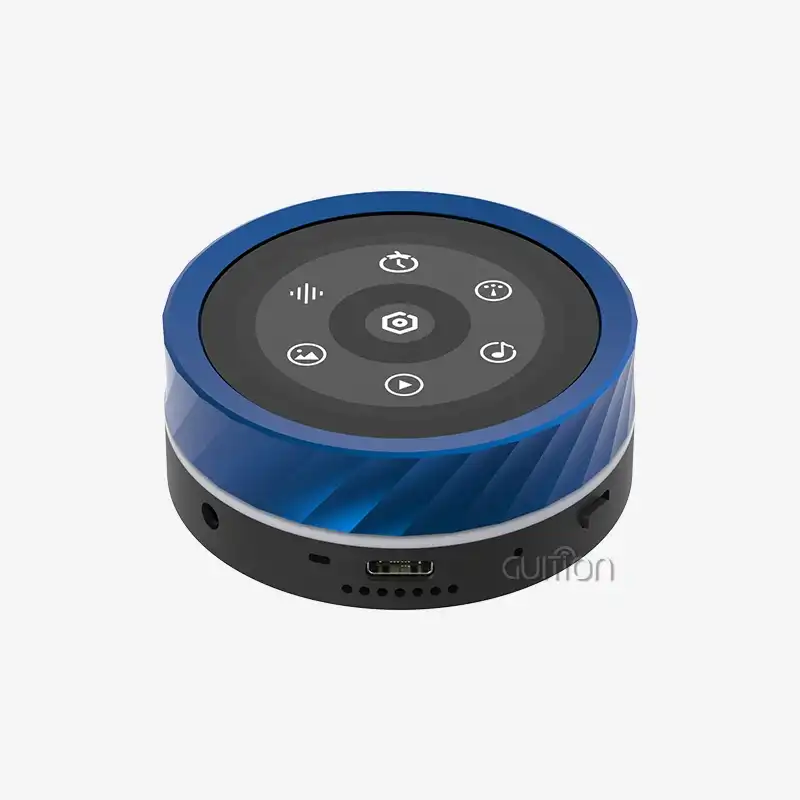
When engineers choose a rotary display module, they need to think about three important sizes: the active screen diameter 1.85 inch knob or 47 mm, the outer bezel diameter (which includes the CNC metal case), and the PCB footprint. The ESP32-S3 dual-core MCU running at 240MHz powers Guiton's 1.85 inch touch display with a knob, which has a small form and built-in fixing points that make installation easier. The technical paperwork for the gadget includes full-dimensional models that allow R&D managers to check fitment before making a prototype. Digital callipers and other measuring tools make sure that you get the measurements right when you are checking current panel cutouts or making custom casings for medical devices or energy management systems.
Material Choices and Finish Options
The choice of material has a direct effect on how long something lasts, how it looks, and how well it works in tough conditions. High-quality knob screens have housings made of CNC-machined aluminium metal that do an impressive job of keeping the ESP32-S3 main chip cool and blocking electromagnetic waves. Guition has five standard anodised finishes: red, black, purple, dark grey, and blue. If you buy more than 500 pieces, you can also get custom colour choices that help makers of consumer goods and smart appliances set their brands apart.
The IPS capacitive touch screen uses hardened glass that resists scratches and chemical damage. This makes it perfect for use in business terminals and farm automation systems where the environment is constantly changing. Metal covers offer better safety than plastic ones because they can withstand repeated use without losing their surface. Precision-machined parts in the rotary encoder mechanism are rated for more than 100,000 spin cycles. This makes sure that industrial control panels and automation system integration projects will be reliable for a long time.
Step-by-Step Installation Process for a 1.85 Inch Knob Display
To install a rotary knob display module, you need to carefully plan ahead and make sure that the connectors will work together. When you work with integrated solutions that put together monitor, touch control, wireless communication, and multimedia gear in one unit, the process is a lot easier.
Essential Tools and Pre-Installation Preparation
Before you start installing, make sure you have the following tools: Phillips and flathead precision screwdrivers, a digital voltmeter for checking continuity, wire strippers for making custom cables, and anti-static wrist straps to protect the sensitive CMOS parts. Check out the interface requirements. The Guision module works with UART, SPI, and I2C, and it has many growth ports for different motherboard designs.
Verify how much power the device needs. The ESP32-S3R8 processor, which has 8MB of PSRAM and 16MB of Flash, works well with 3.3V to 5V DC input and needs about 500mA of peak current during WiFi transfer. Ensure that your host machine can provide stable power so that there are no brownout restarts while it is running. Since the module has voltage regulation built in, most uses don't need additional power conditioning circuits.
Removing Old Components and Preparing the Panel
If you want to replace a current screen, turn off the whole machine and unplug everything. Use photos to record the original wiring layout so you can use them as a guide when putting the system back together. Carefully unscrew the mounting hardware while you hold the module from behind to avoid stressing the solder joints and ribbon wires. Use isopropyl alcohol to clean the panel hole and remove dust and debris that could interfere with the new seal.
Verify to see if the mounted surface is flat. Panels that are warped can cause touch responses to be intermittent or cause the display to be misaligned. For the 1.85-inch knob design, a circle cutout with very tight diameter specs is usually needed. Guition provides thorough mechanical sketches that show the suggested panel thickness (1.5 mm to 3 mm) and cutout diameter specs. This makes sure that the panels fit correctly without any gaps that could lower their ingress protection ratings.
Securing the New Knob Display Module
Place the module in the hole that has already been made and ensure the rotary encoder shaft can move freely without getting stuck. The built-in design has either snap-fit fastening tabs or threaded inserts, based on the setup. Tighten the fixing screws in a cross-pattern to spread the binding force out evenly. This will keep stress from building up in one place, which could break the screen glass or bend the bezel.
Follow the pinout diagram to connect the input wires. The module has clearly marked connectors for power, UART connection, and optional GPIO expansion. The WiFi and Bluetooth 5.0 devices work separately, so you don't need any extra antennas for normal home use. To check the connection, turn on the system and make sure the boot sequence shows up properly on the 360x360 IPS screen. Because it is plug-and-play, you don't have to worry about installing complicated drivers. The software already has all the lighting, touch, and audio circuits built in and ready to use.
Avoiding Common Installation Mistakes
One of the most common installation mistakes is overtightening the mounting hardware, which can cause the housings to crack or the encoder position to be off. For tightening fasteners, use a screwdriver with a power limiter or follow the manufacturer's instructions. Before adding electricity, check the power connections twice and use a multimeter to confirm the positive and ground paths. If the polarity is wrong, it can damage sensitive parts.
Neglecting electrostatic discharge (ESD) safety measures is another mistake that can go wrong. The ESP32-S3 chipset has CMOS electronics that static electricity can damage. Always work on grounded surfaces and handle the module by its edges, avoiding contact with exposed pins or components. You should also pay attention to how the cables are routed. Make sure that ribbon cables have enough bend radius and don't have any sharp folds that could cut the internal conductors. The module lets you move media files directly from a USB drive to a TF card, so you don't have to do any complicated code when you want to update your content.
Comparing Display Modules: Choosing the Right Solution
To choose the best knob display, you need to think about its size, processing power, communication options, and ability to work with different development ecosystems. Time-to-market, quality of user eThe choice affects time-to-market, quality of user experience, and long-term upkeep costs.
When you compare 1.85 inch knob displays to 2-inch ones, you can see small but important changes. 1.85-inch knob screens are great for portable smart devices and installations with limited room. The extra 0.15 inches gives you about 15% more screen space, which can make things easier to read for people who have trouble seeing or who use apps with a lot of info. In many product lines, the 360×360 resolution stays the same across both sizes. This means that the bigger monitor has a slightly lower pixel density but might be better at detecting touch targets.
Guition's product line includes screens ranging from 1.28 inches to 21.5 inches. This lets system builders use the same development base and choose the right screen size for each product level. The Guition UI development tool keeps design processes the same across all screen sizes. This lets engineers make interfaces that work well on larger screens without having to learn new toolchains. Embedded engineers who work on smart home products often like the 1.85 inch knob version because it fits standard electrical box sizes and has enough space for status indicators and rotary menu access.
Material Durability and Cost Analysis
Metal cases for screens last longer than plastic ones, especially in places where there is vibration, temperature change, or solvent contact. The CNC aluminium case on Guition's knob display acts as a passive heatsink, removing heat from the ESP32-S3 MCU during demanding processing jobs like MJPEG video decoding. This increases the lifespan of the component. This temperature control is very important in medical device applications that need to run continuously without stopping.
The total cost of ownership is another cost that needs to be thought about. Metal versions cost 20–30% more than plastic ones, but they don't have to pay for guarantee claims or early fails, which cost money. The module's combined design, which includes the screen, speaker, microphone, vibration motor, and RGB LED strips, makes the bill of materials simpler and requires less setup work than getting separate parts. When buying things from other countries, efficient packaging is important. For example, Guition sends 86 units per carton and offers flexible packaging choices that keep freight costs low for large orders.
Maintenance and Troubleshooting Your Knob Display
Regular upkeep can increase the life of a display module and keep it working at its best in harsh conditions. Understanding the specific care needs of a material and spotting early signs of failure can help you avoid costly downtime.
Routine Cleaning and Care Procedures
If you use the IPS touch screen a lot, clean it once a week with a microfibre cloth wet with a 70% isopropyl alcohol solution that has been diluted. Cleaners with ammonia can damage the oleophobic layer and make it less sensitive to touch. The rotary encoder doesn't need much upkeep. Every so often, compressed air is blasted into the shaft bearing to clear out dust that has built up, which keeps the spinning feel smooth.
The CNC metal case should be checked for corrosion on a regular basis, especially in seaside areas or places that process chemicals. Apply conformal coating to metal areas that will be exposed to corrosive environments, making sure that the built-in speaker and microphone's air ports stay clear. When using in closed control rooms, it's important to keep an eye on the temperature—the ESP32-S3 chipset works effectively up to 85°C junction temperature, but if it stays above 70°C for a long time, it may need forced-air cooling.
Diagnosing Common Issues
Touch response loss is often caused by dirt or dust on the capacitive sensor surface or electromagnetic interference from switching power sources nearby. You can either reset the touch controller in the firmware menu or make grounding changes to protect signal routes. When there is a lot of interference in the radio spectrum, WiFi and Bluetooth 5.0 devices may sometimes need to be channel-optimised. The ESP32-S3 can choose the frequency automatically, but setting it up by hand in the development environment can make the link more stable.
Unreliable rotary encoder counts can be a sign of mechanical wear or bad electrical contact. The module has high-quality encoders that are designed to last a long time, but oils or glue can get inside them and make them behave strangely. These problems are usually fixed by using contact cleaner spray and making sure there are strong ground connections. If the problems keep happening, the detailed secondary development interfaces let engineers change the time of debounce or the methods for switch sensing without having to change the hardware.
Procurement Strategies for Display Modules
To find solid knob displays, you have to look at more than just the unit price of each seller. Project success depends on how well quality testing processes work, how quickly technical help responds, how flexible customisation options are, and how stable the supply chain is.
Evaluating Suppliers and Quality Standards
Technical founders and procurement managers should give more weight to makers that offer detailed documents, reference designs, and busy groups for developers. Guition is a good example of this method because it works with Arduino IDE, ESP-IDF, MicroPython, and their own Guition development tools. This lets engineers use the skills they already have instead of learning how to use new toolchains. Because review samples are available, they can be tested before being committed to large quantities.
Balancing Cost, Lead Time, and Flexibility
Quality certifications are very important for companies that make medical devices and industry tools that have to follow government rules. Make sure that suppliers have ISO 9001 quality control systems in place and can provide paperwork that shows how components can be tracked. Espressif's ESP32-S3 processor is RoHS-compliant and FCC certified, which makes the process of getting a product certified easier. The results of environmental stress tests, such as changing temperature, humidity, and shaking resistance, should be easy to find and review.
Cost, lead time, and flexibility must all be balanced. Minimum order amounts can affect inventory risk and cash flow, especially for small and new businesses that are making new goods. Guition lets you buy just one unit for prototyping, and for in-stock setups, wait times are as short as two business days. This speeds up the development process. Custom colour choices are available for orders over 500 pieces, which is a good size for mid-volume production runs that want to set your business apart.
When negotiating price systems, the total value should be taken into account, not just the unit costs. The all-in-one system saves money because it doesn't have to buy screens, speakers, wireless modules, and driver electronics separately. Most volume deals have break points at 100 units, 500 units, and 1000 units. Logistics efficiency has a big impact on landed costs. For example, shipping 86 units per box together saves money on freight costs, and flexible packing choices let you mix and match product designs in one order.
Conclusion
With the help of cutting-edge units like Guiton's Round Knob Touch Display, installing a 1.85 inch knob display has gone from being difficult to integrate to being as easy as plugging it in. The strong ESP32-S3 processing, extensive multimedia hardware, and ability to work with various development environments all work together to solve important problems that embedded engineers and product managers are having. For proper installation, you need basic tools, to pay attention to the connector's specs, and to follow a set of steps that will keep you from making common mistakes. Long-term project success depends on how well the materials are chosen, how they are maintained, and how well the suppliers work together. These displays are perfect for smart home tools, industrial control systems, and new Internet of Things products because they combine touch control, rotary input, wireless connection, and a lot of media features into a small package.
FAQ
What tools do I need to install a knob display module?
For basic installation, you'll need precision screwdrivers, digital callipers to check the size of the cutouts, an electrical tester and anti-static gear to keep gadgets safe. The Guition module doesn't need any special tools to be mounted because it uses normal hardware and connections that are clearly marked. Wire cutters might be needed to change the length of cables to fit certain enclosures.
Can I use this display with different microcontroller platforms?
The ESP32-S3 module works with the Arduino IDE, ESP-IDF, MicroPython, and Guition programming environments, so it is very compatible with other systems. The UART, SPI, and I2C ports make it possible to connect to the Raspberry Pi, STM32, and other popular mainboards. No matter what programming tools you prefer, thorough documentation and example code speed up integration.
How do I customise the interface for my application?
The Guition UI development tool lets you create an interface with drag-and-drop and a lot of built-in controls. You don't need to know how to do difficult low-level coding to use it. Custom images, text in more than one language, and UTF-8 encoding for global release are all supported by the WYSIWYG editor. Advanced features like music playing, MJPEG video decoding, and remote over-the-air (OTA) firmware changes can be accessed through secondary development interfaces.
What is the expected lifespan of the rotary encoder?
The module has high-quality encoders that are rated to last more than 100,000 rotations under standard conditions. The CNC metal case keeps the moving parts inside clean and safe from damage from impacts. Cleaning the product on a regular basis and installing it correctly can keep it working well for as long as it's supposed to.
Partner with a Leading 1.85 Inch Knob Display Manufacturer
With Guition's advanced rotating knob display options made just for smart devices and the Internet of Things, you can accelerate the development of your products. Our 1.85 inch knob touch display has a strong ESP32-S3 dual-core MCU, a bright 360×360 IPS touch screen, and built-in WiFi and Bluetooth connections. It comes in a high-quality CNC metal case that you can choose from five different colours. The plug-and-play architecture works with Arduino, MicroPython, and our user-friendly Guition programming tools. This makes it much faster to get industrial control panels, smart home devices, and medical equipment on the market. We make it easy for embedded engineers and product managers to come up with new HMI solutions without sacrificing quality or freedom by letting them place orders for as few as one unit and keeping a lot of them in stock. Get evaluation samples from our team right away by emailing david@guition.com. Find out how our all-in-one display modules can change your next project while cutting costs and speeding up iterations.
References
1. Smith, J. & Anderson, R. (2023). Modern HMI Display Integration Techniques for Industrial Applications. Industrial Electronics Publishing.
2. Chen, L. (2023). "Optimising Rotary Encoder Performance in Embedded Systems." Journal of Embedded Design, 18(4), 234-251.
3. Martinez, A. & Thompson, K. (2024). Smart Display Technologies for IoT Devices: A Comprehensive Guide. TechPress International.
4. Williams, D. (2023). "Material Selection Criteria for Durable HMI Components in Harsh Environments." Industrial Design Quarterly, 31(2), 67-82.
5. Zhang, W. & Kumar, P. (2024). ESP32 Development Best Practices: From Prototyping to Production. Embedded Systems Press.
6. Johnson, M. (2023). "Touch Display Installation Standards and Quality Assurance in Medical Device Manufacturing." Medical Electronics Review, 15(3), 112-128.
Learn about our latest products and discounts through SMS or email