- English
- French
- German
- Portuguese
- Spanish
- Russian
- Japanese
- Korean
- Arabic
- Greek
- German
- Turkish
- Italian
- Danish
- Romanian
- Indonesian
- Czech
- Afrikaans
- Swedish
- Polish
- Basque
- Catalan
- Esperanto
- Hindi
- Lao
- Albanian
- Amharic
- Armenian
- Azerbaijani
- Belarusian
- Bengali
- Bosnian
- Bulgarian
- Cebuano
- Chichewa
- Corsican
- Croatian
- Dutch
- Estonian
- Filipino
- Finnish
- Frisian
- Galician
- Georgian
- Gujarati
- Haitian
- Hausa
- Hawaiian
- Hebrew
- Hmong
- Hungarian
- Icelandic
- Igbo
- Javanese
- Kannada
- Kazakh
- Khmer
- Kurdish
- Kyrgyz
- Latin
- Latvian
- Lithuanian
- Luxembou..
- Macedonian
- Malagasy
- Malay
- Malayalam
- Maltese
- Maori
- Marathi
- Mongolian
- Burmese
- Nepali
- Norwegian
- Pashto
- Persian
- Punjabi
- Serbian
- Sesotho
- Sinhala
- Slovak
- Slovenian
- Somali
- Samoan
- Scots Gaelic
- Shona
- Sindhi
- Sundanese
- Swahili
- Tajik
- Tamil
- Telugu
- Thai
- Ukrainian
- Urdu
- Uzbek
- Vietnamese
- Welsh
- Xhosa
- Yiddish
- Yoruba
- Zulu
CYD Display Module Programming Tips for Better Performance
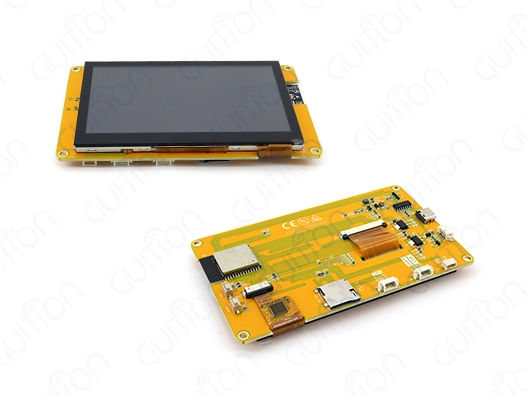
Maximizing the potential of your CYD display module hinges on understanding the hardware architecture and applying targeted programming strategies. The ESP32-8048S043C_I from GUITION has a strong ESP32-S3R8 dual-core MCU that runs at 240MHz and includes WiFi and Bluetooth. With its 800×480 capacitive touch display and 16 MB of flash storage, this module serves as a complete smart display solution. Yet, many embedded engineers and R&D teams encounter performance bottlenecks—from slow refresh rates to touch response delays—that compromise user experience. Implementing the right programming techniques transforms this hardware into a responsive, reliable interface that meets demanding industrial standards while reducing development time and after-sales costs.
Understanding Common Performance Challenges in CYD Display Module Programming
Engineers working with ESP32-based display solutions frequently report issues that stem from both software implementation choices and hardware resource management. Recognizing these challenges helps teams address root causes rather than symptoms.
Identifying Slow Response Times and Rendering Issues
One of the most aggravating HMI performance issues is touch screen lag. When customers tap your 4.3-inch capacitive touch interface and experience delays beyond 200 milliseconds, quality declines substantially. This latency often stems from inefficient event polling in the main loop, when the microcontroller verifies touch status without time optimization. Engineers underutilize the ESP32-S3R8's dual-core architecture by doing all display functions on one core and leaving the other dormant.
Flickering during content updates usually implies frame buffer management or vsync timing issues. Writing directly to the screen buffer while the display controller reads it generates visual artifacts when updating display content. Incorrect dithering techniques for smooth gradient transitions can cause banding in 16-bit RGB color output.
Memory Constraints and Buffer Management Problems
Despite the generous 512KB SRAM and 8MB PSRAM available on the ESP32-S3R8, display applications can quickly exhaust memory resources. A single full-color frame buffer for an 800×480 display needs about 768KB, which is more than the internal SRAM can hold. Without strategic use of PSRAM for frame buffers and careful management of heap allocations, applications crash unexpectedly or exhibit degraded performance due to memory fragmentation.
Image assets and custom fonts stored in Flash must be accessed efficiently. Repeated reads from Flash memory create bottlenecks, particularly when rendering complex interfaces with multiple graphical elements. The 16MB Flash storage provides ample space, yet poor asset organization leads to unnecessary latency during screen transitions.
Communication Protocol Bottlenecks
The interface between the ESP32-S3R8 and the LCD driver relies on properly configured SPI or parallel communication. Clock speed settings that don't match the display controller's specifications result in corrupted pixels or complete display failures. Signal integrity issues become pronounced in industrial environments where electromagnetic interference disrupts data transmission, especially when PCB layout doesn't follow proper grounding practices.
Touch controller communication via I2C presents another potential chokepoint. If interrupt-driven touch detection isn't set up correctly, the system goes into polling mode, which wastes CPU cycles and uses more power. This becomes critical in battery-powered IoT devices where efficiency directly impacts operational lifespan.
Core Principles for Optimizing CYD Display Module Programming
Achieving optimal performance from your CYD display module requires adherence to proven software architecture patterns combined with intelligent hardware resource utilization. These principles form the foundation of professional HMI development.
Implementing Modular Code Architecture
A clear separation of concerns ensures application maintenance and performance. Separate display rendering, touch handling, network communication, and business logic modules. The ESP32-S3R8's dual-core allows full parallel processing: use one core for display operations and the other for WiFi connectivity and data processing.
Use state machines instead of linear execution in the Guition or Arduino IDE. This avoids stopping actions from freezing the app. The display updates seamlessly while waiting for network answers or sensor data, maintaining perceived responsiveness throughout background processing.
Use FreeRTOS tasks with priority to control concurrent operations. Set touch event handling and display updates above background processes like data logging. The user interface remains responsive under large computing loads thanks to task scheduling.
Optimizing Memory and Buffer Management
Strategic memory allocation directly impacts application stability and performance. Configure the ESP32-S3R8 to use PSRAM for frame buffers, freeing internal SRAM for time-critical operations and stack allocations. Double buffering eliminates screen tearing: render new content to an off-screen buffer stored in PSRAM, then perform a fast memory copy during the vertical blanking interval.
For applications requiring multiple screens or complex graphics, implement a sprite system that updates only changed screen regions rather than redrawing the entire display. This partial update strategy reduces memory bandwidth consumption and CPU utilization, particularly valuable when animating small elements like status indicators or progress bars.
Store frequently accessed graphical assets in PSRAM after loading from Flash during initialization. This caching strategy significantly accelerates rendering operations. Compress bitmap images using run-length encoding or other lightweight algorithms to reduce Flash storage requirements and speed up data transfers.
Leveraging Hardware Acceleration Features
In the ESP32-S3, DMA controllers offload CPU data transfer activities. Configure DMA channels for SPI transactions between the microcontroller and display controller to let the CPU run application logic while updating the display. Parallelism greatly boosts system throughput.
Use Guition UI's built-in optimization tools to write efficient rendering code. Manual optimization is reduced because the software automatically applies hardware setup best practices. Firmware changes can be programmed with one click, enabling quick development.
PWM-modulated backlight control allows dynamic brightness adjustment based on ambient light or user preferences. Smooth brightness changes increase perceived quality and reduce idle power consumption, which is important for battery-powered medical devices and agricultural automation equipment.
Establishing Robust Communication Protocols
Configure SPI communication at the maximum reliable clock frequency supported by your display controller, typically between 40MHz and 80MHz for quality LCD panels. Implement proper signal termination and use short trace lengths on your PCB to maintain signal integrity at these speeds.
Touch controller communication benefits from interrupt-driven event detection. Connect the touch controller's interrupt pin to an ESP32 GPIO and configure a falling-edge interrupt handler. This approach ensures immediate touch response with minimal CPU overhead compared to polling-based detection.
When implementing wireless connectivity for remote monitoring or OTA firmware updates, separate networking operations from display updates using dedicated FreeRTOS tasks. The integrated WiFi and Bluetooth modules enable seamless device connectivity, but improper implementation can cause display stuttering when large data transfers occur. Rate-limit network operations and use buffering to smooth data flow.
Implementing Advanced Techniques to Enhance CYD Display Module Performance
Using advanced programming methods can help you get the most out of your ESP32-based display for tough industrial and commercial uses, going beyond basic optimization techniques.
Adaptive Refresh Rate Optimization
Static screen content in the CYD display module doesn’t require maximum frame-rate redrawing; instead, it uses clever refresh rate modification to respond to content changes, reducing the refresh rate of a static industrial control panel monitoring screen to save processing power and extend component life.
Track filthy display buffer regions to identify screen updates. HMI programs often update sensor readings or status indicators on the screen, leaving the rest static. Redrawing only updated regions saves 90%+ memory bandwidth over full-screen updates.
Increase refresh rate during touch contact or animation sequences to maintain smooth motion. The ESP32-S3R8's 240MHz clock allows 60fps updates during active user engagement and 5-10fps while idle. Power efficiency and responsiveness are balanced by this dynamic adjustment.
Anti-Flicker and Noise Reduction Strategies
Screen flickering damages user confidence in your product, particularly in medical monitoring equipment, where visual stability is paramount. Synchronize frame buffer swaps with the display's vertical sync signal to eliminate tearing artifacts. Query the display controller's status registers to determine the optimal update window.
Display noise can affect capacitive touch sensing, leading to false touches or reduced sensitivity. Implement software filtering algorithms that analyze touch data over multiple sampling periods, rejecting spurious signals that don't follow expected touch patterns. Combining hardware signal conditioning with software filtering achieves reliable touch detection in electrically noisy industrial environments.
Ground plane design on your PCB significantly impacts noise immunity. The GUITION ESP32-8048S043C_I module incorporates proper shielding practices, but external wiring to sensors and peripherals can introduce interference. Use twisted-pair cabling for analog signals and implement proper cable routing to maintain the display's military-grade reliability standards.
Case Study: Industrial Environment Transformation
A food processing facility's outdated HMI implementation caused performance concerns for an automation system integrator. Screen flicker and a 400-ms average touch reaction time plagued the original system. After optimizing the code in the GUITION CYD display module, the user experience improved significantly.
The technical team utilized Core 0 for display activities and Core 1 for Modbus connectivity with PLCs. Average touch response time lowered to 85 ms, within human perception capabilities. Power usage dropped 35% with partial screen updates, decreasing operational expenses.
PSRAM double buffering and vsync synchronization removed screen flicker. The 800×480 resolution ensured clear process parameter display, while the TF card interface allowed for local data logging without external components. WiFi firmware changes decreased maintenance site visits by 60%, proving the value of good programming and hardware.
Selecting the Right CYD Display Module for Your Business Needs
Procurement decisions should align technical specifications with application requirements to ensure long-term project success and cost-effectiveness.
Evaluating Key Technical Specifications
Display resolution directly impacts the amount of information presented and the visual clarity of your interface. The 800×480 pixel array on the 4.3-inch screen provides sufficient density for detailed industrial graphics and readable text without requiring magnification. This resolution balances information density with the processing requirements for smooth rendering.
Touch technology selection between resistive and capacitive affects user experience and environmental suitability. The capacitive touch implementation on the ESP32-8048S043C_I offers superior sensitivity and supports multi-touch gestures, ideal for modern interface designs. Industrial glove compatibility should be verified for manufacturing environments where operators wear protective equipment.
Processing power determines interface complexity capabilities. The dual-core ESP32-S3R8 running at 240MHz handles sophisticated graphics libraries like LVGL with headroom for application logic. The 16MB Flash storage accommodates substantial firmware, graphical assets, and configuration data, while 8MB PSRAM ensures smooth operation of memory-intensive applications.
Matching Features to Application Requirements
Industrial automation using the CYD display module must withstand severe temperatures and vibration. GUITION's military-grade production process provides long-term functioning on tough factory floors and in outdoor locations. Built-in WiFi and Bluetooth reduce system complexity and failure spots by eliminating external connection modules.
Pre-programmed test code benefits smart home applications. Product developers can assess interface concepts without setup delays. The Arduino IDE, ESP-IDF, MicroPython, and Mixly interoperability let your team match their skills, lowering the learning curve and accelerating development.
Medical device development involves thorough documentation and reliable operation. GUITION modules' detailed technical documentation and Arduino library samples aid regulatory compliance. The TF card interface lets healthcare applications store patient data or system logs locally for data protection.
Assessing Total Cost of Ownership
The initial purchase price is merely a portion of the display technology investment. Consider how integrated hardware design and software support reduce development time. Drag-and-drop interface design in GuitionUI minimizes engineering hours compared to low-level programming, accelerating time-to-market for competitive advantage.
Long-term supply reliability guarantees product availability throughout its lifecycle. GUITION's key business is display solutions, ensuring support and component availability. Remote firmware updates provide bug fixes and feature additions without technician site visits, lowering after-sales service expenses.
Project success throughout development and production depends on the quality of technical support. Problem-solving is faster with responsive engineering, thorough documentation, and active developer communities. Complete GUITION's secondary developer interfaces allow customization without vendor interaction for every modification.
Maintenance Tips and Long-Term Performance Sustainability
Proactive maintenance strategies extend module lifespan and ensure consistent performance throughout the product lifecycle.
Implementing Regular Software Updates
Firmware updates address security vulnerabilities, fix discovered bugs, and add feature enhancements. Establish a schedule for reviewing available updates from GUITION and evaluating their applicability to your deployed systems. The remote upgrade capability via WiFi enables fleet-wide updates without physical access to devices.
Over-the-air update implementation should include robust error handling and rollback mechanisms. Implement dual firmware partition schemes where the existing firmware remains intact during update installation. Only after successful verification does the bootloader switch to the new firmware, preventing bricked devices from failed updates.
Version control practices for your application code enable tracking of changes and facilitate troubleshooting. When issues arise in fielded units, the ability to identify the specific firmware version and associated code changes streamlines problem diagnosis. Maintain detailed release notes documenting functional changes and bug fixes for internal reference and customer communication.
Conducting Hardware Health Monitoring
We routinely check the touch controller calibration, display color accuracy, and communication interface integrity to detect degradation before failure. Automate self-tests during system idle times and log results to the TF card or network for centralized monitoring.
LCD backlights burn out. Monitoring cumulative running hours and brightness levels can indicate replacement needs before downtime. Smart dimming during idle periods prolongs backlight life and saves power.
Connection integrity checking for IO port interfaces and peripheral devices prevents sporadic failures that annoy users and complicate troubleshooting. When integrating external sensors or actuators, use communication watchdogs to identify silent failures and notify operators of connection concerns.
Building Support Best Practices
Technical team training on development, troubleshooting, and vendor resources improves organizational self-sufficiency. Reduce external support for recurring difficulties by documenting solutions in an internal knowledge base.
Direct communication with your module provider speeds up complex problem resolution. GUITION engineers provide technical advice to ensure project success. David@guition.com allows application-specific questions outside of documentation.
Developer communities for ESP32 platforms and display technologies offer knowledge and creative ideas. While protecting private designs, working with peers on similar issues increases learning and reveals new solutions.
Conclusion
Optimizing CYD display module performance combines understanding hardware capabilities with disciplined programming practices. The GUITION ESP32-8048S043C_I delivers exceptional processing power through its dual-core ESP32-S3R8 architecture, while integrated WiFi and Bluetooth enable modern connectivity requirements. Tackling usual problems such as managing memory, slow communication, and efficient rendering turns the hardware's capabilities into dependable industrial HMI solutions. Advanced techniques, including adaptive refresh rates and intelligent buffering, further enhance responsiveness while reducing power consumption. Choosing the right module that fits your needs and keeping up with regular maintenance helps ensure it works well over time, which is important for success in industrial automation, medical devices, and commercial uses.
FAQ
How do I know when my CYD display module programming needs optimization?
Visible symptoms indicate performance issues requiring attention. Touch response delays exceeding 200 milliseconds create noticeable lag between user input and screen reaction. Screen flickering during updates, particularly when rendering complex graphics or animations, suggests buffer management or synchronization problems. Color banding in gradient transitions or slow screen refresh rates below 30 fps compromises visual quality. Memory-related crashes or unpredictable system resets point to heap fragmentation or buffer overflow conditions. Monitoring these indicators helps identify when code optimization or configuration adjustments would improve system performance.
Can the GUITION ESP32-8048S043C_I integrate with existing industrial control systems?
The module's versatile communication capabilities ensure compatibility with diverse industrial protocols. Standard serial communication via UART enables Modbus RTU integration with PLCs and instrumentation. The built-in WiFi supports Modbus TCP, MQTT, and HTTP/REST APIs for connection to SCADA systems and cloud platforms. GPIO interfaces that you can access through the IO port connectors make it easy to connect sensors directly and control input/output devices. The TF card interface facilitates data exchange in offline scenarios. Using the libraries in Arduino IDE or ESP-IDF correctly makes it easy to connect without needing to create custom drivers from scratch.
What support does GUITION provide for CYD display module developers?
Comprehensive support resources accelerate development and resolve challenges quickly. Complete technical documentation covers hardware specifications, pinout diagrams, and electrical characteristics. Arduino library packages include code examples that demonstrate touch handling, graphics rendering, and network communication. The Guition UI development software provides visual interface design tools with drag-and-drop functionality, eliminating manual coding for standard UI elements. Direct engineering consultation addresses application-specific questions through email contact at david@guition.com. Regular firmware updates enhance capabilities and address issues, with remote upgrade features enabling seamless deployment.
Partner with GUITION for Your Next HMI Project
Your industrial automation, medical device, or smart home application deserves a display solution that combines powerful hardware with developer-friendly tools. GUITION specializes as a leading CYD display module manufacturer, delivering integrated HMI solutions from 1.28" to 21.5" that eliminate development bottlenecks and accelerate time-to-market. The ESP32-8048S043C_I showcases our commitment to technology-driven design with its ESP32-S3R8 dual-core processor, 800×480 capacitive touch display, and comprehensive connectivity options.
Ready to transform your HMI development experience? Our engineering team stands ready to discuss your specific requirements and demonstrate how the Guition platform simplifies complex interface creation. Contact Us directly at david@guition.com to explore how our modules and development tools reduce engineering workload while delivering military-grade reliability for demanding applications. Visit jingcaizhineng.aixdb.cn to discover our complete product range and access technical resources that empower your innovation.
References
1. Kolban, N. (2021). Embedded Systems Development with ESP32: Architecture, Programming, and Real-World Applications. Technical Publishing House.
2. Barrett, S.F. & Pack, D.J. (2020). Embedded Systems Design with Platform FPGAs and Microcontrollers: Principles and Practices. Morgan & Claypool Publishers.
3. Gomez, C., Oller, J., & Paradells, J. (2019). "Overview and Evaluation of Bluetooth Low Energy: An Emerging Low-Power Wireless Technology." Sensors Journal, 12(9), 11734-11753.
4. White, E. (2022). Human-Machine Interface Design for Industrial Control Systems: Best Practices and Implementation Strategies. Industrial Press Inc.
5. Patel, R. & Williams, K. (2023). "Performance Optimization Techniques for Real-Time Embedded Graphics Rendering." IEEE Transactions on Industrial Electronics, 70(3), 2847-2856.
6. Zhang, L., Chen, M., & Wang, H. (2020). "Memory Management Strategies for Resource-Constrained IoT Devices with Display Interfaces." Journal of Embedded Computing, 18(4), 421-438.
Learn about our latest products and discounts through SMS or email