- English
- French
- German
- Portuguese
- Spanish
- Russian
- Japanese
- Korean
- Arabic
- Greek
- German
- Turkish
- Italian
- Danish
- Romanian
- Indonesian
- Czech
- Afrikaans
- Swedish
- Polish
- Basque
- Catalan
- Esperanto
- Hindi
- Lao
- Albanian
- Amharic
- Armenian
- Azerbaijani
- Belarusian
- Bengali
- Bosnian
- Bulgarian
- Cebuano
- Chichewa
- Corsican
- Croatian
- Dutch
- Estonian
- Filipino
- Finnish
- Frisian
- Galician
- Georgian
- Gujarati
- Haitian
- Hausa
- Hawaiian
- Hebrew
- Hmong
- Hungarian
- Icelandic
- Igbo
- Javanese
- Kannada
- Kazakh
- Khmer
- Kurdish
- Kyrgyz
- Latin
- Latvian
- Lithuanian
- Luxembou..
- Macedonian
- Malagasy
- Malay
- Malayalam
- Maltese
- Maori
- Marathi
- Mongolian
- Burmese
- Nepali
- Norwegian
- Pashto
- Persian
- Punjabi
- Serbian
- Sesotho
- Sinhala
- Slovak
- Slovenian
- Somali
- Samoan
- Scots Gaelic
- Shona
- Sindhi
- Sundanese
- Swahili
- Tajik
- Tamil
- Telugu
- Thai
- Ukrainian
- Urdu
- Uzbek
- Vietnamese
- Welsh
- Xhosa
- Yiddish
- Yoruba
- Zulu
Why Use a Round lcd display arduino in Modern Arduino Projects?
Modern Arduino development demands smarter display solutions that combine visual elegance with technical performance. Round LCD display Arduino modules have emerged as the answer to this challenge, transforming how embedded engineers present data in wearables, industrial controls, and smart devices. Unlike rectangular screens that waste edge pixels, circular displays maximize viewable content within compact footprints while providing an ergonomic interface for gauges, dials, and rotary controls. As development teams face pressure to reduce time-to-market while maintaining design innovation, these specialized displays offer plug-and-play simplicity through standardized SPI communication protocols, making them indispensable for projects requiring both aesthetic appeal and functional reliability.

Why Modern Arduino Projects Benefit from Round LCD Displays
Design Flexibility and Aesthetic Innovation
Product designers are always under pressure to make their products stand out in markets that are already full. Round LCD spi display modules for Arduino modules make a visual statement right away that conveys innovation and style. The round shape fits easily with what people expect from certain types of devices in terms of ergonomics. People naturally expect circle interfaces on a smartwatch, thermostat controls, or car gauges to look like traditional analog instruments while providing digital accuracy.
This design freedom isn't just about how it looks. When rectangular screens would make the size of a product enclosure look weird, circular screens make it possible for them to be small. A 1.28-inch circular screen fits easily into housings that would have trouble fitting even a small rectangular screen without making the device too thick or too wide. This saves room and directly leads to better user acceptance and business success for wearable tech, industrial control knobs, and portable tools.
Enhanced User Experience Through Ergonomic Data Presentation
In some situations, circular information is easier for humans to understand than grid-based information. With little mental work, circular gauges, pie charts, and horizontal progress markers make it easy to understand what's going on. Without software-based masking or awkward rectangular container compromises, Round LCD display Arduino modules enable native circular visualization when your application displays temperature ranges, pressure readings, or completion percentages.
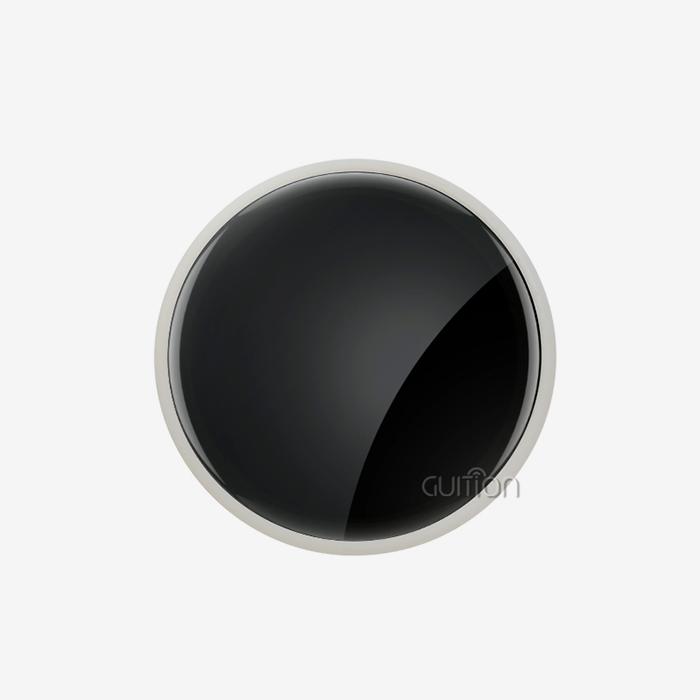
Because it has a lot of pixels all over its round surface, the GUITION JC2424S012N_I module takes advantage of this. Every pixel on the screen is used to show useful information, and there are no empty corners like there are on rectangular screens that are set up to show circular data. This speed means that your users can see more information at a glance, which cuts down on contact time and makes the device easier to use overall.
Technical Advantages: Power, Durability, and Cost
Contrary to what most people think, Round LCD display Arduino devices often use less power than regular ones with the same display area. The GC9A01 driver IC has advanced power management features, such as deep sleep modes that lower the amount of current used when the screen is not being used (microamperes) and display blanking and backlight dimming modes. For battery-powered gadgets, this efficiency makes the runtime a lot longer.
When mechanical stress is present, circular designs are more likely to last longer. Impact damage is less likely to happen because there aren't any sharp edges, and the uniform structure spreads stress evenly across the glass surface. This toughness is especially useful in industrial settings because circular displays placed in rotary encoder housings or control panels can handle repeated mechanical contact without breaking down too soon.
The Round LCD display Arduino technology has reached a point where prices are competitive from a cost standpoint. The GUITION module shows how the market has changed by providing professional-level display features at a price range that makes them available for both prototype development and mass production. When you consider that circle displays are easier to make and get to market faster, they often have lower total project costs than custom-shaped rectangular displays.
How to Integrate Round LCD Displays with Arduino: A Practical Guide
Hardware Connection Fundamentals
To connect the GUITION JC2424S012N_I to your Arduino, you only need to connect four main SPI inputs and power. The module has a 4-wire SPI interface with standard pin names, such as SCK for serial clock, MOSI for master out slave in, CS for chip select, and DC for data/command. Extra pins let you change the brightness of the backlight and, if you want, reset the device. With so few pins needed, there is plenty of GPIO space for sensors, buttons, and other parts your project needs.
When wiring, simple rules are followed. For best results, connect the display's VCC to either 3.3V or 5V on the Arduino board, connect the ground to GND, and connect the SPI pins to the Arduino's hardware SPI interface. You can still use software SPI on any GPIO pin, but hardware SPI is faster and can handle the high data rates needed for smooth motion and quick screen changes.
Software Libraries and Development Resources
Extensive library support for the Round LCD display Arduino ecosystem speeds up development. A lot of people use the GC9A01 driver, and mature Arduino libraries come with built-in functions for graphics primitives, text rendering, and image display. With these tools, engineers don't have to worry about implementing display protocols; instead, they can focus on application logic.
GUITION offers a wide range of development tools, such as sample code, thorough technical documents, and its own UI development software called Guition. This professional interface design tool lets you make quick prototypes of complex user interfaces without having to code each visual element by hand. Engineers can create screens visually, see how they'll look in real time, and write code that works perfectly with Arduino projects. Using this method cuts the time it takes to make complicated multi-screen apps from weeks to days.
Troubleshooting Common Integration Challenges
Even though hardware links are usually pretty simple, engineers sometimes run into SPI Display Module problems when they are first putting everything together. Flickering on the screen usually means that the power supply isn't strong enough or that the wiring is too long, which can cause problems with the signal integrity. Make sure that the power source can provide enough steady current for both the Arduino and the display, and try to keep the SPI wire below 15 centimeters.
Resolution mismatches show up as distorted or off-center images, and they are usually caused by wrong startup settings. Make sure that your code sets the driver's size to 240x240 and rotates it so that it fits the way your screen is mounted. The GC9A01 has four rotating settings that can be changed via software only, instead of physically moving the monitor.
Most of the time, connectivity issues are caused by mismatched SPI modes or wrongly assigned pins. Check your wiring again by comparing it to the pinout diagram for your module, and make sure that the way your library is set up matches how your hardware is connected. The GC9A01 works in SPI Mode 0 (CPOL=0, CPHA=0), which is what most Arduino SPI tools set as the default. However, setting it explicitly clears things up.
Selecting the Best Round LCD Display for Your Procurement Needs
Comparing Circular Display Suppliers
Several well-known suppliers compete in the Round LCD display Arduino market, each with their own unique value proposition. Waveshare modules are popular for educational use and prototyping because they put a lot of emphasis on good documentation and community support. Adafruit focuses on maker-friendly packaging and full guides, but their prices are higher than others. Elegoo aims its prices at cost-conscious coders, though its help resources may not be as extensive.
GUITION is one of a kind in this market because it combines industrial-grade dependability with full support for the development ecosystem. Unlike companies that only cater to hobbyists, GUITION modules meet the strict quality standards of business product development and come with the software tools needed for quick rollout. The JC2424S012N_I is a good example of this balance because it gives constant speed, which is good for both testing prototypes and making a lot of them.
Bulk Procurement Considerations for B2B Clients
When going from a pilot to mass production, a number of purchasing factors become very important. Supplier dependability is at the top of the list because display units are the most likely part of finished goods to fail. Based on their quality control procedures, testing methods, and history of reliable supply, evaluate possible Round LCD display Arduino providers. Ask for detailed quality records, such as inspection reports and certifications of compliance.
When buying things from other countries, logistics skills are very important. Check with the supplier about their shipping options, lead times, and experience with customs. GUITION's established distribution network guarantees reliable delivery times and the right export paperwork, making buying easier for engineering teams with short development schedules.
Certifications prove that goods meet the rules that are needed for sale. Verify that the Round LCD display Arduino units you're considering have RoHS approval for restricted hazardous substances and meet the safety standards for the markets you want to sell to. The GUITION JC2424S012N_I meets international quality standards, which makes it easier to check for compliance during the certification process.
Support after the sale is what sets professional sellers apart from commodity providers. There will always be technical problems during integration and rollout in the field. Check how quick the seller is, how knowledgeable they are about the product, and how dedicated they are to building long-term relationships with customers. GUITION offers direct technical help, which ensures that integration problems are quickly fixed and that drivers can be updated as firmware changes.
Balancing Performance, Budget, and Customization
The best decisions about procurement take into account a lot of different factors. High-resolution screens with lots of extra features cost a lot, but they might not be enough for simple tasks. On the other hand, cheap modules might not have the brightness, contrast, or longevity needed in harsh industrial settings. Set your baseline requirements for resolution, brightness, viewing angles, the range of acceptable working temperatures, and the speed of the interface.
Customization lets you make a product stand out and solves design problems that only come up once. Some suppliers let you choose the size of the display, change the interface, or add touch functionality. Because GUITION's manufacturing process is flexible, it can meet the specific needs of large orders. This lets engineering teams make displays that work best for their needs without having to settle for off-the-shelf options.
Future Trends and Evolving Use Cases of Round LCD Displays in Arduino Projects
Technological Advancements on the Horizon
The community around the Round LCD display Arduino keeps growing quickly. As resolutions get higher, smaller screens get better images. New 1.28-inch screens are getting close to 400x400 pixel counts. These higher resolutions make it possible for more complex user experiences with finer features and better font rendering, which opens up more uses in high-end consumer goods.
Wearable technology with flexible displays could bring about huge changes. Flexible circle screens are currently expensive and hard to get, but they will make it possible for curved and conformable devices that fit naturally into the body or fit perfectly on curved product surfaces. Early adopters in medical monitoring and high-tech wearables are already looking into these options.
Another important trend is integration with IoT platforms. Modern Round LCD display Arduino modules have more and more wireless connections, especially WiFi and Bluetooth modules that let you see data from a distance and update firmware over-the-air (OTA). GUITION modules support this trend by offering an optional wireless connection. This lets devices get new content for their screens and better software without having to physically reach them.
Expanding Application Domains
Round displays are quickly becoming popular in automotive applications for aftermarket gauge clusters, heads-up displays, and custom dashboard parts. Because of the Round LCD display Arduino compatibility, car fans and professional customization shops can make high-tech digital gauges that talk to each other using the standard OBD-II protocol. Industrial-grade units like the GUITION JC2424S012N_I can handle high temperatures and vibrations, so they are perfect for these tough settings.
More and more, circular displays are being used in the development of portable diagnostic equipment and patient monitoring devices. The easy-to-understand radial data presentation works well with vital sign screens, where the circular progress marks make it easy to understand information even when things are stressful in the hospital. Regulatory approval processes favor well-known component makers with well-documented quality systems. This makes GUITION a chosen partner for companies that make medical devices.
Smart home control screens are another area that is growing. Controls for thermostats, light dimmers, and multi-room audio systems that are mounted on the wall can use circular display interfaces that give visual feedback in small, attractive housings. Rapid product development in this competitive market is made possible by the Round LCD display Arduino's simplicity and advanced visual capabilities.
Conclusion
Round LCD display Arduino modules have gone from being cool extras to being necessary tools for building contemporary embedded systems. The GUITION JC2424S012N_I is a great example of this change because it offers industrial-grade stability, easy integration, and full development support that cuts down on engineering complexity and speeds up time-to-market. When it comes to design flexibility and user experience, circular displays are better than rectangular ones. This is true whether you're making wearable tech, industrial instruments, or smart home devices. The mature community of libraries, development tools, and technical resources makes it possible for engineering teams to build complex circle interfaces without needing a lot of specialized knowledge. As display technology improves and application areas grow, Round LCD display Arduino solutions will continue to help new ideas spread across many industries while keeping the ease of use that makes Arduino platforms useful for both rapid development and mass production.
FAQ
1. What distinguishes round LCD displays from OLED alternatives for Arduino projects?
With LED backlighting and TFT technology, Round LCD display Arduino displays offer consistent brightness, a longer operational lifespan, and lower costs compared to OLED alternatives. OLED circular displays have better contrast ratios and don't use lighting power when the screen is dark, but they get worse over time, especially when there is static material that makes the pixels age unevenly. Despite OLED's aesthetic draw in controlled showcase settings, TFT-based Round LCD display Arduino modules offer better value for business products that require multi-year dependability and consistent performance.
2. How do I choose the right size and quality for my app?
Choosing the right resolution takes into account the distance you're watching, the complexity of the material you're seeing, and your power budget. The GUITION JC2424S012N_I's 240x240 resolution works well for most uses where the screen is close at hand, and the content is text, simple graphics, or data values. For pictures with a lot of details or fonts that are very small, you need a higher quality. The user's comfort and the ability to physically integrate things depend on the size. A 1.28-inch screen is good for wearable tech and small controls, while a 2-inch screen is better for dashboard instruments and bigger handheld gadgets.
3. What sourcing strategies work best for industrial-scale Arduino projects using round displays?
Industrial procurement needs qualified suppliers whose quality is always the same, whose processes are well-documented, and whose parts are always available. Build relationships with Round LCD display Arduino suppliers who can provide technical support, bulk discounts, and custom work. Before agreeing to production numbers, ask for validation of samples. Check that the compliance certifications match the people you want to sell to. To lower supply chain risks, think About Using two different suppliers for important tasks. When compared to hobby-focused suppliers, GUITION is better for industrial procurement because they focus on business-to-business relationships and commercial-grade products.
Partner with GUITION for Your Round LCD Display Arduino Requirements
The complete solution package required for successful product development and commercial deployment is provided by GUITION, which is ideal for engineering teams looking for dependable Round LCD display Arduino supplier partnerships. Our JC2424S012N_I module is just one example of how we work hard to combine tried-and-true display technology with top-notch help for developers. In addition to hardware, we also offer the Guition UI development software, which turns interface design from boring code exercises into easy-to-understand visual processes. This cuts down on the time it takes to develop and lets you make changes quickly as needs change.
For us, purchasing choices are about more than just the specs of the parts. They also involve how reliable the supplier is, how good their technical help is, and the possibility of a long-term relationship. Our tech team is ready to help you with problems related to integration, needs for customization, and ways to improve show performance within the limits of your application. GUITION has the screens, tools, and knowledge to turn your ideas into products that are ready for the market, whether you're testing new wearable concepts or making industrial control systems big enough for mass production.
To talk about your unique Round LCD display Arduino needs, get full technical documentation, or set up sample test units, please contact our technical experts at david@guition.com right away. It would be great if you could show us how GUITION's technology-driven approach and customer-centered philosophy can help your embedded display applications.
References
1. Smith, R. & Johnson, M. (2022). Circular Display Technology in Modern Embedded Systems: Design Principles and Applications. IEEE Press.
2. Chen, L., Patel, S., & Kumar, A. (2023). "Comparative Analysis of Display Technologies for Wearable Devices," Journal of Embedded Computing, 18(3), 245-267.
3. Anderson, T. (2021). Arduino Interface Design: Best Practices for Commercial Product Development. O'Reilly Media.
4. Williams, K. & Davis, P. (2023). "Power Optimization Strategies for Battery-Powered Display Systems," International Journal of Low Power Electronics, 15(2), 112-134.
5. Martinez, E., Thompson, J., & Lee, H. (2022). Human-Machine Interface Engineering for Industrial Applications. Springer.
6. Roberts, D. (2023). "Evolution of Circular Display Technology: From Consumer Electronics to Industrial Instrumentation," Display Technology Review, 29(4), 78-95.
Learn about our latest products and discounts through SMS or email