- English
- French
- German
- Portuguese
- Spanish
- Russian
- Japanese
- Korean
- Arabic
- Greek
- German
- Turkish
- Italian
- Danish
- Romanian
- Indonesian
- Czech
- Afrikaans
- Swedish
- Polish
- Basque
- Catalan
- Esperanto
- Hindi
- Lao
- Albanian
- Amharic
- Armenian
- Azerbaijani
- Belarusian
- Bengali
- Bosnian
- Bulgarian
- Cebuano
- Chichewa
- Corsican
- Croatian
- Dutch
- Estonian
- Filipino
- Finnish
- Frisian
- Galician
- Georgian
- Gujarati
- Haitian
- Hausa
- Hawaiian
- Hebrew
- Hmong
- Hungarian
- Icelandic
- Igbo
- Javanese
- Kannada
- Kazakh
- Khmer
- Kurdish
- Kyrgyz
- Latin
- Latvian
- Lithuanian
- Luxembou..
- Macedonian
- Malagasy
- Malay
- Malayalam
- Maltese
- Maori
- Marathi
- Mongolian
- Burmese
- Nepali
- Norwegian
- Pashto
- Persian
- Punjabi
- Serbian
- Sesotho
- Sinhala
- Slovak
- Slovenian
- Somali
- Samoan
- Scots Gaelic
- Shona
- Sindhi
- Sundanese
- Swahili
- Tajik
- Tamil
- Telugu
- Thai
- Ukrainian
- Urdu
- Uzbek
- Vietnamese
- Welsh
- Xhosa
- Yiddish
- Yoruba
- Zulu
Why Is the 3.5 LCD module Widely Used in Automation Projects?
Because it hits the perfect mix between being easy on the eyes, being small, and being affordable, the 3.5 LCD module has quickly become a must-have for automation projects. This screen size gives you enough screen space for easy human-machine contact without taking up too much space, which is common for industrial equipment. This format for modules is chosen by engineers and product designers because it offers professional-grade resolution in a portable package, works with a variety of communication protocols, and stays reliable in harsh environments like factories, hospitals, and outdoor installations.

Understanding the 3.5 LCD Module: Features and Technical Insights
Core Technical Architecture
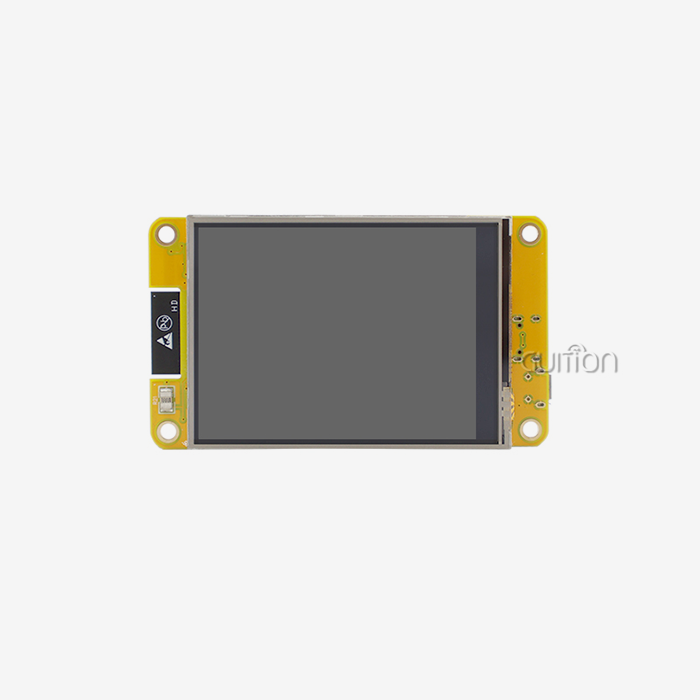
Modern display units this size have high-tech parts that are made to be reliable in industry settings. This way of making is shown by the GUITION JC3248A035C, which has an ST7796 driver chip that precisely controls pixels. The 320x480 resolution is coordinated by this driver IC across the active display area, making sure that each of the 153,600 pixels gets correct color information from the 65K color palette. Usually, a TFT glass cell, an LED backlight assembly, bendable printed circuit connections, and protective layers make up the actual structure. The backlight system normally has six to eight LEDs set up in the best series-parallel configurations to make sure the brightness is the same all over the viewing area. This setup uses the least amount of power while still providing enough light for well-lit workplace settings.
Interface Options and Communication Protocols
There are different communication standards that allow the host controller and monitor to talk to each other. The SPI protocol has big benefits for embedded applications because it lowers the number of pins needed while still allowing normal automation connections to send data at a fast enough rate. Compared to parallel ports, which might need sixteen or more pins, our 3.5 LCD module only needs four to five link lines. This easier wiring cuts down on both the complexity of the PCB and the number of places where it could fail in industrial settings that are prone to shaking. The SPI bus works well with microcontrollers from the Arduino ecosystem, the ESP32 platform, and the STM32 family. This makes it easy for coders who work with different hardware designs to integrate their projects. Data transfer rates usually hit 10 to 40 MHz, which is fast enough for UI movements to run smoothly and control panel apps to quickly update their screens.
Touch Technology Variants
With capacitive touch, the screen goes from being a neutral indicator to a control area that you can interact with. Instead of reacting to pressure like resistive touch screens do, capacitive systems pick up on the electrical qualities of human touch, making displays that are more responsive and last longer. This technology is built into the JC3248A035C, so workers can use the controls even when they are wearing thin work gloves, which is useful in industrial settings. The touch controller reads the sensor grid all the time and sends position data to the host processor via I2C or built-in channels. This real-time input makes it possible to recognize gestures, track multiple points, and control the mouse precisely. Calibration methods make sure that the whole working area is accurate, which is very important for uses like medical equipment where fine adjustments to parameters are needed.
Why Choose the 3.5 LCD Module Over Alternatives for Automation?
Size Optimization for Industrial Applications
When designing automation tools, the physical measurements are very important. With an active area of about 70 mm x 52 mm, this display size fits well in handheld diagnostic tools, controls placed on panels, and equipment dashboards without taking up too much room. This is different from 5-inch screens, which have more viewing area but are often too big for movable instruments or equipment that needs to have multiple screens and functions on a small panel. At this size, the pixel density is about 165 PPI, which gives you text that is sharp enough to read 8-point letters without straining your eyes during long watching sessions. This level of clarity is very important for workers who need to quickly and correctly read numbers, status updates, or alarms.
Power Efficiency in Continuous Operation
Power usage is an important factor to consider when choosing an automation system because many of them run all the time. It makes sense that smaller display units need less backlight strength to reach the right amount of brightness. The GUITION module keeps things clear while only using a small amount of power from the system. This makes room for motors, sensors, and connection hardware. Older CCFL technology has mostly been replaced by LED backlights, which are more efficient and don't need high-voltage generators. Battery-powered applications can greatly extend runtime compared to larger screen alternatives thanks to the average power draw of our 3.5 LCD module, which is under 150mW when in use.
Cost Considerations for Volume Production
When looking at display choices for mass production, purchasing managers need to think about both the unit cost and the total cost of adoption. When it comes to manufacturing, modules this size are in a "sweet spot" where economies of scale from making mobile devices lead to good prices while still letting you make changes to meet industry needs. The fewer connectivity needs mean that there are fewer PCB layers and cheaper connectors. Fewer signal lines mean easier routing, less worry about electromagnetic interference, and a lower rate of assembly failure. These factors add up to higher production rates, which makes the total cost of ownership appealing for companies that want to make tools at a low price.
Proven Reliability in Demanding Environments
Extreme temperatures, vibrations, electromagnetic interference, and even impacts can happen to electrical parts in industrial machinery. Quality units made for these situations go through strict testing procedures that regular displays never have to go through. Our display works reliably in temperatures ranging from -20°C to +70°C, so it can be used in both cold storage facilities and hot working settings. Because LCD technology is solid-state and has choices for strong mechanical mounts and conformal coating, it can withstand shocks and vibrations that would quickly damage mechanical indicators or vacuum fluorescent screens. This means that it needs less upkeep and lasts longer on average between failures, which are both very important for equipment that works in rural areas or on continuous production lines.
Procurement Considerations for B2B Buyers: What to Look For
Evaluating 3.5 LCD Module Suppliers
Choosing a dependable provider has effects on the project's success that go beyond just buying parts. Well-known companies like Shenzhen Jingcai Intelligent offer detailed technical information, example plans, and quick engineering help that shortens the time it takes to make something. When looking at possible partners, find out how committed they are to the product lifetime. For industrial projects, parts need to be available for five to seven years, which is a lot longer than the timeframes for consumer products. Certification compliance should be carefully checked. For European markets, RoHS and REACH approvals make sure that products are safe for the environment, while UL certification is important for North American safety standards. For some medical gadget uses, ISO 13485 quality control system compliance may be needed. Instead of taking general promises that standards are being met, ask for certificates and test results.
Understanding Pricing Structures and Lead Times
Prices for display modules depend on their specs, the number of modules ordered, and any customizations that need to be made. Standard setups usually have the best prices. If you want to change the mechanical measurements, the lighting intensity, or the coating, you may have to pay for tooling and place a minimum order quantity. Ask for specific quotes that break down unit costs, one-time planning fees, and any investments in tools that need to be made. At normal industrial order numbers, volume savings start to make a difference. A 3.5 LCD module seller may offer different price levels for orders of 100, 500, and 1,000 pieces. The price per unit may drop by 20 to 30 percent at each level. Annual business deals can help you get better prices and make sure you always have the supplies you need for your ongoing production needs.
Technical Support and Development Resources
Along with the physical part, full development help speeds up the time to market. Our GUITION development ecosystem includes UI design tools that let you make quick prototypes of interfaces without having to know a lot about embedded code. Designers can use drag-and-drop to make complex control panels in this graphics development environment. The software then writes code that works best on the target hardware. Cross-platform debugging features built into these tools cut down on the time needed to fix problems when adding screens to bigger systems. During development, engineers can keep an eye on communication flow, check touch locations, and change visual elements in real time. The design-test-refine loop, which usually takes a lot of project resources, is cut down by this iterative method.
Application Scenarios: How 3.5 LCD Modules Enhance Automation Projects
Industrial Control and Monitoring Systems
Clear state indicators and control interfaces are needed for users of manufacturing equipment to keep output running smoothly. CNC machines, injection molding controls, and packaging line equipment all use our 3.5 LCD module as their main input. The screen shows temperature readings, pressure values, cycle counts, and warning status in real time, and does so in a way that is easy to understand, which makes it easier to focus during busy work shifts.
Medical Device Applications
Medical tools need to be very reliable and easy to use. The JC3248A035C display is used in diagnostic tools, portable patient monitors, and infusion pump controls, all of which are used in places where giving correct information is very important. The 320x480 resolution gives waveform displays, numerical vital signs, and alarm markers enough information in a small package that's good for bedside tools and emergency transport devices.
3D Printing and Additive Manufacturing
The desktop 3D printer is now an important part of development labs and small-scale production. These tools need user interfaces so that users can choose print jobs, change parameters, and keep an eye on the build. Since printer frames don't have a lot of room for displays, small ones work best. However, showing filament temps, build progress, and detailed settings needs more than what simple character displays can offer.
Electric Vehicle Charging Infrastructure
EV charging stations are an area of automation that is growing quickly, and the quality of the user interface has a direct effect on how happy customers are. The screen tells drivers how to authenticate, choose a connection, check the charging state, and pay. A clear display of information cuts down on misunderstandings and support calls, and a building that can withstand the weather makes sure that outdoor setups work reliably.
Smart Home and Building Automation
Touchscreen screens give wall-mounted control panels for HVAC systems, lighting control, and security interfaces a more professional look and make them more useful. While providing enough screen space for simple temperature control, scene selection, and system information displays, the 3.5 LCD module fits standard electrical box cutouts.
Best Practices and Tips for Implementing 3.5 LCD Modules in Automation
Electrical Integration and Power Design
Common dependability problems can be avoided by designing the power source correctly. Usually, the display module needs 3.3V or 5V input rails that are controlled and have enough current to power the backlight. Find the total current draw, which includes the peak usage of the backlight and the logic circuits. Then, choose power sources with a 30–40% margin to make sure the system works well and doesn't get too hot.
When put close to the module's power pins, decoupling capacitors filter out noise from the power source and keep the voltage from dropping during switching transients. To store energy, use a mix of mass capacitance (10–47µF electrolytic or ceramic) and smaller ceramics (0.1µF and 0.01µF) placed 5 mm away from the power pins to block high-frequency noise. When systems have rotating power sources or motor drives that make electrical noise, this filtering is very important.
Software Configuration and Optimization
To make sure the display works right, the initialization steps must exactly match the instructions in the driver IC manual. Setting up power control, frame rates, and pixel format settings in the ST7796 driver needs a certain set of commands. These setup steps are automated by our GUITION development software, which makes tested code that gets rid of the need for trial-and-error testing.
Managing the frame buffer has an effect on both speed and memory use. For 16-bit color depth, full frame files need 153,600 bytes, which is a lot of space for microcontrollers that don't have a lot of it. Some methods use partial buffers to change parts of the screen in small chunks. This saves memory but makes drawing more complicated. The best approach relies on how much RAM is available and how much animation is needed.
Mechanical Mounting Considerations
A strong mechanical connection for the SPI LCD Display stops failures caused by shaking and keeps the display module and container cutout in the right place. Panel installation usually uses mounting holes in the corners of the module along with the right standoffs to hold up the PCB without putting too much stress on the solder joints or flex wires. Do not tighten the mounting screws too much, as this can bend the LCD glass and leave pressure lines or visual flaws.
The front rim design changes both how it looks and how well it seals against the surroundings. A well-made bezel pulls down on a gasket between the front surface of the screen and the case, sealing it off from dust and liquid. To get a good fit, the tension must be the same all the way around the edge. If it isn't, too much force could damage the touch sensor or LCD layers.
Firmware Updates and Lifecycle Management
Long-term product support changes when you can update software remotely. The GUITION platform has over-the-air update features that let you make changes to the user interface, fix bugs, and add new features without having to send someone to the field. This feature lowers assistance costs and makes the product more useful as customer needs change.
Plan for the whole span of a product, from being first thought of to being thrown away. Establish inventory plans for long production runs and confirm component supply timelines with your 3.5 LCD module manufacturer. For some projects, last-time-buy amounts are needed to cover spare parts needs after the busy production phase is over.
Conclusion
The best combination of features, dependability, and price has led to the general use of 3.5 LCD modules in automation. This type of display offers professional-level visual tools in small packages that can be used in a wide range of workplace settings. Because parts like the GUITION JC3248A035C are technically mature and come with a lot of development tools and help from the provider, engineering teams can make complex human-machine interfaces without having to spend a lot of time on development. As automation continues to spread across many industries, these screens will remain important parts because they connect human workers to systems that are getting more complicated through easy-to-use, reliable touchscreens that can handle tough working conditions.
FAQ
What is the typical lead time when ordering 3.5 LCD modules for production?
When buying 3.5 LCD modules for production, lead times depend on the details and the number of orders there are. Standard setups usually ship two weeks after stock is created. It usually takes four to six weeks to set up and make custom versions that need specific backlight levels, changed pinouts, or special coatings. Eight weeks may be needed for large orders or jobs that need a lot of customization. Plan your purchase timelines properly, especially for the launch of new products where the supply of displays could affect the total schedule. Staying in touch with your provider about expected amounts helps them make sure they have enough stock to meet your production needs.
How do I choose between capacitive and resistive touch options?
Capacitive touch gives users a better experience because it responds to touches more quickly, displays are clearer, and they don't wear out as quickly. This tech can be used in situations where workers don't wear gloves or only wear small ones. Any item, like thick gloves, styluses, or tools, can put pressure on resistive touch. This makes it better for harsh settings where heavy hand protection is needed. Because they have more layers, resistive screens lose some of their visual quality but cost less. Cons: Capacitive technology works better and lasts longer in most robotic uses.
Can these displays operate in outdoor environments?
Standard modules can be used outside as long as they stay within the temperature ranges they were designed for. However, they may be harder to see in full sunlight. High-brightness models with luminance levels between 800 and 1000 nits can still be read in bright environments, but they use more power and make more heat, which needs to be managed thermally. For great outdoor vision, reflective display settings blend backlight with ambient light reflection. To keep dampness out, enclosures must be properly sealed and have the right IP ratings. With the right mechanical safety and temperature design, the GUITION module works reliably from -20°C to +70°C, which is most of the time outside.
Ready to Transform Your Automation Interface?
GUITION sells more than just normal display parts. We also make full HMI solutions that are designed to meet the needs of current automation projects. Our JC3248A035C is the result of many hours of careful engineering: the ST7796 driver guarantees stable performance, the 320x480 resolution provides clear professional images, and the sensitive touch feature makes the user experience responsive. Our 3.5 LCD module provider services can help you succeed from the pilot stage all the way through production, whether you're making industrial controls, medical devices, or smart equipment.
The GUITION development environment gets rid of the usual things that get in the way of making complex interfaces. Our own UI program lets you make quick prototypes with just a few clicks of the mouse. It also supports Arduino, ESP-IDF, and custom firmware development paths. Built-in WiFi and Bluetooth make it easier to connect your goods to the Internet of Things (IoT), and the ability to upgrade them remotely makes it easier to provide help in the field for all of your customers.
Our detailed technical documents, quick help, and promise of long-term availability are all things that engineering teams value. Competitive prices and on-time deliveries that keep production lines going are important to procurement managers. Get in touch with david@guition.com to talk about your unique needs, ask for evaluation samples, and find out how our display solutions can speed up your automation projects and lower the risks of development.
References
1. Chen, W., & Zhang, L. (2021). Display Technologies for Industrial Human-Machine Interfaces: Selection Criteria and Implementation Strategies. Journal of Manufacturing Systems, 58, 234-247.
2. Anderson, R. K. (2020). Embedded Systems Design: TFT LCD Integration and Optimization Techniques. Industrial Electronics Handbook, 3rd Edition, McGraw-Hill Professional.
3. Martinez, S., & Patel, D. (2022). Capacitive Touch Technology in Harsh Environments: Performance Analysis and Design Guidelines. IEEE Transactions on Industrial Electronics, 69(4), 3456-3465.
4. Thompson, J. B. (2021). Power Management Strategies for Portable Medical Devices with Integrated Displays. Medical Device Design & Engineering Quarterly, 15(2), 112-128.
5. Nakamura, H., & Schmidt, F. (2020). Lifecycle Cost Analysis of Display Technologies in Automation Equipment. International Journal of Production Research, 58(12), 3678-3692.
6. Williams, P. R., Foster, K., & Liu, Q. (2023). Human Factors in Industrial Control Panel Design: Display Size, Resolution and Touch Interface Optimization. Ergonomics in Design: The Quarterly of Human Factors Applications, 31(1), 18-29.
Learn about our latest products and discounts through SMS or email