- English
- French
- German
- Portuguese
- Spanish
- Russian
- Japanese
- Korean
- Arabic
- Greek
- German
- Turkish
- Italian
- Danish
- Romanian
- Indonesian
- Czech
- Afrikaans
- Swedish
- Polish
- Basque
- Catalan
- Esperanto
- Hindi
- Lao
- Albanian
- Amharic
- Armenian
- Azerbaijani
- Belarusian
- Bengali
- Bosnian
- Bulgarian
- Cebuano
- Chichewa
- Corsican
- Croatian
- Dutch
- Estonian
- Filipino
- Finnish
- Frisian
- Galician
- Georgian
- Gujarati
- Haitian
- Hausa
- Hawaiian
- Hebrew
- Hmong
- Hungarian
- Icelandic
- Igbo
- Javanese
- Kannada
- Kazakh
- Khmer
- Kurdish
- Kyrgyz
- Latin
- Latvian
- Lithuanian
- Luxembou..
- Macedonian
- Malagasy
- Malay
- Malayalam
- Maltese
- Maori
- Marathi
- Mongolian
- Burmese
- Nepali
- Norwegian
- Pashto
- Persian
- Punjabi
- Serbian
- Sesotho
- Sinhala
- Slovak
- Slovenian
- Somali
- Samoan
- Scots Gaelic
- Shona
- Sindhi
- Sundanese
- Swahili
- Tajik
- Tamil
- Telugu
- Thai
- Ukrainian
- Urdu
- Uzbek
- Vietnamese
- Welsh
- Xhosa
- Yiddish
- Yoruba
- Zulu
Why Choose a 10.1-Inch Display Module for OEM Projects?
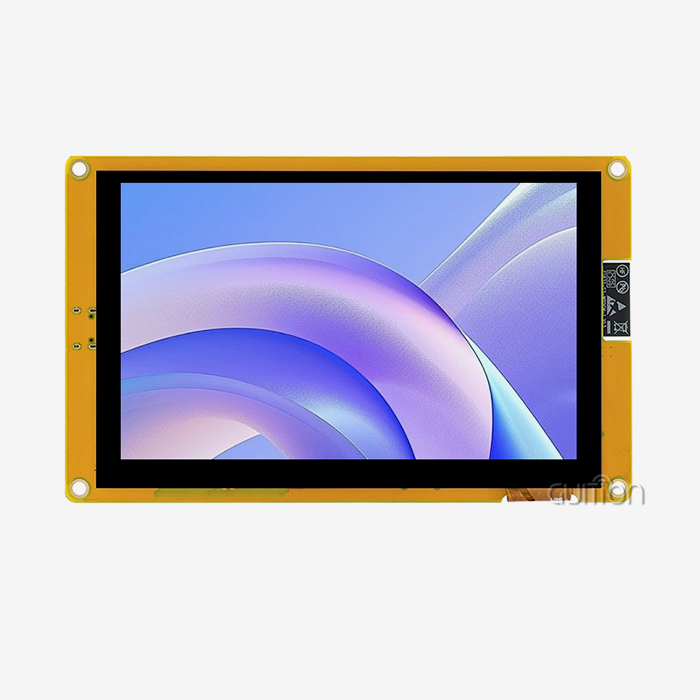
When engineers and product managers evaluate display solutions for OEM builds, the 10.1-inch form factor consistently emerges as a practical sweet spot. A 10.1 inch display module delivers enough screen real estate for complex HMI dashboards, multi-touch interaction, and rich data visualization — without the bulk of larger panels. The GUITION JC8012P4A1C_I_W_Y1 exemplifies this balance, pairing an 800×1280 IPS panel with an ESP32-P4 dual-core processor running at up to 360MHz, integrated Wi-Fi and Bluetooth, and multi-platform development support. For OEM teams prioritizing speed, reliability, and scalability, this module deserves serious consideration.

Understanding the Value of a 10.1-Inch Display Module in OEM Applications
What Defines a 10.1-Inch Display Module?
A 10.1-inch display module is a self-contained visual assembly that usually has a TFT-LCD or IPS panel, a driver IC, a backlight unit, and an optional projected capacitive (PCAP) touch overlay. The aspect ratio of most of them is 16:10, and the sizes range from WXGA (1280×800) to Full HD. The GUITION JC8012P4A1C_I_W_Y1 runs at 800×1280, which makes dashboards, diagnostic screens, and control interfaces look great. Importantly, this size solves a problem that OEMs have had for a long time: a 7-inch panel is too small for layouts with multiple widgets, and a 15-inch panel is too heavy and expensive. The 10.1-inch group is a great way to close that gap.
Why Size Matters in Embedded OEM Design?
The size of the display has direct effects on PCB layout, enclosure dimensions, power draw, and the comfort of the end user. Engineers who design panels for medical tracking stations, industrial control cabinets, or smart kiosk terminals all have to deal with the problem of how to fit the most information into a small area. A 10.1-inch display module has a small size and can support multi-layer user interface designs. This is something that smaller options can't do without affecting reading or touch target accuracy. The GUITION module works with both capacitive and non-capacitive touch versions, which gives OEM makers options from the very beginning of prototyping.
Key Technical Advantages of Choosing a 10.1-Inch Display Module
The GUITION JC8012P4A1C_I_W_Y1 is based on the ESP32-P4 dual-core MCU, a processor design that can handle heavy visual tasks like LVGL-based interfaces and multimedia data streams without slowing down due to heat. It has a lot of memory: 768 KB HP L2MEM, 32 KB LP SRAM, 128 KB HP ROM, 332 MB PSRAM, and 16MB flash. This hardware base makes it possible for animations to run smoothly and for the user interface to respond quickly, which are both important in high-throughput or safety-critical OEM settings.
What makes this 10.1-inch display module better than others in terms of technology are these main claims:
- IPS panel with 16.7 million color support: IPS technology provides wide viewing angles and consistent color accuracy no matter where the operator is sitting. This is a clear advantage over TN panels in shared-use industrial terminals where different operators see screens from different angles.
- Dual-core processing at 360MHz: The ESP32-P4's dual-core architecture keeps UI rendering and communication tasks separate. This keeps the display from lagging while Wi-Fi or Bluetooth data is being sent and received. This is very important for medical monitors and workplace equipment that is tied to the internet.
- Integrated wireless connectivity: Built-in Wi-Fi and Bluetooth get rid of the need for separate communication units, making the bill of materials (BOM) simpler and the PCB size smaller. This saves OEMs money when they buy in bulk.
- TF card interface and expandable IO ports: The onboard TF card slot can be used for local storage of asset logs, UI resources, or software backups. Extra IO ports allow for flexible integration of external sensors or devices.
These benefits can effectively fix the most common problems in producing mid- to high-end HMIs, such as slow iteration cycles, the cost of integrating hardware, and the difficulty of maintaining them in the field.
Comparing 10.1-Inch Display Modules Against Alternatives
10.1-Inch vs. 7-Inch: The Usability Gap
A 10.1-inch display module has about 45% more working space than a 7-inch monitor. That gap is not small in industrial HMI systems, where workers watch many process variables at once. Industrial ergonomics studies have shown that screens bigger than 9 inches are very helpful for interface setups that need more than four data widgets to be visible at the same time. The 800×1280 resolution of the GUITION JC8012P4A1C_I_W_Y1 lets you make dense UI layouts without reducing the size of the touch targets, which is still an important safety and usefulness factor in medical and industrial settings.
Capacitive Touch vs. Resistive Touch
The JC8012P4A1C_I_W_Y1 can be set up to be either non-touch or sensitive touch. Projected capacitive touch panels can handle multiple touches, can be used with light gloves, and stay responsive even when they are vibrating, which can happen on factory floors and in the field. Resistive screens are cheap for single-point input, but they break down faster when used with a stylus over and over again, and they don't allow gestures. Capacitive is still the best specification for OEM projects that want to meet the needs of modern users.
Procurement Insights: How to Choose and Where to Source 10.1-Inch Display Modules?
When purchasing teams look at a 10.1-inch display module for mass OEM production, they have to consider a number of factors that affect each other. Total project risk is often shaped by supplier reliability, the level of customization, the quality of the documentation, and the technical responsiveness after the sale, often more so than unit price alone.
As a vertically integrated hmi display module manufacturer, GUITION does all of its own research and development, production, and sales. This combination directly lowers the range of wait times and allows for real customization, such as changing the cutouts in the enclosure, the touch sensitivity levels, or the software settings for different regional markets. The JC8012P4A1C_I_W_Y1 comes pre-programmed with test programs, so the procurement and engineering teams can check its performance as soon as it arrives without having to write a single line of setup code.
At this level of quality control, the screens are inspected visually against ISO 13406-2 Class II dead-pixel standards; they are subjected to thermal shock cycling from −20°C to 70°C; they are tested for ESD at ±8kV air discharge, and they are vibrated at 1.5 G across 10–55Hz. These are all standard reliability standards for industrial-grade embedded displays.
Best Practices for Integrating 10.1-Inch Display Modules in OEM Projects
Validate Pinout and Power Compatibility Early
Most integration failures are caused by power rail mismatches or interface problems that were found after the design cycle was over. The GUITION JC8012P4A1C_I_W_Y1 works with Arduino IDE, ESP-IDF, MicroPython, and its own development environment. It works with multiple platforms, which makes it easier for engineering teams that are already familiar with any of these ecosystems to get started. Checking the assignments of IO ports and voltage limits while reviewing the schematic saves a lot of money on PCB respins.
Leverage the Guition Development Platform
GUITION's own software platform lets you build user interfaces (UIs) with drag-and-drop, has a large library of pre-built controls (buttons, scales, charts, and gauges), supports cross-platform online testing, and lets you install firmware with just one click. You don't have to write low-level display driver code to make production-ready interfaces for teams that don't have a lot of experience with integrated graphics. Remote over-the-air (OTA) upgrades make after-sales support even easier. Firmware updates can be sent to deployed units in the field without physical access, which is a great feature for OEM products that are spread out in different areas.
Thorough functional testing under realistic working conditions such as high temperatures, vibration, and constant touch input should precede any volume production commitment. The military-grade process standards for the module support long-term operational reliability, but the engineer is still in charge of design-level validation.
Conclusion
In the market for integrated displays, a 10.1 inch display module is one of the most powerful options. In terms of information density, it can't be beaten by smaller screens, and it can still be used for portable and panel-mount OEM uses. The GUITION JC8012P4A1C_I_W_Y1 supports this with an ESP32-P4 processor that works quickly, 800×1280 IPS graphics, built-in Wi-Fi connectivity, and a development environment that really cuts down on time-to-market. This module is a technically sound and commercially viable base for OEM teams making industrial controls, medical interfaces, smart home hubs, or business terminals.
FAQ
What development platforms does the GUITION JC8012P4A1C_I_W_Y1 support?
The module works with the Guition platform, the Arduino IDE, ESP-IDF, and MicroPython. Because it works in multiple environments, your engineering team can start using known toolchains right away, without having to go through a long ramp-up time.
Does the module support wireless connectivity out of the box?
Yes. The ESP32-P4 MCU has built-in Bluetooth and Wi-Fi, so it can connect to the Internet of Things (IoT) without any extra hardware parts. This cuts down on the cost of the bill of materials and makes PCB layout easier for OEM products that are connected.
Is capacitive touch available on this module?
The JC8012P4A1C_I_W_Y1 comes in two different styles: one that doesn't have a touch screen and one that does. The capacitive version works with light gloves and supports multiple touch gestures, making it suitable for use in medical and industrial settings.
Can firmware be updated remotely after deployment?
Yes. The Guition platform has OTA (over-the-air) remote upgrade functionality, which lets firmware updates be sent to field units that are spread out without physical access. This greatly lowers the cost of service after the sale.
What quality standards does this 10.1-inch module meet?
When making sure of the quality of their products, GUITION uses ESD testing (±8kV air discharge), thermal shock cycling (−20°C to 70°C), and optical inspection that follows the rules in ISO 13406-2 Class II.
Start Your Next OEM Project with GUITION's 10.1-Inch Display Module
GUITION is a reliable 10.1-inch display module source for OEM teams in the medical, IoT, and industrial sectors because we have strong R&D capabilities and can handle large-scale production. The JC8012P4A1C_I_W_Y1 can be tested and bought in large quantities. You can email our engineering team at david@guition.com to get more information, a sample quote, or specifications. Let's work together to make sure that the tools for your next HMI project work.
References
1. Bhatt, V. (2022). Display Technology in Embedded Systems: Selection Criteria and OEM Considerations. Electronic Design Magazine. https://www.electronicdesign.com/technologies/displays/article/21800522/display-technology-in-embedded-systems
2. Espressif Systems. (2024). ESP32-P4 Technical Reference Manual. Espressif Official Documentation. https://www.espressif.com/en/products/socs/esp32-p4
3. Stanton, N., & Young, M. (2020). Human Factors in Industrial Interface Design. Applied Ergonomics, 84, 103035. https://www.sciencedirect.com/journal/applied-ergonomics
4. Bhalla, M. R., & Bhalla, A. V. (2010). Comparative Study of Various Touchscreen Technologies. International Journal of Computer Applications, 6(8), 12–18. https://research.ijcaonline.org/volume6/number8/pxc3871622.pdf
5. IEC. (2021). IEC 62368-1: Audio/Video, Information and Communication Technology Equipment – Safety Requirements. International Electrotechnical Commission. https://webstore.iec.ch/publication/62368-1
6. Guition. (2024). GUITION HMI Display Module Product Documentation and Development Guide. Jingcai Intelligence. https://jingcaizhineng.aixdb.cn/
Learn about our latest products and discounts through SMS or email