- English
- French
- German
- Portuguese
- Spanish
- Russian
- Japanese
- Korean
- Arabic
- Greek
- German
- Turkish
- Italian
- Danish
- Romanian
- Indonesian
- Czech
- Afrikaans
- Swedish
- Polish
- Basque
- Catalan
- Esperanto
- Hindi
- Lao
- Albanian
- Amharic
- Armenian
- Azerbaijani
- Belarusian
- Bengali
- Bosnian
- Bulgarian
- Cebuano
- Chichewa
- Corsican
- Croatian
- Dutch
- Estonian
- Filipino
- Finnish
- Frisian
- Galician
- Georgian
- Gujarati
- Haitian
- Hausa
- Hawaiian
- Hebrew
- Hmong
- Hungarian
- Icelandic
- Igbo
- Javanese
- Kannada
- Kazakh
- Khmer
- Kurdish
- Kyrgyz
- Latin
- Latvian
- Lithuanian
- Luxembou..
- Macedonian
- Malagasy
- Malay
- Malayalam
- Maltese
- Maori
- Marathi
- Mongolian
- Burmese
- Nepali
- Norwegian
- Pashto
- Persian
- Punjabi
- Serbian
- Sesotho
- Sinhala
- Slovak
- Slovenian
- Somali
- Samoan
- Scots Gaelic
- Shona
- Sindhi
- Sundanese
- Swahili
- Tajik
- Tamil
- Telugu
- Thai
- Ukrainian
- Urdu
- Uzbek
- Vietnamese
- Welsh
- Xhosa
- Yiddish
- Yoruba
- Zulu
What to Consider Before Buying 7 Inch LCD Displays?
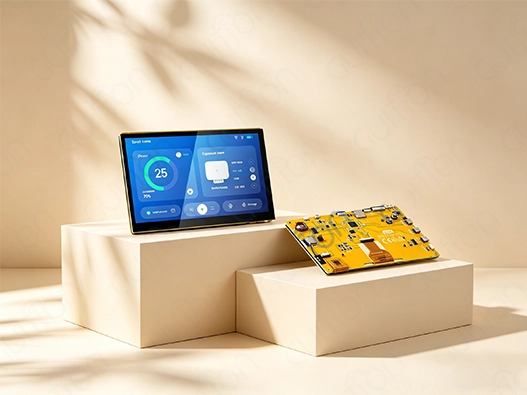
When thinking about what to consider before getting a 7 LCD display module, you need to think about a few important things that will have a direct effect on the success of your project. Before purchasing a 7 LCD display module, buyers should look beyond the seven-inch diagonal measurement and evaluate resolution, display technology, interface, touch configuration, controller performance, power requirements, operating environment, software support, and supplier capability. A display that works well in a laboratory prototype may not be suitable for an outdoor controller, industrial HMI, or commercial device. For B2B projects, the right selection process therefore starts with the application requirements and ends with sample validation, technical documentation, and supply-chain verification.
Start with the Application RequirementsDefine How the Display Will Be Used
The first step is to determine what users actually need to see and operate on the screen. A simple equipment controller may only require several numerical values, status indicators, and buttons. An industrial dashboard may need trend charts, alarms, menus, and multiple parameters on the same page.
A seven-inch display provides substantially more physical interface space than many compact 3.5-inch or 4.3-inch panels, but that does not automatically make it the right choice. Buyers should consider:
- Viewing distance
- Number of interface elements
- Required text size
- Touch-button dimensions
- Frequency of interaction
- Available enclosure space
- Installation orientation
If the operator must read the screen from several meters away, physical size and brightness may be more important than adding additional software functions. For a handheld instrument, however, weight, power consumption, and enclosure dimensions may become higher priorities.
Check the Mechanical Requirements Early
The advertised seven-inch diagonal does not fully describe the physical dimensions of a 7 LCD display module.
Before ordering samples, request the supplier's mechanical drawing and confirm:
- Overall module dimensions
- Active display area
- Bezel dimensions
- Mounting holes
- PCB thickness
- Connector position
- Cable exit direction
- Enclosure clearance
This information should be checked against the planned housing before tooling begins. A panel can have the correct diagonal size and still fail to fit the intended enclosure because of its PCB or mounting structure.
Compare Resolution and Image Requirements
Is 800×480 Enough?
800×480 is a common resolution for seven-inch HMI applications, particularly when the interface consists of large controls and straightforward status information.
It can be suitable for:
- Machine controls
- Basic monitoring panels
- Building controls
- Simple dashboards
- Equipment configuration screens
The key question is not whether a higher resolution exists, but whether the additional pixels provide a practical benefit for the application.
If the interface contains small text, detailed graphics, maps, charts, or multiple information windows, a higher-resolution panel may make the interface easier to organize.
When Does 1024×600 Make More Sense?
A 1024×600 panel provides more pixels than 800×480 and gives UI designers additional space for detailed graphics and text.
For example, an energy-management interface could use separate areas for:
- Current readings
- Historical trends
- Alarm status
- Equipment controls
- Communication status
The higher resolution makes these items simpler to organize without shrinking them.
Buyers must also consider controller and memory needs. Increasing resolution requires more pixels to be delivered and perhaps held in display buffers. The MCU, RAM or PSRAM configuration, interface bandwidth, and graphics framework must be assessed together.
Select the Right Display Technology
TFT LCD Versus Other Technologies
TFT LCD remains widely used for embedded HMI applications because it is available in many sizes, resolutions, and interface configurations.
When evaluating a TFT LCD, buyers should examine:
- Panel type
- Viewing angle
- Contrast
- Brightness
- Color depth
- Response behavior
- Backlight configuration
- Expected operating environment
IPS panels are often considered when viewing angles are important. If several operators may look at the same screen from different positions, a wide-viewing-angle panel can be more practical than a display optimized only for direct frontal viewing.
Do Not Select a Panel Based on “Industrial” Marketing Alone
For industrial applications, the word “industrial” on a product page is not enough.
Request specific information about:
- Operating temperature
- Storage temperature
- Humidity
- Vibration requirements
- Shock resistance
- ESD performance
- EMC considerations
- Front-surface protection
These parameters should be compared with the actual application environment.
A display installed inside a climate-controlled control cabinet has very different requirements from one mounted on outdoor agricultural equipment.
Evaluate Touchscreen Requirements Carefully
Capacitive and Resistive Touch
Touch technology should be selected according to how the equipment will actually be operated.
Capacitive touch can provide a smooth user interface and may support gestures depending on the controller and implementation. It is commonly used in modern HMI products.
Resistive touch can be useful when users need to operate the screen with:
- Gloves
- Styluses
- Tools
- Firm pressure
Neither technology should be treated as universally better. The correct choice depends on the working environment and interface requirements.
Test Touch Performance with the Actual Enclosure
Touch performance can change after the display is installed into the final product.
For this reason, sample testing should be performed with the intended:
- Front cover
- Mounting structure
- Grounding arrangement
- Power supply
- Protective glass
- Operating gloves
This is especially important for industrial equipment, medical instruments, food-processing machinery, and outdoor systems.
If the final product requires glove operation, do not assume that a touch panel advertised as capacitive will automatically work with every type of glove, especially when considering how to choose between a 7-inch TFT display module and a standard LCD for an embedded system. Request the relevant test information and evaluate the actual sample.
Check the Controller and Interface Before Ordering
Match the Display to the Host Platform
A display cannot be evaluated independently from its controller.
The system designer should confirm:
- MCU model
- CPU performance
- SRAM
- PSRAM
- Flash
- Display interface
- Touch interface
- GPIO availability
- Wireless requirements
For example, a higher-resolution GUI with animations and multiple frame buffers may require substantially more memory than a simple static control interface.
A module based on a more capable MCU can simplify system architecture by combining display control and application processing on one platform.
Verify SPI, RGB, MIPI, and Other Interfaces
Resolution, refresh, PCB architecture, and MCU capabilities should determine interface choices.
SPI works for many small screens and basic applications. RGB connections provide varying bandwidth and wiring for bigger panels. MIPI DSI is another display system alternative when its interface matches the CPU and panel.
Before buying, verify the interface rather than assuming a seven-inch display uses the same communication way as a smaller Arduino TFT module.
The interface provider should give a clear pinout and startup information.
Consider Power Consumption and Thermal Conditions
Evaluate the Complete Power Budget
Power consumption should not be estimated from screen size alone.
Actual system consumption can depend on:
- Backlight brightness
- MCU activity
- Display refresh
- Wireless communication
- Touch controller
- Storage devices
- Peripheral interfaces
For a battery-powered system, the buyer should request typical and maximum consumption figures under defined operating conditions.
For a mains-powered industrial controller, peak current is still important because the power supply must remain stable during startup and changes in load.
Plan for Heat Dissipation
Thermal performance becomes more important when the display is combined with a powerful processor, wireless communication, and other electronics inside a sealed enclosure.
During sample testing, measure temperatures at the display and controller under realistic workloads.
Test conditions should include:
- Maximum brightness
- Continuous GUI activity
- Wireless operation if applicable
- Enclosure installed
- Intended ambient temperature
This provides more useful information than relying only on a general “industrial” description.
Assess Software and Development Support
Confirm Your Development Environment
Software compatibility can significantly affect development time.
Before selecting a 7 LCD display module, verify whether it supports the team's intended environment, such as:
- Arduino IDE
- ESP-IDF
- MicroPython
- LVGL
- Other supported GUI frameworks
The exact level of support should be checked. “Compatible with Arduino” may mean anything from a complete example project to simple library-level support.
Ask the supplier for:
- Example code
- Libraries
- Pin definitions
- Initialization code
- Touch drivers
- GUI examples
- Firmware documentation
These resources allow engineers to estimate integration effort before making a production commitment.
Check GUI Development Options
If the project requires a graphical interface, evaluate the software workflow as well as the hardware.
A development environment may provide tools for:
- Screen layout
- Buttons
- Labels
- Sliders
- Charts
- Images
- Touch events
The objective is not simply to find software with many functions. It is to determine whether the tools can support the team's existing development process and whether generated or example code can be maintained after deployment.
Evaluate Outdoor and Harsh-Environment Requirements
Brightness Is Only One Part of Outdoor Readability
Outdoor readability depends on more than maximum brightness.
Buyers should also consider:
- Viewing angle
- Cover-glass reflections
- Optical bonding
- Ambient light
- Contrast
- Backlight control
- Display surface treatment
A bright panel can still be difficult to read if reflections from the protective surface overwhelm the image.
For outdoor kiosks, agricultural machinery, vehicle equipment, and field-service instruments, sample testing should take place under representative lighting conditions whenever possible.
Temperature and Moisture Need Specific Ratings
Outdoor equipment can experience temperature changes that are much greater than those found in indoor environments.
Ask the supplier for documented:
- Operating temperature range
- Storage temperature range
- Humidity limits
- Water-resistance information where applicable
If the final assembly requires an IP rating, verify the rating of the complete enclosure rather than assuming that the display module itself provides the required protection.
Compare the Supplier Before Comparing the Price
Review Technical Documentation
A low unit price does not compensate for missing engineering information.
Before placing a purchase order, request:
- Datasheet
- Mechanical drawing
- Electrical specifications
- Pinout
- User manual
- Software resources
- Touch documentation
- Test information
- Quality documentation
A supplier that can provide these materials allows the engineering team to validate compatibility before mass production.
Check Sample and Customization Support
For B2B projects, sample availability is an important part of supplier evaluation.
The sample should allow the team to verify:
- Display quality
- Touch operation
- Electrical compatibility
- Mechanical installation
- Software integration
- Thermal behavior
If the product requires a custom logo, enclosure, cable, connector, firmware configuration, or UI, these requirements should be discussed before production rather than after the standard model has already been approved.
Evaluate Long-Term Supply
A display integrated into a commercial product may remain in production for years.
Procurement teams should therefore ask about:
- MOQ
- Lead time
- Production capacity
- Product lifecycle
- Component changes
- Revision management
- Replacement models
- Warranty terms
- Technical support
A supplier should be able to explain how engineering changes are communicated so that the buyer can evaluate whether a future revision affects the existing product.
Validate a 7 Inch LCD Display Before Mass Production
Build a Practical Sample Test
A sample test should reproduce the final application as closely as possible.
The engineering team can evaluate:
Display
- Resolution
- Brightness
- Viewing angle
- Color performance
- Uniformity
Touch
- Accuracy
- Response
- Edge performance
- Glove operation if required
Electrical
- Startup
- Current consumption
- Voltage stability
- Interface communication
Software
- Initialization
- GUI rendering
- Touch events
- Long-duration operation
Mechanical
- Mounting
- Cable routing
- Connector clearance
- Front-panel installation
This process gives procurement and engineering teams objective information before committing to a larger order.
Test the Exact Production Configuration
A common mistake is testing one configuration and ordering another.
If the final product uses a different:
- Touch version
- Flash capacity
- Interface
- Connector
- Firmware
- Front cover
the sample should reflect those differences.
For a B2B project, the approved sample should ideally become the reference configuration for future production inspections.
What Makes a 7 Inch LCD Module Suitable for B2B Projects?
A appropriate module goes beyond resolution and price. It must meet all project technical and commercial criteria.
Five aspects comprise a practical evaluation:
- Display
Resolution, panel, viewing angle, brightness, and color needs.
- Hardware
Interface, touch controller, MCU, memory, storage, and extension connectors.
- Environment
Conditions: temperature, humidity, vibration, sunshine, cleaning, containment.
- Software
MicroPython, LVGL, Arduino, ESP-IDF, drivers, examples, and development tools.
- Supply
Lifecycle planning, samples, MOQ, lead time, customization, quality control, and technical support.
This approach lets consumers evaluate seven-inch display providers using the same criteria instead of headline specs.
Conclusion
More than screen size and resolution are needed to choose a 7 LCD display module. Buyers should consider display technology, touch setup, controller performance, memory, interface, power, ambient conditions, software support, and mechanical compatibility. Verify temperature, brightness, durability, and enclosure requirements for outdoor or industrial applications rather than relying on marketing statements.
For B2B procurement, supplier capability matters too. Technical documentation, sample availability, customized support, quality consistency, MOQ, lead time, and long-term product availability impact development cost and risk. Before mass production, engineering and purchasing teams use a systematic sample-validation procedure to ensure the seven-inch display satisfies product specifications.
FAQ
1. What resolution should I choose for my 7-inch display application?
The resolution you choose depends on how complicated your interface is and how far away you are watching. For simple workplace tools with big buttons and plain data displays, the standard 800x480 resolution is enough. 1024x600 resolution, like the one on the GUITION JC1060P470C_I_W, is good for programs that need to show complex data, draw small text, or make detailed images. It makes the text clearer and lets more interface elements fit without being crowded.
2. How does the ESP32-P4 processor benefit display module performance?
The ESP32-P4 dual-core processor running at 360MHz has a lot of computing power that can be used at the same time to handle wireless communication, graphics output, and touch processing. This much processing power lets interface animations run smoothly, screen changes happen quickly, and touch interactions work smoothly while WiFi and Bluetooth links stay stable. This gets rid of the lag and stuttering that low-powered displays show.
3. Can I use the GUITION module with my existing Arduino projects?
The GUITION module works perfectly with Arduino development platforms thanks to its full library support and example code. The familiar Arduino programming model makes it easier to learn, and the module's increased power through ESP32-P4 hardware gives it performance benefits over normal Arduino boards. This makes the switch easy for teams that already know how to use Arduino.
Partner with Guition for Your 7 LCD Display Module Needs
Guition has a wide range of intelligent 7 LCD display module options that are perfect for challenging business-to-business (B2B) applications. We are ready to support your industrial display needs. Our JC1060P470C_I_W module has powerful ESP32-P4 processing, built-in wireless connectivity, and a variety of development choices that help you get your product to market faster while lowering the amount of work engineers have to do. Our technology-driven method and customer-centered support will make sure the success of your project, whether you're an industrial equipment maker looking for reliable HMI solutions or an embedded systems engineer making new IoT devices. Get in touch with our expert team at david@guition.com to talk about your specific needs, get detailed specs, or get quotes for large orders from a reliable 7 LCD display module provider that is dedicated to a long-term relationship and product excellence.
References
1. Smith, J. & Chen, M. (2022). "Industrial Display Technology: Selection Criteria for Embedded Systems." Journal of Embedded Engineering, Vol. 18, pp. 45-62.
2. Anderson, R. (2023). "HMI Development Frameworks: Comparative Analysis of Modern Approaches." International Conference on Human-Machine Interfaces Proceedings, pp. 112-128.
3. Williams, K. (2021). "Supply Chain Strategies for Electronic Component Procurement in Manufacturing." Industrial Engineering Quarterly, Vol. 34, No. 2, pp. 78-94.
4. Zhang, L. & Patel, S. (2023). "Touchscreen Technologies in Industrial Applications: Performance and Durability Assessment." IEEE Transactions on Industrial Electronics, Vol. 70, pp. 1456-1468.
5. Thompson, D. (2022). "Power Management in Portable Display Systems: Optimization Techniques and Best Practices." Embedded Systems Design Magazine, March 2022, pp. 33-41.
6. Martinez, C. & Johnson, T. (2023). "Wireless Connectivity Integration in Industrial HMI Devices: Technical Considerations and Implementation Strategies." Journal of Industrial IoT Applications, Vol. 12, pp. 201-218.
Learn about our latest products and discounts through SMS or email