- English
- French
- German
- Portuguese
- Spanish
- Russian
- Japanese
- Korean
- Arabic
- Greek
- German
- Turkish
- Italian
- Danish
- Romanian
- Indonesian
- Czech
- Afrikaans
- Swedish
- Polish
- Basque
- Catalan
- Esperanto
- Hindi
- Lao
- Albanian
- Amharic
- Armenian
- Azerbaijani
- Belarusian
- Bengali
- Bosnian
- Bulgarian
- Cebuano
- Chichewa
- Corsican
- Croatian
- Dutch
- Estonian
- Filipino
- Finnish
- Frisian
- Galician
- Georgian
- Gujarati
- Haitian
- Hausa
- Hawaiian
- Hebrew
- Hmong
- Hungarian
- Icelandic
- Igbo
- Javanese
- Kannada
- Kazakh
- Khmer
- Kurdish
- Kyrgyz
- Latin
- Latvian
- Lithuanian
- Luxembou..
- Macedonian
- Malagasy
- Malay
- Malayalam
- Maltese
- Maori
- Marathi
- Mongolian
- Burmese
- Nepali
- Norwegian
- Pashto
- Persian
- Punjabi
- Serbian
- Sesotho
- Sinhala
- Slovak
- Slovenian
- Somali
- Samoan
- Scots Gaelic
- Shona
- Sindhi
- Sundanese
- Swahili
- Tajik
- Tamil
- Telugu
- Thai
- Ukrainian
- Urdu
- Uzbek
- Vietnamese
- Welsh
- Xhosa
- Yiddish
- Yoruba
- Zulu
What Size Secondary Portable Monitor Should You Choose?
Knowing the right measurements is important for efficiency and portability when choosing a display extension for your business. A secondary portable monitor is a must-have for engineers, product managers, and system designers who need to be able to change how they work visually. Size of the display: You need to consider the amount of space you want on the screen. Embedded development project: A 7-inch display may give ample capacity for menus, dashboards, and touch controls, while yet retaining a small overall shell. For software development, field service, or multi-window work, a 13- to 15-inch screen may be simpler to utilize. The larger 17-inch screens may provide you with more work area but also add weight, storage needs, and installation limitations. Therefore, the realistic decision for B2B purchasers evaluating a secondary portable monitor should consider screen size as well as resolution, viewing distance, touch needs, connection, power consumption, mounting space, and the desired product lifespan.
How Secondary Portable Monitors Fit Into Modern Development Workflows
Portable Displays as Practical Development Tools
A secondary portable display may be used for a different purpose than a regular desktop monitor or tablet. In embedded development, the display could be used to test an HMI, check touch layouts, look at images, or replicate the interface for the final product. The benefit is that it may be easily moved between a research bench, a client site, a production area, or a field-testing location.
For technical teams, this may make choices about screen size more tangible. If the final product will use a tiny 7-inch HMI, building the interface on a similarly-sized screen offers the team a better grasp of text size, button spacing, navigation structure, and available working surface. A bigger development display may still be helpful for coding, but it doesn’t necessarily match the physical restrictions of the final product.
Portable screens can come in handy when you have to share gear amongst many teams. For example, a firmware engineer may need to observe system information while a UI designer analyzes the interface. The field engineer may have to replicate the same interface as the development team but without having the entire desktop configuration. In these instances, mobility is an integral part of the engineering process, rather than an afterthought.
Why Size Matters in B2B Procurement
Display size matters to B2B buyers for more than just user convenience. It may affect the size of the enclosure, the mounting style, the packing, the shipping costs, the power needs, and the quantity of information that can be exhibited at any one moment.
The first thing to ask is: what does the display do? The HMI screen on a tiny machine does not have the same demands as a portable workstation display. Similarly, a screen used to test a product interface should be assessed differently from the one used for long code reviews.
Procurement teams should also decouple display size from module size. Depending on the enclosure, mounting structure, connections, and control board, the outside frame of a 7-inch screen might be much bigger than its active display area. For planning the installation, the whole module dimensions and mounting requirements are consequently more informative than a diagonal measurement alone.
The same is true for portable usage. A big screen is easier to see but also occupies more room in a laptop bag and might be less handy when engineers go between places often.
How to Evaluate Display Size Before You Buy
Match Screen Area to the Information You Need
The most practical method to determine a secondary portable monitor size is to start by determining what information needs to be shown at the same time.
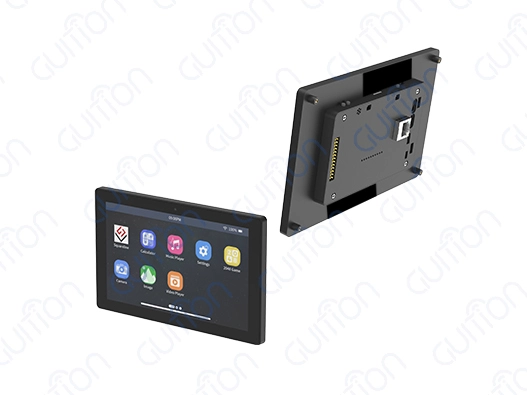
A 7 inch display might be useful when the interface has a limited number of buttons, status indicators, menus, or dashboards. It is particularly effective when there are severe constraints on the enclosure of the finished product. For instance, a 7-inch 1024×600 display offers sufficient horizontal and vertical real estate for many integrated HMI layouts, but keeps the module reasonably small. Capacitive touch is also added to Guition’s 7-inch ESP32P4 module with this resolution.
A 10-inch class display offers designers additional capacity for dashboards, charts, bigger controls, and information-heavy interfaces. This may be a nice middle-ground if 7 inch seems limiting but a 13 inch or bigger portable display would make the enclosure needlessly huge.
13- to 15-inch panels are often more usable for developers who need to have numerous windows displayed at once. Code, documentation, terminal windows, browser pages, and test interfaces may all have their own regions of the screen, without having to be constantly resized.
You have even more room with a 17-inch monitor, but then portability becomes a bigger trade-off. Before picking this size, purchasers should consider the actual module size, weight, and protective case requirements, as well as how the display will be carried.
Consider Resolution Alongside Physical Size
The useful information a display can convey is not only a function of its screen size. Resolution is just as crucial.
A 7-inch 1024×600 display has around 169 pixels per inch, which is good for many small embedded interfaces. But pixel density should not be taken as a direct indication of touch accuracy. It is not only display resolution that determines touch performance, but also the touch controller, panel structure, firmware, and implementation of the interface.
If your customers have to read tiny print, examine intricate visuals, or deal with several windows, better resolution may make a difference—especially on bigger displays. A 1920x1080 panel might be nice for a 13-17″ portable monitor since it gives extra workspace without needing a very high pixel density, while Est-ce que les écrans de 7 pouces conviennent pour un usage en voiture ou comme moniteur portable ? may be a consideration for smaller applications.
The expected viewing distance should also be taken into account. Not every screen near to an operator needs the same resolution as a display seen from several feet away. For an integrated HMI, readable typefaces and correctly sized touch buttons may be more essential than merely choosing the best possible resolution.
If the interface has intricate visuals or must be seen by several people, then color performance and viewing angle are also important. IPS panels are a frequent choice when consistent viewing performance is vital, but consumers should check the exact panel spec instead of assuming that every IPS display is the same.
Check Weight, Thickness, and Installation Space
If the display is part of an actual product design, the physical footprint might be more essential than the diagonal dimension.
The portable monitor must fit inside the designated backpack, workstation, test box, or equipment enclosure. For embedded applications, the designer should verify the whole module dimensions, not just the visible display area. Connectors, mounting holes, control boards, wires, and protective housings. All add to the space needed.
The thickness is important if the display is mounted within a tiny container. But a thin design should not be immediately considered superior. The room for connections, cables, mounting hardware, and heat management might be more critical than shaving a few millimeters off the profile.
And power should be considered too. A display with an embedded controller, wireless connection, touch interface, and extra peripherals may have different power needs than a passive panel. For example, Guition cites around 600 mA power consumption at 5 V for their 7-inch esp32p4 display module; thus, system designers need to take display and controller power into consideration when choosing the total power supply.
Selecting the Right Size for Different Applications
Embedded Product Development
Embedded development usually benefits from a display that reflects the constraints of the final product.
If the finished device is expected to use a compact HMI, a 7-inch module can provide a useful development reference. Engineers can evaluate whether navigation elements are readable, whether touch targets are large enough, and whether the interface remains practical when the screen is viewed at the expected distance.
A Guition 7-inch ESP32P4 module, for example, uses a 1024×600 IPS TFT display with capacitive touch, 32 MB PSRAM, 16 MB Flash, a TF card slot, and IO ports. The published specifications also list Arduino IDE, ESP-IDF, MicroPython, and Guition development support.
These features can be useful during prototyping because the same type of hardware can be used to evaluate both the interface and the embedded software environment. The development team can test graphics, touch interaction, storage, and communication before committing to a final enclosure design.
However, buyers should verify the exact hardware revision and software support before placing a production order. A product page is useful for initial comparison, while a datasheet, sample unit, interface documentation, and development examples provide more practical information for engineering validation.
Industrial Control and Automation
Industrial applications place different requirements on display size.
A compact control panel may benefit from a 7- or 10-inch display because the screen can provide sufficient room for status information and control buttons without occupying excessive panel space. The exact choice depends on viewing distance, operator gloves, touch-target size, and the amount of information displayed.
For equipment operated from a short distance, a smaller screen can be perfectly practical if the interface is designed around clear hierarchy and appropriately sized controls. If operators need to view trends, multiple process values, alarms, and configuration menus at the same time, moving to a larger screen may reduce the need for repeated page changes.
Environmental conditions should also be checked separately from screen size. Buyers may need to review operating temperature, enclosure requirements, brightness, connector protection, mounting method, and long-term component availability.
Guition's published 7-inch module specification lists an operating temperature range of -20°C to 70°C, but buyers should verify whether that range applies to their complete application environment and whether additional enclosure or thermal requirements apply.
Medical and Specialized Equipment Development
Specialized equipment requires a more careful approach because the display is part of a larger validated system.
For development and prototyping, a 7- to 10-inch screen can be suitable when the interface contains a focused set of measurements, controls, or status information. A larger panel may be more practical when several data areas need to remain visible simultaneously.
The important point is that display size alone does not determine suitability for a regulated application. Buyers should also evaluate the complete system's display performance, software behavior, electrical characteristics, environmental requirements, documentation, and applicable regulatory validation.
For this reason, development teams should test the actual display sample under representative conditions rather than selecting a module based only on a catalog photograph or resolution number.
Comparing Portable Displays With Other Screen Options
Portable Monitors Versus Tablets
A tablet and a portable development display may have similar screen dimensions, but they serve different purposes.
A tablet is generally a self-contained computing device with its own operating system, battery, processor, and application environment. A development display can instead be integrated with an embedded controller or development board and used as part of the engineering system.
This distinction matters for embedded teams. If the project requires direct access to interfaces such as GPIO, UART, SPI, I2C, or a TF card slot, a purpose-built development display may be more appropriate than a consumer tablet.
The Guition 7-inch ESP32P4 module, for example, lists a TF card interface and IO ports in its specifications, along with Wi-Fi and Bluetooth connectivity at the module level.
A tablet can still be useful when the main requirement is general-purpose computing or remote access to software. The better comparison is therefore not simply screen size, but whether the device matches the architecture of the product being developed.
Portable Displays Versus Desktop Monitors
Desktop secondary portable monitors provide more screen area and are well suited to fixed workstations. They are useful for software development, CAD, documentation, testing tools, and other tasks where portability is not a major concern.
Portable monitors become more useful when the engineering workflow involves moving between offices, laboratories, customer sites, production lines, or field locations.
A 27-inch desktop monitor may provide considerably more workspace than a 7-inch module, but that does not make it a practical substitute for a compact embedded display. If the objective is to reproduce the physical interface of a finished device, the smaller module can provide information that a large desktop monitor cannot.
Power and connectivity should also be compared. A development display with an integrated controller may reduce the number of external components required during prototyping, while a conventional monitor may require a separate computer or development board to generate the interface.
The right choice therefore depends on whether the priority is workspace, portability, product-size simulation, or hardware integration.
B2B Procurement Checklist for Portable Display Projects
Verify Development and Software Compatibility
Before ordering in volume, buyers should confirm which development environments are actually supported by the selected hardware.
For ESP32-based projects, this may include Arduino IDE, ESP-IDF, MicroPython, and vendor-specific interface tools. Guition states that its 7-inch ESP32P4 module supports these development environments.
Compatibility should be tested rather than assumed. Engineering teams should confirm the available libraries, example projects, display drivers, touch drivers, firmware update process, and documentation.
The development workflow also matters. A visual UI tool can reduce the amount of low-level interface code required for early prototypes, while direct programming may provide more control for production software. Buyers should therefore evaluate the software environment according to the team's actual skills and product requirements.
Review Interfaces, Expansion, and Power Requirements
Connectivity should be evaluated before selecting a screen size because a physically suitable display can still become difficult to integrate if the required interfaces are missing.
Useful interfaces may include USB, UART, SPI, I2C, GPIO, TF card, or other application-specific connections. Wireless connectivity can also simplify testing of network-enabled products, but buyers should verify whether Wi-Fi and Bluetooth are provided by the main MCU or by a separate wireless controller.
This distinction is particularly relevant to ESP32-P4 products. Espressif states that the ESP32-P4 itself does not include built-in Wi-Fi or Bluetooth, while an external ESP32-C6 or another wireless SoC can provide those functions.
Power requirements should be checked at the module level rather than inferred from the processor alone. Buyers should request information about operating voltage, typical current, peak conditions where relevant, backlight consumption, and any external power requirements.
These details help engineers size the power supply correctly and avoid redesigning the system after the prototype stage.
Evaluate Samples, Documentation, and Long-Term Supply
For B2B procurement, the sample stage is one of the most useful opportunities to validate a display.
A buyer can use samples to check physical dimensions, touch response, viewing angles, brightness, connectors, power consumption, software compatibility, and mounting arrangements. Testing the actual unit is particularly important when the display will become part of a long-term product.
Documentation should also be reviewed. A useful supplier package may include a datasheet, pin definition, mechanical drawing, example code, development libraries, firmware instructions, and test programs. Guition's published 7-inch module documentation includes technical specifications, development support, and a factory-programmed sample program intended to help users begin testing.
For production projects, procurement teams should additionally ask about MOQ, sample lead time, production lead time, component availability, customization options, packaging, warranty terms, and after-sales technical support.
Long-term supply is especially important when the display becomes part of a commercial product. A slightly lower unit price may be less useful if a component change later forces the engineering team to redesign the enclosure, interface, or firmware.
The supplier should therefore be evaluated as part of the overall product-development process rather than only as a source of individual display modules.
Conclusion
When choosing the proper secondary portable monitor size, the application comes first, not a preconceived notion of what the optimal screen is. A 7-inch screen makes sense for small embedded systems, HMIs, and prototypes where enclosure space is a consideration. The 10-inch class screen gives you more area for dashboards and controls without being as big as a workstation monitor. 13- to 15-inch screens are more suitable for software development and multi-window jobs. 17-inch versions are better for situations where working space is more vital than mobility.
Then the screen size, resolution, viewing distance, touch needs, module dimensions, power consumption, connection, software support, operating environment, and installation limits should be examined. Buyers should additionally verify the precise module architecture for ESP32-P4-based projects, because wireless capabilities can be provided by an extra ESP32-C6 or other external controller, not the ESP32-P4 itself.
In B2B initiatives, the final choice should be confirmed with a real sample and the appropriate technical documentation. Engineering teams face fewer surprises during integration and a clearer route from prototype to production on the screen-size selection when a display provider can offer continuous long-term supply, clear specs, development resources, and customized assistance.
FAQ
1. What display size balances portability with adequate workspace?
The 7- to 13-inch range gives you the best balance for most business uses. A 7-inch screen with a resolution of 1024x600 gives you enough screen space for developing HMIs, industrial control interfaces, and prototypes for embedded systems, and it doesn't weigh more than a pound. This small size makes it easy to carry in a laptop bag and doesn't take up much room on your desk when you're using it. Engineers who mostly use code editors and development tools often prefer 13-inch screens because they are easy on the eyes and don't take up too much space. The best choice relies on what you'll be using it for. For example, embedded development works best with small screens, while software development works best with bigger screens.
2. Can larger 17-inch monitors serve mobile professionals effectively?
Even though 17-inch portable monitors give you a lot of room, they make it hard to move around. These screens usually weigh three to four pounds and need bigger cases to carry them, which makes them less useful for daily commutes or frequent trips. The extra screen space is helpful for professionals who work from temporary offices or client sites for long amounts of time. But engineers who need displays that can be easily moved between lab benches, field sites, and meeting rooms should look for 13-inch or smaller screens that are both usable and truly portable.
3. How do touchscreen features integrate with different size choices?
Capacitive touch screens work well on all portable monitor sizes, but there are different things to think about when it comes to usefulness. In industrial control applications, where specific button zones and gesture areas are set during interface design, smaller 7-inch screens that can be touched work best. Larger touchscreens allow for more complex interactions, but they might be hard to use as secondary displays on computers because you have to reach across to touch the screen, which slows down work compared to using a mouse or keyboard. For integrated development, touchscreens let you test how users interact with the product right on the development screen, making sure the finished product's interface works the way it's supposed to.
Partner with Guition for Your Display Solutions
Display technology designed for embedded systems and HMI applications can completely change the way you work on making products. The ESP32-P4 processor in Guition's 7-inch portable monitor gives medical device developers, industrial equipment manufacturers, and IoT solution providers the speed, freedom, and dependability they need. Our screens work with the Arduino IDE, ESP-IDF, MicroPython, and the easy-to-use Guition programming platform. This means they will work with the tools you already have and make creating user interfaces easier with drag-and-drop design. As a dedicated secondary portable monitor provider, we know what engineering teams go through: short development cycles, changing product requirements, and the need for displays that work well from concept to production. Our built-in WiFi and Bluetooth, expanded TF card storage, and remote software update features directly address these issues, lowering development costs and speeding up time-to-market. Email our team at david@guition.com to talk about your unique needs and find out how our display options can help your next product. Guition gives you the technical help, documentation, and solid tools you need to make your ideas into goods that are ready for the market, whether you're making smart home devices, industrial control systems, or medical monitoring equipment.
References
1. Anderson, M. & Chen, L. (2023). Embedded Display Technologies for Industrial Applications. Technical Publishing Group.
2. Roberts, J. (2022). "Human-Machine Interface Design Principles for Medical Devices," Journal of Healthcare Engineering, Vol. 18, No. 3, pp. 145-162.
3. Thompson, K. & Williams, R. (2023). IoT Device Development: Hardware and Software Integration Strategies. Engineering Press International.
4. Martinez, S. (2022). "Comparative Analysis of Display Technologies in Smart Home Applications," International Journal of Consumer Electronics, Vol. 11, No. 2, pp. 89-107.
5. Zhang, W. & Patel, N. (2023). Portable Display Solutions for Field Engineering: Selection and Implementation Guide. Professional Engineering Publishers.
6. Davis, H. (2022). "Optimizing Touch Interface Design for Industrial Control Systems," Automation and Control Systems Quarterly, Vol. 29, No. 4, pp. 234-251.
Learn about our latest products and discounts through SMS or email
