- English
- French
- German
- Portuguese
- Spanish
- Russian
- Japanese
- Korean
- Arabic
- Greek
- German
- Turkish
- Italian
- Danish
- Romanian
- Indonesian
- Czech
- Afrikaans
- Swedish
- Polish
- Basque
- Catalan
- Esperanto
- Hindi
- Lao
- Albanian
- Amharic
- Armenian
- Azerbaijani
- Belarusian
- Bengali
- Bosnian
- Bulgarian
- Cebuano
- Chichewa
- Corsican
- Croatian
- Dutch
- Estonian
- Filipino
- Finnish
- Frisian
- Galician
- Georgian
- Gujarati
- Haitian
- Hausa
- Hawaiian
- Hebrew
- Hmong
- Hungarian
- Icelandic
- Igbo
- Javanese
- Kannada
- Kazakh
- Khmer
- Kurdish
- Kyrgyz
- Latin
- Latvian
- Lithuanian
- Luxembou..
- Macedonian
- Malagasy
- Malay
- Malayalam
- Maltese
- Maori
- Marathi
- Mongolian
- Burmese
- Nepali
- Norwegian
- Pashto
- Persian
- Punjabi
- Serbian
- Sesotho
- Sinhala
- Slovak
- Slovenian
- Somali
- Samoan
- Scots Gaelic
- Shona
- Sindhi
- Sundanese
- Swahili
- Tajik
- Tamil
- Telugu
- Thai
- Ukrainian
- Urdu
- Uzbek
- Vietnamese
- Welsh
- Xhosa
- Yiddish
- Yoruba
- Zulu
What Memory Configuration Is Best for a 3.5 inch ESP32S3 display module?
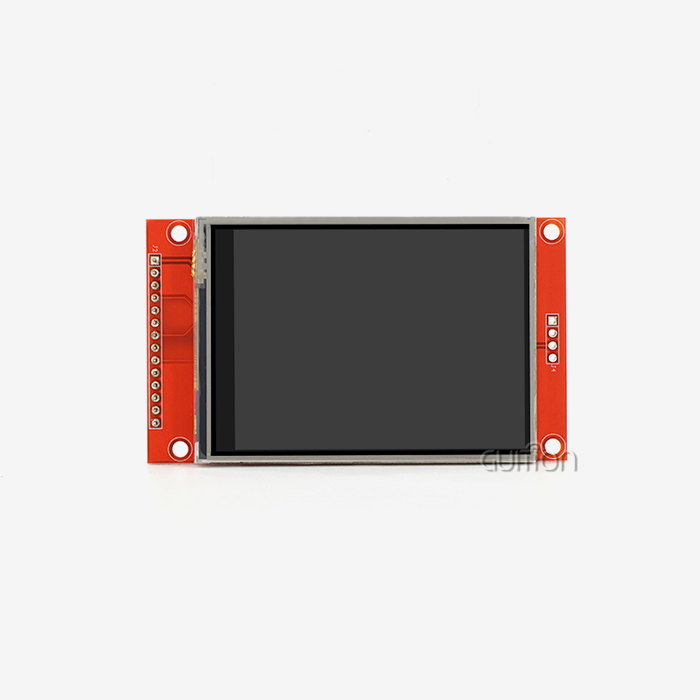
If you have ever used HMI hardware based on ESP32S3 you know that memory configuration is not a secondary problem, it influences directly how your interface operates. Select the correct memory configuration to transform a choppy, unreliable display into a smooth, professional one. The best memory configuration for 3.5 inch ESP32S3 display module is 8MB PSRAM + 16MB Flash. With this combination, you can have full frame double buffering for a 320x480 IPS display, complex LVGL UI rendering at 30-60 FPS, and yet have adequate Flash memory for OTA firmware, multi-language materials, and custom application logic. GUITION JC3248W535C_I_Y has exactly this specification: 8MB PSRAM, 16MB Flash, and 512KB SRAM, thereby making it a suitable candidate for industrial HMI, smart home panels, and medical device interfaces.

Understanding Memory Configuration Basics for the 3.5 Inch ESP32S3 Display Module
Engineers need to have a comprehensive grasp of how each kind of memory contributes to display performance before selecting a module. The ESP32-S3 architecture specifies three separate levels of memory, with a specific purpose in the graphics pipeline.
PSRAM: The Frame Buffer Engine
where your display frame buffers will be in PSRAM (Pseudo Static RAM). A full frame at 16 bits per pixel for a 320x480 screen is around 300KB. Double buffering that eliminates screen tearing needs at least ~600KB. A module like the GUITION JC3248W535C_I_Y with 8 MB PSRAM may enable large LVGL draw buffers, hold image assets in RAM, and yet have capacity for application data. When stacked UI components are shown, 4MB PSRAM only modules begin to be restricted.
SRAM: Speed-Critical Operations
The ESP32-S3R8 will use its onboard 512KB SRAM for interrupt routines, real time sensor callbacks, and time sensitive task data. SRAM is on the SoC chip itself; hence, it is faster than PSRAM. That’s why these routines are in SRAM (rather than external PSRAM) to enable developers building apps that need to rapidly poll GPIO pins, monitor touch events, or parse Bluetooth data.
Flash Memory: Code, Assets, and OTA Space
Flash memory holds your firmware, UI image assets, fonts, and OTA update partitions. A 3.5 inch ESP32S3 display module running complex LVGL themes with multi-language support can easily consume 4–6MB of Flash for assets alone. The 16MB Flash on the JC3248W535C_I_Y leaves substantial room for firmware logic, fallback partitions, and future feature additions — something that 4MB Flash modules cannot reliably support once applications grow.
Analyzing Memory Needs Based on Application Scenarios
Not every project demands the same memory profile. Understanding your application category helps you avoid both over-specifying and under-specifying memory.
Lightweight Dashboards and Sensor Monitors
Simple industrial sensor displays — showing temperature, pressure, or flow data with static backgrounds — can operate within 4MB PSRAM and 8MB Flash. The rendering load is low, screen refresh is infrequent, and the UI state machine is minimal. Power consumption stays lower in this configuration, which matters for battery-operated field devices.
Graphics-Intensive HMI and Smart Panels
Applications with animated widgets, real-time chart updates, multi-page navigation, and PNG/JPEG image assets demand the full 8MB PSRAM. A smart home control panel managing HVAC, lighting, and security feeds simultaneously requires large draw buffers and fast cache cycling. In these scenarios, a module with less PSRAM will either reduce frame rate or crash under memory pressure.
Medical and Industrial Safety-Critical Devices
Medical bedside monitors and industrial diagnostic tools need memory stability above raw throughput. Here, 8MB PSRAM combined with 16MB Flash allows the device to maintain local data logs, run secure boot partitions, and support OTA updates without risking a failed flash write that corrupts firmware. The ESP32-S3's hardware-level secure boot features pair well with a larger Flash partition scheme.
Comparing Popular Memory Configurations: Which One Fits Your Needs?
There are different memory options on the market for integrated displays. As an engineer, I can tell you how the most common choices stack up. The 4MB PSRAM/8MB Flash configuration is good enough for basic tasks. It can handle single-frame graphics and light LVGL use, but at 320x480, double buffering uses up a lot of memory. When engineers add OTA partitions to complex UI assets, the frame rate drops and the heap sometimes gets fragmented.
The 8MB PSRAM / 16MB Flash configuration shown in the GUITION JC3248W535C_I_Y is the most tried-and-true choice for medium to high-level HMI projects. It can handle double-buffered LVGL rendering, loading fonts in multiple languages, and using both WiFi and Bluetooth at the same time without any resource conflicts. Field operations in business kiosks and industrial robotics show that the system stays stable over long periods of time, making the 3.5 inch ESP32S3 display module a suitable option for applications that require reliable, long-term performance. Some modules say they have 16MB of PSRAM, but the ESP32-S3R8 SoC's memory bus design means that for most display apps, throughput gains stop at 8MB. For 320x480 resolution panels, the extra cost of PSRAM rarely leads to a noticeable improvement in UI performance.
The PCB structure and pinout are also important. Fewer signal integrity problems are seen in modules that send PSRAM and Flash through well-designed SPI buses with short trace lengths. The JC3248W535C_I_Y's hardware design makes sure that important memory connections stay stable even when the temperature inside an industrial box goes up and down a lot.
Optimizing Programming and Software Libraries for Memory Efficiency
If memory management isn't done right, even the best system setup won't work as well. You can tell a change when these things are done.
LVGL Buffer Allocation Strategy
LVGL says that at least 10% of the screen should be set aside as a draw buffer. That means at least 30KB per buffer for a 320x480 screen. If you have 8MB of PSRAM, you can assign two full-screen buffers, which add up to about 600KB of real double buffering. This keeps tearing from happening and lets the DMA controller send one frame to the screen while the CPU gets ready for the next.
TFT_eSPI and Memory Footprint
For ESP32-based displays, TFT_eSPI is a library that is used a lot. It doesn't take up much memory, but sprite objects, which are used for flicker-free partial updates, acquire heap memory on the fly. Large icons can cause allocation problems on modules with limited PSRAM. Because the GUITION module has 8MB of PSRAM left over, sprites up to full-screen size can still be used without having to do a lot of heap management tricks.
OTA Updates and Flash Partition Planning
OTA firmware updates need a Flash partition that is big enough to hold two firmware images at the same time. Engineers can set up a partition table with 16MB Flash that gives 4MB to each OTA spot, 1MB to NVS storage, and 2MB+ for SPIFFS or LittleFS asset storage. On 4MB or 8MB Flash modules, this style can't be done without giving up functions.
Procurement Insights: Selecting the Best 3.5 Inch ESP32S3 Display Module and Memory Setup
For procurement teams and OEMs evaluating display module suppliers, memory specification is a non-negotiable factor in total cost of ownership. A 3.5 inch ESP32S3 display module that requires firmware rewrites due to memory constraints costs far more in engineering hours than the price difference between 4MB and 8MB PSRAM variants. Here are the core procurement criteria to evaluate when sourcing an ESP32S3 HMI module:
- PSRAM capacity: 8MB is the practical minimum for full-featured HMI applications with LVGL and double buffering.
- Flash size: 16MB supports OTA, multi-language assets, and firmware versioning without partition compromises.
- Development ecosystem: Verify that the module supports Arduino IDE, ESP-IDF, and MicroPython to avoid lock-in to a single toolchain.
- Touch controller specification: Capacitive touch with a GT911 or FT6236 controller provides multi-touch accuracy and reliable I2C communication.
- IO availability: Up to 12 available GPIO pins, as on the JC3248W535C_I_Y, allow integration with RS485 transceivers, sensors, and expansion peripherals.
These criteria directly affect production scalability, after-sales support burden, and long-term firmware maintainability. Choosing a supplier with documented hardware specifications and available technical resources reduces project risk at every stage.
Conclusion
The most important hardware choice in an ESP32S3 display project is how to set up the memory. For a 3.5 inch ESP32S3 display module with a strong HMI stack, 8MB of PSRAM and 16MB of Flash are the best settings for a wide range of demanding applications. This standard is met by the GUITION JC3248W535C_I_Y, which also has a 240MHz dual-core processor, sensitive touch, built-in WiFi and Bluetooth, and support for development on multiple platforms. When engineers and procurement teams define this setup from the start, they avoid having to do expensive work over and over again because of hardware that doesn't have enough memory.
FAQ
Is 4MB PSRAM enough for a 3.5 inch ESP32S3 display module running LVGL?
It depends on complexity. For simple static interfaces with minimal animation, 4MB PSRAM can work. However, double buffering at 320×480 with layered LVGL widgets and image assets typically requires 8MB PSRAM to avoid heap allocation failures and frame rate degradation.
Does Flash size affect OTA update reliability?
Yes. OTA updates require two firmware partitions in Flash simultaneously. On 4MB Flash devices, partition space is too limited for full OTA plus asset storage. The 16MB Flash on the GUITION JC3248W535C_I_Y resolves this entirely.
Can I use external TF card storage to compensate for less Flash?
The TF card interface on the JC3248W535C_I_Y allows external asset storage, but card read speeds are slower than internal Flash. It works for media playback or logging but should not substitute for firmware or critical asset storage.
Which development environment works best with this module?
The module supports Arduino IDE, ESP-IDF, MicroPython, and Guition. ESP-IDF gives the most direct control over memory allocation, while the Guition software environment reduces UI development time significantly without requiring low-level coding.
How does Bluetooth affect available memory at runtime?
The ESP32-S3's Bluetooth stack consumes approximately 60–80KB of SRAM at runtime. With 512KB SRAM and 8MB PSRAM available, the JC3248W535C_I_Y handles simultaneous WiFi and Bluetooth operation without forcing application code to compete for memory with the connectivity stack.
Start Your Next HMI Project With the Right Foundation
A 3.5 inch ESP32S3 display module made for production-grade applications is the JC3248W535C_I__Y from GUITION. Your team can go from prototype to release without having to redesign anything connected to memory if they have 8MB PSRAM, 16MB Flash, and the Guition software development environment. Get in touch to talk about prices for large orders, technical documents, or custom development help. Today, email us at david@guition.com or go to https://jingcaizhineng.aixdb.cn/.
References
1. Espressif Systems. ESP32-S3 Technical Reference Manual. 2023.
2. Espressif Systems. ESP-IDF Programming Guide: Memory Types and Management. 2023.
3. LVGL LLC. LVGL Documentation: Memory and Buffer Configuration. 2024.
4. Bodmer. TFT_eSPI Library: Memory Usage and Sprite Management. GitHub Repository Documentation, 2023.
5. Yiu, J. The Definitive Guide to ARM Cortex-M3 and Cortex-M4 Processors (applicable memory architecture principles). Newnes, 2013.
6. Barr, M. & Massa, A. Programming Embedded Systems: With C and GNU Development Tools. O'Reilly Media, 2006.
Learn about our latest products and discounts through SMS or email