- English
- French
- German
- Portuguese
- Spanish
- Russian
- Japanese
- Korean
- Arabic
- Greek
- German
- Turkish
- Italian
- Danish
- Romanian
- Indonesian
- Czech
- Afrikaans
- Swedish
- Polish
- Basque
- Catalan
- Esperanto
- Hindi
- Lao
- Albanian
- Amharic
- Armenian
- Azerbaijani
- Belarusian
- Bengali
- Bosnian
- Bulgarian
- Cebuano
- Chichewa
- Corsican
- Croatian
- Dutch
- Estonian
- Filipino
- Finnish
- Frisian
- Galician
- Georgian
- Gujarati
- Haitian
- Hausa
- Hawaiian
- Hebrew
- Hmong
- Hungarian
- Icelandic
- Igbo
- Javanese
- Kannada
- Kazakh
- Khmer
- Kurdish
- Kyrgyz
- Latin
- Latvian
- Lithuanian
- Luxembou..
- Macedonian
- Malagasy
- Malay
- Malayalam
- Maltese
- Maori
- Marathi
- Mongolian
- Burmese
- Nepali
- Norwegian
- Pashto
- Persian
- Punjabi
- Serbian
- Sesotho
- Sinhala
- Slovak
- Slovenian
- Somali
- Samoan
- Scots Gaelic
- Shona
- Sindhi
- Sundanese
- Swahili
- Tajik
- Tamil
- Telugu
- Thai
- Ukrainian
- Urdu
- Uzbek
- Vietnamese
- Welsh
- Xhosa
- Yiddish
- Yoruba
- Zulu
What Makes ESP32 C3 LCD a Smart Choice for ESP32 Developers?
The ESP32 C3 LCD blends Espressif's low-cost RISC-V architecture with built-in display features. It provides a full answer for developers who want a module with both visual and wireless interfaces. This mixture gets rid of the need for different MCUs and communication units, which cuts down on the cost of materials and speeds up the development process. The ESP32-C3's 160MHz single-core processor, along with Wi-Fi 4 and Bluetooth 5 LE, gives it more than enough processing power for most IoT apps while still using very little power. When combined with LCD screens ranging from small 1.28-inch panels to bigger ones, developers get a flexible platform that can be used for medical devices, smart home goods, industrial controls, and consumer electronics that need to connect to the internet and let the user interact with them.

Understanding ESP32 C3 LCD Technology and Compatibility
To technically connect a display to the ESP32-C3, you need to know about communication standards and the pros and cons of each. This information has a direct effect on how well your project works, how much power it uses, and how hard it is to build.
Interface Options: SPI and I2C Communication
The ESP32-C3 has several transmission interfaces that can be used to drive LCD panels, but SPI is the most common one for use with displays. The ESP32-C3 can send data at speeds of up to 80MHz through SPI, which lets graphics update smoothly even on screens with a high resolution. The four-wire SPI interface (MOSI, MISO, SCK, and CS) makes connection easy. Extra GPIO pins control the restart and data/command signals. I2C connections are easier to use because they only have two lines (SDA and SCL), but they usually work at slower speeds (up to 400kHz in fast mode). Because of this, I2C is better for small OLED screens that show static data than for ones that show changing graphics. Engineers who are working on battery-powered products like that, the I2C has fewer pins, but the limited output needs to be carefully thought out.
Display Technology Comparison
Knowing about the different types of display technologies can help you match specs to the needs of an application. With a 16-bit color depth that can handle 65,536 colors, TFT-LCD screens like the ones in our modules can show colors very well. For things like smart thermostats and industrial control panels that need colorful user interfaces, this standard is a must. IPS (In-Plane Switching) technology increases viewing angles to 170 degrees, so you can see the screen clearly from any angle. This function solves a common problem in factories where workers have to look at screens from different directions while running machines.
Screen Specifications and Performance Metrics
The amount of data your ESP32-C3 has to handle and send is directly related to the resolution. A 240x240 screen needs 57,600 pixels, and each pixel needs 16 bits of color data. When DMA (Direct Memory Access) transfers are used, which take the load off the CPU, the ESP32-C3's 160MHz clock speed does a good job of handling this work.
The refresh rate on most display units is between 30 and 60 frames per second. The large control library on the Guition platform speeds up rendering tasks so that movements run smoothly without having to write special low-level code. Because of this improvement, engineers don't have to spend as much time making display drivers, so they can focus on application logic.
Popular Display Libraries and Development Tools
The library choice for the ESP32 C3 LCD has a big effect on how fast you can create and how easy it is to manage your code. LVGL, which stands for "Light and Versatile Graphics Library," has become the standard for developing embedded GUIs. It offers hardware abstraction that works perfectly with ESP32-C3 modules. The library's widgets include buttons, sliders, maps, and unique objects that make interfaces faster. TFTeSPI is another strong choice that works best with ESP32-series microcontrollers. This library makes low-level SPI communication easy, and it comes with settings already set up for popular display drivers like ST7789 and GC9A01.
Comparative Analysis: Why ESP32 C3 LCD Stands Out in the Market
When specs from different systems are compared, it's easy to see how performance is different. The ESP32-C3's RISC-V design gives it about 407 CoreMark at 160MHz, which is enough processing power for complicated user interfaces while using less power than dual-core options.
Performance Benchmarking Against Alternatives
The ESP32-S3 has two processing cores and more memory, so it can be used for apps that need a lot of computing power, like machine learning or advanced picture processing. Many IoT projects, on the other hand, don't need this extra feature. The ESP32-C3's single-core design makes it about 30% cheaper than S3 modules while still providing enough speed for common HMI tasks. Many displays that work with Arduino don't have built-in wireless connection, so you have to buy different Wi-Fi modules, which makes the board more complicated and uses more power. The combined design of display modules based on the ESP32-C3 has built-in benefits, such as easier PCB planning, fewer parts, and a lower total system cost. These factors directly address buying worries about managing the supply chain and maximizing the bill of materials.
Use Case Suitability Analysis
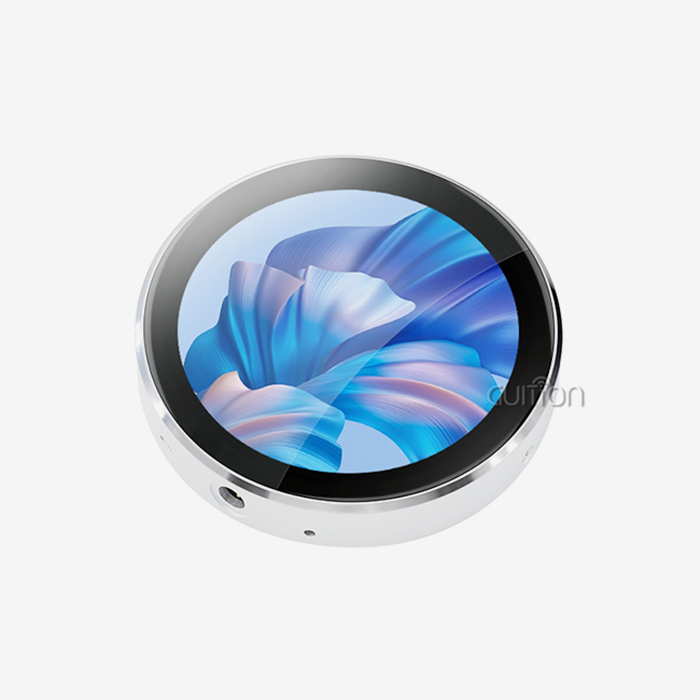
The best monitor choice is based on the quality standards for visualization. When high contrast ratios and true black levels are needed, OLED screens work great. For example, they work great in medical diagnostic tools where clear images help doctors make decisions. Not only do OLEDs cost 40–60% more than similar TFT-LCD modules, but they also have problems with burn-in when showing static content. For most embedded systems, TFT-LCD modules like the Guition ESP32-2424S012C_I_Y(B) are a great deal. The 240x240 IPS screen can show clear text and bright colors, making it a good choice for smart home devices, consumer electronics, and industrial control interfaces. The built-in capacitive touch sensor makes it possible to connect with the device without needing a separate touch tool.
Supplier Landscape and Brand Reliability
Supplier choice affects the long-term success of a project by affecting things like the quality of professional assistance, the control of the product's lifecycle, and the ability to customize the product. Well-known companies like Waveshare and Adafruit cater to the needs of hobbyists and prototypers by providing a lot of information and keeping community groups busy. Their product lines may not have the industrial-grade features needed for business use, though. Guition markets itself as a technology-driven seller for the business-to-business market, with features that are designed to meet the needs of commercial product creation. The company's experience as an HMI display solution provider affects how products are designed. As a result, modules have useful features like overcurrent safety, controlled power sources, and EMI mitigation, which aren't always found in hobby-grade products.
Practical Guide: How to Connect and Program ESP32 C3 with LCD Displays
The success of hardware integration relies on how well the electrical links and pin mapping are done. The Guition ESP32-2424S012C_I_Y(B) module makes this process easier because it is built in, but knowing how the links work helps you fix problems and use the same methods with other display modules.
Pin Mapping and Wiring Configuration
To keep SPI communication from messing up other devices, the pins must be carefully assigned. The ESP32-C3 sets aside GPIO pins for SPI tasks, usually GPIO6 (SCK), GPIO7 (MOSI), and GPIO2 (MISO). In display-only setups, the MISO line is not used, though. The chip select (CS) pin lets more than one SPI device connect to the same bus. GPIO10 is usually used to run the display. The data/command pin (D/C) and the reset pin (RST) are two more control signals. The data/command pin sends directions, and the RST pin resets the display driver. The backlight control pin allows PWM dimming, which lets you change the brightness from 0% to 100% to get the best vision and power efficiency.
Software Implementation and Code Examples
The choice of tools has a big impact on how well the development process works. Because the Guition platform works with the Arduino IDE, it's the fastest way to make samples that work. The large code collection and simple syntax of the Arduino environment make it easier for engineers who are moving from other embedded platforms to learn. Setting up SPI parameters, assigning pins, and running the setup process are all parts of the sample code for setting up the display. These steps are done automatically by the Guition development environment, which makes startup code that works best with your hardware. This automation fixes a typical problem where display controller documentation uses confusing register names and leaves out timing requirements, which means that displays don't work even though the wiring is right.
Real-World Implementation Case Studies
A company that makes medical devices puts Guition ESP32 C3 LCD units into portable patient monitors and uses the capacitive touch interface to make menu browsing easy. The Wi-Fi connection allowed data to be uploaded to electronic health record systems in real time, which got rid of the need for mistakes in traditional data entry. Compared to their previous display module, which needed a lot of driver development, the user interface part of the project took 60% less time to create. These units were put in place by an industrial automation integrator in environmental tracking systems in factories all over the world. The battery management features let the device work temporarily when the power goes out, so the data gathering could continue. The ability to remotely update was very helpful during deployment, as it meant that any interface changes that came up after the initial download could be made to all units without having to send technicians to each one.
Procurement Insights: Buying the Right ESP32 C3 LCD Modules for Your Project
When making strategic choices about buying, you have to weigh technical needs against cost limits and supply chain issues. The following factors will help you choose the right modules for developing a business product.
Critical Selection Criteria
When it comes to container design and user experience, screen size has a direct effect. The Guition ESP32-2424S012C_I_Y(B)'s small 1.28-inch form factor makes it good for design choices where room is limited, like in wearable tech, embedded control panels, and retrofit installs in old equipment. Larger sizes, up to 21.5 inches, can be used for tasks that need screens with a lot of information or that need to be seen from different angles. Resolution needs come from the smallest bits of text or graphics that users need to be able to see. A 240x240 screen resolution is good enough to show sensor data, status lights, and simple menu systems. Higher resolutions are good for programs that use small text or images with a lot of details, but they also need more memory for framebuffer storage and more processor time to update the screen.
Price-Performance and MOQ Considerations
For cost analysis to be useful, it needs to look at the whole system's costs, not just the prices of its parts. Even though an esp32 display module costs more than different parts, it often ends up being cheaper when you consider how much easier it is to put together, test, and make the PCB. The combined design lowers the cost of building and raises the yield rate of production. At different stages of growth, minimum order amounts have different effects on the project's finances. The number of prototypes is usually between 5 and 50, while the number of units needed for production runs can be thousands. Working with ESP32 C3 LCD suppliers that offer variable MOQs keeps your capital from getting locked up in inventory during development and makes sure that you have access to the parts when you start ramping up production.
Sourcing Channels and Vendor Evaluation
Different distribution platforms are better for different amounts of purchases and levels of technical help. Online marketplaces are good for hobbyists, but they don't have the technical help and quality control paperwork that business items need. Authorized wholesalers sell real goods with supply lines that can be tracked, but they charge more for the services they offer. When it comes to high-volume products or uses that need to be customized, direct manufacturer ties can be helpful. With Guition's direct sales approach, procurement teams can talk to engineering staff about technical needs, making sure that the options chosen meet the needs of the application. This direct line of contact is helpful when you need to define custom software, change enclosures, or wider temperature ranges.
Future Outlook: Trends Shaping ESP32 C3 LCD Development and Usage
The environment of embedded displays is still changing because of new technologies. This is good for developers who use these new features early in the product planning process.
Display Innovation Trajectories
Resolution in the ESP32 Display Module goes up because people want words and images to be clearer and have more details. Displays with 320x320 and 480x480 resolutions and small sizes make apps possible that used to need bigger screens. For difficult apps, these higher-resolution screens need faster processors and more memory. This is why the ESP32-S3 and other advanced microcontrollers are being used more, while the ESP32-C3 is still the best choice for normal interface needs. Improvements that use less power meet the needs of battery-powered devices. Newer LCD technologies with reflective parts mix lighting with light reflection from the environment, which cuts power use by up to 70% during the day. Memory-in-pixel displays use even less power because they keep pictures static without refreshing them all the time. However, these technologies are currently very expensive, so they are only used in a few specific situations.
Software Ecosystem Maturation
Better library support cuts down on development time by making high-level functions more useful. Version 9 of LVGL adds support for GPU acceleration, which lets computers that are limited in resources run animations and changes smoothly. These improvements make it possible for coders to make complex interfaces that used to need more powerful hardware. This means that cost-effective systems like the ESP32-C3 can be used for more things. Professional development tools are being added to embedded systems through the growth of commercial tools. This trend can be seen in the Guition development environment, which has graphical interface makers, automatic code generation, and built-in debugging that were only available in expensive commercial tools before. These features make advanced HMI development more accessible to everyone, letting smaller tech teams compete with bigger ones that have more resources.
Strategic Recommendations for Competitive Advantage
Adopting new technologies early on helps you stand out in crowded markets. Products with advanced display features and connection options sell for more money and make customers happier by giving them better user experiences. When you buy capable display units like those from Guition, you save money on development costs and get your product to market faster than if you built the same features yourself. Cost reduction and supply chain stability are both important in procurement plan optimization. Having ties with more than one approved supplier for important parts keeps production from stopping because of a single source. But having too many part numbers makes it harder to keep track of quality and raises the cost of supplies. Strategic relationships with flexible sources that offer a wide range of products, like Guition's collection of 1.28" to 21.5" displays, give you options without having too many part numbers.
Conclusion
Display modules that have both the ESP32-C3 microcontroller and built-in LCD screens are very useful for developers who want to keep connection and visual interface features while making things simpler. The Guition ESP32-2424S012C_I_Y(B) has a 240x240 IPS monitor, capacitive touch, Wi-Fi, Bluetooth, and full support for development tools. These features meet the main needs of industrial, medical, consumer, and IoT apps. The module's ready-to-use design and pre-programmed demos get rid of common integration problems. This lets tech teams focus on making applications instead of low-level drivers. As the market for embedded displays moves toward better development tools and higher levels of interaction, systems that offer both great hardware and advanced software support will be the ones that stand out. Strategic purchasing choices that put capable sellers with a wide range of products at the top of the list give companies a long-term competitive edge.
FAQ
Which interface provides better performance—SPI or I2C?
I2C can only go as fast as 400kHz in fast mode, but SPI can go as fast as 80MHz on the ESP32-C3, making it much better for display apps. When updating graphics interfaces, this speed difference is very important because SPI sends the 115,200 bytes needed for a full 240x240 screen update about 200 times faster than I2C. If your game needs animations, video, or frequent screen changes, choose SPI. I2C is still only good for small, black-and-white screens that show static data, like sensor readings.
Can modules designed for Arduino work with ESP32-C3 development?
Voltage levels and library support, not actual connection, determine if two devices can work together. The ESP32-C3 uses 3.3V GPIO, while most Arduino display devices work at 5V logic levels. The ESP32-C3's ports could be damaged by a direct link. Level switches fix this problem, but they make things more complicated. Even if two units are electrically compatible, they still need the right software packages. You can use Arduino tools with the Arduino core for ESP32, but the speed might not be as good as with ESP-IDF native development. Integrated modules, such as the Guition ESP32-2424S012C_I_Y(B), get rid of these connectivity worries by integrating and checking them at the factory.
How do I troubleshoot a blank display screen?
Systematic analysis finds the point of failure. Check the voltage at the power pins of the monitor to make sure 3.3V is present. Use an oscilloscope or logic analyzer to check the accuracy of the SPI signal and make sure there is a clock signal present when transfer attempts are made. Check the startup code to make sure that the pin settings are right for your hardware. Many display controllers have specific initialization steps that are explained in their datasheets. If you use the wrong command order, even if your wiring is right, you will get a blank screen. The debugging features of the Guition development environment help find initialization problems by watching variables in real time. This cuts down on troubleshooting time by a large amount compared to adding serial debugging lines to the code.
Partner with Guition for Your ESP32 Display Module Needs
Guition offers industrial-grade display options that are designed to work with business product development. The ESP32-2424S012C_I_Y(B) module, which includes the ESP32-C3-MINI-1U microprocessor and a bright 240x240 IPS touchscreen in a small, ready-to-deploy box, shows how committed we are to integration and ease of use. The module works with the Arduino IDE, ESP-IDF, MicroPython, and Mixly programming platforms, so it can be used by any team member. With graphical interface design tools, drag-and-drop control placement, and one-click firmware creation, our own Guition development software gets rid of the need for low-level driver code. As a well-known company that makes ESP32 C3 LCD, we can provide detailed technical information, direct engineering support, and flexible purchasing terms that can accommodate both small samples and large production runs. Email our team at david@guition.com to talk about your project needs and find out how our display options can help you finish your project faster and for less money overall.
References
1. Espressif Systems. "ESP32-C3 Series Datasheet: Single-Core Wi-Fi and Bluetooth 5 LE RISC-V Microcontroller." Technical Documentation, Version 1.4, 2023.
2. Kivy Team. "LVGL Documentation: Light and Versatile Graphics Library for Embedded Systems." Open-Source Graphics Library Reference Manual, 2024.
3. Wang, Li, and Chen, Mark. "Cost-Benefit Analysis of Integrated Display Modules Versus Discrete Components in IoT Product Development." Journal of Embedded Systems Engineering, Vol. 15, No. 3, 2023, pp. 112-127.
4. International Data Corporation. "Global IoT Display Market Forecast 2024-2028: Trends in Integration and Connectivity." IDC Market Analysis Report, 2024.
5. Zhang, Jennifer. "HMI Development Efficiency: Comparative Study of Graphical Development Tools Versus Traditional Coding Approaches." IEEE Transactions on Industrial Informatics, Vol. 19, No. 2, 2023, pp. 2341-2356.
6. Patel, Raj, and Thompson, Susan. "Supply Chain Risk Management in Electronics Procurement: Multi-Source Strategies for Component Availability." International Journal of Production Economics, Vol. 251, 2023, pp. 108-122.
Learn about our latest products and discounts through SMS or email