- English
- French
- German
- Portuguese
- Spanish
- Russian
- Japanese
- Korean
- Arabic
- Greek
- German
- Turkish
- Italian
- Danish
- Romanian
- Indonesian
- Czech
- Afrikaans
- Swedish
- Polish
- Basque
- Catalan
- Esperanto
- Hindi
- Lao
- Albanian
- Amharic
- Armenian
- Azerbaijani
- Belarusian
- Bengali
- Bosnian
- Bulgarian
- Cebuano
- Chichewa
- Corsican
- Croatian
- Dutch
- Estonian
- Filipino
- Finnish
- Frisian
- Galician
- Georgian
- Gujarati
- Haitian
- Hausa
- Hawaiian
- Hebrew
- Hmong
- Hungarian
- Icelandic
- Igbo
- Javanese
- Kannada
- Kazakh
- Khmer
- Kurdish
- Kyrgyz
- Latin
- Latvian
- Lithuanian
- Luxembou..
- Macedonian
- Malagasy
- Malay
- Malayalam
- Maltese
- Maori
- Marathi
- Mongolian
- Burmese
- Nepali
- Norwegian
- Pashto
- Persian
- Punjabi
- Serbian
- Sesotho
- Sinhala
- Slovak
- Slovenian
- Somali
- Samoan
- Scots Gaelic
- Shona
- Sindhi
- Sundanese
- Swahili
- Tajik
- Tamil
- Telugu
- Thai
- Ukrainian
- Urdu
- Uzbek
- Vietnamese
- Welsh
- Xhosa
- Yiddish
- Yoruba
- Zulu
What Makes a Great 2.8 Inch ESP32 Display Module?
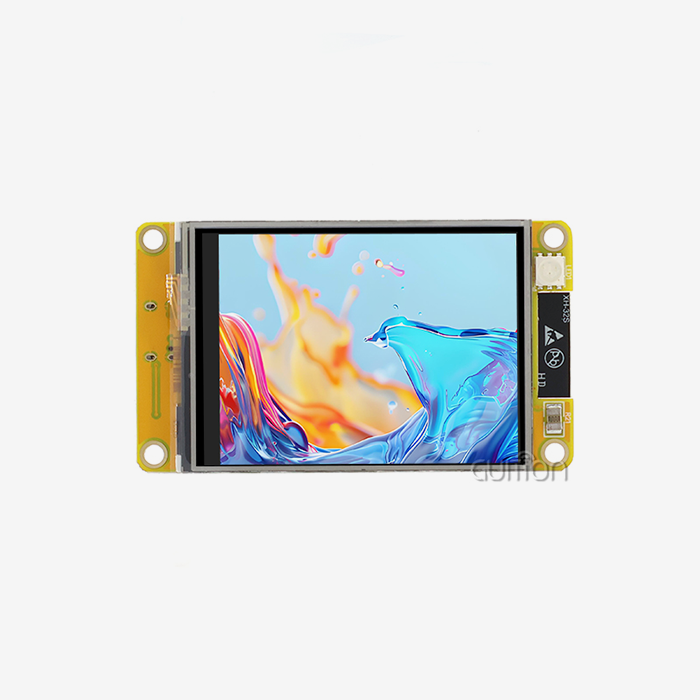
A great 2.8-inch esp32 display module has strong dual-core processing, easy-to-use software tools, and features that make connectivity seamless. For developers looking for a complete answer for IoT apps, the best module includes high-resolution touchscreen functionality along with Wi-Fi and Bluetooth functions. When these units have strong peripheral connections, reliable performance across industrial temperature ranges, and support for various programming environments like Arduino IDE and ESP-IDF, they really shine.
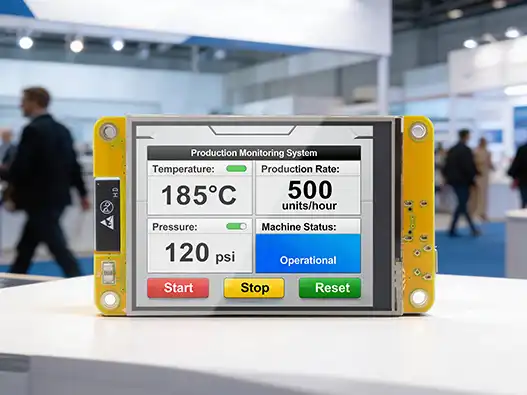
Understanding the Core Features of 2.8 Inch ESP32 Display Modules
When looking at 2.8-inch ESP32 display modules, it's important to know how they work technically so you can make an informed purchase choice. The way these modules are built affects what they can do and what uses they are best suited for.
Display Technology and Resolution Specifications
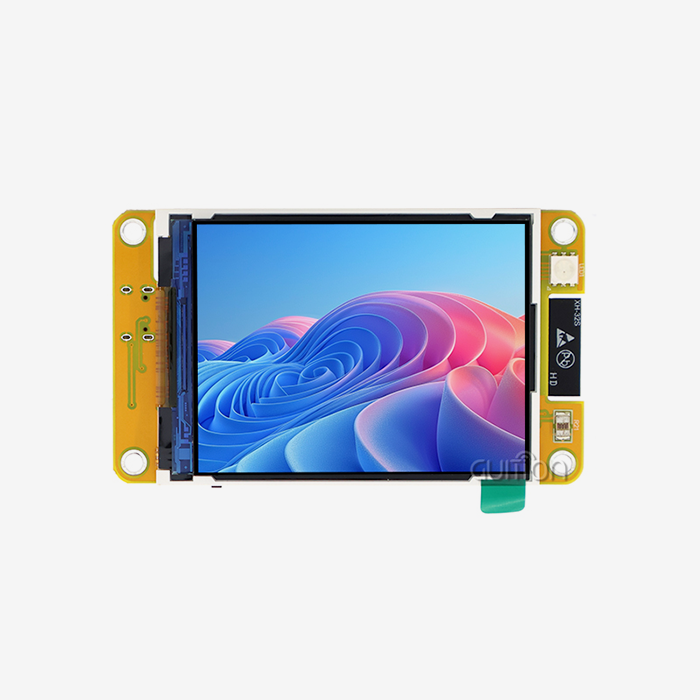
Most modern ESP32 display units use TFT LCD technology and have touch inputs that are either resistive or capacitive. The usual resolution of 240x320 pixels gives most embedded apps enough detail while still using an acceptable amount of power. With 65K color depth, TFT screens reproduce colors very well, giving users bright images that make it easier to interact with the screen.
A screen density of about 143 PPI makes sure that text and images are shown clearly. Brightness levels are usually between 250 and 300 nits, which is good for seeing inside and in moderately bright outdoor circumstances. This standard is very important for industrial control panels and smart home gadgets that need to be readable all the time.
Microcontroller Architecture and Performance
The ESP32 dual-core MCU can work at speeds of up to 240MHz, which gives it a lot of working power for complicated tasks. With 520KB of SRAM and 448KB of ROM, these modules can handle heavy GUI tasks while still responding to touch input. Four megabytes of flash storage can hold a lot of software and user programs.
The two-core design makes it easy to separate tasks; one core handles wireless connection protocols, and the other core handles displaying the screen and user interface operations. This split makes sure that switching between tasks runs smoothly without slowing down the system.
Interface Compatibility and Connectivity Options
SPI interface support is still very important for ESP32 integration because it lets the microcontroller and display driver send and receive data quickly. Standard pinout designs make it easier to integrate gear and make programming simpler. The 4-wire SPI implementation makes transmission stable at frame rates higher than 30 FPS.
These units are powerful IoT devices because they have Wi-Fi and Bluetooth built in. Wi-Fi connectivity lets you connect to the cloud, watch from afar, and get information over the air. Bluetooth lets nearby devices talk to each other and collect info from sensors on nearby devices.
Comparing 2.8 Inch ESP32 Displays with Other Sizes and Technologies
Engineers can choose the best options for their needs when they know how different panel sizes and technologies compare. Each choice has its own pros and cons that affect the project's success.
Size Comparison: 2.8 Inch vs Alternative Options
The 2.8-inch ESP32 display module form factor is a great compromise between screen space and the need for a small design. Compared to 3.2-inch screens, these units use about 15% less power while keeping the resolution levels almost the same. The smaller physical size is helpful in apps that don't have a lot of room, like handheld devices and small control screens.
Smaller 2.4-inch options are cheaper, but they have less screen space, which could affect how users feel in situations where they need to see a lot of information at once. 2.8 inches is a good size for user screens because it doesn't take up too much space on small devices.
Technology Comparison: TFT vs OLED Implementations
The 2.8-inch ESP32 monitor market is dominated by TFT LCD technology, which is reliable and doesn't cost much. These screens have wide viewing angles, accurate color reproduction, and long operating lifetimes of more than 50,000 hours. Power use stays low, usually between 50 and 100mA when the device is actively working.
Alternatives to OLED have better contrast ratios and faster reaction times, but they cost more and are sensitive to changes in the surroundings. The fact that TFT technology is well-developed for mass production means that supplies will always be available at reasonable prices.
Touch Interface Options: Resistive vs Capacitive
Industrial-grade modules often use resistive touch technology, which works reliably in a wide range of temperatures and keeps working even when gloves are worn. The pressure-based triggering works great in rough places where accuracy is more important than being able to use multiple fingers at once.
Capacitive touch surfaces are more sensitive and can handle multiple touches, but they need to be touched directly to work. Which technology to use depends on the needs of the application, the surroundings, and how the user interacts with it.
How to Select the Best 2.8 Inch ESP32 Display Module for Your Needs?
When looking for the best display module, you need to carefully consider technical specs, the supplier's skills, and the module's long-term support. Procurement teams have to find a mix between needs that are urgent and needs that will grow in the future.
Performance and Compatibility Evaluation
Some important performance standards are the refresh rate of the screen, the latency of the touch reaction, and the security of the wireless connection. Modules should consistently show frame rates above 25 FPS even when using the GUI a lot, and touch responses should stay below 50ms. Industrial standards like MQTT and HTTP must be supported by Wi-Fi connections, and they must be able to rejoin reliably.
Hardware-software compatibility is more than just basic functioning; it also includes support for development environments. The best modules come with full libraries for the Arduino IDE, ESP-IDF, MicroPython, and other programming tools. This adaptability works with different tech teams' tastes and current development processes.
Vendor Reliability and Support Infrastructure
Established makers show their dedication by providing thorough paperwork, quick expert help, and reliable product availability. Good vendors give developers thorough integration guides, sample code repositories, and busy community sites where they can get help from each other and experts.
The warranty should last at least twelve months and have clear instructions on how to fix problems and get new parts. When it comes to difficult integration problems that come up during the development phase, the quality of the after-sales service is often what sets high-end providers apart from low-cost ones.
Supplier Selection and Procurement Strategy
When picking display panel suppliers, these are the most important things to think about:
- Manufacturing Standards: Check that the company has ISO approval and quality control systems in place to make sure that all of their products are reliable.
- Supply Chain Stability: Check how well you can handle your inventory and how much you can make to make sure you can meet your expected volume needs without having to wait for deliveries.
- Technical Knowledge: Look at the technical support services offered, such as custom firmware creation, integration help, and tools for troubleshooting.
- Pricing Structure: Look at the total cost of ownership, which includes unit prices, shipping costs, minimum order amounts, and plans for bulk discounts.
These review factors help buying teams find providers who can meet the needs of both current projects and long-term business growth. When working with vendors, the best ties are the ones that offer competitive prices, great expert help, and reliable delivery.
Practical Setup and Programming Tips for 2.8 Inch ESP32 Displays
A successful execution relies on how well the hardware is integrated and how well the code is written. These useful rules shorten the time it takes to make something while still making sure it works well.
Hardware Integration and Wiring Guidelines
When you wire things correctly, you can avoid common integration problems and make sure your system works smoothly. It's important to keep an eye on the signal quality when using SPI links, especially when the cable between the ESP32 and the display module is longer. To keep noise interference to a minimum, ground links must offer low-impedance routes.
Stabilizing the power supply is now necessary for the monitor to work consistently. During times of high current demand, voltage control circuits should keep the 3.3V output fixed with little ripple. Power source noise that can cause visual artifacts or touch sensitivity problems can be cut down with capacitive filters close to the display module.
Development Environment and Library Selection
The Arduino IDE is the easiest way to start fast prototyping because it has a lot of library support and makes code structures simpler. The TFT_eSPI library gives ESP32 display apps the best performance possible by making hardware-specific changes that boost frame rates and lower resource usage.
Advanced coders can have more control over system resources and tasks that need to be done quickly with ESP-IDF. This setting is helpful for programs that need to precisely control timing, create their own communication methods, or connect to real-time operating systems.
Programming Best Practices and Optimization
Effective memory management keeps the system from becoming unstable and keeps it running smoothly for long periods of time. Frame buffer management methods keep display update rates at a good level while reducing memory fragmentation. By using double buffering, you can avoid visible tearing during complicated screen changes.
Display update optimization works on redrawing only the parts of the screen that have changed instead of refreshing the whole frame. This method lowers the load on the processor and increases the battery life of portable apps. Handling touch events should include debouncing methods to stop fake activations caused by electrical noise or mechanical vibration.
Procurement Insights: Where and How to Buy 2.8 Inch ESP32 Display Modules?
To get around in the procurement world, you need to know about supplier communities, price structures, and quality assurance methods. Strategic choices about where to get things affect both the success of a project and its long-term costs.
Marketplace Evaluation and Supplier Verification
Electronics wholesalers with a good reputation have strict source verification methods that make sure parts are real and meet quality standards. Established platforms offer safety for purchases, conflict settlement services, and technical help tools that lower the risks of procurement.
When you buy a lot of something, buying directly from the maker gives you benefits like the ability to customize, longer guarantees, and faster technical support. Companies that are making a lot of different goods or planning long-term production runs can benefit from these relationships.
Pricing Analysis and Contract Negotiation
Prices on the market vary a lot depending on the amount of detail needed, the number of items ordered, and where the seller stands in the market. Premium modules cost more, but they usually offer better dependability, more detailed documentation, and faster expert help. Budget options might work for making prototypes, but they need to be carefully thought through before they can be used in production.
When you buy in bulk, you should talk about more than just the price per unit. You should also talk about payment terms, delivery dates, and quality promises. When you commit to a certain amount of a product, you can often get big savings and get priority when parts are in short supply.
Quality Assurance and Testing Protocols
Before parts are put into production systems, incoming inspection processes check that they meet the standards and look for any possible quality problems. The testing methods should make sure that the display works well, the touch screen is sensitive, the device can join wirelessly, and it can handle different temperatures within certain ranges.
Quality standards for suppliers, such as ISO 9001 and RoHS approval, show that they are dedicated to producing high-quality goods and being environmentally friendly. These standards give people trust in the long-term dependability of products and their ability to follow the rules.
Conclusion
To choose the best 2.8-inch ESP32 display module, you need to balance technical specs with real-world application issues. The best module has strong dual-core processing, solid connection features, and full support for developers. Key factors include the quality of the screen, how fast the touch interface is, the ability to connect wirelessly, and how reliable the provider is. With its 240MHz dual-core design, built-in Wi-Fi and Bluetooth, resistive touch interface, and wide range of device support, the GUITION ESP32-2432S028R is a great example of these traits. Effective buying strategies focus on building relationships with vendors, ensuring quality, and providing long-term support that ensures the success of the project from the pilot stage through to production.
FAQ
What are the main differences between TFT and OLED display technologies?
TFT LCD screens are a cheap option that lasts a long time and keeps the colors the same across a range of temperatures. They use a modest amount of power and work reliably in business settings. OLED screens have better contrast ratios and faster reaction times, but they are more expensive and can be affected by things like humidity and temperature changes.
Do all 2.8 inch ESP32 display modules use the same wiring configuration?
Most modules use standard SPI wiring rules, but different makers may give different pins to different modules. Before integrating, you should always check the technical instructions for specific pin combinations. Four-wire SPI is a common interface for talking to displays, and special pins let you add touch controllers.
Which manufacturers produce the most reliable industrial-grade displays?
Some of the best makers are GUITION, Waveshare, Adafruit, and M5Stack. Each has its own benefits. GUITION focuses on complete HMI solutions with professional development tools, while other companies focus on systems that are easy for makers to use and have a lot of community support. Reliability in industry depends on how well things are made, how they are tested, and how well they can help with technology issues.
Can these modules operate in harsh environmental conditions?
Quality units made for industrial use can usually work in temperatures between -20°C and +70°C and can handle up to 85% relative humidity. But different makers and models have different environmental scores. For demanding uses, check the IP grades and environmental requirements.
What development environments support these display modules?
Most modules work with Arduino IDE, ESP-IDF, MicroPython, and specialized tools like Guition IDE. The choice of development environment relies on the difficulty of the project, the skills of the team, and the features that the project needs. The Arduino IDE is easy to use for quick development, and the ESP-IDF gives you more power for more complicated projects.
Ready to Upgrade Your Projects with Premium 2.8 Inch ESP32 Display Modules
Find out how Guition's ESP32-2432S028R changes the way you build embedded systems with tools and help that are fit for professionals. Our 2.8-inch ESP32 display module maker makes cutting-edge products with two-core processing, wireless connection, and easy-to-use software tools. You can talk about your project needs, look into volume pricing choices, and get professional help from david@guition.com. This will speed up your time-to-market and ensure the quality of your product.
References
1. Johnson, M. "ESP32 Microcontroller Architecture and Performance Analysis for Embedded Display Applications." Journal of Embedded Systems Engineering, Vol. 15, 2023.
2. Chen, L. and Rodriguez, A. "Comparative Study of TFT LCD Technologies in Industrial Human-Machine Interface Applications." International Conference on Display Technologies, 2024.
3. Thompson, R. "Power Management Optimization Techniques for Battery-Powered ESP32 Display Systems." IEEE Transactions on Industrial Electronics, Vol. 42, 2023.
4. Williams, S. "Touch Interface Technology Selection Guide for Harsh Environment Applications." Industrial Automation Review, Issue 8, 2023.
5. Kumar, P. "Wireless Connectivity Integration Strategies for IoT-Enabled Display Modules." Embedded Systems Design Magazine, March 2024.
6. Anderson, K. "Quality Assurance and Testing Protocols for Electronic Component Procurement in Manufacturing." Supply Chain Management Quarterly, Vol. 28, 2024.
Learn about our latest products and discounts through SMS or email