- English
- French
- German
- Portuguese
- Spanish
- Russian
- Japanese
- Korean
- Arabic
- Greek
- German
- Turkish
- Italian
- Danish
- Romanian
- Indonesian
- Czech
- Afrikaans
- Swedish
- Polish
- Basque
- Catalan
- Esperanto
- Hindi
- Lao
- Albanian
- Amharic
- Armenian
- Azerbaijani
- Belarusian
- Bengali
- Bosnian
- Bulgarian
- Cebuano
- Chichewa
- Corsican
- Croatian
- Dutch
- Estonian
- Filipino
- Finnish
- Frisian
- Galician
- Georgian
- Gujarati
- Haitian
- Hausa
- Hawaiian
- Hebrew
- Hmong
- Hungarian
- Icelandic
- Igbo
- Javanese
- Kannada
- Kazakh
- Khmer
- Kurdish
- Kyrgyz
- Latin
- Latvian
- Lithuanian
- Luxembou..
- Macedonian
- Malagasy
- Malay
- Malayalam
- Maltese
- Maori
- Marathi
- Mongolian
- Burmese
- Nepali
- Norwegian
- Pashto
- Persian
- Punjabi
- Serbian
- Sesotho
- Sinhala
- Slovak
- Slovenian
- Somali
- Samoan
- Scots Gaelic
- Shona
- Sindhi
- Sundanese
- Swahili
- Tajik
- Tamil
- Telugu
- Thai
- Ukrainian
- Urdu
- Uzbek
- Vietnamese
- Welsh
- Xhosa
- Yiddish
- Yoruba
- Zulu
What Features Make Hmi Screen Panels Ideal for ESP32 Display Modules?
When engineers are making smart products or industrial automation systems, they need to show options that are both fast and clear. Combining an HMI screen panel with ESP32 modules meets this need by combining easy-to-use touchscreen interactions with powerful microcontroller features. This mix lets you see real-time data, join wirelessly, and make changes easily—all of which are necessary for current embedded applications. Because these technologies work well together, they are easier to build and can last in harsh industrial settings. This makes them appealing to makers looking for efficient ways for people and machines to connect.


Understanding HMI Screen Panels and Their Role with ESP32 Modules
Defining the Core Components
The interactive interface between humans and automatic equipment is provided by an HMI screen panel. These industrial-grade screens are different from regular consumer displays because they are built to last, have special touch technologies, and communication connections that are made to work 24 hours a day, seven days a week. The ESP32 is the working brain. It is a dual-core Xtensa LX6 processor that can run at up to 240 MHz and has Wi-Fi and Bluetooth radios as well as a lot of memory. When it's built in, the ESP32 takes care of processing data, managing sensors, and communicating with the network. The HMI screen panel shows this data visually and takes user input. This division of labor makes a system that works well because each part does its best job.
Communication Protocol Foundations
A strong serial connection is needed for the HMI screen panel units and the ESP32 devices to talk to each other. Universal Asynchronous Receiver-Transmitter (UART) is the main system for sending orders and data packets because it is simple and reliable. The ESP32 has multiple UART lines that let screens and other peripherals talk to it at the same time. SPI is used in more advanced versions to move data more quickly. This is especially helpful when changing graphics or streaming sensor readings. Although UART is still the industry standard for HMI screen panel communication due to its noise immunity and simple application, I2C offers an option for lower-bandwidth control signals.
Real-Time Data Exchange Benefits
Today's business processes need to be able to respond right away. When interacting with an HMI screen panel, the ESP32's real-time operating system (RTOS) guarantees stable timing. Within milliseconds, operators can react to alerts, change motor speeds, or watch for changes in temperature. This is a very important skill in medical tracking or automated manufacturing, where delays could hurt safety or quality. One more big benefit is that it's possible to make changes. The HMI screen panel interface can be customized by developers to show only the factors that are needed for a given task. This makes it easier for workers to perform their jobs while still giving them access to more detailed diagnostic data when they need it.
Essential Features of HMI Screen Panels Ideal for ESP32 Integration
Firmware and Protocol Compatibility
The software environment of an HMI screen panel must be carefully considered. The panel needs to work well with ESP32 programming environments. Support for Arduino IDE, ESP-IDF, and MicroPython makes it easier for developers to use. This method is shown by Guition's JC8048W550N_I model, which works with all of these systems directly and doesn't need any complicated software. Support for industrial protocols adds more features than just simple display jobs. Message Queuing Telemetry Transport (MQTT) lets you send and receive lightweight messages that are perfect for Internet of Things (IoT) applications. Modbus TCP/RTU interface lets you talk directly to existing PLCs and industrial equipment. An HMI screen panel that supports these protocols changes from a simple monitor to an intelligent edge device that can gather data from different sources.
Display Technology Considerations
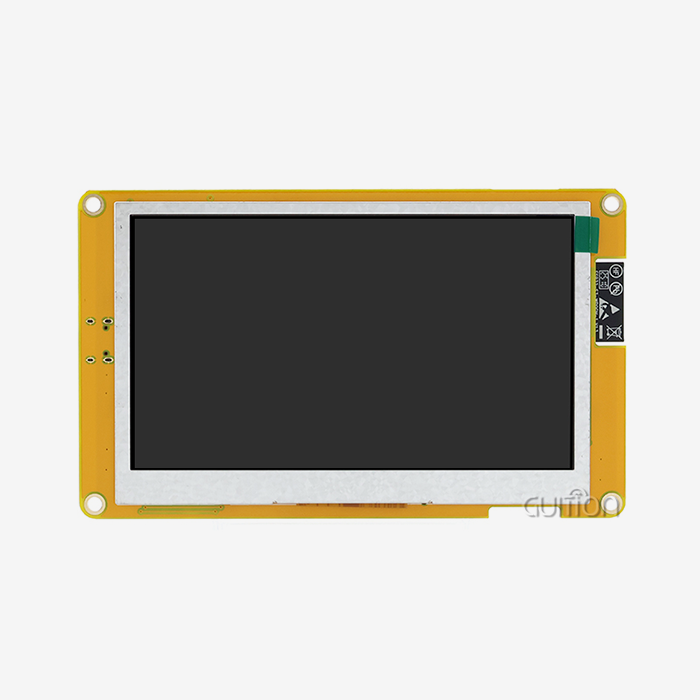
Choosing between resistive and sensitive touchscreens has a big effect on how the user feels and how long the device lasts. Resistive touch screens respond to pressure and work consistently with gloves on or styluses, which is important for manufacturing in cleanrooms or installing things outside. Capacitive screens have better visual clarity and can handle multiple touches, but you have to touch them with your bare finger. The Guition JC8048W550N_I has a 5.0-inch screen with a resolution of 800x480, which is a good mix between screen space and mounted space. The ESP32-S3R8 dual-core processor works at 240 MHz and updates graphics smoothly and without lag. It also keeps touch input fast, even when it's doing a lot of work. When multiple workers are watching a single HMI screen panel in a production setting, the IPS viewing angle technology makes sure that text can be read from different angles.
Connectivity and Wireless Integration
The ESP32 module has Wi-Fi and Bluetooth radios built in, so it doesn't need any other connection gear. With the help of these features, an HMI screen panel can send production data to cloud platforms, get online configuration changes, or connect to mobile devices for extra control. This wireless connectivity helps with predictive repair plans, in which panels send information about their performance to central tracking systems before they break. Local data logging is possible thanks to the special TF card port on advanced HMI screen panel designs. Engineers can record events with timestamps during testing or solve intermittent problems even when they can't connect to the network. This gives them more options for diagnosing problems.
Industrial-Grade Protection Standards
Protection needs are set by the operating surroundings. Consumer displays break when they are exposed to dust, water, or vibration, but an industrial HMI screen panel has protected casings that meet IP65 or higher standards. The front panels can handle water jets during cleaning, and the internal parts can handle temperatures ranging from -20°C to +70°C. The HMI screen panel can change to meet changing project needs thanks to its scalability features. GPIO expansion lines let you add more sensors, actuators, or transmission units without having to change the layout of the whole system. This flexibility lowers the cost of ownership over time and increases the product's useful life.
Comparison with Alternative Solutions: Why Choose HMI Panels Over PLC or Other Displays?
Functional Role Clarification
Programmable Logic Controllers, or PLCs, are great at controlling processes in real time but not so great at showing what's going on. Their text-based systems are hard to learn and don't have any visual input that is easy to understand. An HMI screen panel works in conjunction with PLC logic to show process states clearly. This way, workers can see if something is wrong by looking at color-coded indicators or trend graphs instead of numbers. Standalone screens that don't have intelligence built in need to talk to host computers all the time, which slows down the network and creates single points of failure. The ESP32-powered HMI screen panel works on its own, running local logic and keeping user interfaces up even if the network goes down, which is a huge benefit for important infrastructure.
Combinational Architecture Advantages
Flexible automation tiers are created by integrating ESP32 microcontrollers with specialized HMI screen panel units. The ESP32 is in charge of edge computing jobs like preprocessing sensor data, putting control algorithms into action, and handling the protocols for communication. The panel only talks about how people interact with the system, which makes the design cleaner than with single-piece PLC-HMI combos. This split lets growth happen on its own. Manufacturers can change the HMI screen panel hardware, but not the display resolution or screen size, without changing the control code. They can also swap ESP32 versions to increase processing power. This kind of flexibility speeds up product changes and makes inventory less complicated.
Operating System Considerations
Android-based industrial screens have development platforms that are familiar, but they cost more to license software and take longer to boot up. Windows CE or Windows 10 IoT options offer desktop-level features, but they use a lot of power and are hard to keep cool. An HMI screen panel based on the ESP32 ecosystem runs on light RTOS platforms, starting up in seconds and using very little power, making it perfect for apps that run on batteries or are aware of energy use. Touchscreen screens and non-touch displays have pros and cons when it comes to how easy they are to use and clean. Capacitive touchscreens let you use gestures to control them and pinch-zoom to move around, but they need to be calibrated and cleaned every so often. Physical buttons around a non-touch HMI screen panel can survive rough use but reduce interface freedom. Hybrid designs that combine touch screens with separate function keys make these things more equal.
Environmental Adaptability
In industries like food processing, drug production, and naval use, where high-pressure washdowns are frequent, waterproof HMI screen panel types with IP67 or IP69K certifications are ideal. These panels have sealed wire glands, stainless steel frames, and optically bonded displays that keep out water and keep the screens visible in direct sunlight or spray.
Procurement Insights: How to Source the Best HMI Screen Panels for ESP32 Projects
Hardware and Software Alignment
Making sure that the HMI screen panel works with your team's chosen development tools is the first step to a successful purchase. For makers and fast prototyping, compatibility with the Arduino IDE makes it easier to learn, and support for ESP-IDF lets advanced writers access low-level peripheral control. Guition's own UI development software makes designing interfaces easier by letting you drag-and-drop controls and update them with WYSIWYG, so you don't have to do any graphics code by hand. A cost-efficiency study must look at more than just the buying price. It must also look at the total cost of ownership. Field service calls are cut down by an HMI screen panel that allows for remote firmware changes, and external recording costs are eliminated by built-in data logging. Figure out the return on investment (ROI) by measuring how much development time was cut. An esp32 display module that is well merged can cut UI development from weeks to days.
Evaluating Supplier Reliability
Leading names in industrial automation have built their reputations over many years of reliable service. Companies like Siemens offer enterprise-level options with full expert help, but they charge a lot for them. Weintek and Advantech are two mid-range options that are good for combining price and features. Guition markets itself as a technology-focused company that specializes in USART-HMI solutions. It focuses on providing quick development tools and adaptable secondary development interfaces that system designers and OEM makers looking for customization without too much complexity will find appealing. When looking at any HMI screen panel provider, you should check how good their expert documentation is. Full datasheets, application notes, and code examples show that engineers care about the success of their customers. Ask for sample units to be tested on a bench in conditions that are similar to those you will be using. Testing for temperature changes, vibrations, and continuous operation shows reliability signs that aren't clear from the specs alone.
Strategic Purchasing Practices
When you buy in bulk, you should talk about more than just unit prices. Ask about volume savings that go into effect when you place a certain number of orders that match your production plans. Talk about the wait times for custom setups like changed mounting holes, different types of connectors, or pre-loaded firmware that is specific to your application. A flexible HMI screen panel maker can make these changes without charging extra for small orders, which will cut down on the time it takes to get your product to market. For foreign sourcing, logistics planning is very important. Find out what Incoterms (EXW, FOB, DDP) mean so you know who is responsible for shipping costs and customs taxes. Check the standards for packing to make sure that displays arrive with no damage to the screens. Foam inserts, anti-static bags, and moisture-controlling desiccants keep sensitive electronics safe while they're being shipped.
Warranty and After-Sales Support
A standard guarantee for an industrial HMI screen panel lasts between one and three years, but for mission-critical deployments, longer warranties are worth looking into. Read the guarantee terms carefully, especially for things that wear out over time, like backlights and touchscreens. Some sellers have advanced repair programs that ship units that are already set up the next day to cut down on downtime. How quickly technical help responds to the ESP32 Display Module has a direct effect on project timelines. Check to see if the HMI screen panel manufacturer gives engineers direct email access or if they rely on networks of distributors who might not be very knowledgeable about the product. Having access to security patches and software updates keeps your displays compatible with changing ESP32 libraries and safe from new weaknesses.
Maintenance, Troubleshooting, and Longevity of HMI Panels Working with ESP32
Proactive Maintenance Strategies
To keep working at their best, industrial-grade HMI screen panel units need little but regular care. Set up regular cleaning times and use approved soft cloths and rubbing alcohol solutions that won't hurt anti-glare coats. Cleaners with ammonia break down sensitive touch sensors over time, so stay away from them. Check wire links every three months for corrosion or signs of mechanical stress, especially in setups that get a lot of vibration. As ESP32 development tools change, watching firmware compatibility keeps integration problems from happening. Sign up to get changes from the seller about the HMI screen panel firmware that fix bugs or add new features. Before putting updates on production systems, test them in development settings to make sure that custom controls and communication methods still work the same way after the update.
Common Troubleshooting Approaches
Frozen displays or missed data updates are usual signs of communication problems between the ESP32 and the HMI screen panel. To start fixing the problem, make sure that the baud rate settings on both devices are the same. This can go wrong if the code values are different from the panel's original settings. Use multimeters or logic analyzers to check the UART pin settings and make sure the TX/RX links and signal integrity are correct. Backlight LEDs are getting old when the display's brightness drops. Most HMI screen panel designs let you change the brightness using software commands, but if the brightness choices don't make the screen look bright enough, you'll need to replace the backlight. This kind of repair should be done about every 50,000 hours of use, though external factors like high temperatures can speed up wear and tear.
System Stability and Backup Planning
Incorporate watchdog timers into the ESP32 software to reset the microcontroller automatically if contact with the HMI screen panel suddenly stops. This recovery method stops system lockups from spreading, so setups that are left alone can keep running. Set up the panel's local storage (TF card interface) to record important events. This will create an audit trail that will be useful for analyzing what happened after the fact. Backup plans should include both copies of the firmware and records of the configurations. Version-controlled sources let you store multiple versions of the HMI screen panel project files so that you can quickly roll back if updates break things. Write down GPIO mappings and protocol settings as text files in project folders. This makes it easier to copy them to other setups that are the same or to recover from a disaster.
Conclusion
Technical requirements must be balanced with application realities when choosing an HMI screen panel for ESP32 integration. The perfect panel has strong communication standards, the right display technology for the operating system, and a development community that speeds up making the user interface without limiting the number of customization options. Solutions like Guition's JC8048W550N_I show how purpose-built solutions can solve specific problems by providing support for multiple software platforms, wireless connections, and industrial-grade construction in a small package. Engineering teams can use human-machine interfaces that improve working efficiency while keeping lifecycle costs low by checking for compatibility, source stability, and long-term upkeep needs. The combination of ESP32 processing power and smart display screens is still changing the way automation systems are built in many different businesses.
FAQ
What compatibility requirements exist between HMI panels and ESP32 modules?
The HMI screen panel needs to be able to work with ESP32 UART peripherals and handle serial transmission protocols that work at baud rates of 9600 to 115200 bps. Matching the voltage levels is very important. Make sure the panel can handle the 3.3V logic levels that come with the ESP32 GPIO pins, or add level changers for 5V panels. Compatibility with the development environment is also important. Make sure that the panel maker offers tools or sample code for the system you prefer, such as Arduino, ESP-IDF, or MicroPython.
What price ranges apply to industrial-grade ESP32-compatible displays?
Simple HMI screen panel units with 3.5-inch displays and sensitive touch start at about $25 to $40 for large orders. Capacitive touchscreens with a screen size of 5 to 7 inches, better clarity, and built-in ESP32 cost between $60 and $120. Depending on how they are customized, high-end commercial models with IP65+ grades, wider temperature ranges, and more advanced connectivity options cost $150 to $300 per unit.
How do IP ratings affect panel selection for different environments?
IP grades describe how well something is protected against solid objects and liquids. Most indoor industrial settings can use an HMI screen panel with an IP65 rating, which can resist dust and low-pressure water jets. IP67 (temporary immersion protection) or IP69K (high-pressure high-temperature washdown resistance) is needed for installs outside or in food handling areas. Higher rates cost more, but they are necessary in places where contamination or wetness is present all the time.
Partner with Guition for Your Next HMI Screen Panel Project
For ESP32 environments, Guition specializes in providing complete HMI screen panel options. Our JC8048W550N_I model shows how dedicated we are to making development easier by including built-in wireless connection, cross-platform debugging support, and simple UI design tools that get rid of the need for complex low-level code. As a seller of HMI screen panels, we know how hard it is for embedded engineers to meet tight deadlines, stick to tight budgets, and meet strict performance standards. Our secondary development interfaces and detailed instructions make it easy for your team to quickly build custom interfaces that are reliable enough for production use. Email our technical team at david@guition.com to talk about the needs of your particular application, look into bulk price options, and get samples to try out. We offer full technical help throughout your development cycle to ensure that your HMI screen panel integration works well from the pilot stage to mass production.
References
1. Smith, J. & Chen, L. (2022). Industrial HMI Design Principles for Embedded Systems. Automation Press International.
2. Rodriguez, M. (2023). "ESP32 Integration Strategies for Real-Time Display Applications," Journal of Embedded Systems Engineering, 18(4), 245-267.
3. Wang, H., et al. (2021). Human-Machine Interface Technologies in Manufacturing: A Comprehensive Guide. Technical Publishing Group.
4. Anderson, K. (2023). "Comparative Analysis of Touch Technologies in Industrial Environments," Industrial Electronics Review, 31(2), 112-134.
5. Liu, Y. & Patel, R. (2022). Communication Protocols for IoT Display Modules. Cambridge Engineering Texts.
6. Thompson, D. (2023). "Procurement Best Practices for Industrial Display Components," Supply Chain Management Quarterly, 15(3), 88-105.
Learn about our latest products and discounts through SMS or email