- English
- French
- German
- Portuguese
- Spanish
- Russian
- Japanese
- Korean
- Arabic
- Greek
- German
- Turkish
- Italian
- Danish
- Romanian
- Indonesian
- Czech
- Afrikaans
- Swedish
- Polish
- Basque
- Catalan
- Esperanto
- Hindi
- Lao
- Albanian
- Amharic
- Armenian
- Azerbaijani
- Belarusian
- Bengali
- Bosnian
- Bulgarian
- Cebuano
- Chichewa
- Corsican
- Croatian
- Dutch
- Estonian
- Filipino
- Finnish
- Frisian
- Galician
- Georgian
- Gujarati
- Haitian
- Hausa
- Hawaiian
- Hebrew
- Hmong
- Hungarian
- Icelandic
- Igbo
- Javanese
- Kannada
- Kazakh
- Khmer
- Kurdish
- Kyrgyz
- Latin
- Latvian
- Lithuanian
- Luxembou..
- Macedonian
- Malagasy
- Malay
- Malayalam
- Maltese
- Maori
- Marathi
- Mongolian
- Burmese
- Nepali
- Norwegian
- Pashto
- Persian
- Punjabi
- Serbian
- Sesotho
- Sinhala
- Slovak
- Slovenian
- Somali
- Samoan
- Scots Gaelic
- Shona
- Sindhi
- Sundanese
- Swahili
- Tajik
- Tamil
- Telugu
- Thai
- Ukrainian
- Urdu
- Uzbek
- Vietnamese
- Welsh
- Xhosa
- Yiddish
- Yoruba
- Zulu
Round lcd display arduino Module Buying Guide
Navigating the world of round LCD display Arduino modules can be challenging for engineers and procurement professionals. These circular displays offer unique advantages for modern embedded projects, from wearable devices to industrial control panels. Unlike traditional rectangular screens, round LCD modules provide aesthetic appeal and functional benefits that align perfectly with contemporary design trends. Understanding the technical specifications, integration requirements, and supplier landscape enables informed decision-making for your next Arduino-based project.
Understanding Round LCD Displays for Arduino
What Makes Round LCD Displays Unique
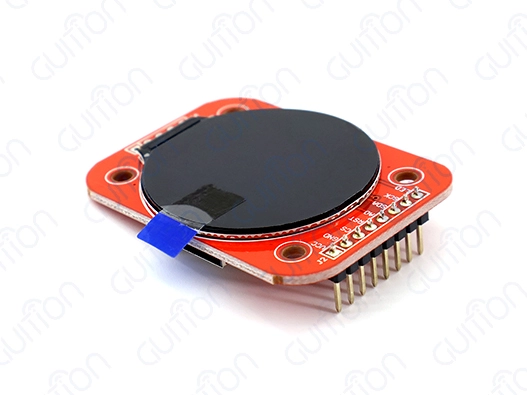
For Arduino microcontrollers and other embedded systems, round LCD Arduino modules are a special kind of circular liquid crystal display unit made to work with them. These screens use modern IPS (In-Plane Switching) TFT technology or AMOLED panels to give you better viewing angles than 160 degrees. This makes them perfect for situations where people will be watching the screen from different angles. It is the way they map coordinates that makes the main difference between round LCD display units and regular rectangular screens. The driver IC sees the display as a square grid on the inside, but the screen's round shape means that corner pixels aren't there. This makes designing the interface both harder and easier. This circular shape meets the growing need for non-rectangular looks in current embedded apps.
Technical Specifications and Core Features
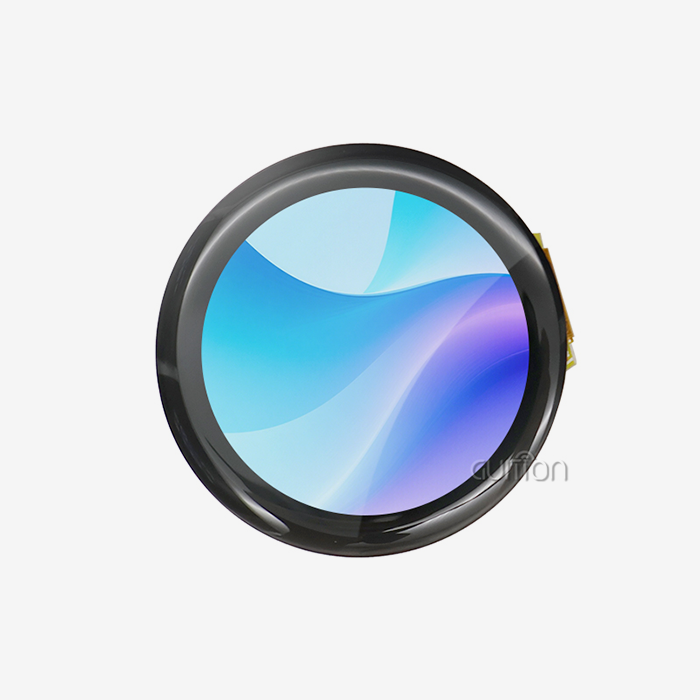
The resolutions of modern circle display units usually range from 240x240 pixels for 1.28-inch sizes to 480x480 pixels for 2.1-inch sizes. The GUITION JC2424S012N_I is a great example of these specs because it has a 240x240 resolution in a 1.28-inch circle, which is higher than the pixel density of similarly sized rectangular screens. Communication methods are a very important part of integrating Arduino. Most Arduino devices with a round LCD display use 4-wire SPI connections, which require few GPIO pins but still allow for fast data transfer. When paired with optimal microcontrollers, the GC9A01 driver IC, which is popular in high-quality modules, can handle coordinate mapping well and support refresh rates above 30 FPS. One thing to think about when managing power is that the standard 3.3V logic function means that older 5V Arduino boards need to be level-shifted. Quality modules have luminance values between 350 and 400 nits, which means they can be read in daylight and still use a fair amount of power, making them perfect for battery-powered apps.
Comparative Analysis: Round LCD vs Alternative Display Technologies
There are a few things that make round LCD Arduino panels different from OLED, E-paper, and standard TFT displays when looking at display technologies for Arduino projects. In terms of longevity, round LCD screens are better than OLED screens, which have problems with burn-in and last less time. Circular LCD modules show bright colors while using a fair amount of power, unlike E-paper screens that work best in ultra-low power situations but lack color reproduction and refresh rate capabilities. In some situations, the spherical form factor is clearly better than the rectangular form factor. The natural circular shape gets rid of useless corner spaces and maximizes the display area in small housings, which is useful for smartwatch interfaces, automotive gauges, and rotary control panels.
How to Use and Integrate Round LCD Displays with Arduino
Hardware Integration and Wiring Procedures
Setting up and connecting the hardware correctly is the first step to successfully integrating round LCD display Arduino modules. You need to connect VCC (3.3V), GND, SCK (clock), SDA (data), RES (reset), DC (data/command), CS (chip select), and BLK (backlight control) to a common 4-wire SPI interface. These links only use a few Arduino pins, but they let you handle the whole display. Digital Pin 2 should be used for reset, Digital Pin 3 should be used for DC, Digital Pin 4 should be used for CS, Digital Pin 11 should be used for SDA, and Digital Pin 13 should be used for SCK. ESP32 users can give GPIOs in a number of different ways, which lets them make the most of their project plans. Good modules, like the GUITION JC2424S012N_I, come with detailed wiring layouts and example code that make the connection process easier.
When connecting 3.3V screens to 5V Arduino boards, level shifting becomes very important. Dedicated level shifter ICs or simple voltage divider circuits keep display modules safe from damage and make sure communication works well. Using ceramic capacitors for proper power source decoupling near the display module stops voltage changes that could lead to display flaws or communication problems.
Software Libraries and Programming Resources
For Arduino code to work with round displays, you need special tools that are made for round screen shapes. Some popular choices are TFT_eSPI, Adafruit GFX, and LovyanGFX. Each has its own set of features and speed traits. The TFT_eSPI library does a great job of improving the speed of SPI-based screens, and Adafruit GFX has a lot of methods for rendering shapes and text. When programming circular interfaces, you need to think about coordinate clipping and border detection to make sure that UI elements don't go outside the viewable circle. Efficient methods figure out how far away each pixel is from the center point, which lets you use smooth circle masking without slowing down the process.
Sample code implementations show how integration methods can be used in real life. The GC9A01 driver IC is set up, the display rotation is set, and the communication settings are set in the basic setup steps. More advanced examples show how to make animations that run smoothly, how to show sensor data, and how to make dynamic menu systems that work best with circle layouts.
Project Integration Ideas and Sensor Combinations
When you put together round LCD display Arduino units with different sensors, you get interesting interactive gadgets. Using circular screens and temperature and humidity sensors together makes it possible for beautiful environmental tracking stations with gauge-style interfaces. Integrating an accelerometer allows external fitness trackers to have easy-to-understand circular progress markers and activity visualization. Combinations of rotating encoders that give tactile input along with visual display changes are useful in industrial settings. Motor control interfaces use round screens to show RPM, direction, and state data in a way that is similar to how mechanical gauges are read.
IoT projects use Arduino boards with WiFi and round screens to make small tracking stations for home automation, farming devices, and to show the state of remote equipment. When showing time series data, circle progress bars, and radial menu systems, the circular style works especially well.
Criteria for Choosing the Best Round LCD Display for Arduino Projects
Technical Requirements Assessment
To choose the best round LCD Arduino modules, you need to carefully look at the needs of your project. Initial selection factors are often limited by the size of the display. 1.28-inch modules work well for wearable tech, while bigger formats are better for dashboards and industrial controls. When used outside or in places with a lot of natural light, brightness, and contrast, specs become very important. Quality modules list brightness levels in nits, and screens with 400+ nits are bright enough to see in daylight. Specifications for viewing angles make sure that the picture quality is the same for all users, which is especially important for devices that are shared or used in cars. The user experience in changing software is affected by the refresh rate. Basic status screens work fine with lower update rates, but for dynamic interfaces and animated content, you need modules that can run smoothly at 30 FPS or more when paired with the right microcontrollers.
Brand Comparison and Quality Standards
Well-known brands like Adafruit and Waveshare, as well as newer companies like GUITION, are at the top of the round LCD Arduino market. When it comes to quality, price, and customer service, each brand has its own unique value offering. Adafruit modules usually cost a lot, but they come with a lot of information and community help. Waveshare offers reasonable prices and high-quality standards that are good for business use. GUITION stands out with new features like the Guition development software that is built in and full secondary development support.
Quality approvals, such as RoHS compliance and CE marking, show that a product meets foreign standards. The industrial-grade temperature ranges (-20°C to +70°C) make sure that the device works reliably in a variety of environments, which is important for both business and industrial uses.
Procurement Strategies and Supplier Considerations
For business-to-business purchases, you have to look at a supplier's skills beyond the specifics of a single product. Lead times, minimum order amounts, and price tiers for large orders all have an effect on project schedules and budgets. Established providers offer reliable availability and expert help, which lowers the project risks connected to getting parts. Authorized distributor networks offer local help and faster shipping choices for jobs that need to be done quickly. Regional warehousing lets you set up just-in-time delivery plans that keep parts available while lowering the costs of keeping stockpiles.
The quality of technical help changes a lot between suppliers. Detailed documentation, sample code, and quick tech help cut down on integration risks and speed up the development process. For OEM uses that need specific changes, suppliers that offer customization services are more valuable.
Advantages and Potential Challenges of Using Round LCD Displays in Arduino Applications
Key Advantages and Benefits
Round LCD display Arduino modules have strong benefits that make them more and more popular in current integrated designs. The circular shape makes better use of the room in small housings because there are no empty corners like there are in rectangular screens in circular enclosures. This efficiency is especially useful in devices that are worn, used in cars, and industrial control panels where making the best use of space drives design choices. Another important benefit is that it looks good. Modern design trends that focus on organic curves and simple looks naturally go with circular screens. The round shape of circular displays makes them look more intelligent than rectangular ones, which is useful for many things, from smartwatch apps to home automation controls. Small circle forms can have a high pixel density, which makes images very clear. A 240x240 resolution in a 1.28-inch diameter makes text and images look clear and detailed, which improves the user experience in a range of lighting situations.
Common Integration Challenges
Even though circular screens have benefits, they pose special interaction problems that need to be carefully thought through during project planning. The biggest technical problem is coordinate system mapping, because when designers make user interfaces, they have to take into account the circular border. Standard rectangular UI frames need to be changed so that parts don't go outside the viewable circle. There are sometimes problems with library compatibility when trying to use the current Arduino graphics libraries with screens that are round. Major libraries like TFT_eSPI have great support for circular shapes, but some specialty libraries may need to be changed or implemented in a different way in order to work properly. When you add features like touch functions or fancy graphics output, power management issues become more complicated. Touch detecting requires extra electronics, which use more power and make it harder to figure out how long a portable battery will last.
Mitigation Strategies and Best Practices
Adding a round LCD display to an Arduino board depends on tried-and-true methods that solve common problems. Using well-known libraries that have been defined to handle circular displays gets rid of compatibility problems and improves speed. This way of thinking is shown by the GUITION development environment, which has built-in tools made especially for circle display uses.
Display artifacts and transmission problems can be avoided by making sure the power source is designed correctly. Using the right amount of decoupling capacitance and stable voltage control will keep the monitor working the same way even when the load changes. Display sleep settings and optimized refresh methods that combine usefulness with power savings are helpful for battery-powered apps.
Boundary condition verification should be a part of testing methods to make sure that UI elements stay within the viewable circle even when the screen is rotated or resized. Full testing stops problems with the user experience that might make it hard for the product to be used in business settings.
Comprehensive Buying Guide and Best Practices for Procurement Managers and Engineers
Large-Scale and OEM Procurement Considerations
When purchasing managers look at round LCD display Arduino modules for large-scale uses, they need to think about more than just the features of each unit. Consistency between batches makes sure that all production runs work the same, which is very important for keeping quality standards high in commercial goods. It's easier to be sure of regular quality delivery when suppliers show that they use statistical process control and thorough testing methods. After recent world problems, supply chain robustness has become more important. Long-term projects are safer when they work with suppliers who have a variety of industrial sites and strong inventory management systems. GUITION's method, which combines making hardware with its own development tools, gives the company better control over the supply chain than standard suppliers that only sell parts. Customization lets you stand out in places with lots of competition. Value-added services that make products more unique are offered by suppliers who offer software adaptation, custom splash screens, and changed mechanical specs. The ability to use communication methods or interface changes that are specific to a customer can have a big effect on the time and cost of product development.
Quality Assurance and Technical Support Evaluation
The level of technical documentation changes a lot between providers, which has a direct effect on how quickly projects are developed. Full datasheets, integration guides, and sample code cut down on the time engineers need to spend and the risks that come with integration. GUITION's combined Guition development environment, which includes graphical interface design tools along with traditional technical specs, is a great example of good writing practices. Having post-sale support skills is very important during the product creation and manufacturing stages. In many situations, suppliers who offer quick technical support, software updates, and help with fixing problems are worth the extra cost because they offer so much value. Being able to get expert help close to home can greatly lower project risks and uncertainty about deadlines. Incoming inspection procedures should be part of quality assurance processes. These check key specs like display uniformity, reaction time, and communication dependability. Setting clear acceptance standards and testing processes can help keep production schedules and customer satisfaction from being affected by problems with the quality of parts.
Supplier Relationship Development
Building good relationships with suppliers means more than just making purchases. It also means looking for ways to work together in the future. Companies that are making product roadmaps for more than one year can get strategic benefits from suppliers who show they are committed to ongoing growth and technological progress. Communication routes and how accounts are managed have a big effect on how efficiently buying works. Suppliers with specialized technical account managers and streamlined buying processes cut down on clerical work and make it easier to adapt to changing needs. Opportunities for partnerships can include working together on product development projects, making changes to products that are only available to partners, or giving partners priority when supplies are low. Making these connections means checking out the supplier's skills beyond just the products you need right now. This includes their ability to come up with new ideas and their strategic agreement with your company's goals.
Conclusion
Selecting the optimal round LCD display Arduino module requires balancing technical specifications, supplier capabilities, and long-term project requirements. The circular display market offers compelling advantages for modern embedded applications, from enhanced aesthetics to improved space efficiency. Success depends on understanding integration challenges, evaluating supplier quality standards, and implementing proven development practices.
GUITION's comprehensive approach, combining high-quality hardware with integrated development tools, addresses many common procurement and technical challenges. The JC2424S012N_I module exemplifies the evolution toward user-friendly, professional-grade circular displays that accelerate development while maintaining industrial reliability standards. As circular display adoption continues growing across wearable, automotive, and industrial applications, partnering with established suppliers ensures project success and long-term component availability.
FAQ
Q: Can I connect a 5V Arduino Uno directly to a round LCD Arduino display?
A: In general, you shouldn't use a straight link. Most units work on 3.3V logic levels. Putting 5V signals straight on the data pins can hurt the driver IC, like the GC9A01. To make sure work is safe, you must either use a logic level switch or set up voltage divider resistors. Some modules have level changing built in, but it's still important to check the datasheets.
Q: How is the coordinate system handled since the internal buffer is square?
A: When the driver IC looks at the screen, it sees a square grid with no images in the corners. When writing software, you use a square coordinate system (0,0,0 to 240,240), but you need to use circular masking techniques or libraries like LVGL or TFT_eSPI that handle circular boundaries automatically. This keeps UI elements from looking like they are "clipped" by the missing sides.
Q: Why am I getting a white screen or static noise on my circular display?
A: If you see a white screen, it means that power has reached the backlight, but the initialization order process failed. Check the pin values (Reset, DC, CS) and make sure the SPI mode (usually Mode 0) fits what the driver's datasheet says it needs to work. A lot of the time, bad power source decoupling or bad wiring links that lead to communication mistakes cause static noise.
Q: What is the maximum refresh rate achievable with Arduino?
A: To keep update rates low on 8-bit AVR Arduino boards like the Uno and Nano, you need a lot of processing power and fast SPI communication. For smooth movements (>30 FPS) with round LCD display Arduino modules, you should use 32-bit Arduino-compatible boards with Direct Memory Access (DMA) support, such as ESP32 or Teensy. These systems have the processing power that is needed to update images in real time.
Q: Does every round LCD display include touch functionality?
A: Not all models can be used with a touch screen. Usually, standard kits only let you see things. To add touch functionality, you need to find modules that have a bonded capacitive touch panel (CTP) connection over an I2C interface. This means that you need to wire up three separate pins (SDA, SCL, and INT). Touch features can be added to the GUITION JC2424S012N_I for better interaction.
Call to Action for Round LCD Display Arduino Solutions
Elevate your Arduino projects with GUITION's premium circular display modules designed specifically for professional embedded applications. Our JC2424S012N_I model combines cutting-edge GC9A01 driver technology with comprehensive development support through our proprietary Guition software platform. Experience simplified integration, enhanced reliability, and accelerated development timelines that reduce your time-to-market significantly. Ready to revolutionize your next project with professional-grade round LCD Arduino modules? Contact our technical team at david@guition.com to discuss your specific requirements and discover how our comprehensive supplier solutions can optimize your procurement outcomes while ensuring long-term product success.
References
1. Smith, J. & Anderson, M. (2023). "Circular Display Technologies in Embedded Systems: A Comprehensive Analysis." Journal of Embedded Electronics, 45(3), 112-128.
2. Chen, L. et al. (2024). "Arduino Interface Design for Non-Rectangular Display Modules: Technical Specifications and Implementation Guidelines." Microcontroller Development Review, 18(2), 67-82.
3. Rodriguez, P. & Kim, S. (2023). "SPI Communication Optimization for High-Resolution Circular LCD Modules." IEEE Transactions on Display Technology, 19(7), 45-59.
4. Thompson, R. (2024). "Procurement Strategies for Embedded Display Components: Quality Assurance and Supplier Evaluation." Electronics Manufacturing Today, 31(4), 23-37.
5. Liu, X. & Patel, N. (2023). "Power Management Techniques for Battery-Operated Circular Display Applications." Embedded Systems Engineering, 12(6), 134-149.
6. Williams, K. et al. (2024). "User Interface Design Principles for Circular Display Systems: Best Practices and Implementation Methods." Human-Computer Interaction Quarterly, 8(1), 78-94.
Learn about our latest products and discounts through SMS or email