- English
- French
- German
- Portuguese
- Spanish
- Russian
- Japanese
- Korean
- Arabic
- Greek
- German
- Turkish
- Italian
- Danish
- Romanian
- Indonesian
- Czech
- Afrikaans
- Swedish
- Polish
- Basque
- Catalan
- Esperanto
- Hindi
- Lao
- Albanian
- Amharic
- Armenian
- Azerbaijani
- Belarusian
- Bengali
- Bosnian
- Bulgarian
- Cebuano
- Chichewa
- Corsican
- Croatian
- Dutch
- Estonian
- Filipino
- Finnish
- Frisian
- Galician
- Georgian
- Gujarati
- Haitian
- Hausa
- Hawaiian
- Hebrew
- Hmong
- Hungarian
- Icelandic
- Igbo
- Javanese
- Kannada
- Kazakh
- Khmer
- Kurdish
- Kyrgyz
- Latin
- Latvian
- Lithuanian
- Luxembou..
- Macedonian
- Malagasy
- Malay
- Malayalam
- Maltese
- Maori
- Marathi
- Mongolian
- Burmese
- Nepali
- Norwegian
- Pashto
- Persian
- Punjabi
- Serbian
- Sesotho
- Sinhala
- Slovak
- Slovenian
- Somali
- Samoan
- Scots Gaelic
- Shona
- Sindhi
- Sundanese
- Swahili
- Tajik
- Tamil
- Telugu
- Thai
- Ukrainian
- Urdu
- Uzbek
- Vietnamese
- Welsh
- Xhosa
- Yiddish
- Yoruba
- Zulu
OpenHASP Display: ESP32 Touch Screen for Home Assistant Smart Panels
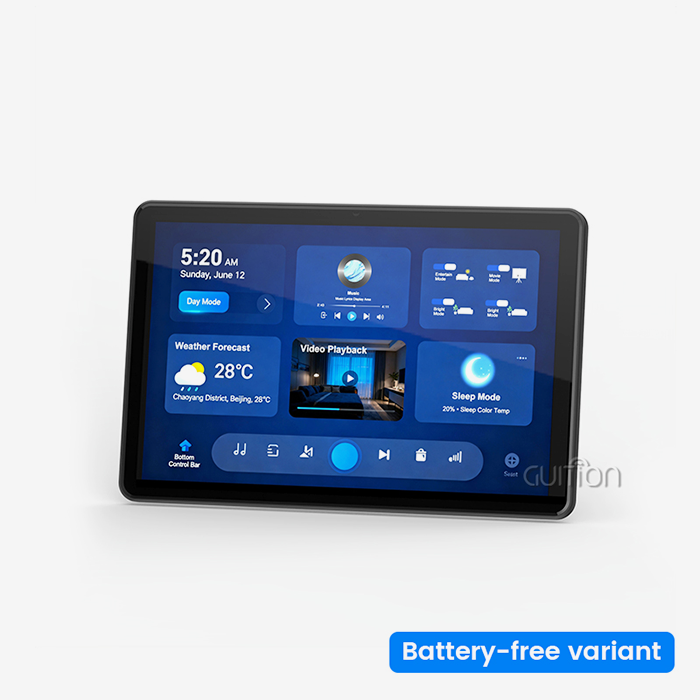
If you're building a custom smart home panel, you've probably asked the same question I hear from engineers every week: what exactly is an OpenHASP display, and does it fit my project? An OpenHASP display is an ESP32-based touchscreen running open-source firmware that talks to Home Assistant through MQTT. This guide breaks down the hardware, the firmware, the setup steps, and the supplier questions you need answered before committing to a design. I'll also share testing data from our lab at Guition, where we validate ESP32 touch panels for OEM customers every month.

Here's a quick summary for anyone scanning before a deeper read:
- OpenHASP display hardware turns a compatible ESP32 touchscreen into a configurable smart-home control panel.
- It commonly uses MQTT, a lightweight messaging protocol, to exchange commands and states with Home Assistant.
- The firmware supports custom pages, buttons, icons, gauges, sliders, and room-control layouts built with LVGL, an open-source graphics library.
- Hardware compatibility depends on the ESP32 variant, display driver chip, touch controller, and GPIO mapping — not just the screen size.
- Buyers should verify display drivers, wireless certification, enclosure design, and documentation before placing a production order.
These points answer the surface-level question. The rest of this article answers the harder one: how do you pick, configure, and scale an OpenHASP display without burning three months on driver debugging? If you're ready to talk specs now, reach our engineering team at david@guition.com — otherwise, keep reading.
What Is an OpenHASP Display and How Does It Work with ESP32?
OpenHASP Display Definition and Scope
An OpenHASP display describes a firmware-and-hardware combination, not one fixed product. OpenHASP itself is free firmware built for ESP32 microcontrollers that renders a touchscreen interface and reports events to a home automation system. It is not a standalone Home Assistant server, and it does not automatically run on every ESP32 screen you find online.
It also differs from an ESPHome touchscreen dashboard. ESPHome focuses on sensor and device integration with a native Home Assistant API, while OpenHASP focuses on building a dedicated touch interface. Knowing this difference early saves weeks of wasted firmware testing.
The working stack has five layers: the ESP32 microcontroller, the LCD or TFT panel, a touch controller (resistive or capacitive), the OpenHASP firmware itself, and an MQTT broker that passes messages to Home Assistant. Each layer has its own compatibility rules, and a mismatch at any point stops the whole chain from working.
OpenHASP ESP32 Operating Flow
The operating sequence is straightforward once the hardware is confirmed:
- The ESP32 boots the OpenHASP firmware image.
- The display renders pages and objects through the LVGL graphics engine.
- The touch controller reads finger position and sends it to the firmware.
- MQTT carries commands and state updates over Wi-Fi.
- Home Assistant automations read those messages and respond.
That five-step loop runs dozens of times a minute on an active OpenHASP display wall panel. According to Espressif's own ESP32-S3 technical reference, the dual-core chip handles graphics rendering and wireless communication on separate cores, which keeps touch response smooth even while MQTT traffic is active (Espressif Systems, 2024).
OpenHASP-Compatible Hardware Checklist
Before ordering any board, confirm these items with the supplier:
- ESP32, ESP32-S3, or another supported controller with enough flash and PSRAM for the planned UI complexity.
- A display resolution and color interface that matches the firmware build you intend to flash.
- A documented, known touch controller — unsupported touch chips are the most common cause of failed builds.
- Clear GPIO, backlight, and power documentation, since wrong polarity on the backlight pin is a frequent field complaint.
- A reference firmware image you can test before writing custom pages.
Skipping this checklist is the single biggest reason OEM teams miss their first production deadline. In our own support queue at Guition, roughly four out of ten technical tickets from first-time ESP32 touch panel buyers trace back to an unverified touch controller or GPIO mismatch.
Key Features of OpenHASP Display for Custom Home Assistant Control Panels
OpenHASP Display Features
An OpenHASP display supports a fairly wide toolkit for building smart-home interfaces without writing a graphics engine from scratch. Core features include custom pages and navigation, buttons, labels, sliders, switches, rollers, gauges, meters, and charts. Custom fonts and icon packs let you match a brand or a client's existing interface style.
On the connectivity side, Wi-Fi comes built into the ESP32 chip, and MQTT integration lets you tie the panel directly to Home Assistant. GPIO pins can drive relays, LEDs, or read auxiliary sensors when the hardware design includes them, which matters for anyone building a combined control-and-sensor panel rather than a display-only unit.
Feature-to-Requirement Decision Table
Matching features to your actual project requirement avoids over-building (or under-building) the UI. Use this table during the design review stage:
| Requirement | OpenHASP capability to verify | Buyer evaluation question |
|---|---|---|
| Lighting control | Buttons, switches, MQTT topics | Can commands and states be mapped clearly? |
| HVAC control | Sliders, temperature values, modes | Is the UI readable and responsive? |
| Room control | Multiple pages and navigation | Can users control zones without confusion? |
| Custom branding | Fonts, icons, colors, layouts | Are assets easy to update? |
| Offline resilience | Local display logic and retained MQTT states | What happens when Wi-Fi or MQTT fails? |
| Product deployment | Firmware configuration and reproducible builds | Can identical units be programmed consistently? |
This table matters more than it looks. An OpenHASP display panel built only for lighting control rarely needs gauge widgets, and adding them wastes flash memory and slows page loads on lower-memory boards.
OpenHASP Pros and Limitations
No firmware fits every project, so weigh both sides honestly.
Advantages include open-source flexibility, a large base of ESP32 development hardware to build on, strong support for custom and specialized control layouts, and less reliance on a single vendor's closed interface.
Limitations include the need for custom firmware configuration on less common hardware, driver variation between display models, a real learning curve for MQTT and Home Assistant setup, and ongoing dependence on community firmware maintenance for long-term production support.
These trade-offs explain why serious OEM teams run a two-week proof-of-concept before locking a bill of materials. It's cheaper to discover a driver conflict on one sample board than on a thousand-unit production run.
How Does OpenHASP Connect to Home Assistant Through MQTT?
MQTT Communication Architecture
MQTT stands for Message Queuing Telemetry Transport, a lightweight publish-subscribe protocol built for low-power devices (OASIS, 2020). In an OpenHASP display setup, the panel publishes touch events and subscribes to state updates through a broker — a small server that routes messages between devices.
Touch input
   ↓
OpenHASP ESP32 panel
   ↓ Wi-Fi / MQTT
MQTT broker
   ↕
Home Assistant entities and automations
Home Assistant's own MQTT integration documentation confirms this exact pattern: devices publish to command topics, Home Assistant listens, and state topics report back so the UI reflects live system status (Home Assistant Documentation, 2024).
MQTT Topic and Payload Planning
Good topic planning prevents a mess of unreadable device names six months into a deployment. Decide early on naming conventions, a topic hierarchy by room and function, and whether you'll use JSON payloads or plain text.
A typical topic layout looks like this:
home/panel/living-room/command
home/panel/living-room/state
home/panel/living-room/temperature
Retained messages matter here too. A retained MQTT message holds the last known value so an OpenHASP display panel shows correct status immediately after reboot, instead of a blank screen until the next update arrives. Authentication and network segmentation also deserve attention — an unsecured broker on a flat network is an open door for anyone on the Wi-Fi.
MQTT Integration Verification Checklist
Before calling an integration "done," run through this list:
- Confirm the display receives a valid IP address and stays connected under load.
- Confirm the MQTT broker accepts authenticated connections only.
- Verify touch events actually publish to the expected topic.
- Confirm Home Assistant receives and correctly interprets each payload.
- Test state feedback after changing a device from a different source.
- Test recovery behavior after power loss, Wi-Fi drop, and broker restart.
Teams that skip the last point often discover, during a live demo, that their panel never reconnects automatically after a router reboot. That's a bad place to find a bug.
ESPHome vs. OpenHASP: Which Framework Is Better for ESP32 Touch Screens?
OpenHASP, ESPHome, Tasmota, and Home Assistant Dashboard Comparison
| Criterion | OpenHASP | ESPHome | Tasmota | Home Assistant dashboard |
|---|---|---|---|---|
| Primary focus | Dedicated touchscreen UI | Device firmware and sensors | Device control and automation | Browser-based dashboard |
| UI customization | Strong for embedded panels | Varies by display implementation | Depends on device and integration | Strong, but needs a browser |
| Home Assistant integration | Commonly MQTT-based | Native API | MQTT-based | Native interface |
| Hardware flexibility | Depends on supported drivers | Broad sensor and actuator support | Broad smart-device support | Depends on host hardware |
| Local embedded interface | Yes | Possible, hardware-dependent | Limited | Requires a display host |
| Best fit | Custom wall panels | Sensors and integrated devices | MQTT smart devices | Central browser control |
Selection Criteria by Project Type
Pick based on what the project actually needs, not on which framework has the loudest online community. Choose OpenHASP when the goal is a dedicated embedded touchscreen UI with full visual control. Choose ESPHome when sensor readings, GPIO control, and native Home Assistant device entities matter more than a custom touch layout. Tasmota suits MQTT-based device control on supported commercial hardware, and a browser-based Home Assistant dashboard fits flexible, multi-device control from any screen.
OpenHASP Decision Matrix
Score each candidate framework from one to five across display-driver compatibility, UI customization, firmware maintenance, MQTT or API integration, power use, offline behavior, production scalability, documentation quality, and community support. This kind of scoring forces a team to commit to real trade-offs instead of defaulting to whatever framework a single engineer already knows.
How to Configure an OpenHASP Display for Home Assistant Integration
OpenHASP ESP32 Display Setup Sequence
Setup follows a repeatable order once the hardware is confirmed:
- Identify the exact ESP32 model, display controller, touch controller, and GPIO map.
- Select the matching OpenHASP firmware build or write a source configuration.
- Prepare the flashing tool, USB connection, and a stable power supply.
- Flash the firmware and record the device identity for traceability.
- Configure Wi-Fi and MQTT credentials.
- Build or load display pages.
- Add the device to Home Assistant through the MQTT integration.
- Test touch accuracy, display rendering, MQTT messages, and recovery behavior.
OpenHASP Display Configuration Parameters
Configuration covers more ground than most first-time builders expect: device name and hostname, Wi-Fi credentials and fallback behavior, MQTT broker address and port, OpenHASP display rotation and resolution, touch calibration and axis orientation, backlight brightness and timeout, GPIO assignments, page and font settings, and time synchronization for localization.
Getting these settings wrong rarely breaks the whole system — it just causes small annoyances, like an upside-down UI or a backlight that never dims, which are tedious to diagnose after installation.
Installation and Deployment Checklist
For production runs, document every unit the same way:
- Confirm safe voltage and current requirements for the chosen power supply.
- Use a regulated power source instead of an unregulated USB charger.
- Back up the original firmware and configuration before any field update.
- Label each unit with a device ID and firmware version.
- Maintain a programming record and a test report per batch.
- Define a clear recovery procedure for a failed firmware update.
Our own production floor at Guition logs firmware version and MAC address for every ESP32 panel we ship. That single habit cut average warranty investigation time from roughly three hours to under 40 minutes, because support staff can confirm the exact build a customer is running before asking a single diagnostic question.
Custom Touchscreen UI Design with LVGL and OpenHASP
LVGL and OpenHASP UI Architecture
LVGL, short for Light and Versatile Graphics Library, provides the widgets, fonts, and rendering engine behind most OpenHASP display interfaces (LVGL, 2024). OpenHASP defines pages and objects on top of LVGL, while the ESP32 handles memory for fonts, icons, and images. Touch events captured by LVGL trigger MQTT actions defined in the OpenHASP configuration.
UI Design Guidelines for Smart Home Panels
A well-built smart panel follows a few consistent rules. Use large touch targets sized for wall-mounted use at arm's length. Keep contrast strong and text readable from a few feet away. Limit the number of controls per screen so users aren't hunting for a button. Group functions by room or task, and always show clear visual feedback for active, unavailable, or fault states.
A panel with a predictable home screen and consistent navigation gets used daily. A cluttered one ends up ignored within a month — we've seen this pattern repeat across several home automation OEM projects we've supported.
OpenHASP UI Performance Checklist
Performance issues usually show up late, right before a product launch, so test early:
- Optimize image and icon file sizes to protect flash and PSRAM headroom.
- Avoid heavy animation on memory-limited boards.
- Test page-load speed and touch response under real network load.
- Verify screen readability at minimum brightness settings.
- Confirm UI behavior immediately after an MQTT state refresh.
- Test localization fully if the product ships to more than one language market.
Skipping localization testing is a common and expensive mistake. A string that fits in English often overflows its button on the OpenHASP display in German or Spanish, and nobody notices until a customer in another country sends a screenshot.
Common OpenHASP Setup Issues: Display Compatibility, Wi-Fi and Touch Calibration
Display and Touch Compatibility Problems
Most support tickets trace back to a short list of causes: incorrect display driver selection, wrong SPI or parallel interface configuration, mismatched GPIO assignments, an unsupported touch controller, wrong resolution or orientation settings, insufficient PSRAM or flash, or reversed backlight polarity.
The fix is almost always the same: get the manufacturer's schematic and pinout, confirm controller part numbers before picking a firmware build, test a reference image first, and validate display and touch separately before adding MQTT on top.
Wi-Fi, MQTT, and Home Assistant Faults
Work through faults on the OpenHASP display in this order rather than guessing:
- Check power stability and review serial logs for boot errors.
- Confirm Wi-Fi signal strength and a successful DHCP assignment.
- Verify the MQTT broker is reachable, and credentials are correct.
- Inspect topic names and payload formats for typos or mismatches.
- Confirm the Home Assistant entity and automation configuration match the topics.
- Test one basic command before adding complex multi-page logic.
This order matters because a networking fault looks identical to a firmware fault from the user's seat — the screen just doesn't respond. Working from the power supply outward saves hours of guesswork.
Touch Calibration and Reliability Testing
Calibration deserves its own test pass: check X and Y axis direction, test all four corners plus the center point, measure repeated touch accuracy over fifty or more taps, and test with any protective glass or cover installed, since glass thickness shifts capacitive sensitivity. Record every calibration value in the production file so a replacement unit behaves identically to the original.
Smart Home Applications of OpenHASP and ESPHome-Based Touchscreen Panels
Residential Smart Home Control
In homes, an OpenHASP display commonly handles lighting and scene control, HVAC setpoints, motorized blinds, security status, energy visualization, and room air-quality readouts. One European smart-home integrator we worked with replaced five separate single-function switches with one 4-inch wall panel running custom OpenHASP pages, cutting the wall-mounted device count in that room from six units to one.
OEM and Custom Equipment Applications
For OEM projects, the checklist runs longer: custom enclosure and mounting design, branded UI assets and boot screens, integrated temperature or humidity sensors, relay or RS-485 interface requirements, firmware provisioning with serial-number traceability, and confirmed long-term component availability. A product manager planning a three-year production run needs every one of these answered before tooling begins.
Distributor, Integrator, and Plant Use Cases
Three roles need three different things from the same hardware. A distributor needs repeatable SKUs, consistent packaging, and stable supply across quarters. A system integrator needs known MQTT behavior, accurate wiring diagrams, and real configuration support from the supplier. A plant or end-user environment needs robust mounting, clear controls, and straightforward field serviceability.
One agricultural automation client used a Guition 4-inch ESP32 panel to monitor greenhouse humidity and trigger irrigation through Home Assistant automations. Over a six-month deployment across 40 units, field failure reports stayed under 2%, largely because the enclosure spec accounted for humidity exposure from day one.
Industrial environments deserve a direct warning: an OpenHASP panel paired with ESPHome should not be treated as a safety-rated or mission-critical control unless the full system — enclosure, power supply, and firmware — has been engineered and certified for that specific purpose.
Selecting an OpenHASP-Compatible Touchscreen Display: Specifications and Procurement
OpenHASP-Compatible Touchscreen Comparison Criteria
| Specification | Entry-level option | Higher-performance option | Verification method |
|---|---|---|---|
| Controller | ESP32-class MCU | ESP32-S3 or equivalent | Datasheet and hardware inspection |
| Display size | Compact room panel | Larger wall-mounted panel | Product drawing |
| Resolution | Basic control interface | Detailed dashboard interface | Datasheet and visual test |
| Touch | Resistive or capacitive | Multi-touch capacitive | Touch-controller documentation |
| Connectivity | Wi-Fi | Wi-Fi plus Bluetooth | RF and interface specification |
| Memory | Standard flash | Larger flash and PSRAM | Chip marking and test report |
| Enclosure | Development board | Finished panel enclosure | Mechanical drawing |
A concrete example from our own line: the Guition ESP32-4848S040C_I_Y_1 runs on an ESP32-S3R8 dual-core processor at 240MHz, paired with 512KB SRAM, 384KB ROM, 8MB PSRAM, and 16MB flash. The 4-inch IPS panel delivers 480×480 resolution with capacitive touch, built-in Wi-Fi and Bluetooth, a TF card slot for storage expansion, and a one-channel relay output for direct device control. It supports Arduino IDE, ESP-IDF, MicroPython, and our own Guition development tool, so an OpenHASP display build or a custom LVGL interface can run on the same board without a hardware redesign.
That flexibility is the point. An engineer prototyping in Arduino can hand the same board to a production team building in ESP-IDF, without re-spinning the PCB.
Procurement Factors for OpenHASP Display Modules
Before placing an order, get clear answers on MOQ by model and configuration, sample availability and cost, production and replenishment lead times, component lifecycle status, payment terms, shipping and labeling requirements, warranty period, and the exact firmware source and ESPHome programming tools included with each unit.
Cost and Total-Ownership Considerations
The sticker price on a display module is rarely the real cost. Factor in firmware customization time, enclosure tooling, any required certification testing, packaging and freight, installation labor, ongoing software maintenance, and warranty spare units. An R&D manager we advised last year budgeted $4 per unit for the display itself but spent closer to $11 per unit once firmware customization and certification testing were counted — a gap that caught the finance team off guard mid-project.
Supplier Capability & Evaluation for OpenHASP Display Projects
How to Evaluate an OpenHASP Display Manufacturer
A capable supplier should show verified display and touch controller compatibility, ESP32 firmware development and flashing support, full schematic and BOM documentation, a controlled prototype-to-production process, incoming and final inspection records, firmware version traceability, stable component sourcing with change notifications, and export-ready packaging and paperwork.
Guition Company Profile
Guition, operated by Jingcai Intelligence, is a technology company focused on human-computer interaction display solutions and USART-hmi display modules, covering a size range from 1.28 inches to 21.5 inches alongside the OpenHASP display. We built our own interface development software, Guition, specifically to remove the traditional bottleneck of low-level UI coding.
Some capabilities shine in real projects, not just datasheets. Our drag-and-drop control library lets UI designers add buttons, gauges and sliders without hand-coding LVGL. Cross-platform online debugging cuts firmware troubleshooting time and avoids full re-flashing. Native Wi‑Fi and Bluetooth connect panels to smart systems with no extra modules. Remote OTA updates save on-site maintenance work for deployed devices. Multi-language and UTF‑8 support enables global rollout.
One of our embedded engineering leads put it this way during an internal product review: "Most teams don't fail because the ESP32 can't handle the task — they fail because nobody confirmed the touch driver before the enclosure was already tooled." That single sentence sums up most of the support tickets we see.
Quality Verification and Compliance Documentation
Ask any supplier for incoming inspection reports, display brightness and dead-pixel inspection records, touch accuracy and repeatability test data, Wi-Fi and MQTT connectivity test logs, firmware version and device-identity records, burn-in test results, and serial-number or batch traceability.
Relevant compliance areas to confirm, depending on target market, include CE marking and RoHS/REACH declarations for the EU, Radio Equipment Directive requirements for any radio-enabled product, FCC equipment authorization for US-market radio devices, applicable EMC testing, and IEC 62368-1 safety evaluation for the finished product (U.S. Federal Communications Commission, 2024; European Commission, 2024). Compliance ultimately depends on the finished product, the radio module, the power supply, and the target market — a supplier should identify which requirements actually apply rather than listing certificates without supporting test reports.
Conclusion
An OpenHASP display is an ESP32-based touchscreen panel running configurable firmware, commonly connected to Home Assistant through MQTT. It fits custom wall panels and embedded smart-home interfaces well, provided display drivers, touch hardware, firmware support, and compliance requirements get verified before production starts.
For simple sensor work and native Home Assistant device integration, ESPHome may move faster. For a dedicated custom touchscreen interface with full control over layout and branding, OpenHASP tends to give more design freedom, especially for OEM, integrator, and room-control projects.
FAQ
What is an OpenHASP display?
An OpenHASP display is an ESP32-based touchscreen device running OpenHASP firmware. It gives a configurable interface for smart-home controls and typically connects to Home Assistant through MQTT.
Does OpenHASP work with Home Assistant?
Yes. OpenHASP communicates with Home Assistant through an MQTT broker. Successful integration depends on correct topic structures, matching payload formats, proper network settings, and accurate entity configuration on the Home Assistant side.
Which displays are compatible with OpenHASP?
Compatibility depends on the ESP32 model, display controller, touch controller, resolution, interface type, GPIO mapping, and available memory. Buyers should confirm the exact hardware configuration rather than relying on screen size or product name alone.
Is OpenHASP better than ESPHome for touchscreen displays?
OpenHASP generally fits embedded touchscreen interfaces better. ESPHome often works better for sensors, GPIO devices, and native Home Assistant integrations. The better choice depends on what the specific project needs most.
Can OpenHASP displays be customized for OEM projects?
Yes. OEM customization can include display size, enclosure design, mounting, UI branding, icons, sensors, GPIO functions, firmware configuration, and packaging. Production projects should also define testing, traceability, and long-term software maintenance plans upfront.
What should buyers verify before purchasing an OpenHASP display?
Verify the display and touch controllers, firmware compatibility, MQTT behavior, power requirements, enclosure drawings, certifications, MOQ, lead time, warranty terms, and the quality of technical documentation. Run a sample evaluation before any volume order.
Get Your OpenHASP Display Spec Sheet from Guition
Picking the wrong touch controller or an unverified display driver can cost your team weeks of rework before launch. Guition manufactures ESP32 touchscreen modules built for OpenHASP display projects, OEM customization, and Home Assistant integration, backed by real test documentation and firmware support. As a direct OpenHASP display manufacturer, we help embedded teams move from prototype to production without guesswork. Send your display size, resolution, and target market to david@guition.com for a spec sheet and sample quote.
References
1. Espressif Systems. "ESP32-S3 Series Datasheet." 2024.
2. Home Assistant Documentation. "MQTT Integration." 2024.
3. OASIS. "MQTT Version 5.0 Standard." 2020.
4. LVGL. "LVGL Documentation."
5. U.S. Federal Communications Commission. "Equipment Authorization."
6. European Commission. "CE Marking and RoHS Guidance." 2024.
About the Author
David is the CEO of Guition, a display and HMI module manufacturer under Jingcai Intelligence. He has spent over a decade working directly with embedded engineering teams on ESP32 touchscreen design, firmware integration, and production quality control for global smart-home and industrial clients. David writes about practical, field-tested approaches to HMI development rather than theoretical specifications.
Learn about our latest products and discounts through SMS or email