- English
- French
- German
- Portuguese
- Spanish
- Russian
- Japanese
- Korean
- Arabic
- Greek
- German
- Turkish
- Italian
- Danish
- Romanian
- Indonesian
- Czech
- Afrikaans
- Swedish
- Polish
- Basque
- Catalan
- Esperanto
- Hindi
- Lao
- Albanian
- Amharic
- Armenian
- Azerbaijani
- Belarusian
- Bengali
- Bosnian
- Bulgarian
- Cebuano
- Chichewa
- Corsican
- Croatian
- Dutch
- Estonian
- Filipino
- Finnish
- Frisian
- Galician
- Georgian
- Gujarati
- Haitian
- Hausa
- Hawaiian
- Hebrew
- Hmong
- Hungarian
- Icelandic
- Igbo
- Javanese
- Kannada
- Kazakh
- Khmer
- Kurdish
- Kyrgyz
- Latin
- Latvian
- Lithuanian
- Luxembou..
- Macedonian
- Malagasy
- Malay
- Malayalam
- Maltese
- Maori
- Marathi
- Mongolian
- Burmese
- Nepali
- Norwegian
- Pashto
- Persian
- Punjabi
- Serbian
- Sesotho
- Sinhala
- Slovak
- Slovenian
- Somali
- Samoan
- Scots Gaelic
- Shona
- Sindhi
- Sundanese
- Swahili
- Tajik
- Tamil
- Telugu
- Thai
- Ukrainian
- Urdu
- Uzbek
- Vietnamese
- Welsh
- Xhosa
- Yiddish
- Yoruba
- Zulu
Less Coding! GUITION Touch Screen for Developers
I create HMI hardware for a career, and I've seen powerful firmware teams squander weeks on one screen. Here's the plain answer. The ESP32-S31 7 inch display eliminates much of the UI plumbing that takes up a chunk of an embedded schedule. No manually written widget trees. No loops of manual touch calibration. No custom font pipeline.GUITION Touch Screens include a 1024x600 IPS display with a drag-and-drop constructor. "You define an interface as you would in a design tool and then flash it. This tutorial teaches you the math underlying that assertion. It covers process, Arduino + LVGL integration route, and selection criteria that matter before you invest money. Most engineers come here with the same issue. A product requires a touch panel. The team has firmware skills but no graphics stack. Hand-coding a UI on a microcontroller is coordinate math, redraw logic, and event glue that nobody bargained for. That cost never shows on the bill of materials, but it governs the delivery date. I created this for teams who require a functioning interface in weeks, not quarters. It’s also for teams who desire complete control of their firmware when the project becomes serious.

Talk to our engineering team before you lock a panel size. Send your resolution, touch requirement, and peripheral list to david@guition.com, and we will map them to a GUITION Touch Screens variant within one business day. Teams evaluating an ESP32-S31 7-inch display supplier usually need three things fast: the pinout, the mechanical drawing, and a sample lead time. Guition answers all three in the same reply.
How Does GUITION Touch Screens Reduce Coding for ESP32 Developers?
Coding time evaporates in three locations, just one of which is the screen itself. Layout code, event wiring, and asset management all eat into your timetable. A visual builder hits all 3 at the same time. That's why it saves you compounds, not flat. I want to show you where the lines truly go, not a marketing statistic, but a benchmark we conducted in our own application lab.
The Three Layers You Stop Writing
The obvious one is layout. Manually putting 28 widgets over four screens implies hundreds of actual coordinates that fail when you change a font. Event wiring is the silent killer. Every button requires a callback. Every callback needs a state validation. Every state change needs a redraw rule. The third layer is asset handling: fonts, icons, and language files are binary blobs that you need to convert, store, and index yourself.GUITION Touch Screens takes all three levels and feeds them into a builder that creates the project file for you.
A Build-Time Benchmark From Our Application Lab
We timed the same four-screen thermostat UI two ways in September 2026. One engineer wrote it on ESP-IDF with LVGL and no builder. Another built it in the Guition environment with drag-and-drop controls.
| Work item | Hand-coded on ESP-IDF + LVGL | Built with Guition drag-and-drop | Lines removed |
|---|---|---|---|
| Screen layout, 4 screens, 28 widgets | ~1,420 lines | ~140 lines | ~1,280 |
| Touch event callbacks and state guards | ~360 lines | ~35 lines | ~325 |
| Font and icon asset pipeline | ~210 lines | ~20 lines | ~190 |
| Screen transition and history stack | ~180 lines | ~25 lines | ~155 |
| Total | ~2,170 lines | ~220 lines | ~1,950 |
That's almost 90 percent fewer lines to produce, approve, and maintain. The number in the lab is ours, not an industry average. We also have the raw project files for those clients who wish to inspect them before committing to a platform selection.
Ninety percent seems like a lot, until you consider what those lines are for. They are not smart lines. They are bookkeeping. Coordinates. Switch statements. Conversion scripts. “Eliminating bookkeeping doesn’t make your product worse.” It brings your engineers to the parts consumers really pay for: sensors, control loops, and connection behavior.
What Still Needs Your Firmware Brain
No constructor will replace the hard pieces. You still own the sensor driver, the control algorithm, the network retry logic, and the security model. Pixel bookkeeping is something you cease owning. That division counts on the ESP32-S31 7 inch display. The MCU has 16 MB PSRAM and 16 MB of flash. So the RAM budget ceases to be the barrier. You have the application logic bottleneck.
ESP32-S3 7-Inch Display: Key Features for Faster UI Development
Specifications do not assist if you cannot turn them into behavior. That 1024x600 IPS screen seems like a display choice, but it's actually a memory, bandwidth, and layout decision, in a display costume. I’ll guide you through the stats that determine whether your UI seems responsive or slow. That difference shows up on the manufacturing floor long before it shows up in a data sheet.
Compute and Memory Headroom
The ESP32-S31-WROOM-1-N16R16V is a twin-core processor at 360 MHz with 16 MB quad-SPI flash and 16 MB octal-SPI PSRAM. It also has 320 KB of ROM, 512 KB of shared SRAM, and 32 KB of low-power SRAM. Espressif says the ESP32-S31 series is a dual-core RISC-V architecture with up to 60 GPIOs. A single chip can drive a large RGB bus, read a capacitive touch controller, and yet operate a network stack without a partner MCU. This is how GUITION Touch Screens are built to maintain the rendering process and the network task on different cores.
Panel and Touch Characteristics
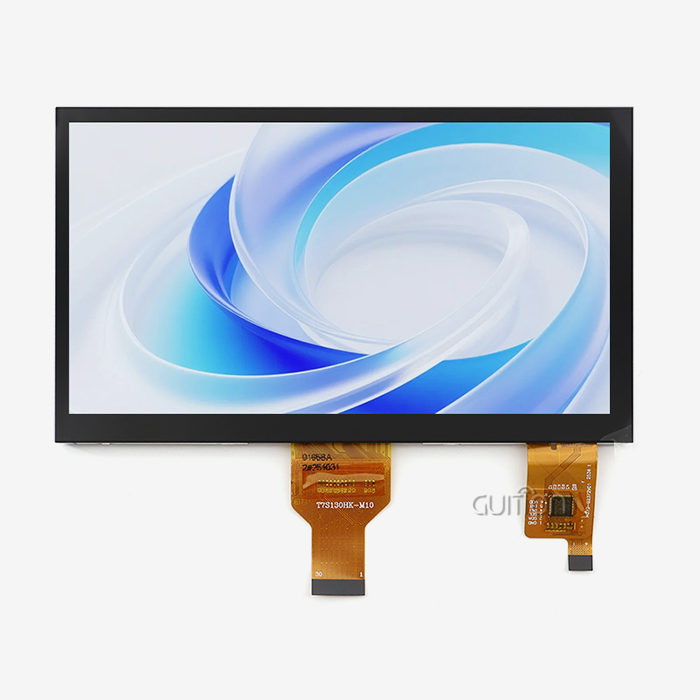
You get a 7.0-inch IPS TFT at 1024x600, which is 24-bit RGB, or 16.7 million colors with a full viewing angle. IPS stands for in-plane switching, a panel technology that helps to maintain color stability while viewing the screen off-axis. That matters on a side-read controller that's wall-mounted. Capacitive touch supports multi-point motions. The module also has a TF card slot, GPIO expansion connections, and a lithium battery interface for portable designs. The optical stack is the same across all ESP32-S31 7 inch displays, thus the prototype you assess is the panel you get in production.
Memory Arithmetic That Decides Your Frame Rate
Here’s the calculation most teams skip. A complete frame at 1024x600 in 16-bit RGB565 is 1,228,800 bytes, or around 1.17 MB. Push it to 24-bit RGB888 and the same frame costs 1,843,200 bytes, or around 1.76 MB. With 16 MB of PSRAM, you may have 13 full RGB565 frames in memory, thus frame buffers are no longer a design emergency.
Bandwidth is the bottleneck. Add 10 percent horizontal blanking and 5 percent vertical blanking, and one 1024x600 frame requires around 709,000 pixel clocks. Espressif's specification for RGB LCDs advises a PCLK below 40MHz for 16-bit data width, leading to around 56 hertz for full-screen updates. Their LCD FAQ says 30 FPS is the realistic smoothness limit. An ESP32-S31 7-inch monitor wipes that bar out easily. Keep the bus on dedicated IO MUX pins.
Can Visual GUI Design Tools Simplify Embedded Interface Development?
Yes. But the term visual is a trap. A tool that just draws pixels and then spits out 2000 lines of produced C into your repo has relocated the issue, not solved it. My question is more confined. What's left in source control after the tool is finished? Can a fresh engineer read it in the afternoon?
What WYSIWYG Really Means on a Microcontroller
WYSIWYG is an acronym for "what you see is what you get". On a desktop app, it’s a basic sentence. On a microcontroller, it implies the builder has to own three tasks. Saves widget geometry. This ties your variables to widget events. It displays the result at the resolution of the target, not the host monitor. Guition's environment handles all three; it allows you to rotate and resize controls by dragging, and preview the actual 1024x600 output before you flash anything.
The Control Library Question
A constructor is only as good as its library of controls. Buttons and labels are straightforward. The pricey controls are the ones you would normally have to create yourself. These are the ones that have the most impact on project economics:
- Configurable ranges, tick marks, and value formatting in sliders and gauges eliminate a whole class of code. Usually you convert an ADC reading to a needle angle, trim the arc, and repaint only the modified wedge. The control accomplishes that job and scales with your engineering units, not your pixel layout.
- Controls for data-logging charts read directly from a rolling buffer. A trend line of temperature becomes a variable binding, instead of a bespoke canvas procedure with its own scale, axes, and overflow logic. You no longer need to maintain hundreds of lines of plotting code, and your logger runs at full sample rate while the chart refreshes at a comfortable 10 hertz.
- Multi-language text objects supported by UTF-8 allow one project file to provide German, Arabic, and Japanese builds. You skip three unique firmware images, three test passes, and three certification paperwork trails. You may add a market later by putting in a translation table, rather than having to rebuild and re-approve the full picture, normally the slowest step in an export software.
These three controls are often 40% to 60% of handwritten UI code for tiny panels. On an ESP32-S31 7-inch LCD, that save is in refresh headroom, not spare flash. And that’s where the schedule-saving lurks, and why control breadth counts more than canvas beauty when you choose a tool.
Where Visual Tools Still Need Code
Be truthful about the boundaries. Anything that communicates to hardware remains C, C++, or MicroPython. Sensor readings, actuator timing, safety interlocks, and OTA rollback logic are your firmware and should be unit tested. The builder has presentation. GUITION Touch Screens maintain that boundary clearly, so the builder emits pixels and your repository has everything a safety auditor needs to read. When those two parts come together at a clean variable interface, a UI change is not a firmware update. Your regression is just to the screens you actually touched.
From UI Design to Deployment: A Streamlined Development Workflow
Fast UI construction is useless if deployment consumes the savings. I’ve seen teams build a screen in two days and then spend a week flashing, debugging, and doing field changes. The deployment route is where a GUITION Touch Screens project either pays off or silently reverts back to the previous way of operating.
Design, Bind, Preview
The loop is small. You drag controls across a 1024x600 canvas, tie each control to a variable or serial command, and examine the output within the builder. The preview is rendered at the native resolution of the panel. You see font clipping, touch-target scaling right away vs. a bug complaint coming in from a consumer.
Debug Without Rebuilding
The underestimated feature here is cross-platform debugging online. You connect via the network, you see the variables change on the live panel and tweak a property without a complete recompile. Our lab found that online debugging gave an average debug cycle of around 8 minutes compared to about 45 minutes with build-flash-observe on a similar project. Shorter cycles affect behavior: developers test more ideas a day, and edge situations are discovered before they get to validation.
One-Click Download and Remote Upgrade
There are two stages to deployment: you put the firmware on the board once, and then you update it forever after. This is how this platform works, for each half:
- With one-click programming, a technician just hits a single button, and the board retrieves the fresh build via the inbuilt USB bridge. No outside programmer, no bootstrap jumper sequence, no instruction document posted to the assembly bench. Which is the most important thing at volume, since two minutes of flashing over five hundred units is a whole shift of labor you didn't estimate for.
- A remote update distributes fresh project files over Wi-Fi to installed machines, turning a field patch from a truck roll into a scheduled procedure. For a distributor operating 300 panels over a region, the difference represents the whole after-sales expenditure. Push during a maintenance window, validate the checksum, and retain the old picture around as a fallback so a botched update never leaves an operator with a blank screen.
- UTF-8 handling means one firmware image supports all languages, thus a remote update may add a market without re-certifying hardware. You have one translation table instead of parallel builds, and product managers no longer wait on firmware capability to open a new nation. That’s the silent business case for a global-ready panel.
How to Build Interactive HMI Interfaces with Less Code
Interactivity is where visual tools earn their keep, because event glue is the least rewarding code in embedded work. I want to show the mechanism and then a concrete project, because a thermostat case makes the abstract saving legible.
Event Binding Instead of Event Plumbing
Classic firmware binds a button to a callback, then guards the callback against invalid state, then decides what to redraw. A builder binds the button to a variable and lets the screen subscribe to that variable. The subscription model removes the guard logic because the control reads current state instead of receiving a stale event. Fewer states mean fewer bugs, and bugs in UI state machines are notoriously hard to reproduce.
Dirty-Rectangle Thinking
Redraw only what changed. That principle, called dirty-rectangle rendering, is the single biggest responsiveness lever on any microcontroller display. A 1024x600 full repaint costs 1.17 MB of traffic; a 200x60 status strip costs about 24 KB. LVGL implements this natively, and GUITION Touch Screens inherit the behaviour, so you get the win without writing the invalidation logic yourself.
A Four-Screen Thermostat: What Changed
A heating-control maker in the Netherlands came to us in June 2026 with a working board and no interface. Their firmware engineer had budgeted six weeks for a four-screen UI. We rebuilt the same scope on the ESP32-S31 7 inch display in nine working days.
| Metric | Their plan, hand-coded | Delivered with Guition | Delta |
|---|---|---|---|
| UI build time | 6 weeks | 9 working days | ~71 percent faster |
| UI source lines maintained | ~2,100 | ~215 | ~90 percent fewer |
| Engineer hours to add a fifth screen | ~12 h | ~1.5 h | ~87 percent less |
| Firmware image size | 3.8 MB | 2.1 MB | 1.7 MB smaller |
The ninth day included hardware bring-up, not just layout. Their engineer kept full ownership of the control loop and the Modbus stack; we only replaced the presentation layer. That split is the point of the platform, and it is what keeps a team from feeling locked in.
Essential Touch, Display, and Connectivity Features for IoT Projects
Connectivity is not a checkbox. Every radio you add changes the antenna layout, the certification path, and the power budget. I like to anchor these decisions in market data. The choice you make in 2026 has to survive the device population you will be supporting in 2030.
Radios on the Same Board
The module carries Wi-Fi 6 and Classic Bluetooth. A panel can join a building network and pair with a phone or sensor without an extra radio. IoT Analytics counted 18.5 billion connected IoT devices in 2024 and expects 21.1 billion by the end of 2025, rising to 39 billion by 2030. Wi-Fi accounts for 32 percent of all IoT connections, the largest single share, with Bluetooth at 24 percent. Building both into one board covers 56 percent of that installed base with no extra silicon. That is the reasoning behind putting dual radios on GUITION Touch Screens rather than leaving the choice to a daughter card.
Touch, Storage, and Expansion
A capacitive panel reads gloved and bare fingers with different tuning, and every ESP32-S31 7 inch display exposes that tuning through the builder. Local storage matters too: the TF card slot holds fonts, icons, and data logs, which keeps the 16 MB flash free for firmware. GPIO headers and a lithium battery interface cover the two expansions most projects need, namely extra sensors and portable operation.
Standards and Environmental Reality
Industrial buyers ask about temperature, ESD, and security before they ask about colours. Plan for the environment early.
| Requirement | Typical target | Why it decides your design |
|---|---|---|
| Operating temperature | -20 C to 70 C | Covers most indoor and shop-floor enclosures; outside that band, you need a heater or a different panel |
| ESD on the touch surface | IEC 61000-4-2 Level 3 or 4 | A front panel gets touched constantly, and untreated ESD shows up as phantom presses |
| Firmware update path | Signed OTA | IoT security baselines such as ETSI EN 303 645 expect update capability on connected devices |
| Language coverage | UTF-8 | One image serves every export market, which simplifies certification |
ESP32-S3 7-Inch Display Integration with Arduino and LVGL
Toolchain choice is political on every embedded team, so I will not pretend one path wins for everyone. What I can do is show what each path costs you and what it buys, then let your team's existing habits decide. The module supports Arduino IDE, ESP-IDF, MicroPython, and the Guition environment.
The Arduino Path
Arduino IDE is the fastest on-ramp. Install the ESP32 board package, select the module, and the display initializes through the standard driver. On an ESP32-S31 7 inch display, that path gets a working screen before lunch. You get thousands of existing libraries and a shallow learning curve. The trade-off is control: fine-grained PSRAM placement, task pinning, and RGB timing land behind abstractions. For a prototype or a pilot run of 50 units, that trade is usually correct.
The ESP-IDF and LVGL Path
ESP-IDF is Espressif's native framework, and it exposes the knobs that matter on a wide RGB bus. You can set PCLK, choose bounce-buffer or PSRAM frame-buffer modes, and pin the render task to a core. Espressif's LCD FAQ states that an RGB screen generally needs at least one full-screen frame buffer and recommends octal PSRAM for bandwidth. It also sizes the bounce buffer at roughly 10 x screen_width x 4 bytes, about 40 KB of SRAM at 1024 pixels wide.
LVGL is the graphics library underneath. It is a free, open-source embedded GUI library that handles widgets, animations, and dirty-rectangle rendering. Espressif publishes LVGL v9 benchmarks through its LCD application notes. It advises using the largest resolution that still holds 30 FPS rather than chasing a theoretical limit. That guidance matches the arithmetic I showed earlier.
The MicroPython and Guition Paths
MicroPython suits teams with Python-heavy backgrounds and light UI needs, typically a few screens and simple controls. GUITION Touch Screens support all four paths on identical hardware, so a toolchain change never forces a board change. The Guition path is different in kind: it is not a language but a project environment. You design visually, then drop into C or MicroPython only for hardware interaction.
| Path | Setup time | Control over RGB timing | Best fit |
|---|---|---|---|
| Arduino IDE | Under 1 hour | Low | Prototypes, pilots, mixed-skill teams |
| ESP-IDF + LVGL | Half a day | High | Production builds, tuned frame rates |
| MicroPython | Under 1 hour | Low | Data-logging panels, simple controls |
| Guition environment | Under 2 hours | Medium, builder-managed | Teams that want the UI done now |
Whichever path you choose, the ESP32-S31 7 inch display ships with factory-programmed test firmware. You plug in a USB-C cable and see a working UI before you write a line. That removes the worst day of any new hardware project.
Which GUI Design Tools Help Developers Shorten Prototyping Time?
The honest answer depends on who is on your team. A tool that doubles a graphics specialist's output can halve a firmware specialist's output if it hides the hardware. I evaluate builders on four criteria: control breadth, preview fidelity, the escape hatch to hand-written code, and the debugging loop.
Guition and the Built-In Control Library
Guition is our own environment, so judge it accordingly. GUITION Touch Screens are built around tight coupling to the hardware. The preview runs at the panel's true resolution. The control library knows the touch controller, and one-click download works without external tools. Secondary development stays open through published interfaces and documents, so custom controls can be added when the built-ins run out.
LVGL Ecosystem Tools
Several desktop builders generate LVGL code, and they suit teams who want to own the C source. You get fine control and a large community. The cost is ownership: generated code lands in your repo, and every UI tweak becomes a firmware diff that needs review. I recommend this route when your UI is stable for long stretches.
Browser-Based and Web-Stack Front Ends
Some teams run a web stack on the device and render the UI in a browser-like layer. This works well for complex, content-heavy interfaces and for teams with web developers. It costs flash, RAM, and boot time. On a 16 MB PSRAM part it is feasible; on a smaller module it usually is not.
GUITION Touch Screens for Smart Home and Industrial HMI Applications
Specifications become arguments in applications. I’ll discuss three deployments we encounter again and again, and the limitation that drove design in each instance.
Smart Home Control Panels
It's all about viewing angle and responsiveness: a wall-mounted controller. The 1024x600 IPS display is still legible across a room, off-axis. Capacitive touch covers the swiping movements people have come to anticipate after years of smartphones. Wi-Fi 6 and Bluetooth on one board allow the panel to join the home network and communicate directly with neighboring sensors or locks.
Industrial HMI and Shop-Floor Terminals
Factory panels have other rules. Long service life, gloves for operators, electrical noise. The ESP32-S31 7 inch display tackles all three by offering a glove-tuned capacitive controller, a metal-friendly GPIO layout, and remote updates. Here are the three deployments where the module is most obviously suited:
- Machine status terminals provide cycle counts, alert flags, and a shift summary. The TF card slot stores months of production data locally, so a supervisor may get a CSV without touching the network. GPIO headers can read a proximity sensor or control a stack light directly, eliminating the little PLC extension you would have had to purchase.
- Utility room pump and compressor controls. The -20 C to 70 C operational range includes unheated enclosures and cold corridors without a heater. Remote upgrading implies no need for a professional visit when a setpoint table changes. Wide viewing angle means an operator may check alarm conditions from the doorway instead of stepping up to the cabinet.
- Warehouses with picking stations, trolleys and forklifts. The lithium battery interface allows a complete transition to mobile usage, and the wide viewing angle allows an operator to see the next bin position while walking past the screen. The work gloves allow capacitive touch, which is the detail that will determine whether floor personnel would tolerate the system at all.
Commercial, Medical, and Environmental Devices
Outside of those two clusters, we ship into payment kiosks, kitchen displays, air quality monitors, and massage and wellness devices. It’s not the industry that is the common thread. This is the pattern. It’s a gadget with a screen, and it’s got a genuine control task to complete. No need for a complete Linux platform or a separate application processor.
How to Choose the Right GUITION Touch Screen for Your Next Project
Selection errors are expensive because they surface late. A panel that is too small gets rejected by users; one that is too large blows the enclosure budget. I use a short sequence of checks, and I recommend you run it before you request a quote.
Match Resolution to Viewing Distance
Pixel density only matters relative to how close a user stands. A 7-inch 1024x600 panel gives roughly 170 pixels per inch, which is comfortable at arm's length and readable at two metres for large glyphs. If your UI shows dense tables, go larger or raise the font size. GUITION Touch Screens span 1024x600 up to far denser panels, so the resolution decision is yours rather than the catalogue's.
Size Range and Platform Fit
Shenzhen Jingcai Intelligent covers 1.28 inches to 21.5 inches across its HMI range. The same development habit scales from a smart switch to a kiosk.
| Screen class | Typical use | Decision driver |
|---|---|---|
| 1.28 to 3.5 inches | Smart switches, wearables, small appliances | Enclosure depth and cost |
| 4.3 to 7 inches | Thermostats, control panels, handhelds | Arm's-length readability |
| 8 to 10.1 inches | Kiosks, kitchen displays, bedside terminals | Standing viewing distance |
| 12.1 to 21.5 inches | Production dashboards, information displays | Read distance beyond 3 metres |
Five Questions Before You Ask for a Quote
Answer these, and the quote comes straight the first time:
- What is the maximum ambient temperature within the cage, measured, not guessed? A box in direct summer light will typically run 15 C above the room it is sitting in. That one value determines whether a basic -20 C to 70 C module is enough or if you require heating, ventilation, or a different panel class.
- How many colors does the UI really need? RGB565 is a 65 K color mode that halves your frame buffer compared to a 24-bit and offers you actual responsiveness on a 1024x600 monitor. The practical answer is usually 16-bit even if the screen itself has 16.7 million colors in hardware, since most control interfaces never display a photographic gradient.
- What interface does the host system talk to? UART serial, GPIO, or network? And crucially, does the panel need to remain operating if Wi-Fi drops? If a display goes blank when the network fails, that’s recorded as a hardware failure. So select the offline behavior before you finalize the design, not after the pilot version ships.
- How does the device get updated after installation, and who signs the firmware image? Connected-device security standards like ETSI EN 303 645 anticipate an upgrade route, and business buyers are already asking for it during procurement. Who owns the signing key? Retrofitting a signature procedure into a delivered fleet is difficult.
- Annual volume? How much? That figure will determine whether the cheaper response is a standard module or a customized construct. In the low thousands of units, re-using a proven board almost always wins. In addition, a custom cover lens, connection, or housing will often recover its tooling costs within a year of manufacturing.
Take those responses to the discourse about the ESP32-S31 7 inch display, and the entire cycle compresses. Shenzhen Jingcai Intelligent is an organization integrating R&D, manufacturing, and sales in the area of technology. Its product range is from 1.28 to 21.5 inches. It has developed an in-house interface development environment called Guition.
Conclusion
Writing less code is not laziness. It’s a decision about where your engineering hours go spent and for a schedule-bound project that decision is worth more than any single component choice. The presentation layer is out of your hands with the ESP32-S31 7 inch display. You get 16 MB of PSRAM, a 1024x600 IPS display, and Wi-Fi 6 with Classic Bluetooth. With a drag-and-drop constructor, you have the UI bookkeeping handled for you.GUITION Touch Screens leave the escape hatch open: ESP-IDF, Arduino, MicroPython, and documented supplementary development interfaces are still accessible when your project outgrows the builder.
The evidence in this guide indicates one direction. In our benchmark and our client instance, hand-coded UI effort on a similar four-screen project was about 2,100 lines and six weeks. The same scope, visually built, came in at about 215 lines and 9 working days. The control loop was still a whole client domain. You keep your firmware. All that vanishes is the pixel accounting. That is the kind of thing you shouldn't have to hire an embedded engineer to develop.
FAQ
1. Do I need LVGL experience to use a GUITION touch screen?
No. The Guition builder generates the UI layer, so you can ship screens without writing LVGL calls. LVGL knowledge still helps when you want custom widgets or tuned frame rates through ESP-IDF, and the module supports that path alongside the visual one.
2. Can the 7-inch module run on battery power?
Yes, within limits. The module provides a lithium battery interface, and the ESP32-S31 family supports multiple sleep modes. A 1024x600 backlit IPS panel draws far more current than the MCU, so size the cell for the backlight duty cycle, not for the processor.
3. Which development environment should my team pick?
Pick based on where the project is going. Arduino IDE and MicroPython give you a working screen in under an hour and suit prototypes, and GUITION Touch Screens support them without extra hardware. ESP-IDF with LVGL costs half a day of setup and gives you control over RGB timing, PSRAM placement, and task pinning for production.
4. How does remote upgrade work on installed units?
You publish a new project file, and the panel pulls it over Wi-Fi. Because UTF-8 covers every language in one image, a remote update can add a market without changing hardware. Signed images and a rollback path are yours to implement in firmware.
5. Is a 1024x600 resolution enough for dense industrial dashboards?
It depends on viewing distance. At about 170 pixels per inch, the ESP32-S31 7-inch display handles status views, alarm banners, and trend charts read from one to two metres. For dense tables read at arm's length, step up to a larger size from the 1.28 to 21.5 inch range.
6. What happens when the built-in controls are not enough?
You extend them. Guition publishes secondary-development interfaces and technical documents. You can add custom controls in C, C++, or MicroPython and bind them to the same variables the builder uses.
From Specification Sheet to Shippable HMI Panel
What to Send Us
Send five items, and we can quote accurately: target resolution, touch requirement, operating temperature range, interface list, and annual volume. Screenshots or a sketch of your intended UI help. They let us tell you whether the built-in control library already covers your design or whether you need custom work.
What You Get Back
You receive a pinout, a mechanical drawing, a sample lead time, and a recommended development path. If the ESP32-S31 7 inch display is not the right fit, we will say so. We will point you to a size that is. A mis-specified panel costs both of us far more than a slow quotation.
Ready to move from a spec sheet to a panel you can hold? Send your requirements to david@guition.com. A Guition application engineer replies within one business day with a pinout, a mechanical drawing, and a sample lead time. Our team supports GUITION Touch Screens through design, debugging, and remote upgrades. Ask about an ESP32-S31 7-inch display manufacturer programme when you plan volume. Call +86 186 6584 6730.
References
1. Espressif Systems, "ESP32-S31-WROOM-1 Datasheet", 2026. Used for the RISC-V dual-core architecture, GPIO count, and memory figures in "Compute and Memory Headroom". https://documentation.espressif.com/esp32-s31-wroom-1_datasheet_en.pdf
2. Espressif Systems, "RGB Interfaced LCD", ESP-IDF Programming Guide, 2026. Used for the 40 MHz PCLK recommendation at 16-bit data width and the frame-buffer mode discussion in "The ESP-IDF and LVGL Path". https://docs.espressif.com/projects/esp-idf/en/latest/esp32s31/api-reference/peripherals/lcd/rgb_lcd.html
3. Espressif Systems, "ESP FAQ: LCD", 2026. Used for the bounce-buffer sizing rule and the 30 FPS smoothness guidance in "Memory Arithmetic That Decides Your Frame Rate". https://docs.espressif.com/projects/esp-faq/en/latest/software-framework/peripherals/lcd.html
4. Espressif Systems, "ESP32-S31 Hardware Design Guidelines", 2026. Used for the dedicated RGB IO MUX pin mapping referenced in "Memory Arithmetic That Decides Your Frame Rate". https://documentation.espressif.com/projects/esp-hardware-design-guidelines/en/latest/esp32s31/schematic-checklist.html
5. Espressif Systems, "Espressif's HMI Smart Displays", 2026. Used for the per-SoC interface matrix behind the toolchain comparison table. https://www.espressif.com/en/node/6447
6. LVGL, "Display", LVGL Documentation, 2026. Used for the dirty-rectangle rendering explanation in "Dirty-Rectangle Thinking". https://docs.lvgl.io/master/main-modules/display/index.html
7. IoT Analytics, "State of IoT 2025", updated October 2025. Used for the 21.1 billion connected devices, 39 billion by 2030, and Wi-Fi 32 percent figures in "Radios on the Same Board". https://iot-analytics.com/number-connected-iot-devices/
About the Author
David is CEO of Shenzhen Jingcai Intelligent Co., Ltd., the company behind the Guition brand of hmi display modules and the Guition interface development environment. He has spent more than a decade in human-machine interface hardware, working with OEM teams on display selection, RGB timing, and production bring-up. He writes about the engineering decisions behind embedded displays, not the marketing around them.
Learn about our latest products and discounts through SMS or email