- English
- French
- German
- Portuguese
- Spanish
- Russian
- Japanese
- Korean
- Arabic
- Greek
- German
- Turkish
- Italian
- Danish
- Romanian
- Indonesian
- Czech
- Afrikaans
- Swedish
- Polish
- Basque
- Catalan
- Esperanto
- Hindi
- Lao
- Albanian
- Amharic
- Armenian
- Azerbaijani
- Belarusian
- Bengali
- Bosnian
- Bulgarian
- Cebuano
- Chichewa
- Corsican
- Croatian
- Dutch
- Estonian
- Filipino
- Finnish
- Frisian
- Galician
- Georgian
- Gujarati
- Haitian
- Hausa
- Hawaiian
- Hebrew
- Hmong
- Hungarian
- Icelandic
- Igbo
- Javanese
- Kannada
- Kazakh
- Khmer
- Kurdish
- Kyrgyz
- Latin
- Latvian
- Lithuanian
- Luxembou..
- Macedonian
- Malagasy
- Malay
- Malayalam
- Maltese
- Maori
- Marathi
- Mongolian
- Burmese
- Nepali
- Norwegian
- Pashto
- Persian
- Punjabi
- Serbian
- Sesotho
- Sinhala
- Slovak
- Slovenian
- Somali
- Samoan
- Scots Gaelic
- Shona
- Sindhi
- Sundanese
- Swahili
- Tajik
- Tamil
- Telugu
- Thai
- Ukrainian
- Urdu
- Uzbek
- Vietnamese
- Welsh
- Xhosa
- Yiddish
- Yoruba
- Zulu
Knob Display Module Design Trends for 2026
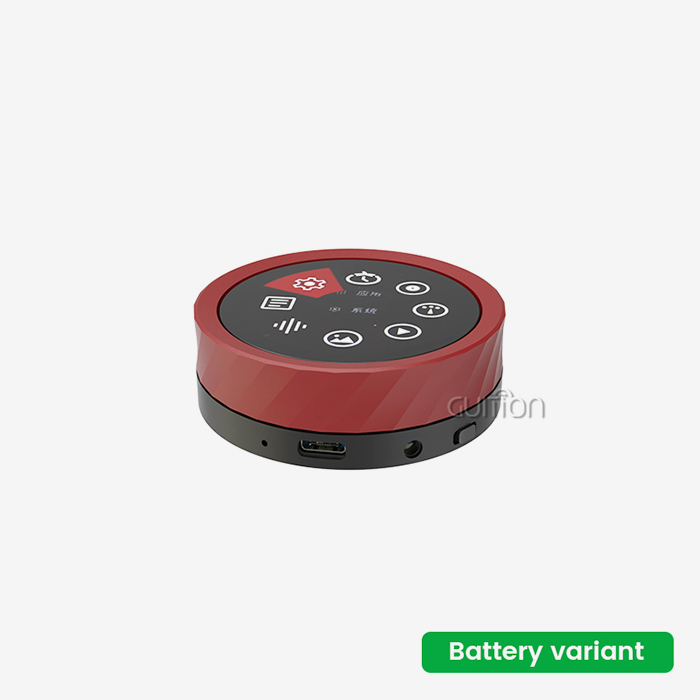
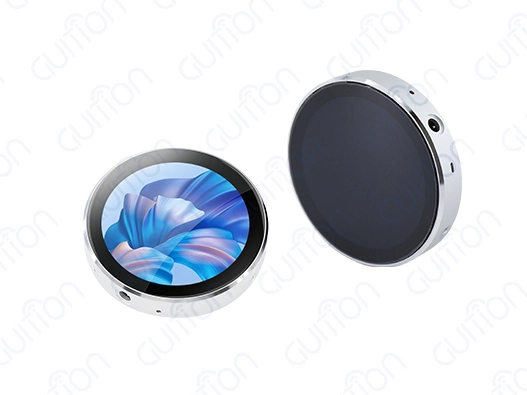
In 2026, the development of knob display module technology is a big step forward in the design of human-machine interfaces. These high-tech parts have both rotary controls and built-in screens. A modern control interface no longer has to choose between a physical rotary control and a digital screen. A Knob display module combines tactile adjustment with visual feedback in one compact interface, making it useful for smart appliances, industrial equipment, IoT controllers, instruments, and other embedded products. Instead of turning a knob on one part of a machine and reading a separate display somewhere else, users can adjust a value and see the result on the same control surface. In 2026, the main design direction is not simply adding more functions. Engineers are focusing on better integration between the encoder, display, touch interface, processor, wireless connectivity, software, and mechanical structure. This creates more opportunities for OEM manufacturers while also making supplier evaluation more important.
What Is Changing in Knob Display Module Design?
Moving From Separate Controls to Integrated Interfaces
Rotary encoders for adjustment, LCDs for information, physical buttons for confirmation, and controller boards for processing are common components in traditional equipment. This method may work, but engineers must fit more connections and components inside the container.
An integrated knob display module combines these functionalities. The rotary control may be used for numerical adjustment, menu navigation, mode selection, or parameter setting, and the display shows the chosen value immediately.
Users who demand precise physical control benefit from this combo. A touchscreen is good for choosing objects and navigating menus, while a knob is better for incremental changes. The tactile movement offers the operator a tangible reference without using their eyes.
Equipment makers may simplify mechanical design with integration. Design the product around a single interface assembly instead of separate screen and encoder mounting structures.
Why Compact Human-Machine Interfaces Are Gaining Attention
Space is vital in contemporary embedded technology. Industrial controllers, portable instruments, smart appliances, audio equipment, and IoT goods demand additional capability without a bigger container.
A compact circular or square display and rotary control may perform several operations on a small screen. The knob offers physical input, while the display may provide numerical values, icons, menus, operational status, warnings, or connection information.
This helps simplify controls for non-technical people. Instead of several buttons, manufacturers may employ a rotary control with a push function and graphical display.
Application determines interface design. Before choosing a module, engineers should consider whether the knob requires rotation, push, multiple buttons, touch input, or another input method.
Hardware Features Engineers Should Evaluate in 2026
Processor and Memory Configuration
The CPU limits module graphics and application capability. A small embedded processor may be enough for a temperature, pressure, speed, or status interface. A complicated GUI with animation, pictures, music, wireless connection, and numerous interface states demands more processing and memory.
The GUITION JC3636W518C_I_Y employs an ESP32-S3R8 dual-core MCU with up to 240 MHz, 512 KB SRAM, 384 KB ROM, 8 MB PSRAM, and 16 MB Flash. The module has a 1.8-inch IPS TFT display with capacitive touch and 360×360 resolution.
These parameters apply to this module, not all knob display devices.
Buyers must determine whether memory can handle the GUI, picture assets, touch functionalities, wireless stack, and application software, including Smart Knob Devices and Projects. PSRAM availability matters if the product needs bigger frame buffers or more complex graphics.
Display Resolution and Physical Size
Very high resolution is not necessary for a tiny screen. In an interface with huge numbers and basic icons, legibility may matter more than pixel density. A greater resolution is ideal for interfaces with intricate graphics, several information panels, photos, or complicated menus.
The GUITION JC3636W518C_I_Y is a small device with a 1.8-inch display, 360×360 resolution, and an effective display area of 45.68×45.68 mm. Completing the module measures about 58x58x11 mm.
Engineers should examine viewing angle, brightness, cover lens, mounting technique, FPC location, and enclosure clearance for OEM development. A display that appears OK on paper may need mechanical adjustments if the connection or mounting dimensions don't fit the desired housing.
Encoder and Physical Control Design
The rotary encoder is as crucial as the screen. Buyers should consider encoder type, resolution, rotation direction, detent behavior, push-button function, and operating cycle before buying a module. Menu navigation products may need a different encoder feel than precision parameter adjustment products.
User experience is also affected by the mechanical knob. Diameter, height, surface material, resistance, tactile feedback, and display spacing affect operator adjustment ease.
Using a physical sample instead of an electrical specification is helpful. Engineers must test the control with the enclosure and user workflow.
Display, Touch, and Software Integration
Combining Rotary Input With Touch
A knob does not have to replace touch input. In many designs, the two methods can complement each other.
The knob can handle precise numerical adjustment, while touch can be used for selecting a menu, opening a page, or switching between functions. This hybrid approach gives users multiple ways to interact with the same interface.
A capacitive touchscreen can also reduce the number of physical buttons required. On the GUITION JC3636W518C_I_Y, the display uses a CST816 capacitive touch controller, while the screen itself uses an ST77916 driver IC.
When evaluating a complete module, engineers should therefore look at the display driver, touch controller, encoder interface, and processor together rather than treating them as unrelated components.
GUI Frameworks and Development Tools
Software support has a direct impact on development time.
An embedded knob display may need a graphical interface with numerical indicators, sliders, menus, status icons, animations, and touch controls. Frameworks such as LVGL can provide reusable GUI components instead of requiring engineers to draw every element manually.
Espressif's development ecosystem supports LCD and LVGL-based applications on ESP32 platforms. Official documentation also covers display buffering, frame-buffer management, and optimization techniques for ESP32-S3 display applications.
For B2B buyers, compatibility with familiar development tools can reduce training and integration costs. GUITION's JC3636W518C_I_Y is specified for Arduino IDE, ESP-IDF, MicroPython, and Guition development environments.
The practical procurement question is not simply whether a module “supports” a development environment. Buyers should ask whether the supplier provides example code, display initialization files, touch libraries, encoder examples, and documentation that can be used with the selected framework.
Wireless Connectivity as an Optional System Layer
Wireless connectivity is increasingly useful for control interfaces, but it should be matched to the application.
A connected appliance may need Wi-Fi for configuration or remote monitoring. An industrial controller may require wireless communication for data collection, while a simple local control panel may not need wireless functionality at all.
The ESP32-S3-based GUITION knob module integrates Wi-Fi and Bluetooth and therefore provides a starting point for connected interface projects.
However, wireless capability should not be treated as an automatic advantage. It adds software, security, certification, antenna, and power considerations. If the product does not require wireless communication, a simpler architecture may be more appropriate.
Comparing Knob Display Modules With Other Control Interfaces
Rotary Controls Versus Touchscreens
Touchscreens provide flexible menus and can change their layout through software. This makes them useful when a product needs many functions but has limited physical buttons.
A rotary control provides a different interaction method. Users can feel the movement of the control and make incremental adjustments without placing a finger directly on the display.
Environmental conditions can also influence the decision. Water, gloves, dust, or grease may affect the usability of some touch interfaces, depending on the touchscreen technology and product design. A physical knob can remain useful for functions that need tactile adjustment.
The choice does not have to be either-or. Combining a rotary control with a touchscreen can provide both flexible navigation and precise physical input.
Integrated Modules Versus Separate Components
A separate encoder, LCD, controller board, and touch panel can give engineers more freedom during initial design. However, it also increases integration work.
The team must manage additional connectors, mechanical tolerances, PCB routing, firmware interfaces, and component sourcing.
An integrated knob display module can reduce the number of separate assemblies. This may simplify prototype construction and help manufacturers create a more compact front panel.
The trade-off is customization. An integrated module may have fixed dimensions, connector locations, processor choices, or display specifications. Therefore, buyers should determine whether the standard module is suitable before requesting extensive customization.
Where Integrated Designs Provide the Most Value
Integrated knob display interfaces are particularly relevant when the product needs:
- A compact control surface
- Physical adjustment with visual feedback
- A programmable graphical interface
- Touch plus rotary input
- Wireless connectivity
- A customized front-panel design
- A single supplier for display and controller integration
They are less useful when the application only requires a simple mechanical switch or a basic indicator without graphical information.
This application-first approach prevents manufacturers from adding unnecessary technology to a product simply because a newer module is available.
Environmental and Reliability Considerations
Temperature and Operating Conditions
Environmental requirements should be established before the module is selected.
The GUITION JC3636W518C_I_Y specifies an operating temperature range of -20°C to 70°C and a storage temperature range of -30°C to 80°C.
These are product-specific specifications. They should not be interpreted as a universal operating range for all knob display modules.
Industrial applications may require exposure to vibration, temperature cycling, dust, moisture, or chemical cleaning agents. If the product is installed inside outdoor equipment, vehicles, factory machinery, or process-control equipment, these conditions should be considered during qualification.
The enclosure, sealing structure, connector, display, encoder, PCB, and mounting method all contribute to environmental reliability. An MCU with a wide temperature specification does not automatically make the complete module suitable for every industrial environment.
Long-Term Reliability Testing
Reliability should be verified through the complete operating system.
For the rotary control, manufacturers should consider rotation cycles, button presses, mechanical load, and contamination. For the display, they should evaluate backlight stability, touch performance, temperature exposure, and long-duration operation.
For the electronics, engineers should evaluate power stability, wireless performance, memory behavior, and software recovery.
A supplier should be able to provide relevant product specifications and, where available, quality or reliability documentation. This gives procurement teams a stronger basis for qualification than generic claims such as “industrial grade.”
Procurement Guide for Knob Display Modules
What to Ask Before Ordering Samples
A sample order should be accompanied by a technical checklist.
Buyers should confirm:
- Processor model and clock frequency
- SRAM, Flash, and PSRAM capacity
- Display size and resolution
- Display driver IC
- Touch controller
- Encoder type and function
- Wireless connectivity
- Operating voltage
- Typical power consumption
- Operating temperature
- Module dimensions
- Development environments
- Available SDK or example code
- MOQ and lead time
- Customization options
This information allows engineers and purchasing teams to evaluate the module using the same criteria.
Sample Validation Before Mass Production
A prototype should be tested on the actual target application.
The engineering team should verify the display under normal brightness, test rotary input response, confirm touch behavior, run the intended GUI, and evaluate wireless communication if required.
Mechanical validation is equally important. The module should be installed in the planned enclosure to confirm the knob position, screen visibility, mounting points, cable routing, and clearance.
If the product will operate continuously, a longer-duration test can help identify problems that are not visible during a short demonstration.
Supplier Documentation and Customization
For OEM and ODM projects, technical support can become as important as the hardware itself.
A supplier should ideally provide a mechanical drawing, pin definition, electrical specifications, display information, touch-controller information, development instructions, and sample software.
Customization should also be discussed early. Buyers may need a different screen size, knob design, connector location, front-panel appearance, firmware configuration, or mounting structure.
GUITION's current knob display product provides an example of an integrated platform with ESP32-S3 processing, IPS display, capacitive touch, wireless connectivity, TF-card expansion, and support for several development environments.
For manufacturers evaluating the platform, requesting a sample and technical documentation is the practical next step before committing to a customized production program.
Applications Driving Knob Display Adoption in 2026
Industrial Equipment and Automation
Industrial machinery often needs operators to change values quickly while maintaining awareness of machine status.
A knob display can show the selected parameter while the operator turns the control. For example, a machine interface may use the rotary input for speed, temperature, pressure, or timing settings while the display shows the current value and operating state.
The physical control is especially useful when the operator needs incremental adjustment rather than selecting from a large touchscreen menu.
Smart Appliances and Consumer Products
Consumer appliances can use integrated rotary displays to create a simpler front panel.
Coffee machines, cooking equipment, HVAC controls, audio products, lighting systems, and other smart appliances can combine a physical adjustment mechanism with a programmable display.
The graphical interface can change depending on the operating mode without requiring a large number of physical buttons.
For consumer products, appearance also matters. The knob diameter, display shape, viewing angle, enclosure finish, and mounting structure should therefore be evaluated together.
Instruments and Compact Control Devices
Measurement equipment and portable instruments can benefit from the combination of physical adjustment and immediate visual feedback.
A knob can be assigned to a frequently changed parameter while the display presents measurement values, configuration menus, or system status.
The compact structure is also useful when the front panel has limited space. Instead of installing several controls and a separate display, a single integrated module can provide a larger range of functions through software.
Conclusion
Knob display module design in 2026 includes physical controls, graphical interfaces, integrated CPUs, touch input, and wireless connectivity. We want to guide and configure user-machine interaction, not merely add technology.
The most practical design variables include CPU, display resolution, memory, encoder, touch support, software compatibility, mechanical dimensions, power consumption, and environmental characteristics. These criteria should be application-specific.
JC3636W518C_I_Y is a compact device featuring an ESP32-S3R8 dual-core controller, a 1.8-inch 360×360 IPS display, capacitive touch, Wi-Fi, Bluetooth, 8 MB PSRAM, 16 MB Flash, and TF-card interface. The module is 58×58×11 mm and can operate from -20°C to 70°C.
Test the module against the enclosure, software, control logic, and operational environment for B2B producers. Suppliers should be evaluated for documentation, sample support, customization, production, and long-term communication. A prototype integrated rotary display interface becomes a manufacturing component using this method.
FAQ
Q: What makes the 2026 knob display modules different from previous generations?
A: 2026 modules feature integrated wireless connectivity, AI-powered feedback systems, and modular designs that let you make changes quickly. Real-time audio visualization, high-quality media playback, and over-the-air changes were not possible with older designs because they lacked advanced processing power.
Q: How do environmental factors affect the knob display module performance?
A: Modern units are made to work in a wider range of temperatures, from -20°C to +70°C, and they can achieve IP65/IP67 grades by using more modern sealing technologies. Touchscreens stop working when they get wet, but manual buttons keep working even if the surface is dirty or wet.
Q: What development platforms are compatible with the current knob display modules?
A: The best modules work with a lot of different development platforms, such as the Arduino IDE, ESP-IDF, MicroPython, and their own special tools, such as Guition software. This cross-platform flexibility keeps teams from being locked into one company and lets them use development tools they already know how to use.
Q: How do integrated modules compare to discrete component assemblies?
A: Integrated modules offer better protection against environmental factors while reducing the number of parts needed, the difficulty of assembly, and the number of possible failure spots. Even though the initial costs may be higher, the overall cost of ownership is usually lower because it takes less time to put together and works better.
Q: What role does wireless connectivity play in modern interface design?
A: Remote monitoring, predictive repair, and over-the-air updates are all possible with wireless capabilities. These features lower running costs and raise customer happiness. When you integrate IoT, you can make interfaces part of bigger, linked systems that give you useful, practical data and the ability to automate tasks.
Ready to Transform Your Interface Design with Advanced Technology?
Guition is a leader in interface innovation, providing state-of-the-art knob display module solutions that meet the strict needs of current apps. With its ESP32-S3 dual-core processing, built-in WiFi and Bluetooth, and stunning 360×360 resolution screens, our GUITION JC3636W518C_I model is a great example of design trends for 2026. As a reliable company that makes knob display modules, we offer a wide range of development tools, 24/7 expert support, and easy customization choices that help you get your products to market faster. Get in touch with david@guition.com right away to find out how our advanced modules can improve your product ideas and make the development process easier.
References
1. Advanced Technologies for Human-Machine Interactions in Industry, Journal of Manufacturing Systems Engineering, 2024
2. Rotary Control Interface Design Guidelines for Consumer Electronics, International Design Standards Consortium, 2024
3. Environmental Testing Protocols for Electronic Interface Components, Industrial Electronics Reliability Handbook, 2024
4. Wireless Connectivity Integration in Embedded Control Systems, IEEE Transactions on Industrial Electronics, 2024
5. Cost-Benefit Analysis of Integrated vs. Discrete Interface Components, Manufacturing Economics Quarterly, 2024
6. User Experience Design Principles for Tactile-Visual Interface Systems, Human Factors in Technology Design, 2024
Learn about our latest products and discounts through SMS or email