- English
- French
- German
- Portuguese
- Spanish
- Russian
- Japanese
- Korean
- Arabic
- Greek
- German
- Turkish
- Italian
- Danish
- Romanian
- Indonesian
- Czech
- Afrikaans
- Swedish
- Polish
- Basque
- Catalan
- Esperanto
- Hindi
- Lao
- Albanian
- Amharic
- Armenian
- Azerbaijani
- Belarusian
- Bengali
- Bosnian
- Bulgarian
- Cebuano
- Chichewa
- Corsican
- Croatian
- Dutch
- Estonian
- Filipino
- Finnish
- Frisian
- Galician
- Georgian
- Gujarati
- Haitian
- Hausa
- Hawaiian
- Hebrew
- Hmong
- Hungarian
- Icelandic
- Igbo
- Javanese
- Kannada
- Kazakh
- Khmer
- Kurdish
- Kyrgyz
- Latin
- Latvian
- Lithuanian
- Luxembou..
- Macedonian
- Malagasy
- Malay
- Malayalam
- Maltese
- Maori
- Marathi
- Mongolian
- Burmese
- Nepali
- Norwegian
- Pashto
- Persian
- Punjabi
- Serbian
- Sesotho
- Sinhala
- Slovak
- Slovenian
- Somali
- Samoan
- Scots Gaelic
- Shona
- Sindhi
- Sundanese
- Swahili
- Tajik
- Tamil
- Telugu
- Thai
- Ukrainian
- Urdu
- Uzbek
- Vietnamese
- Welsh
- Xhosa
- Yiddish
- Yoruba
- Zulu
Importing SPI LCD Display Modules: A Practical Guide
An SPI LCD Display module is a compact screen that receives pixel data and commands from a microcontroller through the Serial Peripheral Interface. To import one successfully, I recommend five steps. First, confirm the controller IC and resolution. Second, test the module on your own platform. Third, compare suppliers using the same documents. Fourth, calculate the full landed cost. Fifth, set inspection rules before shipment. This approach keeps wiring short, reduces firmware surprises, and protects your schedule. In this guide, I explain how each SPI LCD display module works, how to choose one, and how Guition supports buyers in the United States.

How an SPI LCD Display Module Works
Signal Lines and Four-Wire Operation
The Serial Peripheral Interface is a bidirectional, real-time protocol developed by Motorola to allow a processor to communicate with its peripherals, such as an SPI LCD display module. The host reads data back, and the clock is SCLK. MOSI is used to send data to the screen, CS is used to select the device, and MISO is used to read data. In the four-wire mode, an additional DC pin is included to assist the controller in determining if a byte is command or pixel data. In three-wire mode, that pin is removed, and each byte gets a ninth bit. This part is usually handled by software. Most hardware SPI peripherals send eight-bit bytes, which makes four-wire systems easier for me to code and debug.
Controller ICs and Resolution Limits
The driver IC decides what the screen can show and what orders it can take. A lot of people use the ST7735, ST7789, ILI9341, and ILI9488 chips. It can handle up to 262K colours and 240 by 320 pixels. The document says that it has 172,800 bytes of display memory. The chip needs to match the initial number. Gamma, power, pixel format, and orientation can be changed on different devices. The screen will often be white or jumbled if you pick the wrong ones. We also need to talk about data flow. A 20 MHz clock takes about 61 ms to update a 240x320 16-bit frame, which is equal to 16 frames per second. Updates in parts keep the animation running well.
Voltage Levels and Wiring Errors
A lot of LCD hardware can only work with 3.3 V power supplies. You could hurt the driver IC if you connect a 5 V board like an Arduino Uno straight to it. You should add a level shifter or a resistor divider to the output lines to keep it safe. Too many SPI lines add noise and capacitance. For longer runs, I think you should stay close to 10 to 15 cm or slow down the clock. Most of the time, a white screen at startup means that there is a problem with the reset or setup. Hold down the reset pin for at least 10 ms, and then send commands that your controller can understand. Also, look at the backlight pin. Most of the time, when the backlight is on but there is no picture, the wiring is to blame.
Selecting the Right SPI LCD Display Module for Your Project
Size, Resolution, and Panel Type
Take a look at how far away you are and how much information is on the screen to begin. The length of most SPIs is between 1.8 and 3.5 inches. A 2.4-inch screen has about 167 pixels per inch, which is enough for menus, progress pages, and simple graphs. Indoor instruments typically have standard TFT screens. IPS panels are better when you’re reading a controller on the wall from the side, as you can see more. Check the datasheet for backlight current, operating temperature, and brightness. In devices powered by batteries, a brighter backlight takes more power. Pick a higher resolution (if your MCU and clock speed can handle it).
Resistive and Capacitive Touch Options
You can press down on a resistive touch with gloves, a pen, or your fingernail. This makes it suitable for 3D printers, industrial screens, and workplace tools. It's lighter and can handle more than one touch, but you usually need to use bare fingers or special gloves with it, and it usually needs an I2C driver to work. The SPI touch controller is often used with a resistive touch panel. It has a chip-select pin of its own, and shares the clock and data lines with the display. Be careful when you share the bus. Two devices with different clock limits can cause problems. First off, consider how the person will use the touch screen. Then consider price and the cover lens design.
Platform Compatibility and Interface Comparison
Check the site before you order a lot of output. SPI works on ESP32 boards running ESP-IDF, Arduino boards, and Raspberry Pi devices, but you must have the correct library, setup code, and pin map. The documentation says that the ESP-IDF has an SPI master driver that works with DMA. Thus, the CPU is less busy when large moves are being made. It is also helpful to compare SPI to other types of ports. I2C works well for slow data rates and character displays. It only has two wires, though. Parallel buses can move more data, but require many GPIO pins and are difficult to wire. QSPI takes a lot more design effort. Usually, an SPI LCD display module is the fastest and has the most pins for a simple MCU that needs a small colour screen.
Guition JC2432S024R: A Compact 2.4-Inch SPI LCD Display Module
Key Specifications
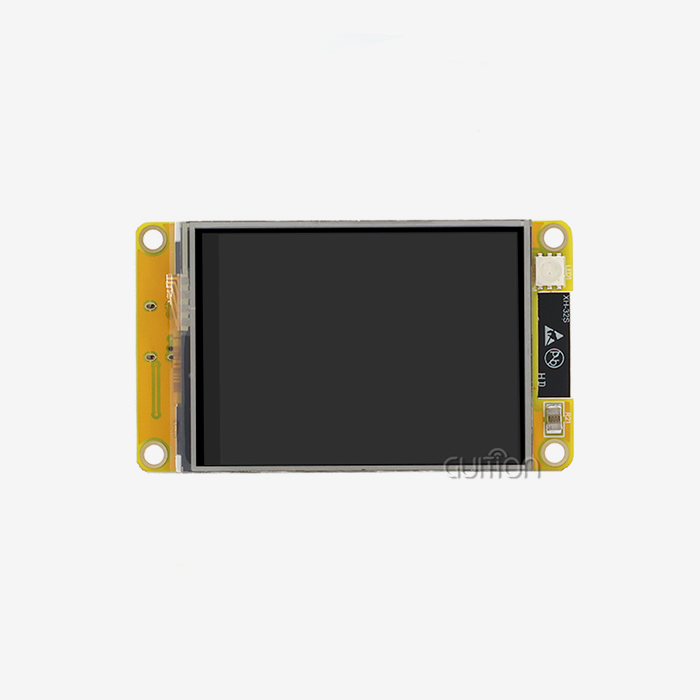
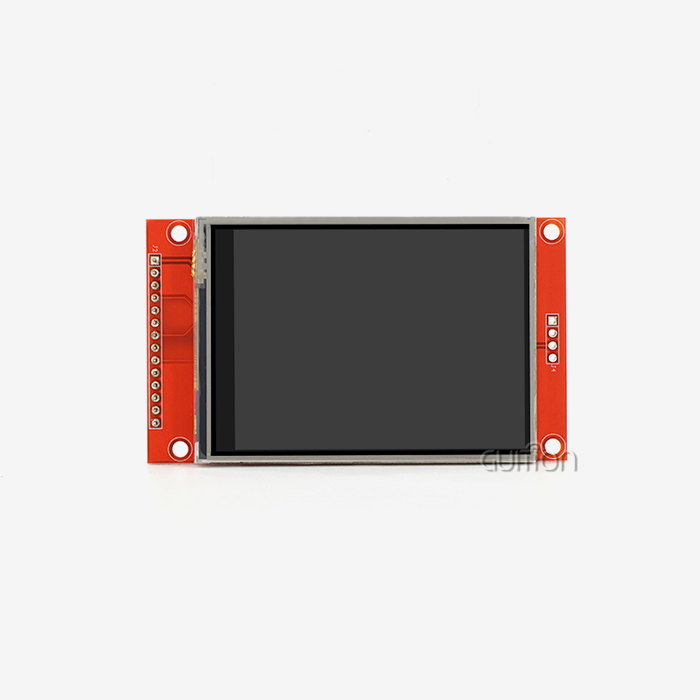
It is a 2.4 inch TFT LCD screen panel with an ILI9341 driver IC and 240*320 resolution. It talks over 4 SPI lines, so just a few IO pins will drive the whole screen. This module has electronics to control the lights and the touch screen, so you don't need resistive touch. The device has an SD card slot for storing pictures, fonts, and data files. It also gives you test programs so that when your team writes setup steps, they don't have to start from scratch. Or they can use code that already works. When asking for a price, be sure to ask for the touch choice and exact setting.
Core Advantages for Engineers
For teams that need to get going quickly, these are the major perks I see.
• Simple integration: This design is easy to put together because it only needs a few IO pins to fully control the screen with its four-wire SPI. This gives sensors, switches, and wireless modules more pins to use. This is good for small microcontrollers and makes switching on a small board go faster. Pin conflicts take less time to fix, which means that testing of the first prototype can begin faster.
• Development support: If you need help with programming, Guition has test programs with easy graphics and more complicated interface examples. It's also possible to get simple technical help for drivers. When engineers can compare their own code to working references, they can find bugs faster in the early stages of testing, when the code is still being built. This also lets them test the SD card slot and display output before they decide on a board plan.
Because of these advantages, early development is easier, and pin clashes in small designs are less likely to happen.
Typical Applications
This module works well for projects that only need a small color screen and not a lot of wires. 3D printers can use Guition to see how prints are going and set control parameters. Medical equipment can get readings and set device settings. Smart home devices can use Guition as a control interface. Handheld diagnostic tools, air detection systems, financial equipment, audio equipment for playback controls, and EV charging stations can use Guition to see how charges and bill payments are going. A 240x320 screen is big enough to show menus, status pages, and simple graphs. For teams that need bigger screens, the Guition UI development software can work with HMI screens ranging from 1.28 inches to 21.5 inches.
Importing SPI LCD Display Modules: Supplier, Pricing, and Cost
Supplier and Documentation Checks
Make a list of what you need before you call the service providers. Among the things you should write down are the type of screen, its resolution, size, brightness, working temperature, SPI frequency, controller IC, and a mechanical model. Then, ask each provider for the datasheet, drawings, pinout, startup code, test results, and a list of all the changes that have been made. A real group should be used to compare these studies to. It's a bad sign if the controller IC or pin order doesn't match; this means that firmware changes may need to be made late in the project. Follow the tech team's quick and clear answers to questions while sampling is going on. That answer will often tell you what kind of help you'll get with testing and making a lot of them.
MOQ, Pricing, and Incoterms
The price per unit being low doesn't mean the project will be cheap. The price can vary according to the type of touch screen, size, resolution, brightness, connections, customisation, testing an,d packaging. For small orders, pilot runs, and large orders, ask for prices separately. Also determine if the engineering or tooling costs are one-time or continuous. You can compare prices using the same Incoterms rule. The International Chamber of Commerce has published Incoterms 2020. It clarifies who pays for insurance and goods and who assumes the risk at each stage. If you buy something EXW, you pay for most of the costs. As soon as the goods are on the ship, the risk is with the ship for both FOB and CIF. When you buy something DDP, the seller pays for the customs and the taxes.
Landed Cost and US Customs Basics
The landed cost of a good is its price, freight, insurance, taxes, clearance fees, local delivery, inspection, units that are returned, and keeping an inventory. U.S. Customs and Border Protection says it is the importer’s job to properly label, value, and bring in the goods. Generally, shipments over $2,500 will require formal entry. Before placing a large order, you should speak with a qualified customs broker to ensure that you understand the HTS classification and country of origin. You can use a spreadsheet to keep track of all the prices per unit and then use that number to contrast the quotes from different SPI LCD display modules. If you want the samples in a hurry, send them by air freight. If possible, ship steady sales by ocean freight.
Quality Control, Customisation, and Buying Checklist
Pre-Shipment Inspection and ESD
Send the order, but make terms for review. Check model name, resolution, dead pixel count, brightness uniformity, backlight bleed, power consumption, communication stability, touch accuracy, labels an, and packaging. Test each SPI LCD display module on both the demo board and the gear you plan to use. Okay. Good sample. Use it as a guide for each batch. Don’t let a new controller or panel pop up out of nowhere. Request batch tracking and a documented engineering change process. Another thing to watch out for is electrical discharge. The standard that defines the test that uses a human body model to rate the sensitivity of a part to ESD is ANSI/ESDA/JEDEC JS-001 . Make sure the package is static-free and water resistant.
OEM and ODM Options
Standard modules are good for when you need to make samples, small batches of goods, or things quickly. It makes sense to have your product a certain size, with a certain connection, wire, mounting structure, cover lens, brightness level, touch solution, marking, or connector if that is what your product needs. Usually, the first thing is to see what is needed and if it is possible. Then there are drawings, engineering models, integration, stability testing, trial production, and, at the end, mass production. Making sure you know the minimum order quantity (MOQ), development fees, lead times, rules for replacing parts, and who provides technical support is important before you agree to a custom design. All Guition’s HMI products come with more development tools and technical manuals that make it easy for teams to change features to fit their own designs without having to do a lot of hard low-level work.
A Practical Buying Checklist
Engineering and procurement always agree on what to do for all suppliers because there is a written list. For the technical review, you need to make sure that the screen size, resolution, panel type, controller, SPI mode, pinout, voltage, touch interface, backlight control, mechanical drawings, operating temperature, and tested platform compatibility are right. “See how good they are at making things, how good their paperwork is, how well they track quality, how much experience they have with OEM and ODM, how fast they can respond, and how well they manage the customer lifecycle.” You should compare the MOQ, tiered price, tooling, lead time, Incoterms, payment terms, and landing cost for the commercial review. Different groups should be used to make a review. Quality, service, supply stability, and the like should be high on the list. That scorecard means you cannot make price decisions without adding to expensive integration problems further down the road.
Conclusion
It works best when the technical review comes before the business review when importing an SPI LCD display module. The voltage level, clock speed, startup code, and driver IC all play a role in how well the screen works. The SPI link makes links short. You can choose based on the screen size, type, touch feature, and platforms it works with. SPI is better than I2C or parallel lines for small colour TVs. To get the real price, you need to look at the supplier's paperwork, do a full landed-cost calculation, and make sure that the sample and volume prices are the same. Clear OEM or ODM terms, inspection rules, and "golden samples" protect the work that comes after. This test method works with the Guition JC2432S024R, a 2.4-inch ILI9341 module that is 240 by 320 and has four-wire SPI.
FAQ
Q: Can an SPI LCD display module play smooth video?
A: Not in full HD or with high quality. For 16-bit colour, a full 240x320 frame takes up 153,600 bytes. This means that the host MCU needs a faster clock and more DMA.
Q: Why does my screen stay white after startup?
A: A lot of the time, the timing of the restart or the wrong startup code is to blame. You need to hold down the reset button for at least 10 microseconds and send commands that are unique to the controller, like the ILI9341.
Q: Which documents should I request before ordering?
A: Ask for the datasheet, mechanical drawing, pinout, initialisation code, test report, and change history. After that, compare them to the real sample.
Q: Does the JC2432S024R include a touch?
A: When you ask for a price, make sure you look at the setup to make sure you don't need a sensitive touch.
Request a Guition SPI LCD Display Module Quote
There is a tech company called Guition that is growing quickly. The Guition UI creation tool and HMI display systems with screens from 1.28 to 21.5 inches are made by the company. If you want to find a supplier of SPI LCD display modules, email david@guition.com with your specs, goal number, and platform. We can talk about tech papers, samples, and the work that was done after the first one. You can see all of the goods at https://jingcaizhineng.aixdb.cn/.
References
1. ILI Technology Corp., ILI9341 TFT LCD Single Chip Driver Datasheet, 2011
2. Motorola, SPI Block Guide V03.06, 2003
3. Espressif Systems, ESP-IDF Programming Guide: SPI Master Driver, 2024
4. International Chamber of Commerce, Incoterms 2020 Rules, 2019
5. U.S. Customs and Border Protection, Importing into the United States: A Guide for Commercial Importers, 2006
6. ESDA and JEDEC, ANSI/ESDA/JEDEC JS-001 Human Body Model Testing, 2017
Learn about our latest products and discounts through SMS or email