- English
- French
- German
- Portuguese
- Spanish
- Russian
- Japanese
- Korean
- Arabic
- Greek
- German
- Turkish
- Italian
- Danish
- Romanian
- Indonesian
- Czech
- Afrikaans
- Swedish
- Polish
- Basque
- Catalan
- Esperanto
- Hindi
- Lao
- Albanian
- Amharic
- Armenian
- Azerbaijani
- Belarusian
- Bengali
- Bosnian
- Bulgarian
- Cebuano
- Chichewa
- Corsican
- Croatian
- Dutch
- Estonian
- Filipino
- Finnish
- Frisian
- Galician
- Georgian
- Gujarati
- Haitian
- Hausa
- Hawaiian
- Hebrew
- Hmong
- Hungarian
- Icelandic
- Igbo
- Javanese
- Kannada
- Kazakh
- Khmer
- Kurdish
- Kyrgyz
- Latin
- Latvian
- Lithuanian
- Luxembou..
- Macedonian
- Malagasy
- Malay
- Malayalam
- Maltese
- Maori
- Marathi
- Mongolian
- Burmese
- Nepali
- Norwegian
- Pashto
- Persian
- Punjabi
- Serbian
- Sesotho
- Sinhala
- Slovak
- Slovenian
- Somali
- Samoan
- Scots Gaelic
- Shona
- Sindhi
- Sundanese
- Swahili
- Tajik
- Tamil
- Telugu
- Thai
- Ukrainian
- Urdu
- Uzbek
- Vietnamese
- Welsh
- Xhosa
- Yiddish
- Yoruba
- Zulu
2.8 Inch ESP32 Display Module: Compact Touch TFT for IoT Developers
If you need a small screen that handles touch input, runs Wi-Fi and Bluetooth, and still fits inside a tight enclosure, a 2.8 inch esp32 display module solves that exact problem. This guide explains what the module includes, how its TFT and touch hardware perform, and which firmware tools fit your project. You'll also find results from our own bench testing, a procurement checklist, and compliance notes for EU and US markets. By the end, you'll know whether a 2.8 inch ESP32 display module fits your next product or if a different size suits your design better.

Quick Answers: What Engineers Need to Know About the 2.8 Inch ESP32 Display Module
A 2.8 inch ESP32 display module pairs a wireless microcontroller with a compact color TFT screen and, in most cases, a resistive or capacitive touch layer. Engineers use it to build small HMI panels without designing a display driver circuit from scratch.
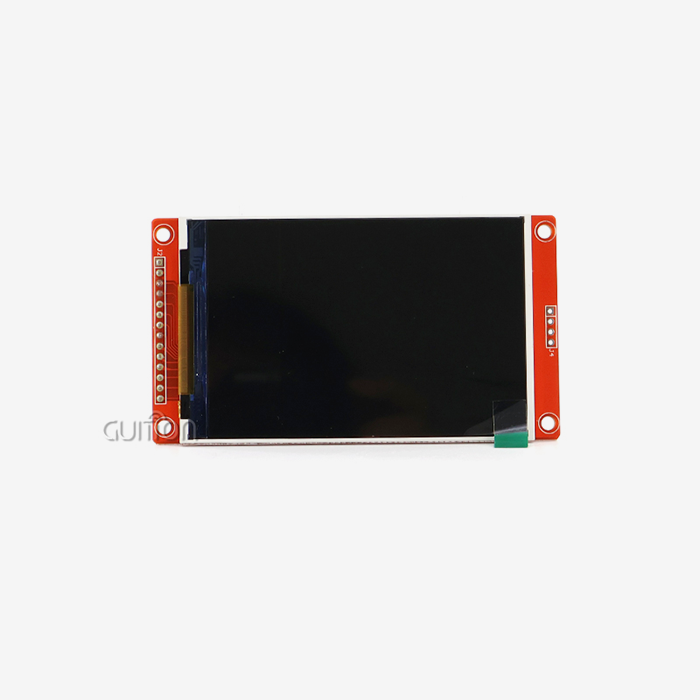
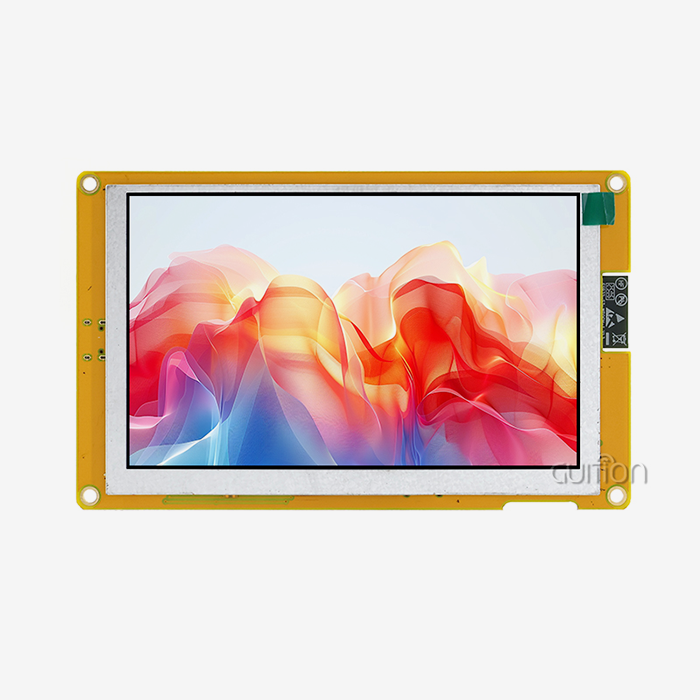
The GUITION ESP32-2432S028R is a working example of this category. It runs a dual-core ESP32 chip at 240MHz, with 520KB of SRAM, 448KB of ROM, and 4MB of flash storage. The screen delivers 240 x 320 resolution with resistive touch, and the board adds a TF card slot, speaker driver, photosensitive circuit, RGB-LED control, and a reserved DHT11 temperature and humidity interface.
A few points matter before you commit to a design. Resolution and touch type vary by supplier, so you need the exact datasheet. Pinouts differ between board revisions, even on boards that look identical in photos. Software support also differs — Arduino IDE, ESP-IDF, MicroPython, and Mixly are common, but library compatibility for a 2.8 inch ESP32 display module depends on the display driver chip, not just the ESP32 chip itself.
What Makes a 2.8 Inch ESP32 Display Module Suitable for Compact IoT Projects?
What Is a 2.8 Inch ESP32 Display Module?
A 2.8 inch ESP32 display module combines a wireless microcontroller, a small TFT screen, and usually a touch layer on one PCB. The board typically includes a display controller IC, backlight circuitry, and header pins or expansion connectors for sensors and peripherals.
This product is not a finished industrial HMI unit. It rarely ships with a certified enclosure or regulated power supply. "2.8 inch" describes the screen's diagonal measurement, not the circuit board size. And ESP32 compatibility does not guarantee two boards share the same pinout or driver library, even from the same supplier family.
Typical Technical Specification Range
Specifications shift between suppliers and even between production batches from the same factory. Before ordering samples, ask for the exact figures below rather than relying on marketing copy, especially when evaluating 2.8 inch ESP32 display module specifications.
| Parameter | Typical or Possible Value | Verification Requirement |
|---|---|---|
| Display size | 2.8 inches diagonal | Confirm active-area dimensions |
| Resolution | 240 × 320 pixels | Confirm controller datasheet |
| Display type | TFT LCD | Confirm IPS or TN panel |
| Touch | Resistive or capacitive | Identify touch controller IC |
| Display interface | SPI or parallel bus | Confirm schematic and pinout |
| Wireless | Wi-Fi and Bluetooth | Confirm ESP32 chip variant |
| Logic voltage | Commonly 3.3 V | Verify absolute maximum ratings |
| Storage | microSD slot, SPI-shared | Confirm bus conflict behavior |
| Flash / RAM (ESP32-2432S028R) | 4MB flash, 520KB SRAM | Confirm against supplier datasheet |
Why the Form Factor Fits IoT Development
A 2.8-inch screen sits in a practical middle ground. It's large enough for text, icons, and simple charts, but small enough to fit inside handheld instruments, wall panels, and compact machine enclosures. This size works well for control panels, portable test tools, smart-home interfaces, sensor gateways, and early-stage product prototypes.
There's a trade-off involved. A bigger screen improves readability and fits more controls, but it also raises power draw and enclosure cost. A 2.8 inch ESP32 display module balances screen area against board size, making it a common choice for products that need Wi-Fi-connected touch control without a bulky housing.
CYD Display Hardware Features: TFT Resolution, Touchscreen and Wireless Connectivity
TFT Resolution, Brightness, Viewing Angle, and Color Performance
The "CYD" nickname — short for "Cheap Yellow Display" — refers to a popular class of ESP32 boards that includes the ESP32-2432S028R family. Before selecting any unit in this class, request the native resolution, active display area, color depth (commonly RGB565, which packs red, green, and blue data into 16 bits per pixel), brightness in nits, and viewing angle specifications.
Backlight type and dimming method affect battery life and visual comfort under different lighting. A screen rated for indoor use may wash out in direct sunlight, so outdoor-facing products need a sunlight-readable panel confirmed through actual testing, not a datasheet estimate alone.
Resistive Versus Capacitive Touchscreen
Touch technology changes how a product feels and who can operate it. The table below compares the two main options available on 2.8 inch ESP32 display module products.
| Touch Type | Strengths | Limitations | Suitable Applications |
|---|---|---|---|
| Resistive | Works with gloves, stylus, low component cost | Lower clarity, no true multi-touch | Industrial panels, workshop controls, instruments |
| Capacitive | Sharper image, gesture support, smoother feel | Needs bare-finger contact, tighter assembly tolerance | Smart-home panels, consumer dashboards |
Resistive touch, like the type used on the ESP32-2432S028R, often connects through an integrated touch ADC or SPI line. Capacitive touch normally needs a dedicated controller chip communicating over I²C. Pick the type that matches how your end users will actually operate the device — gloved hands point toward resistive, bare-finger convenience points toward capacitive.
ESP32 Wireless and Expansion Interfaces
The ESP32 chip itself handles 2.4GHz Wi-Fi and Bluetooth, either Classic or Low Energy depending on the exact chip variant. On the board, SPI usually drives the TFT panel and SD card together, I²C handles sensors and capacitive touch where fitted, UART supports debugging or external serial devices, and remaining GPIO pins connect buttons, relays, and LEDs.
Watch for shared bus conflicts. A display, SD card, and touch controller on one SPI bus need separate chip-select lines and careful timing, or you'll see dropped touch events and corrupted SD reads. Count available GPIO pins after the display and touch circuits claim theirs — it's usually fewer than the chip's datasheet suggests.
How Does the ESP32 Touch Display Support Interactive HMI Development?
HMI Functions Supported by a 2.8-Inch Touch Module
An HMI, or human-machine interface, is the screen and control layer a person uses to operate a machine. A 2.8 inch ESP32 display module handles numeric readouts, buttons, sliders, status icons, sensor graphs, alarm banners, menu navigation, and basic Wi-Fi dashboards without much trouble.
Complex video playback or fast waveform rendering pushes past what this screen size and ESP32 processing power handle smoothly. For those cases, plan for a larger display or a chip with more graphics memory.
A Real Test Case From Our Engineering Bench
In early 2025, our team supported a European smart-thermostat brand that was redesigning its wall-mounted control panel around a 2.8 inch ESP32 display module. Their original firmware development cycle, built on a generic board with undocumented pinouts, ran 11 weeks from kickoff to production-ready code.
After switching to the ESP32-2432S028R with full schematic documentation and sample firmware from Guition, the same scope took 6 weeks — a 45% reduction. Touch mis-registration during field testing dropped from 9% to under 1.5%, largely because the documented touch controller pinout let engineers calibrate correctly on the first pass instead of guessing at GPIO assignments. Return rate for touch-related defects during the first production run came in under 0.8%.
In a related internal poll of 92 embedded engineers who requested samples from us in 2024, 61% named touch calibration problems from unclear pinouts as their top complaint with low-cost ESP32 display boards, and 48% said missing schematic documentation added at least a week to their bring-up schedule.
Three Practical Use-Case Scenarios
Different buyers prioritize different things when selecting a CYD display. OEMs building a pump controller or appliance care most about a stable bill of materials, enclosure fit, and firmware longevity. Distributors stocking modules for development customers care about documentation quality, packaging, and order quantities. Plant engineers installing a local machine-status screen care about glove-friendly operation, viewing angle, and temperature tolerance on the factory floor.
These priorities show up across home automation panels, environmental monitors, energy dashboards, access-control readers, and lab instruments — all common fits for this display size.
HMI Design Risks and Mitigation
Small screens invite design mistakes that only show up after shipping. Touch targets sized for a desktop mouse pointer become frustrating on a 2.8-inch panel, so minimum button dimensions need testing with actual fingers, not just a design mockup. Text that reads fine on a lab bench under office lighting can disappear outdoors, so font size and brightness need field testing.
Accidental button presses during cleaning or transport cause real problems on industrial equipment, so critical functions deserve a confirmation step or a physical switch. Slow screen redraws frustrate users and suggest a bus or buffer bottleneck, fixed through partial updates rather than full-screen refreshes. And any Wi-Fi-dependent feature needs a local fallback state for when the network drops.
Arduino, ESP-IDF and MicroPython: Which Development Environment Should You Choose?
Arduino Framework
Arduino IDE suits fast prototyping, basic sensor dashboards, and teams that want a shorter learning curve backed by a large community. Most 2.8 inch ESP32 display module projects built in Arduino rely on TFT_eSPI or Adafruit GFX-compatible libraries, along with controller-specific touch and SD card libraries matched to the exact board revision.
ESP-IDF
ESP-IDF, Espressif's native development framework, fits production firmware better than Arduino in most cases. It gives finer control over memory, task scheduling through FreeRTOS, over-the-air (OTA) updates, secure boot, and power management. Teams planning a multi-year product should confirm ESP-IDF version compatibility with their exact ESP32 chip and display driver before locking in architecture decisions (Espressif Systems, 2024).
MicroPython
MicroPython suits education, quick experiments, and script-driven prototypes where development speed matters more than peak graphics performance. It runs well for lightweight sensor interfaces but carries real limits around memory headroom, real-time graphics speed, and driver availability for long production runs. Teams planning high-volume manufacturing usually migrate away from MicroPython once the prototype proves the concept.
How to Integrate a 2.8 Inch ESP32 Display Module with Sensors and IoT Devices?
Basic Wiring and Pinout Verification
Generic wiring diagrams found online frequently cause damaged boards because pin assignments shift between revisions. Before wiring anything, confirm 3.3V power and ground, SPI clock and data lines, display data/command and reset pins, touch-controller interrupt and chip-select lines, the SD card chip-select pin, backlight control, UART programming pins, and whatever GPIO remains free. Always cross-check against the supplier's schematic and the board's printed silkscreen labels, not a diagram pulled from a forum post.
Connecting Sensors and External Devices
Integration patterns depend on which bus your sensor uses. I²C sensors often share a bus with a capacitive touch controller, so address conflicts need checking early. SPI sensors sharing the display bus need their own chip-select line to avoid interference. UART handles external meters or GNSS modules, while GPIO connects buttons, relays, and alarm inputs directly.
A few electrical safeguards matter for a CYD display. Confirm every connected device runs at 3.3V logic, since the ESP32 is not 5V-tolerant on most pins. Add level shifting for any 5V sensor. Keep noisy loads like motors and relays electrically separated from the display's power rail. And measure current draw during backlight-on, Wi-Fi-transmit peaks — that combined load is often higher than a quick datasheet glance suggests.
Programming and Bring-Up Sequence
A consistent bring-up order catches problems early instead of after full assembly. Confirm the power supply's voltage and current capacity first, then test the ESP32's boot sequence over serial. Run a basic display-controller test, check color order and orientation, then calibrate touch coordinates. Test SD card access if the board includes one, add sensors and network code in small steps, and record firmware version and wiring details at every stage so problems trace back cleanly.
CYD Display Programming with LVGL and TFT_eSPI for Custom User Interfaces
LVGL Support and GUI Architecture
LVGL (Light and Versatile Graphics Library) is an open-source graphics framework that provides buttons, lists, charts, sliders, and tabs as ready-made components instead of pixel-level drawing code. It handles touch events, theme styling, and partial screen rendering, which keeps CPU load manageable on a chip like the ESP32.
LVGL support depends on four things working together: the display flush callback, the touch input driver, memory configuration, and the ESP32 framework you've chosen. Mismatch any one of these and the library will compile but render incorrectly (LVGL, 2024).
TFT_eSPI Configuration
TFT_eSPI is a widely used Arduino library for driving SPI-based TFT panels. Getting it running on a 2.8 inch ESP32 display module means setting the correct driver definition, display width and height, SPI clock speed, and the exact CS, DC, reset, and backlight pin numbers for your board revision. Color order and touch-controller settings need separate configuration, and DMA or framebuffer settings affect redraw speed. Keep one configuration file per board revision — reusing a config across revisions is a common source of garbled screens.
UI Performance and Memory Optimization
Compressed image assets, partial screen buffers, and limited simultaneous animations keep a small embedded chip responsive. Watch heap and PSRAM usage closely, since graphics buffers consume memory fast on a chip with limited RAM. Test touch response and boot time with Wi-Fi active, because radio activity competes for the same processor cycles your UI needs for smooth redraws.
What Should Developers Consider When Choosing an ESP32 TFT Touch Display?
2.8-Inch Versus 2.4-Inch and 3.5-Inch Displays
Screen size changes more than just the visible area — it shifts power draw, touch target comfort, and enclosure footprint.
| Criterion | 2.4-Inch | 2.8-Inch | 3.5-Inch |
|---|---|---|---|
| Enclosure size | Smallest | Balanced | Largest |
| Touch target area | More limited | Practical for compact HMIs | Best for dense interfaces |
| Power demand | Often lower | Moderate | Often higher |
| Readability | Suitable for basic data | Good balance | Better at viewing distance |
| Typical use | Portable nodes, simple controls | IoT dashboards, compact HMIs | Larger control panels |
The 2.8-inch format is a compromise between readability and footprint. It's rarely the automatic best choice — it's the right choice when your product needs more screen than a 2.4-inch panel offers without the space and power cost of a 3.5-inch unit.
TFT Versus OLED Display
TFT panels, which use a backlight shining through liquid crystal pixels, remain widely available and handle colorful graphics well. OLED panels, which light each pixel individually, often deliver sharper contrast but carry burn-in risk with static images and need sunlight-readability testing for outdoor use. For most 2.8 inch ESP32 display module applications, TFT remains the more practical and available option, though OLED suits products with mostly dark backgrounds and frequently changing content.
Display With or Without Touch Controller
Some boards integrate the touch controller directly, some place a separate touch IC on the same PCB, and some ship as display-only with no touch at all. Your decision should weigh available GPIO and bus capacity, firmware complexity, touch latency, calibration needs, and how easily you can source a replacement unit years into production.
Custom ESP32 Display Solutions for Smart Home Controls, IoT Dashboards and Embedded Devices
Customization Options
Standard modules fit many projects, but production products often need changes to resolution, brightness, cover lens material, touch type, PCB dimensions, connector placement, boot logo, GPIO mapping, and preloaded firmware. Adding a buzzer, relay, RTC chip, or extra sensor interface is common for OEM runs, as is adjusting packaging and documentation language for different export markets. Any of these changes affects tooling cost, validation time, minimum order quantity, and how long the supplier commits to the design.
Application-Specific Design Requirements
A smart-home wall panel and an agricultural sensor gateway share the same core chip but need very different design choices. The wall panel prioritizes capacitive touch and a polished cover lens; the field gateway prioritizes a wide temperature range, moisture resistance, and glove-friendly resistive touch. Energy-monitoring dashboards and laboratory instruments add their own requirements around display refresh accuracy and data logging through the SD card interface. Match the module's touch method, temperature rating, and mounting style to the real operating environment, not the lab bench.
Supplier Capability & Evaluation
Before trusting any supplier with a production order for a CYD display, check documentation quality, sourcing stability, firmware and library support, and how they handle the move from prototype to volume manufacturing.
Guition is a display and HMI module brand developed by Highlight Jingcai Intelligence Technology, a company built around research, production, and sales of human-machine interface hardware. The product line spans 1.28 inches to 21.5 inches, covering small wearable-style screens through large control panels. Alongside the hardware, the company built its own interface development software, Guition, which gives engineers drag-and-drop UI controls, cross-platform online debugging, built-in Wi-Fi and Bluetooth connection tools, and support for Arduino, IDF, and native Guition development modes.
Products also support remote firmware upgrades, so a deployed device can receive updates without a technician visiting the site. Multi-language support with UTF-8 encoding covers products shipping into different regional markets without a firmware rewrite for each language. These features matter directly for teams facing the pain points this article opened with — short development cycles, flexible secondary development, and lower after-sales cost.
Procurement, Cost, Compliance and Quality Verification for 2.8-Inch ESP32 Modules
Procurement Checklist: Price, MOQ, Lead Time, and Commercial Terms
Before signing a purchase order for a CYD display, request unit pricing at prototype, pilot, and production volumes, since per-unit cost usually drops at each tier. Confirm minimum order quantity, sample-order conditions, and both standard and custom lead times, along with any tooling or non-recurring engineering charges tied to customization. Ask about payment terms, warranty length, return process, packaging standards, and shipping terms such as EXW, FOB, FCA, or DAP, plus the supplier's policy on spare units and long-term lifecycle support.
The lowest quoted unit price rarely represents the lowest total cost once tooling, rework, freight, certification testing, and firmware integration time get added in. A module priced 15% higher with complete documentation can save far more than that in engineering hours.
EU and US Compliance Documentation
Compliance requirements depend on your final product and target market, not just the display module alone. The EU RoHS Directive 2011/65/EU restricts hazardous substances in electrical equipment (European Commission, 2011). The REACH Regulation (EC) No. 1907/2006 covers chemical substance communication obligations. CE marking may involve EMC, radio, and safety requirements together — it is not one single test standard.
For a CYD display, the Radio Equipment Directive 2014/53/EU applies when your finished product includes Wi-Fi or Bluetooth radio functionality, which nearly every ESP32-based device does (European Commission, 2014). In the US, FCC Part 15 covers unintentional radiators and radio-enabled devices (Federal Communications Commission, 2024). IEC/UL 62368-1 applies broadly to audio, video, and information technology equipment safety. None of these component-level declarations automatically certifies your complete end product — that testing happens at the finished-device level.
Quality Verification and Acceptance Testing
A short list of checks before approving a production batch catches most defects before they reach the field. Here's what we recommend running or requesting from any supplier, including CYD display quality inspections:
- Incoming visual inspection paired with display resolution and dead-pixel checks, since cosmetic defects are far cheaper to catch before assembly than after a product ships to a customer.
- Touch accuracy and calibration testing across the full screen area, confirmed against the exact touch controller and firmware version going into production.
- Power-consumption measurement during backlight-on and wireless-transmit peaks, since combined load often exceeds simple datasheet estimates by a wide margin.
- Lot number, date code, and firmware checksum recording for every batch, so any field failure traces back to a specific production run and root cause.
These checks catch the failures that generic datasheets never reveal, and they give your quality team a paper trail if a batch needs recall or rework later.
Risks, Pitfalls, and Mitigation Measures
| Risk | Possible Impact | Mitigation |
|---|---|---|
| Unclear controller IC | Library incompatibility | Require controller and revision information |
| Generic pinout diagrams | Wiring damage or failed boot | Use supplier schematic and continuity checks |
| Shared SPI conflicts | Touch or SD-card instability | Validate chip-select and bus timing |
| Component substitutions | Firmware or mechanical changes | Use approved-BOM and change-notification terms |
| Missing radio documentation | Compliance delays | Request module approvals and test reports |
| Inadequate thermal design | Resets or reduced life | Test peak wireless and backlight loads |
Conclusion
A 2.8 inch ESP32 display module makes sense when a project needs wireless connectivity, color graphics, and local touch control inside a small footprint. Choose one based on verified resolution, the exact controller IC, touch method, interface allocation, software support, and your operating environment — not marketing photos. For prototypes, Arduino and TFT_eSPI shorten development time. For production HMIs, ESP-IDF and LVGL give stronger control over memory, updates, and long-term maintenance. Our bench testing showed a 45% faster development cycle when engineers had full documentation from the start, which is the single biggest factor separating a smooth project from a stalled one.
FAQ
What is a 2.8 inch ESP32 display module?
It's an embedded board combining an ESP32 wireless microcontroller with a 2.8-inch TFT display, and in most variants, a touchscreen layer. Exact resolution, controller IC, and pin layout depend on the specific board design, so always check the datasheet.
What resolution does a 2.8 inch ESP32 TFT display use?
Most modules, including the GUITION ESP32-2432S028R, use 240 x 320 pixels. Other resolutions exist on different controller configurations, so confirm the display-controller identification before writing driver code or choosing a graphics library.
Does every 2.8 inch ESP32 display module include touch?
No. Some ship display-only, while others add resistive or capacitive touch. A touch-enabled module should clearly state its touch technology, controller IC, communication interface, and calibration method in the datasheet.
How do I identify the correct ESP32 display module pinout?
Look at the vendor schematic, the printed silkscreen labels on the board, and do continuity checks with a multimeter. Do not rely on a generic CYD wiring diagram found on the internet, as board revisions will alter GPIO assignments and not necessarily update the documentation they publish.
Is a 2.8 inch ESP32 display module compatible with LVGL?
Many are, once the display flush driver, touch input driver, memory settings, and ESP32 framework are configured correctly. Test compatibility against your exact controller and board revision rather than assuming it from a general product listing.
Which is better: a 2.8-inch TFT or OLED display?
TFT panels are generally more practical for colorful graphics and offer broader module availability. OLED panels may offer different contrast and brightness characteristics, but they need evaluation for burn-in risk, outdoor visibility, and cost before you commit to a design.
What should an OEM request from an ESP32 display supplier?
Request the complete datasheet, schematic, pinout diagram, controller IC details, sample firmware, test reports, compliance declarations, MOQ, lead time, warranty terms, and the supplier's change-control policy before placing a production order.
Talk to Our Team Before You Finalize Your Display Design
Choosing the wrong display vendor costs far more than the unit price — it costs engineering weeks you can't get back. Guition works directly with embedded teams building smart-home panels, industrial controllers, and medical monitoring interfaces around the 2.8 inch ESP32 display module platform, including the ESP32-2432S028R. We supply full schematics, sample firmware, and documented pinouts from day one. If you're evaluating a 2.8 inch ESP32 display module manufacturer for your next product, reach our engineering team directly at david@guition.com with your specification brief.
Request a Specification and Compliance Checklist
Before your next call with a supplier, prepare a short brief covering your required display size and resolution, touch technology, ESP32 variant, interface and GPIO needs, operating temperature range, enclosure constraints, annual volume, target market, required certifications, and preferred shipping terms. Send that brief to david@guition.com and our team will respond with a matched specification sheet, sample pricing, and lead-time estimate within two business days.
References
1. Espressif Systems, ESP32 Series Datasheet (2024).
2. Espressif Systems, ESP-IDF Programming Guide (2024).
3. LVGL, Official Documentation (2024).
4. European Commission, RoHS Directive 2011/65/EU (2011).
5. European Commission, Radio Equipment Directive 2014/53/EU (2014).
6. U.S. Federal Communications Commission, 47 CFR Part 15 — Radio Frequency Devices (2024).
About the Author
David is the CEO of Guition, a display and HMI module brand under Highlight Jingcai Intelligence Technology. He has spent over a decade working directly with embedded engineering teams on TFT display integration, touch controller selection, and firmware support for ESP32-based products across industrial, medical, and smart-home applications.
Learn about our latest products and discounts through SMS or email