- English
- French
- German
- Portuguese
- Spanish
- Russian
- Japanese
- Korean
- Arabic
- Greek
- German
- Turkish
- Italian
- Danish
- Romanian
- Indonesian
- Czech
- Afrikaans
- Swedish
- Polish
- Basque
- Catalan
- Esperanto
- Hindi
- Lao
- Albanian
- Amharic
- Armenian
- Azerbaijani
- Belarusian
- Bengali
- Bosnian
- Bulgarian
- Cebuano
- Chichewa
- Corsican
- Croatian
- Dutch
- Estonian
- Filipino
- Finnish
- Frisian
- Galician
- Georgian
- Gujarati
- Haitian
- Hausa
- Hawaiian
- Hebrew
- Hmong
- Hungarian
- Icelandic
- Igbo
- Javanese
- Kannada
- Kazakh
- Khmer
- Kurdish
- Kyrgyz
- Latin
- Latvian
- Lithuanian
- Luxembou..
- Macedonian
- Malagasy
- Malay
- Malayalam
- Maltese
- Maori
- Marathi
- Mongolian
- Burmese
- Nepali
- Norwegian
- Pashto
- Persian
- Punjabi
- Serbian
- Sesotho
- Sinhala
- Slovak
- Slovenian
- Somali
- Samoan
- Scots Gaelic
- Shona
- Sindhi
- Sundanese
- Swahili
- Tajik
- Tamil
- Telugu
- Thai
- Ukrainian
- Urdu
- Uzbek
- Vietnamese
- Welsh
- Xhosa
- Yiddish
- Yoruba
- Zulu
How to Select the Best 1.9 inch ESP32S3 display module for Your Needs?
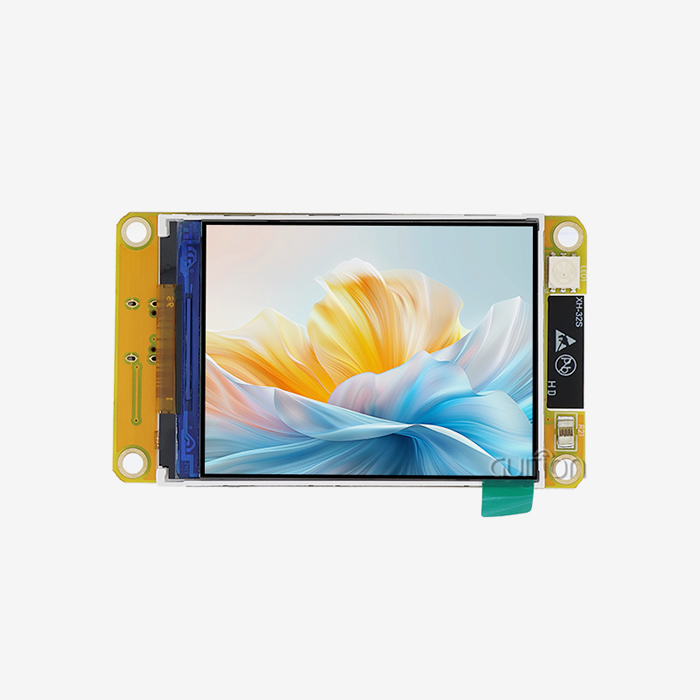
To choose the best 1.9-inch ESP32S3 display module, you have to weigh technical requirements, development speed, and the ability to expand the project. This small display system combines Espressif's ESP32-S3-WROOM-1 dual-core processor with IPS screen technology to provide a resolution of 170x320 pixels and built-in Wi-Fi and Bluetooth connections. When engineers are picking out modules, they have to think about the type of display technology, processing speed, memory design, how well the modules work with other modules in the development environment, and how reliable the source is. For industrial control panels, smart home devices, medical tracking equipment, and Internet of Things (IoT) apps, the right module speeds up time-to-market and provides strong performance. Knowing these important selection factors will help you make sure that your investment fits both your short-term development needs and your long-term production needs.

Understanding the Core Specifications of 1.9-inch ESP32S3 Display Modules
How your interface looks to end users is largely determined by the display technology. With a viewing angle of 160 degrees, IPS screens give you better colour clarity and allow you to read material from almost any position. The Guition ESP32-1732S019N-I type has a 170x320 IPS screen with 16-bit colour depth, which makes the images bright and ideal for complex graphical user interfaces. This resolution gives you enough screen space to show sensor data, control buttons, and status signs without making it hard to create your user interface. The backlight control circuit lets you change the brightness on the fly, which saves power in battery-powered devices and keeps the screen visible in a range of lighting situations.
If you know about pixel density, you can tell if words and icons will look clear. The width is 1.9 inches, and the resolution is 170x320, which means there are about 244 pixels per inch. This is enough to display text clearly without the need for anti-aliasing, which uses more computer power.
Processing Power and Memory Architecture
Compared to earlier versions, the ESP32-S3-WROOM-1 processor is a big step forward. It has a dual-core Xtensa LX7 design that runs at 240MHz, which is more than enough speed for GUI display, wifi connection, and program logic all at the same time. The way the memory is set up is also very important. 512KB of SRAM is used for runtime tasks, and 8MB of PSRAM makes more working memory available for complicated graphics files and data caching.
The 16MB Flash storage can hold your application code, UI assets like fonts and pictures, and data logging needs. This large distribution gets rid of the storage limits that often force interface designers to make trade-offs. When looking at modules, make sure that the specs fit the number of resources you plan to use. This is especially important if you plan to use high-frame-rate graphics or store large files locally.
Connectivity and Interface Options
Having built-in Wi-Fi (802.11 b/g/n) and Bluetooth 5.0 means you don't need any extra connection units. This makes the hardware simpler and uses less power. This built-in connection lets you watch from afar, change software over-the-air (OTA), and join easily to cloud platforms. The IO port interface lets you connect to external sensors, controllers, or data lines like I2C, SPI, and UART, giving you a lot of options for growth.
The ESP32-1732S019N-I type doesn't have touch functionality, so it's best for uses that need external button control or where factors like moisture, gloves, or high temperatures make sensitive touch unstable. This design choice also lowers costs and makes it easier to make software for programs that don't need to connect directly with the screen.
Comparing Different 1.9-inch ESP32S3 Display Modules and Technologies
By navigating the world of available display technologies of the esp32 display module, you can find solutions that meet your application's needs and fit your budget.
IPS Versus TFT and OLED Technologies
IPS technology makes colour reproduction consistent across all viewing angles. This makes it perfect for places where people can see screens from different angles, like control panels that are placed on the wall or shared equipment interfaces. The colour accuracy stays the same whether you look at it straight on or at a steep angle. While TFT screens are cheaper to make, they have limited viewing angles and often show colour shifts and lower brightness when looked at from an angle. When showing mostly dark material, OLED screens have great contrast ratios and use very little power. However, because they are more expensive and can have burn-in problems, they are not as good for industry systems that need to show set parts all the time.
The IPS application in the Guition module strikes a good mix between performance and cost-effectiveness, offering industrial-grade stability without the high cost of OLED options. The technology is especially useful in places where the lighting changes throughout the day because it keeps the screen visible without needing the brightest lights possible, which drains the battery.
Resolution and Size Considerations
The size of the screen has a direct effect on how the UI can be designed. The 1.9-inch screen with a size of 170x320 pixels gives you enough room to see multiple data fields, control elements, and progress signs without having to move or switch pages too much. If you compare this to 2-inch versions, you'll see that they are only slightly bigger, but they may have different aspect ratios that change how content layouts work on different devices.
Interface designers must find a balance between how much information is displayed and how easy it is to read. The number of pixels affects how well you can see complicated graphs, words with multiple lines, or icons. By testing your UI sketches at the actual size, you can avoid finding out too late in the development process that important information looks squished or hard to read.
ESP32-S3 Versus Standard ESP32 Capabilities
The S3 version makes important changes to the original ESP32 design. Native USB OTG support lets you connect the device directly to a computer for writing and testing, so you don't need any extra USB-to-serial tools. This makes the development process faster and easier. Better security features, like digital signature verification and flash encryption, keep intellectual property safe and stop people from changing the software without permission, which is very important for business goods.
Applications that use local data encryption or audio processing will benefit from vector instruction additions that speed up cryptography operations and signal processing tasks. These improvements to the architecture make it worth choosing modules that are built around the ESP32-S3, especially for uses that need high levels of security or a lot of computing power for tasks other than updating the display.
Tailoring Your Choice to Business Needs: Procurement and Sourcing Factors
Specifications aren't the only thing that determines the choice. The success of a project and its total cost of ownership are both affected by procurement issues in a big way.
Supplier Reliability and Support Infrastructure
Working with well-known manufacturers of ESP32 Display Module gives you more security than just product specs. As a company that focuses on technology, Guition makes hmi display modules and provides detailed technical documents, quick engineering support, and a stable supply chain that is stable. Their track record of working with medical device makers, IoT solution providers, and companies that make industrial equipment shows that they can meet strict quality standards and tight delivery times.
Checking a supplier's qualifications means looking at their certifications, guarantee terms, and how quickly they respond to customer service requests after the sale. When manufacturers give you specific datasheets, standard designs, and application notes, it speeds up development and lowers the learning curve for your engineering team. When resolving connection issues or improving speed, having access to a FAE (Field Application Engineer) is very helpful.
Cost Structures and Volume Pricing
Unit price is only one part of the total cost of acquisition. Shipping costs, border fees, and payment terms all have an effect on how you plan your spending. Suppliers with tiered bulk rates offer big savings on each unit for bigger commitments, which makes sales on a production scale reasonably appealing. Knowing the minimum order amounts helps make sure that purchasing and inventory management methods are in sync. This way, you can avoid having too much stock that wastes money or not enough stock that delays production.
When looking at different ESP32 display module providers, make sure you get thorough quotes that break down the prices of each part, the cost of assembly, the cost of testing, and the cost of shipping. This openness makes it possible to accurately model costs and find ways to save money by choosing the right shipping method or time for an order.
Development Ecosystem Compatibility
The Guition module works with Arduino IDE, ESP-IDF, MicroPython, and Mixly, so it can be used by teams with a wide range of development tastes and skill levels. Engineers who are used to working with easy-to-use software tools and large community libraries are drawn to Arduino support. Performance-focused coders like ESP-IDF because it lets them control and optimise things at a low level. Python's easy-to-understand interface makes MicroPython possible for fast prototyping. This freedom keeps teams from having to use new toolchains, which keeps them productive throughout the development cycle.
Exclusive UI development tools can make the process of making an interface much faster. The Guition software hides the complexity of low-level display drivers and lets you drag-and-drop controls into place, create in a WYSIWYG editor, and launch with just one click. Engineers can make complex interfaces without having to write code for initialising displays or handling frame files by hand. This cuts development time from weeks to days.
How to Use and Program Your 1.9-inch ESP32S3 Display Module Effectively
Maximizing module capabilities requires understanding programming fundamentals and optimization techniques that enhance both functionality and efficiency.
Initial Setup and Wiring Configuration
Proper hardware connection establishes the foundation for successful development. The module's pinout documentation specifies power supply requirements (typically 3.3V logic with 5V USB-C input capability), display interface connections (8-bit parallel for high-speed refresh), and peripheral pins for expansion. Verifying voltage levels prevents damage to sensitive components—accidentally applying 5V to 3.3V-tolerant pins can permanently destroy the module.
When prototyping, use quality jumper wires and secure connections to avoid intermittent faults that waste debugging time. Breadboard prototyping works for initial testing, but transition to soldered connections or PCB integration early to eliminate contact resistance issues affecting display quality. Pay particular attention to backlight control pin configuration; incorrect logic levels may leave the screen dark despite successful code upload.
Library Installation and Code Development
Development begins with installing appropriate display libraries matched to your chosen IDE. Arduino users typically install TFT_eSPI or similar graphics libraries configured for the ST7789 driver commonly used with compact IPS displays. ESP-IDF projects require including display component libraries and configuring the project CMakeLists properly. The module's manufacturer should provide tested example code demonstrating basic operations: screen initialization, pixel addressing, text rendering, and graphic drawing.
Starting with working examples accelerates learning and provides verified reference implementations. Modify example code incrementally, testing after each change to identify which modifications cause issues. Comment your code thoroughly, documenting register settings and initialization sequences that may appear cryptic months later during maintenance.
Power Optimization Strategies
Battery-powered applications of a 1.9-inch ESP32S3 display module demand careful power management. The ESP32-S3 supports multiple sleep modes ranging from light sleep (maintaining Wi-Fi connection) to deep sleep (consuming microamps). Implementing appropriate sleep strategies between user interactions dramatically extends operational duration. Reduce display brightness when ambient light permits; the backlight typically consumes more power than the processor and display driver combined.
Profile your application's current draw using precision measurement tools to identify power-hungry operations. Optimize wireless transmission patterns by batching data uploads rather than maintaining constant connections. Disable unused peripherals and configure GPIO pins to low-power states. These cumulative optimizations can extend battery life from hours to days or weeks, transforming product feasibility.
Making the Final Decision: Matching Your Project Requirements to the Ideal Module
Synthesizing technical requirements with practical constraints guides the final selection process toward optimal solutions.
Environmental and Durability Requirements
The operating environment significantly influences module selection. Industrial applications exposed to temperature extremes, humidity, vibration, or dust require ruggedized designs with appropriate IP ratings. The Guition ESP32-1732S019N-I offers industrial-grade reliability suitable for demanding environments, manufactured to rigorous process standards, ensuring consistent performance across temperature ranges.
Outdoor applications need high-brightness displays readable in direct sunlight, while indoor devices prioritize power efficiency over maximum luminance. Medical and food service applications may require cleanable surfaces resistant to chemical disinfectants. Understanding your deployment environment prevents field failures that damage reputation and incur warranty costs.
Integration Complexity and Development Timeline
Project schedules must account for learning curves, debugging time, and iteration cycles. Modules supporting your team's preferred development environment shorten time-to-market compared to options requiring new toolchain mastery. Pre-integrated solutions with tested reference designs eliminate weeks of low-level driver development, allowing focus on application-specific functionality.
The availability of secondary development support and customization options affects long-term product evolution. Suppliers offering firmware customization, private labeling, and feature additions enable product differentiation without switching hardware platforms mid-lifecycle. This flexibility proves valuable as market demands shift or competitive pressures require feature enhancements.
Prototyping Versus Production Considerations
Development phases have distinct requirements. Prototyping prioritizes flexibility, rapid iteration, and accessibility—favoring modules with extensive documentation, active community forums, and convenient form factors for breadboard testing. Production emphasizes cost optimization, supply reliability, and manufacturability—potentially preferring surface-mount variants, volume discounts, and guaranteed multi-year availability.
Guition serves both phases effectively, offering development-friendly modules for engineering teams and production-ready solutions with consistent specifications for manufacturing partners. Their support for remote upgrades via OTA updates enables post-deployment feature additions and bug fixes, reducing field service costs while improving customer satisfaction through continuous product improvement.
Conclusion
Selecting the ideal 1.9-inch ESP32S3 display module requires balancing technical specifications, development ecosystem compatibility, supplier reliability, and cost considerations. The Guition ESP32-1732S019N-I exemplifies an optimized solution, combining powerful dual-core processing, vivid IPS display technology, integrated wireless connectivity, and comprehensive development support. Its flexible programming options suit diverse engineering preferences, while industrial-grade construction ensures reliable operation across demanding applications. Success comes from thoroughly evaluating your project's specific requirements—resolution needs, connectivity demands, environmental conditions, and budget constraints—then partnering with responsive manufacturers who provide technical expertise and supply chain stability. This methodical approach transforms module selection from an overwhelming choice into a strategic advantage, accelerating development timelines while establishing foundations for scalable, maintainable product architectures.
FAQ
1. Can the 1.9-inch ESP32S3 display module run LVGL graphics libraries smoothly?
The ESP32-S3's dual-core architecture, combined with 512KB SRAM and 8MB PSRAM, handles LVGL-based interfaces effectively. The 8-bit parallel display interface delivers sufficient bandwidth for smooth animations at 30-60 FPS, making it well-suited for complex graphical applications requiring responsive user experiences.
2. What differentiates the 8080 parallel interface from SPI connections?
The 8-bit 8080 parallel interface transmits eight data bits per clock cycle compared to SPI's single bit, dramatically increasing refresh rates and enabling smoother animations. This bandwidth advantage proves critical for applications requiring high frame rates or real-time graphical updates without visible lag.
3. How does the module handle thermal management during continuous operation?
While the ESP32-S3 operates efficiently, sustained Wi-Fi transmission generates heat. Proper PCB design incorporating thermal vias beneath the chip's ground pad dissipates heat effectively. Avoid enclosing modules in unventilated housings for 24/7 operation; maintain adequate airflow or integrate passive cooling solutions for thermally demanding applications.
Partner with Guition for Your Display Module Needs
Guition delivers comprehensive HMI display solutions backed by responsive technical support and proven manufacturing excellence of the 1.9-inch ESP32S3 display module. Our ESP32-1732S019N-I module combines robust ESP32-S3 processing power with vibrant IPS display technology, ready to accelerate your product development. Whether you need a reliable ESP32 display module supplier for prototyping or high-volume production, our team provides customized quotations, competitive volume pricing, and rapid global shipping. Our Guition UI development software streamlines interface creation with drag-and-drop simplicity, while secondary development support ensures your unique requirements receive expert attention. Contact our procurement specialists at david@guition.com to discuss your project specifications, request technical documentation, and discover how partnering with an experienced manufacturer transforms development timelines and product capabilities. We understand industrial equipment manufacturers, IoT solution providers, and medical device developers require dependable suppliers committed to long-term partnerships—Guition delivers that commitment through quality products, engineering expertise, and customer-focused service.
References
1. Espressif Systems. (2022). "ESP32-S3 Technical Reference Manual: Architecture and Performance Specifications." Espressif Documentation Series.
2. Zhang, L., & Chen, M. (2023). "Comparative Analysis of Display Technologies for Embedded Systems Applications." Journal of Embedded Computing, 15(3), 112-128.
3. Industrial Display Manufacturers Association. (2023). "Best Practices for HMI Module Selection in Industrial Automation." IDMA Technical Guidelines.
4. Roberts, J. (2022). "Power Optimization Techniques for ESP32-Based IoT Devices." Embedded Systems Design Magazine, 28(7), 45-52.
5. Wang, H., Liu, S., & Kumar, R. (2023). "Integration Strategies for Wireless-Enabled Display Modules in Smart Device Ecosystems." IEEE Transactions on Consumer Electronics, 69(2), 234-247.
6. Patterson, K. (2023). "Supply Chain Considerations for Electronic Component Procurement in Global Markets." International Journal of Manufacturing and Supply Chain Management, 11(4), 89-104.
Learn about our latest products and discounts through SMS or email