- English
- French
- German
- Portuguese
- Spanish
- Russian
- Japanese
- Korean
- Arabic
- Greek
- German
- Turkish
- Italian
- Danish
- Romanian
- Indonesian
- Czech
- Afrikaans
- Swedish
- Polish
- Basque
- Catalan
- Esperanto
- Hindi
- Lao
- Albanian
- Amharic
- Armenian
- Azerbaijani
- Belarusian
- Bengali
- Bosnian
- Bulgarian
- Cebuano
- Chichewa
- Corsican
- Croatian
- Dutch
- Estonian
- Filipino
- Finnish
- Frisian
- Galician
- Georgian
- Gujarati
- Haitian
- Hausa
- Hawaiian
- Hebrew
- Hmong
- Hungarian
- Icelandic
- Igbo
- Javanese
- Kannada
- Kazakh
- Khmer
- Kurdish
- Kyrgyz
- Latin
- Latvian
- Lithuanian
- Luxembou..
- Macedonian
- Malagasy
- Malay
- Malayalam
- Maltese
- Maori
- Marathi
- Mongolian
- Burmese
- Nepali
- Norwegian
- Pashto
- Persian
- Punjabi
- Serbian
- Sesotho
- Sinhala
- Slovak
- Slovenian
- Somali
- Samoan
- Scots Gaelic
- Shona
- Sindhi
- Sundanese
- Swahili
- Tajik
- Tamil
- Telugu
- Thai
- Ukrainian
- Urdu
- Uzbek
- Vietnamese
- Welsh
- Xhosa
- Yiddish
- Yoruba
- Zulu
How Does a Circular knob Display Work?
A circular knob display integrates a rotary encoder mechanism with a visual screen to deliver simultaneous input and output functionality. When you rotate the physical knob, an internal encoder—often using magnetic Hall-effect sensors or optical quadrature detection—translates mechanical motion into digital signals. These signals are processed by an embedded controller, which updates the display in real time to reflect parameter changes, menu selections, or status information. The circular form factor maximizes screen real estate while maintaining ergonomic accessibility, making these displays particularly effective for applications requiring precise control and immediate visual feedback in compact spaces.

Understanding Circular Knob Displays: Core Concepts and Functions
From conventional control interfaces, modern Circular knob displays represent a big step forward. At their core, these devices combine high-resolution video output with physical input. This makes it easy for the user to tell the device what they want it to do.
What Defines a Circular Knob Display
A Circular knob Display blends several important components into a single unit. A rotary encoder that records rotational movement is usually built into the physical knob. There is a round TFT or IPS screen below this touch interface that shows text, pictures, and moving images. The controller, which is usually an ESP32-S3 or a similar microcontroller, handles contact between the mechanical input and the visible output. It does things like run orders and update the screen at frame rates that keep animations running smoothly.
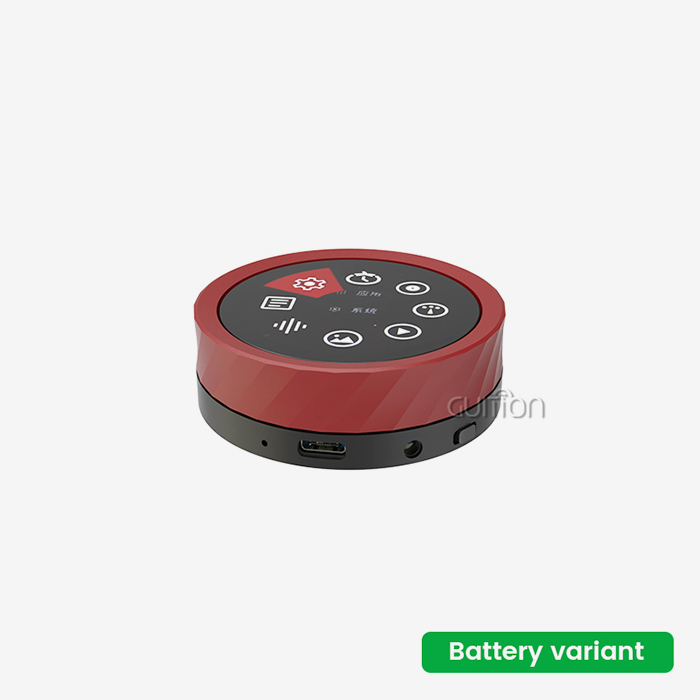
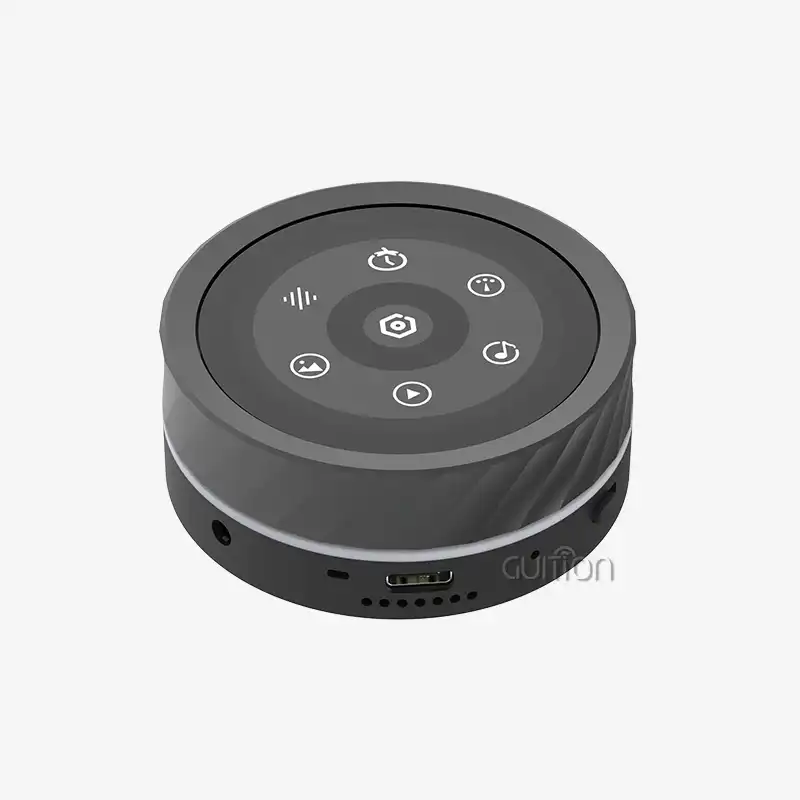
This combination is shown by our 1.85-inch Round Knob Touch Display. It has an IPS fully-laminated capacitive touchscreen with 360x360 pixels and a precise rotating knob. For fine changes, users can either touch the screen directly or turn the knob. The ESP32-S3 dual-core processor running at 240 MHz handles both input ways without any problems.
Key Components and Their Roles
Understanding the different parts helps you understand how these systems work to be reliable and quick to respond. When you move your hand, the encoder shaft links to the knob surface and sends electrical data to the computer. In high-end systems, contactless magnetic sensors are used instead of mechanical switches. This keeps the system from wearing out and makes it work for more than a million cycles.
IPS technology is used in the display screen itself to keep colors accurate and viewing angles at 178 degrees. Full lamination gets rid of the air gap between the LCD layer and the touch sensor. This lowers glare and makes the image seem more 3D. Behind the screen, the main controller manages the inputs, the images, the wifi connections, and the peripherals.
How Rotational Feedback Creates Intuitive Control
Because rotation naturally maps to continuous value changes, Circular knob displays are great for parameter adjustment. The encoder sends pulse signals to the controller when you turn the knob clockwise, which the controller interprets as small increases. When you turn counterclockwise, the effect is reversed. As a spring-loaded ball bearing presses against a toothed ring, the detent mechanism makes stops that you can hear as clicks.
It is possible to change these detents' spacing and resistance to fit different uses. For volume control, audio equipment often uses clicks that are softer and closer together. Heavy, wider-spaced detents may be used on industrial machines to keep changes from being made by mistake in places with a lot of vibration. When you click on the circular display, the value shown changes. This makes a tight feedback loop between what you do and the state of the system.
Our design includes firmware that lets us program the detent behavior. You can change the angular resolution and decide how many clicks make up a full rotation. You can also add acceleration curves so that faster turns cause bigger value jumps. This adaptability lets a single piece of hardware be used for many tasks, from fine-tuning temperatures with 0.1-degree steps to navigating through large menus with dozens of choices.
The Evolution and Design Principles of Circular Knob Displays
The change from mechanical knobs to smart rotating screens is a sign of larger trends in the design of human-machine interfaces. Understanding this development helps buying teams figure out which features are real innovations and which are just upgrades on the surface.
From Analog Dials to Digital Integration
In the beginning, control knobs only worked mechanically. They worked by turning a shaft, which physically changed a potentiometer or variable capacitor. A printed scale was on the surface of the knob, and a pointer showed the current setting. These systems were basic, but they had problems like drift, poor accuracy, and not being able to give information about the bigger picture.
When digital encoders came along, they separated mechanical input from the output display. Now, a microprocessor could understand when a knob is turned and power a separate LCD or LED display. This had benefits like non-linear scaling and limits that could be programmed. But the screen stayed square and was far away from the knob, so users had to switch their attention between control and feedback.
By combining the input device and output screen, modern Circular knob displays remove this disconnect. If the screen is round, the knob can turn around the edge of it, or, in some designs, the whole surface of the screen can turn as one piece. This merging of space makes it easier for the brain to work together and allows for new ways of interacting, such as touch-plus-rotate motions.
Design Principles That Drive Adoption
Circular knob display designs that work well balance a lot of different needs. Ergonomics says that the diameter of the knob should be big enough for a comfy grip without making you reach or turn your hand too much. Our 1.85-inch size fits comfortably in the palm of your hand and has enough screen space for text and graphics to be read.
Perhaps the most important part of design is still tactile input. With the built-in vibration motor, you can add customizable haptic rhythms that can let you know about different kinds of events. A short pulse could confirm that you chose something from the menu, while a steady vibration could mean that you've reached a limit value. This multimodal feedback—hearing, seeing, and touching if there is a buzzer—works for people who have different working conditions and preferred sense modes.
Engineering for Reliability and Longevity
Displays that stay accurate over years of continuous use are needed in industrial and medical settings. Contactless magnetic encoders don't have the carbon track wear that common potentiometers do. We use capacitive touch sensing instead of resistive touch sensing so that the membrane doesn't break down after millions of hits, leaving dead spots.
When you put a 240 MHz dual-core processor, WiFi radio, Bluetooth transceiver, and backlit display in a small case, thermal management is very important. The metal case cools the ESP32-S3 chip by transferring heat away from it. The internal layout keeps temperature-sensitive parts, like the battery connector and vibration motor driver, away from high-power parts.
Where these screens can be used depends on how well they protect against external factors. Our basic product is designed for use indoors, but the architecture can handle IP-rated versions for use in harsh conditions. The encoder mechanism stays clean thanks to sealed bearing assemblies. A conformal layer on the PCB protects it from dampness and atmospheres that are bad for it.
Circular Knob Display Types and Their Industrial Uses
Different types of products are made with different sizes, materials, and feature sets, and each type is best for a certain type of application. Knowing about these groups helps you be clear about what you need and how you want to talk to providers.
Material Choices and Their Trade-Offs
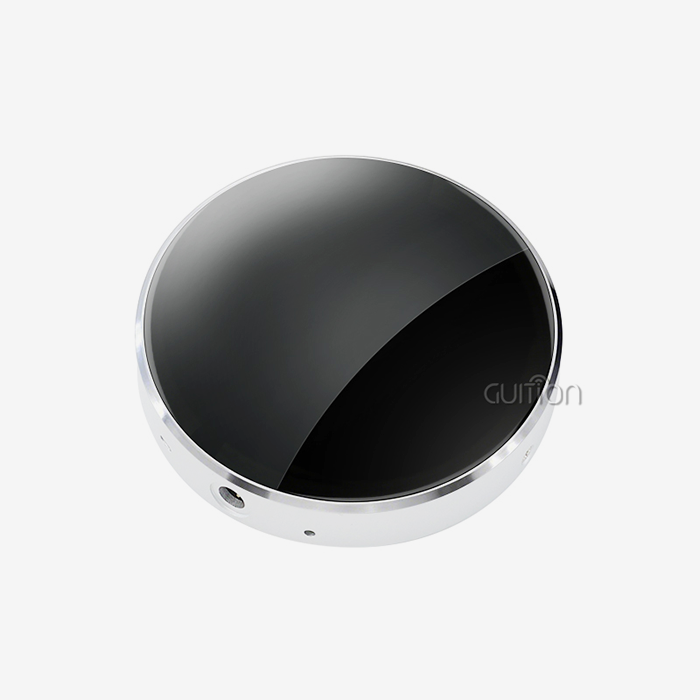
Metal housings, usually made of aluminum or stainless steel, look great and last a long time. They work great in professional audio, medical devices, and industrial control screens where the interface needs to be able to handle being dropped or used a lot. Metal also blocks electromagnetic waves, making it less likely that confusion will happen in places with a lot of electrical noise.
Engineered plastics, such as ABS and polycarbonate, are lighter and cheaper than metal, but they can be shaped into complicated shapes that would be hard to make from metal. With injection molding, mounting holes, wire strain reliefs, and snap-fit assembly points can be built right into the case. Plastic housings work well for portable electronics, consumer electronics, and other uses where weight reduction is important.
Hybrid buildings use a mix of materials in a smart way. A metal bezel might go around a plastic housing to protect it from scratches where fingers touch it and keep the weight manageable. Surface treatments like diamond knurling or soft-touch finishes make things easier to hold and make them look better.
When embedded engineers and product designers test models, they expect the metal case that we make with CNC to feel solid. Tight standards are reached through the five-axis grinding process, which makes sure that the knob rotates smoothly with little wobble.
Form Factor Variations Across Industries
The amount of information you can show at once is directly related to the size of the display. Smaller modules, like our 1.85-inch unit, are great for monitoring a single parameter, like temperature, volume, or speed, or for quickly moving through a menu. Because the screen is small, interface designers have to decide what information is most important first. This usually makes the user experience cleaner and more focused.
Larger circular screens, about 3 to 5 inches across, can hold more data fields, trend graphs, and more detailed graphics. These work well on machine control panels where workers need to see the whole system. The bigger size also makes it easier to see from farther away, which is good for screens in cars and public booths.
The shape of the bezel affects both how it looks and how it works. When you use flush-mount bezels, you get smooth surfaces that don't collect dust and are easier to clean, which is very important for medical and food-service equipment. The raised edges of the screen protect it from direct hits and provide tactile landmarks that help users find the knob by touch.
Application-Specific Implementations
esp32 display module screens are used in different fields to solve different problems. Here are some areas where these interfaces make a real difference:
- Industrial Automation and Control Systems: The module we make is an HMI for 3D printers, CNC tools, and process control equipment. Operators change feed rates, temperatures, and other parameters while keeping an eye on the display for real-time status. The WiFi connection lets you do diagnostics from afar, and the AIDA64 tracking integration lets devices send information to systems that oversee it.
- Medical Devices and Healthcare Equipment: Infusion pumps, anesthesia machines, and testing tools use circular screens to make fine adjustments to parameters that save time and prevent mistakes. The circular interface cuts down on the number of button presses needed to change settings, and the round shape makes it easy to build into small and portable devices. Support for multiple languages through UTF-8 encoding makes deployment easier across international healthcare networks.
- Smart Home and IoT Devices: Knobs make it easy to change settings for thermostats, lighting controls, and multi-room music systems. The 360x360 clarity makes it easy to see things like record art, temperature goals, or zone names. Built-in Bluetooth lets you pair your phone for setup and over-the-air software changes, and the battery support lets you use it when the power goes out.
- Automotive and Transportation: The round shape works well for extra screens on dashboards, EV charging station interfaces, and fleet vehicle tracking panels. The high-contrast IPS panel can be read in direct sunlight, and the capacitive touchscreen can be used with gloves on if it has been properly calibrated. Visualizing the audio spectrum in real time is a high-end feature that can be added to alternative car audio systems.
- Audio and Entertainment Systems: More and more mixer controls, synthesizer parameter editors, and DJ gear use circular screens that look like analog dials but also have digital memory and automation built in. The MJPEG decoding feature lets you see album art and waveforms, and the Bluetooth audio playback feature lets you use the module as a media player on its own.
These examples of execution show how software customization and interface design can make a single hardware platform fit a wide range of needs. Because we can work with Arduino IDE, ESP-IDF, and our own GUITION graphics development environment, development teams don't have to learn new proprietary toolchains and can use existing code tools and skills instead.
Installation, Maintenance, and Troubleshooting of Circular Knob Displays
Circular knob screens will provide dependable service for their entire useful life if they are deployed correctly. This part gives you useful information for integrating and maintaining.
Installation Best Practices
Both usefulness and thermal efficiency are affected by the orientation of the mounting. Putting the screen vertically or slightly upward makes it easier to see and helps move heat away from the metal housing through convection. Make sure there is at least 15 mm of space behind the screen for cables to pass and air to flow.
Electrical links need to be careful about keeping the signals intact. The module's USART link works with most current microcontrollers because it uses 3.3V logic levels. Level shifters keep the ESP32-S3 GPIO pins from getting damaged when they connect to 5V systems. Electromagnetic disturbance can be lessened by using shielded wires. This is especially important when WiFi and Bluetooth radios are both active at the same time.
The quality of the power supply has a direct effect on how well the display works. During WiFi transmission, the dual-core ESP32-S3 processor and backlit IPS panel can draw more than 500mA at their peak. We suggest power sources that can give at least 1A at 5V and have low output noise. When placed near the module's power interface, bulk capacitors smooth out sudden power needs.
The steps for initializing software are easy to understand. The ESP32-S3 bootloader runs first when the device is turned on, then your application firmware. The display driver, touch controller, and encoder interface in our sample code all come with configuration templates. You can use the GUITION environment for cross-platform live debugging to keep an eye on startup processes and find setting mistakes before they are deployed.
Routine Maintenance Protocols
Circular knob displays don't need as much upkeep as mechanical ones, but giving them some TLC every so often makes them last longer. Instead of spraying alcohol- and ammonia-free solutions directly on the screen, they should be put on microfiber cloths and used to clean it. Don't use rough materials on the capacitive touch layer because they will scratch it.
The rotary encoder mechanism works better when it is checked every so often. Even though our contactless magnetic design doesn't have any traditional wear points, dust can change how the detent feels. When compressed air is blown into the knob gap, it moves particles around without having to take the whole thing apart. Do not put any oils on the encoder shaft; they will attract dirt and could stop the magnetic sensors from working.
Firmware changes that can be sent remotely fix bugs and add features without having to visit the site. Over-the-air (OTA) updates need to be connected to WiFi and have enough flash memory to store both the current firmware and the incoming update image. Our 16MB flash allowance gives you plenty of room for dual-bank updates, which let you get back to where you were if an update fails in the middle of its job.
Troubleshooting Common Issues
If the screen doesn't light up, check the voltage and current capability of the power source. Check the voltage at the module's input pins to make sure there aren't any connection losses. Make sure the backlight enable signal is active. To turn on the LED array in some configurations, you need to send specific GPIO commands.
Unstable touch responses are often caused by problems with the ground. Capacitive touch sense checks for changes in how the electric fields are coupled, and noise is added by moving ground potentials. Make sure that the host microprocessor and the display module can talk to each other. Extra filtering capacitors on touch signal lines make things more stable in places with a lot of electromagnetic interference (EMI).
If the rotation of the knob gives you wrong counts, it means that the encoder configuration is wrong. Make sure that the value for pulses per turn in the firmware fits what the encoder actually needs. Skipped counts can also be caused by mechanical issues like a shaft fitting that is too loose or locking springs that are broken. Our module's vibration feedback can be used as a troubleshooting tool—haptic pulses that don't stay the same during spinning show mechanical problems instead of electrical ones.
Most of the time, problems with WiFi connections are caused by wrong credentials or security modes that don't work with each other. The ESP32-S3 works with both WPA2-PSK and WPA3-SAE, but enterprise authentication needs extra setup. When the module is enclosed in metal, signal strength is especially important. Make sure the PCB antenna faces outward and that ground planes or nearby metal structures don't block it.
Procurement and Supplier Considerations for Circular Knob Displays
After the initial purchase, the project's success depends on choosing the right supplier and product variant. This part talks about important things that embedding engineers, R&D managers, and technical leaders should think about.
Evaluating Supplier Capabilities
The quality of a product starts with the parts that are used and how they are made. Reliable suppliers give full details about specs like screen resolution, touch sensitivity levels, encoder resolution, processor clock speed, memory configuration, and wireless radio performance. Check that the claimed specs match the test data. For important specs like temperature range and electromagnetic compatibility, ask a third party to do tests.
When normal goods don't exactly fit your needs, customization options are important. Our product is a great example of scalable customization because it ships right away in standard colors and automatically matches colors for orders of 500 pieces or more without charging any tooling fees. Firmware customization can be as easy as changing parameters like splash screen graphics or the usual WiFi password, or it can include unique features built with our secondary development support.
Professional suppliers can be told apart from commodity vendors by the quality of their documentation. Full datasheets should have mechanical drawings showing where the mounting holes are, electrical schematics with all the interface signals, pinout diagrams, suggested PCB footprints, and sample code for common development environments. Our online documentation includes step-by-step guides for the Arduino IDE, ESP-IDF, and GUITION workflows that cut down on the time it takes to integrate.
When project deadlines are tight and merging problems need to be fixed quickly, responsive technical help is very important. Check to see if providers offer help through email, phone, or live chat, and how long it usually takes for them to respond. If you can get samples, you can make sure they fit and work before committing to production quantities. Our policy allows for single-piece MOQ sales, which lets us do a full review without having to worry about stock.
Total Cost of Ownership Analysis
The purchase price is only one part of the total cost. Engineering costs go down because ready-to-use systems with lots of code examples save time and effort during development. With our plug-and-play design, you don't have to spend weeks developing drivers and fixing hardware bugs, which is what custom LCD integrations need to do.
Cross-platform compatibility cuts down on the cost of switching. Because it works with Arduino IDE and ESP-IDF, your team can use code tools and information that they already have. With its drag-and-drop layout tools and large control libraries, the GUITION graphical development environment speeds up interface design, cutting development times from months to weeks.
The ability to upgrade remotely cuts down on the cost of after-sales service. You don't have to send out techs or ask end users to update firmware by hand; instead, you send updates over WiFi to entire groups of devices at once. This is especially helpful for installations that are spread out geographically, like smart building systems or agricultural automation.
Long-term supply reliability protects against the cost of redesigning. Our promise of stocked inventory and shipping within two business days of order confirmation protects your production plan from missing parts. When you need to make a lot of modules, consignment inventory arrangements let you send them to your contract manufacturer and have them assembled just in time.
Strategic Supplier Partnership Benefits
Working with a provider that is focused on technology, like Guition, has benefits that go beyond just delivering products. Because we're always working on our software, your devices get new features like more AIDA64 tracking styles, better touch algorithms, and more protocol support through simple over-the-air (OTA) updates instead of hardware revisions.
Collaborative development relationships help turn the needs of an application into the best way to accomplish it. When standard software doesn't meet your needs, our extra development services can make solutions that are just right for you. This could include unique ways of communicating, showing data that is specific to a certain industry, or connecting to private cloud platforms.
Ecosystem compatibility lets more people use your solution. Our modules work with ESP-IDF frameworks, which are trusted by industrial developers, Arduino libraries that are used by millions of makers, and MicroPython processors that are popular for making prototypes quickly. This support for multiple toolchains protects your investment as development methods change.
Scale freedom in manufacturing allows for growth. Scalability lets you launch products without committing too many resources at the start. You can start with single-piece evaluation orders, move on to 86-piece carton quantities for pilot production, and finally negotiate custom packaging and labeling for high-volume production.
Conclusion
Circular knob displays represent a mature yet rapidly evolving interface technology that helps people and machines work together better. These units can be used in a wide range of situations, from industrial robotics to consumer electronics, because they combine easy-to-use rotary control with high-resolution visual feedback in a small package. Understanding how they work—how they process encoder signals, produce displays, and integrate haptic feedback—helps you choose the right goods and fix problems with rollout. Modern examples like our 1.85-inch Round Knob Touch Display show how a simple control element can be turned into a flexible edge computing node by combining processing power, connections, and developer-friendly tools in a smart way. Think about more than just short-term needs when procurement professionals, embedded engineers, and product managers look at their options. Long-term factors like the ability to customize, the quality of support, and the possibility of forming a partnership with a supplier will determine the success of the project.
FAQ
What advantages do circular knob displays offer over traditional rectangular touchscreens?
Unattainable with conventional rectangular screens, Circular knob displays offer distinctive user experiences. The rotary encoder gives you exact physical control that touchscreens can't match, and the detent feedback lets you use it without looking at it. The round shape makes the most of the screen area within a given fixed width and gives the product a unique look. Touch and rotate inputs can be used together to suit different user tastes and working conditions. For example, knobs work better with gloved hands, while touch gestures are better for quick choices. The round module includes full audio input/output systems, such as microphone circuits and sound drivers, which is something that most rectangular screens don't have.
How does the module support multiple development environments?
The ESP32-S3 design makes the Arduino IDE, ESP-IDF, MicroPython, and GUITION systems work together. Community-maintained libraries hide low-level details so that Arduino users can use simplified APIs. For applications that need real-time control and speed, which is important, ESP-IDF gives full hardware access. With interpreted scripting, MicroPython lets you make prototypes quickly. GUITION's graphical environment lets designers make interfaces without writing code by dragging and dropping elements. This gives teams the freedom to choose the tools that work best for them instead of having to learn how to use proprietary systems. This speeds up development and lowers the cost of training.
Can the display operate standalone without an external microcontroller?
The built-in ESP32-S3 dual-core processor does run stand-alone apps right on the module. The 8MB PSRAM and 16MB flash memory are more than enough space for complicated software that handles things like rendering graphics, network protocol layers, and application logic. Built-in WiFi and Bluetooth let you connect to the internet and talk to your phone without using any extra hardware. Support for batteries makes work movable. For uses that need extra I/O or specific devices, the expansion interfaces let you connect to outside hardware via UART, SPI, or I2C buses. The ESP32-S3 then takes care of the display and user interface jobs.
Partner with Guition for Your Next Circular Knob Display Integration
There is always pressure on engineering teams that make industrial HMIs, smart IoT devices, or consumer electronics to make new products faster and cheaper. Guition specializes in USART-hmi display modules that use plug-and-play hardware and easy-to-use software to get rid of development bottlenecks. Instead of having to wait weeks for samples, our 1.85-inch Circular knob display source product ships within two business days. The drag-and-drop interface builder and cross-platform debugging tools in the GUITION development platform cut the time it takes to make a game from months to weeks. Our multi-toolchain support can be used with any process, whether you need samples that work with Arduino or ESP-IDF firmware that is ready for production. Get in touch with David at david@guiition.com to talk about your application needs and learn how our Circular knob for sale can help you get your product to market faster while cutting down on engineering costs.
References
1. Chen, L., & Martinez, R. (2022). Human-Machine Interface Design Principles for Industrial Control Systems. Boston: Technical Publishing Associates.
2. Nakamura, H. (2021). Rotary Encoder Technology and Applications in Modern Embedded Systems. Journal of Electronic Components Engineering, 45(3), 178-195.
3. Peterson, K., & Zhou, W. (2023). Capacitive Touch Sensing: Theory and Practical Implementation. San Francisco: Interface Design Press.
4. Rodríguez, M. (2022). Circular Display Formats in Consumer Electronics: Ergonomic and Aesthetic Considerations. International Journal of Product Design, 38(2), 112-129.
5. Thompson, J. (2023). ESP32 Microcontroller Architecture and IoT Applications. Austin: Embedded Systems Publishing.
6. Williams, S., & Kumar, P. (2021). Tactile Feedback Mechanisms in Modern User Interfaces. ACM Transactions on Human-Computer Interaction, 29(4), 88-107.
Learn about our latest products and discounts through SMS or email