- English
- French
- German
- Portuguese
- Spanish
- Russian
- Japanese
- Korean
- Arabic
- Greek
- German
- Turkish
- Italian
- Danish
- Romanian
- Indonesian
- Czech
- Afrikaans
- Swedish
- Polish
- Basque
- Catalan
- Esperanto
- Hindi
- Lao
- Albanian
- Amharic
- Armenian
- Azerbaijani
- Belarusian
- Bengali
- Bosnian
- Bulgarian
- Cebuano
- Chichewa
- Corsican
- Croatian
- Dutch
- Estonian
- Filipino
- Finnish
- Frisian
- Galician
- Georgian
- Gujarati
- Haitian
- Hausa
- Hawaiian
- Hebrew
- Hmong
- Hungarian
- Icelandic
- Igbo
- Javanese
- Kannada
- Kazakh
- Khmer
- Kurdish
- Kyrgyz
- Latin
- Latvian
- Lithuanian
- Luxembou..
- Macedonian
- Malagasy
- Malay
- Malayalam
- Maltese
- Maori
- Marathi
- Mongolian
- Burmese
- Nepali
- Norwegian
- Pashto
- Persian
- Punjabi
- Serbian
- Sesotho
- Sinhala
- Slovak
- Slovenian
- Somali
- Samoan
- Scots Gaelic
- Shona
- Sindhi
- Sundanese
- Swahili
- Tajik
- Tamil
- Telugu
- Thai
- Ukrainian
- Urdu
- Uzbek
- Vietnamese
- Welsh
- Xhosa
- Yiddish
- Yoruba
- Zulu
How Does a 2.4 inch ESP32 display module Improve HMI Design?
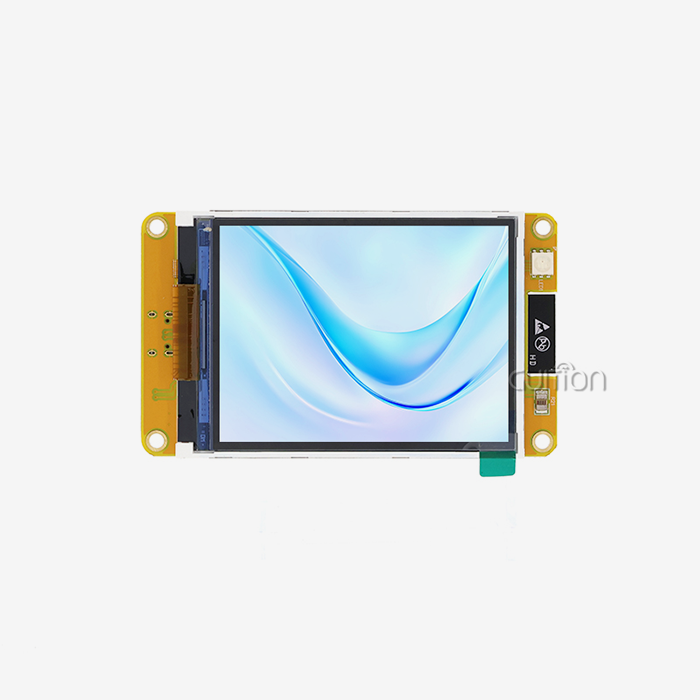
A 2.4 inch esp32 display module improves HMI design by placing the processor, the TFT screen, the wireless radios, and common interfaces on one compact board. This integration cuts wiring, reduces part count, and shortens the time between a concept and a working interface. The dual-core ESP32 can run graphics and control logic together, while Wi-Fi and Bluetooth support remote monitoring and updates. Small products benefit most, because every millimetre of enclosure space and every hour of engineering time counts. Below, I explain how the Guition ESP32-2432S024N applies these advantages.

Why HMI Designers Choose a 2.4 inch ESP32 Display Module
Space, Wiring, and Time Pressure in Compact Products
A display board, a controller board, and the wires that connect them together are a few of the small items. These are big. “Every additional part adds more test steps, more solder joints, more places for something to go wrong. There’s also the fact that product managers need to move fast. It takes weeks to work on the wires and drivers of the prototype — which means testing with users gets delayed. A 2.4 inch ESP32 display module gets around these problems by putting the control and display on the same board. Embedded programmers need not reinvent the wheel when developing the display interface. They may utilise hardware that already works. This way, work is focused less on getting the board up and more on what people see, such as the layout, how easy it is to read, and how people respond.
Why the 2.4-Inch Size Works for Many Interfaces
The screen is 2.4 inches wide and has 167 pixels per inch, or 240 × 320 pixels. Small text and icons that are spaced closely together are easy to read at a distance. A status page with several values would fit just fine on this size. It's not too small for handhelds, wall controllers, or equipment front panels, though. Also, the backlight doesn't need as much power as bigger screens, but how much is used depends on how bright it is and how much wireless activity there is. I like it best for short jobs like one clear reading, one alert, or one short choice per screen when it's this size.
Where a 2.4 inch ESP32 display module fits
On the Guition product page, you will find 3D printers, medical hardware, smart home systems, industrial automation, EV charging stations, air quality screens, safety systems, personal devices, and 3D printers. In each case, the screen must show information in real time, connect to a network, and fit inside a small case. Most of the time, companies building smart homes, industrial tools, and IoT solutions have to meet all three needs simultaneously. Teams building regulated items like medical hardware still need to validate their work. ... Adding a module is not a panacea.
What Is a 2.4 inch ESP32 Display Module?
Core Hardware of the ESP32-2432S024N
These are the major components that control the Guition ESP32-2432S024N. The MCU has two cores, 520 KB SRAM, 448 KB ROM, and 4 MB Flash. It can reach up to 240 MHz. It also has Bluetooth and Wi-Fi. They help the HMI to work. One can take care of communication, and the other can take care of screen updates and control logic. This is because the two cores can perform different things. A full 240x320 picture with 16 bits per pixel requires 307,200 bytes of memory. That’s why writers often draw in chunks. This is something the LVGL graphics library can do.
Display and Onboard Interfaces
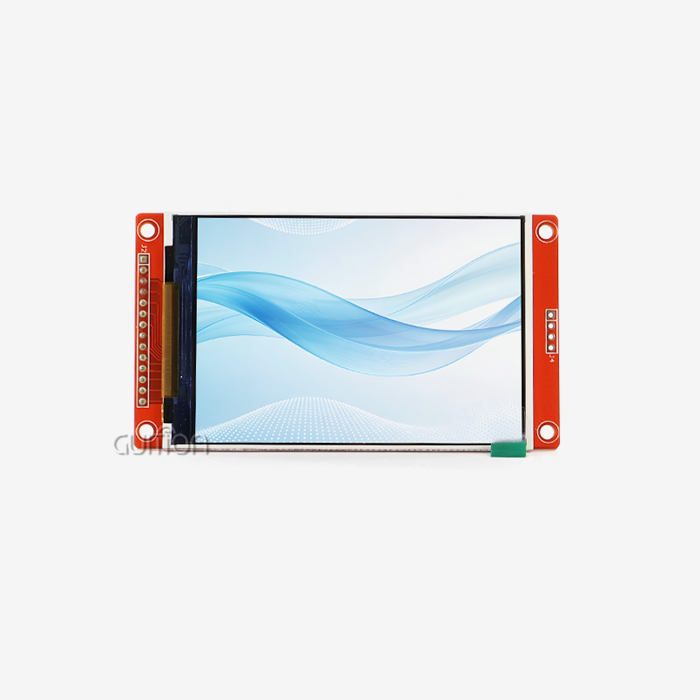
The driver chip is ILI9341, 240 × 320 resolution, 65K colours. The 2.4 inch ESP32 display module uses a 2.4 inch TFT screen. This one doesn't have a touchscreen. The board includes a photosensitive circuit, a touch screen control circuit, a speaker drive circuit, and an RGB-LED control circuit. It has a TF card slot, a USB port, a DHT11 temperature and humidity sensor, and some IO ports that are reserved for further use. When all these are used together, one board can display data, provide sound and light cues, read the room light, and store data on a card.
Built-In Features That Shorten Setup
Here are the main benefits. I believe will help the most in the early stages of development:
- Ready to use: People can turn on the module and make sure that the screen, wireless radio, and internal circuits all work before they write any code. The module comes with test programs already installed. Later, you can start changing things because you know where you stand. This also saves you the first day of setup.
- Flexible power and storage: The board can be powered by a lithium battery or USB power. The battery is safe because it is guarded while it charges. With the TF card slot, you can add more space for logs, pictures, or fonts as the project grows. You don't have to change the hardware.
- Remote update capability: The product page says that changes to software can be sent to a device that is already in use without having to physically get to it. And then, fixes done on the spot cost less than service calls. This is important for things that are built into walls, machines, or cars.
How a 2.4 inch ESP32 display module Improves HMI Design
Integration Reduces Wiring and Component Count
The best way to get a direct benefit is integration. If the controller, the screen driver, the backlight circuit, and the wireless radio are all on the same board, then an engineer does not have to run display signals through different boards and cables. The fewer links there are, the less chance there is of the contacts becoming loose, which is a thing to be desired in shaking machines. It's easy to shop too, as one part number can be used for many. For those who are responsible for R&D, the extra hours are put in the calendar. The team doesn’t design the board or the signals in the first sprint. They work on screens and logic instead.
Clear Local Feedback and Responsive Logic
An HMI that is well made always tells the user what the system is doing. Nielsen Norman Group states that one of the main measures of usefulness is the ability to see what is going on with a system. You can see this on a screen right next to you, so no phone or PC needed. It has two cores and can clock up to 240 MHz. This means a single device can change numbers, read sensors, and handle alarms. The ISA-101 standard also addresses the HMI design guidelines for process automation. It says that you have to make sure that everything is the same. So not much on each page, lots of contrast, and alerts that stick on a small screen.
Wireless Connectivity and Remote Maintenance
The screen is built into the product with Wi-Fi and Bluetooth, so it can be switched on and off. The ESP32 manual states that the ESP32 can connect to a phone via Bluetooth and 2.4 GHz Wi-Fi (802.11 b/g/n). That means it can send data to a computer or plug into a phone. 3. Maintenance is more useful, as it can be updated remotely. A team can fix firmware, add a language string, or correct a mistake in the layout without sending a technician. That means it's cheaper for smart appliance brands and energy tracking companies to provide help after the sale and also means that interface changes will keep coming after the launch.
Using a 2.4 inch ESP32 display module in an HMI project
Review the Hardware Before You Write Code.
The first thing I do when I plug something in is check the pinout and diagram. Check which pins power the DHT11 link, the TF card, the 2.4 inch ESP32 display module screen, and the lighting on the ILI9341. Also make a note of which IO ports are still open. Also look at the path of the supply. Wi-Fi causes current jumps. So you want to test the module not only with a bench source but also with the final USB supply or lithium battery. Then execute the test programs that were included. The radio and screen work, so if things go wrong, it’s more likely to be a problem with your code or wiring than the board itself.
Choose the Development Path That Fits Your Team
It works with Arduino IDE, ESP-IDF, MicroPython, and Mixly. Guition’s GUI has its own app as well. ESP-IDF allows you to control the production firmware at a lower level, MicroPython allows you to write scripts quickly, and Mixly is good for programming with blocks. Add built-in controls to the gesture software with a click, and then drag and drop to move, resize, and style. It will look the same as the design view in the end. Plus, you can switch languages and debug in real time across multiple devices. It also includes additional programming tools and academic papers.
2.4 inch ESP32 Display Module Compared With Other HMI Options
By contrast, another microcontroller with an external LCD requires more parts, wires, and time to get running than this board. It also has WiFi in the same box. It may still make sense to have two different designs for a product that needs a certain display interface, or a bigger processor, or a clear separation between control and display. It takes up more space for text and buttons on a 2.8-inch screen, but the case has to be bigger. Since the ESP32-2432S024N isn’t a touch screen, it can only be used with devices designed for display purposes, such as dashboards and status monitors. It can accept commands wirelessly, or you can plug in external controls into the dedicated IO ports.
Selecting a 2.4 inch ESP32 display module Supplier and Avoiding Design Errors
Define Your Requirements First
In the business world, before you choose each module, buyers should write down its use case, working environment, expected product life, and production volume. The next step is to match the ESP32 version, resolution, display driver, memory, interfaces, power source, and mounting size on the technical list. Touch or non-touch should be the driver for the screen. It is helpful to write down the needs for samples, pilots, and mass production, the MOQ, the wait time, and the batch consistency so that one does not lose track of anything. The price of the module is not the only factor that contributes to the total cost. Includes testing, cover work and rework. What is the use of a low unit price if the team has to spend additional weeks looking for lost papers?
What to Expect From a 2.4 inch ESP32 display module manufacturer
A good maker can get you datasheets, pinouts, sample code, and quick help. This is important because modules with the same name may have different display controllers, chips, or pin assignments. Guition has screens ranging from 1.28 inches to 21.5 inches. It has its own tools for making interfaces, other development interfaces, and support for Arduino, IDF, and Guition development modes as well. So before you place a big order, find out how much the supplier can make, how they check the quality, how long the lead time is, what export documents they offer, and how they let you know when the product changes. When you are making lots of something, it’s better to have clear answers to these questions.
Common HMI Mistakes and Simple Fixes
A lot of people make three mistakes. First, teams often think that modules that are similar can be used together, but they later find that they don't work well together. Before you work on the PCB or program, make sure you know the name of the model. Second, the screen is too small because too many things were put on it. The type should be easy to read, and the contrast should be high. Keep only the most important numbers shown. Third, teams don't give the power source enough power, which can cause bugs, flickering, or lost links when many things are going on at once. Before you launch it, make sure you test it with the final case, power source, and temperature. You should also check it for electromagnetic fields, durability, and following the rules.
Conclusion
A 2.4 inch ESP32 display module improves HMI design primarily through interaction. It has a 240x320 ILI9341 screen, wireless connectivity, and onboard interfaces, which means it requires less wiring, fewer parts, and less time to set up. Teams can create and keep up with interfaces in various ways, thanks to tools that let them make changes online, get feedback locally, and work with software like Arduino, ESP-IDF, MicroPython, Mixly, and Guition. The module works with dashboards, monitors, and small controllers that are designed to show information. But because it doesn't have a touch screen, it has to be managed from the outside or by radio signals. Still, you should check the pinout, power supply, screen layout, and supplier documentation to make sure everything works well before you start making the product.
FAQ
Q: What display driver and resolution does the ESP32-2432S024N use?
A: A driver called ILI9341 is used, which has a resolution of 240 × 320 and can handle 65K colours. You'll have to use external controls or wireless commands to tell this type what to do since it doesn't have a touch screen.
Q: Which development tools does this 2.4 inch ESP32 display module support?
A: With it, you can use software like ESP-IDF, MicroPython, Guition, Arduino IDE, and more. It also gives you an Arduino code and test tools to speed up early development.
Q: Does the module support 5 GHz Wi-Fi?
A: There is no need to worry; the ESP32 works with Bluetooth and 2.4 GHz Wi-Fi (802.11 b/g/n). When you set them up, make sure you use a network that can handle them.
Q: How can I power the module?
A: It can be charged through a cell phone charger or a USB port. It is important to check the main supply while Wi-Fi is connected, since radio waves can cause current spikes that can restart a weak source.
Request a 2.4 inch ESP32 display module. Sample or Quote from Guition
Guition is ready to support your next HMI project as a 2.4 inch ESP32 display module manufacturer and supplier, with sizes from 1.28 to 21.5 inches. Please email david@guition.com with your application, quantity, and shipping address, and our team will help you find the right ESP32-2432S024N configuration. We can also share documents and talk about samples. Visit https://jingcaizhineng.aixdb.cn/ to learn more about this item.
References
1. Espressif Systems, ESP32 Series Datasheet, 2023
2. Espressif Systems, ESP-IDF Programming Guide, 2024
3. ILITEK, ILI9341 TFT LCD Single Chip Driver Datasheet, 2011
4. International Society of Automation, ANSI/ISA-101.01 Human Machine Interfaces for Process Automation Systems, 2015
5. Nielsen Norman Group, 10 Usability Heuristics for User Interface Design, 2024
6. LVGL, LVGL Documentation, 2024
Learn about our latest products and discounts through SMS or email