- English
- French
- German
- Portuguese
- Spanish
- Russian
- Japanese
- Korean
- Arabic
- Greek
- German
- Turkish
- Italian
- Danish
- Romanian
- Indonesian
- Czech
- Afrikaans
- Swedish
- Polish
- Basque
- Catalan
- Esperanto
- Hindi
- Lao
- Albanian
- Amharic
- Armenian
- Azerbaijani
- Belarusian
- Bengali
- Bosnian
- Bulgarian
- Cebuano
- Chichewa
- Corsican
- Croatian
- Dutch
- Estonian
- Filipino
- Finnish
- Frisian
- Galician
- Georgian
- Gujarati
- Haitian
- Hausa
- Hawaiian
- Hebrew
- Hmong
- Hungarian
- Icelandic
- Igbo
- Javanese
- Kannada
- Kazakh
- Khmer
- Kurdish
- Kyrgyz
- Latin
- Latvian
- Lithuanian
- Luxembou..
- Macedonian
- Malagasy
- Malay
- Malayalam
- Maltese
- Maori
- Marathi
- Mongolian
- Burmese
- Nepali
- Norwegian
- Pashto
- Persian
- Punjabi
- Serbian
- Sesotho
- Sinhala
- Slovak
- Slovenian
- Somali
- Samoan
- Scots Gaelic
- Shona
- Sindhi
- Sundanese
- Swahili
- Tajik
- Tamil
- Telugu
- Thai
- Ukrainian
- Urdu
- Uzbek
- Vietnamese
- Welsh
- Xhosa
- Yiddish
- Yoruba
- Zulu
How Do ESP32 C3 LCD Panels Support Touch Control on ESP32 Modules?
Capacitive touch sensors built into ESP32 C3 LCD screens let them talk to the ESP32-C3 microprocessor directly through GPIO pins and SPI interfaces. With its 160MHz RISC-V core, the ESP32-C3-MINI-1U module can handle touch events in real time, turning raw capacitive readings into position data that apps can understand. This architecture gets rid of the need for separate touch controllers, making the design simpler while still allowing IoT devices, industrial panels, and consumer products to use touch to connect.

Understanding ESP32-C3 LCD Touch Control Technology
Touch-enabled screens have changed the way we use embedded computers. Engineers have to find the right balance between the number of parts needed, their usefulness, and their cost. Putting display and touch sensors into small ESP32-based modules solves one of the biggest problems they face.
Display Technologies Compatible with ESP32-C3
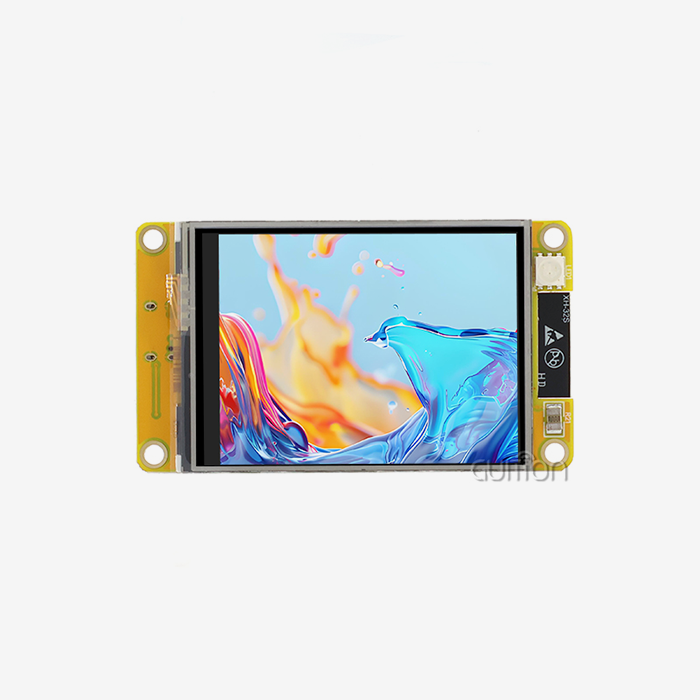
Different LCD technologies are used in modern ESP32 display units to meet the needs of different applications. IPS screens have better viewing angles and more accurate colors, which makes them perfect for apps that people will see and where looks are important. The Guition ESP32-2424S012C_I_Y(B) has an IPS monitor with a resolution of 240x240 pixels that shows colors accurately from 170-degree viewing angles. This standard is very important for medical monitoring tools where more than one person needs to be able to see the screen at the same time. However, TFT screens are cheaper options for situations where price is more important than high-quality visuals. These screens link via SPI ports, which the ESP32-C3 handles well, using very little CPU power when updating the screens. Another choice is OLED technology, which offers deep blacks and high contrast ratios, but it usually costs more and uses power in different ways.
Capacitive vs. Resistive Touch Mechanisms
Modern ESP32 implementations mostly use capacitive touch technology because it is durable and can handle multiple touches. The Guition module puts capacitive sensors right on the IPS screen. These sensors can tell when a finger is on the panel by changing the electric field, so no physical pressure is needed. Compared to resistance options, which break down over time from frequent mechanical stress, this method greatly increases the device's lifespan. Pressure-sensitive layers that make contact when pressed make resistive touch screens work. These have some benefits, like being able to use a stylus and even wear gloves, but they don't have the smooth, responsive feel that users are used to from current displays. In industrial settings, resistive solutions are sometimes better because they are better at keeping out contaminants. However, capacitive technology has come a long way in recent years to solve these issues with better coatings and closing methods.
Interface Architecture and Pin Configuration
The ESP32-C3 talks to touch devices through its GPIO framework. I2C or special touch-sensing pins are usually used. The ESP32-C3-MINI-1U has touch sensors built in on certain GPIO pins that can sense changes in capacitance without any extra hardware. When these pins are connected to display modules, they link to the controller IC of the touch panel. This IC handles raw sensor data first before sending coordinates to the main processor. SPI interfaces let multiple displays talk to each other at the same time. When built as different parts, the ESP32-C3 handles separate chip-select lines for the LCD driver and touch controller. The Guition module makes this design easier to use by setting up pin assignments ahead of time. This way, developers can use the touch features fully without having to do any manual setup. This plug-and-play method cuts the time it takes to set up from hours to minutes, which helps engineers meet their time-to-market goals.
Software Frameworks and Driver Libraries
ESP-IDF is the platform for developing on the ESP32-C3 and includes full touch sensor APIs and display drivers. The Arduino IDE makes development even easier by using generalized tools that hide how to change low-level registers. The Guition development environment makes things even easier by including visual interface design tools that automatically make code that runs faster. When working with the ESP32-C3 LCD, developers can use libraries like TFT_eSPI and LVGL to create graphics. Both of these libraries allow integrating touch input. These frameworks take care of the complicated timing needs of SPI connection and touch scanning, so engineers can focus on the logic of the applications instead of the details of how the hardware is connected. The ESP32-C3's 400KB SRAM is enough buffer room for managing the display frames and adding touch events to a queue.
Step-by-Step Guide: Connecting ESP32-C3 LCD Panels with Touch Control
Pay close attention to how the hardware is connected and how the software is set up when adding touch features. When working with combined parts that handle physical interfacing on the inside, the process is easy.
Hardware Selection and Wiring Considerations
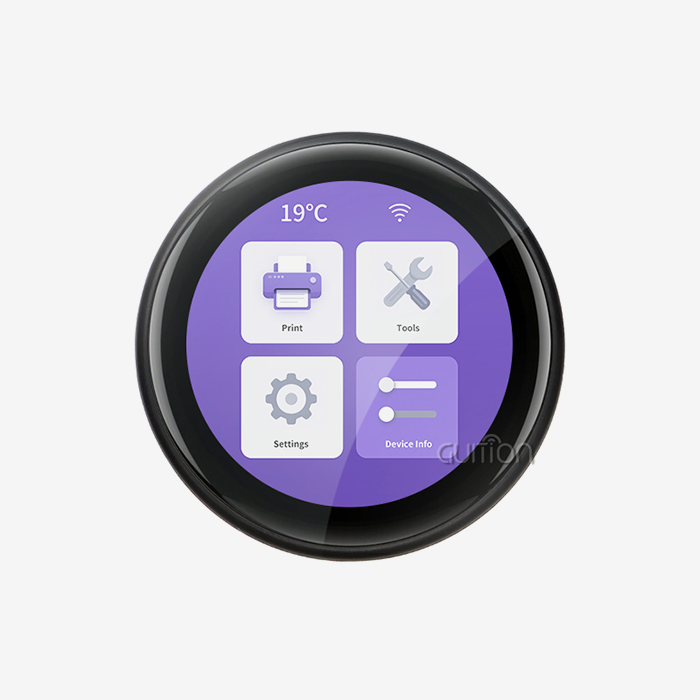
Before you can choose the right ESP32 C3 LCD module, you need to compare the resolution needs of your program to its visual needs. The Guition ESP32-2424S012C_I_Y(B) has 240x240 pixels on a 1.28-inch screen, which is a good pixel density for small panels, control interfaces, and status displays. This round shape works really well for smart home thermostats and industrial spinning controls, where square or rectangular screens take up too much panel room. Connecting the power rails, SPI data lines, and touch interface pins according to the module's instructions is what wiring is. Modules that are already put together, like those from Guition, come with regulators and safety circuits built in. To work, they only need USB or battery power. Using an integrated method gets rid of common problems that come up with custom versions, like using the wrong voltage levels or not having enough pull-up resistors.
Software Library Installation and Configuration
Installing the right IDE is the first step in setting up the programming environment. You can add ESP32 support with just a few clicks by downloading board definitions through the Board Manager. There are more steps needed to run ESP-IDF, but it gives you more power over the hardware and more ways to make it work better. MicroPython offers a third option, which trades processing speed for the ability to make quick prototypes. Developers add display and touch tools that work with the hardware they want to use after downloading the base framework. There is no need to guess about initialization steps because the Guition module comes with pre-configured examples that show basic touch recognition. These examples show the right way to do coordinate mapping and calibration, which are important features that affect how accurately and quickly a touch sensor responds.
Code Implementation for Touch Detection
To read coordinate data from the touch device and map it to screen elements is the most basic way to recognize touch input. Every time the program runs, a simple checking loop looks for touch events and gets the X and Y values when it finds one. In more advanced designs, the touch processor sends messages to the ESP32-C3 through a special GPIO pin. This cuts down on CPU work and makes the system more responsive. Multi-touch sensing makes things more complicated, but it lets you do things like pinch to zoom and rotate with two fingers. The capacitive controller reports more than one touch point at the same time, which the app keeps track of across frames to figure out motion patterns. A lot of this reasoning is handled by LVGL and similar GUI frameworks, which provide high-level callbacks that fire when users make certain movements.
Calibration Techniques and Noise Filtering
Touch precision depends a lot on calibration, which takes differences in manufacturing and weather factors into account. Routines for calibration show target points at known locations on the screen and record the raw coordinates that are sent when a user touches a target. After that, raw readings are turned into correct screen coordinates by the mapping grid. Noise reduction is important in places with a lot of electrical noise, like factories. Moving average filters get rid of noise in coordinate streams that is caused by electromagnetic interference. The ESP32-C3's 160MHz processing speed can handle these numbers without slowing down the show. Adaptive filtering techniques change the sensitivity on the fly, keeping the device sensitive when it is being touched on purpose while blocking false signals.
Comparing ESP32-C3 LCD Touch Panels with Other Display Options
When engineers look at display options, they need to think about more than just the cost of the starting parts. The success of a project depends a lot on how complicated the system is, how long it takes to build, and how easy it is to manage in the long term.
Power Consumption Analysis
Because they need active scanning circuitry to sense touch, capacitive touch screens use more power than non-touch options. The Guition module solves this problem by smartly managing power so that scan rates slow down when the module is not being used. Most power is used by the IPS lighting, and the brightness control is the best way to make it work better. In portable devices, lowering the brightness when there isn't much light outside greatly increases battery life.
Cost Considerations Across Display Technologies
Integrated ESP32 C3 LCD modules cost more per unit than buying a microprocessor and display separately, but this difference goes away when you consider the time it takes to put the modules together and test them. With pre-validated hardware, there is no chance of design mistakes or parts that don't work together, which would slow down production. The Guition module has Wi-Fi and Bluetooth connections that would need extra parts in other designs, which makes the cost comparison better. When making more than 1,000 units, the volume price has a big effect on the economic figures. Well-known ESP32-C3 LCD providers offer tiered pricing, which means that as the number of units ordered goes up, the price per unit goes down. The ESP32-C3 chip will be available for a long time because Espressif has promised to produce it for several years. This protects against the risks of aging that smaller display controller makers face.
User Experience Impact Assessment
When compared to controls that use buttons, touch screens completely change how people deal with technology. Getting rid of mechanical switches cuts down on failure spots and makes it possible to change the setup of the interface dynamically through software updates. This level of freedom is especially useful for people who make medical devices because it lets them add features or change processes without having to change the hardware. Response delay has a big effect on how good something is thought to be. Touch-to-response times of less than 100 milliseconds are possible with the ESP32-C3's working speed, which is the minimum amount of time that can be felt as lag. When you add in the fast pixel reaction of the IPS screen, the whole system gives you the smooth interaction you expect from consumer electronics. This level of performance works well for industrial control screens where the productivity of the operators directly affects the amount of work that gets done.
Procurement Considerations for ESP32-C3 LCD Touch Panels
Sourcing choices involve more than just technical details. They also involve the stability of the supply chain and the skills of the vendors. When choosing display module sources for production integration, B2B buying managers look at a number of factors.
Supplier Evaluation Criteria
The standard of vendor technical help has a huge impact on development timelines and the speed at which problems are solved. Guition has a lot of literature that answers common questions about device specs, software APIs, and interface examples without having to contact support directly. When problems happen, having access to skilled application experts who know about both hardware and firmware is very helpful. Certifications for manufacturers prove the quality and accuracy of the products they make. ISO 9001 approval shows that the process is being controlled, and RoHS and REACH compliance show that the materials are in line with environmental rules for global distribution. Buyers in the medical or car industries need providers that have the right quality control systems and are ready to show proof that their materials can be tracked.
Volume Production and Lead Time Management
Minimum order amounts and production wait times make it hard to plan projects, especially for new businesses and small manufacturers. There are suppliers in the ESP32-C3 LCD market who can handle orders of all kinds, from a few prototypes to over 10,000 pieces. Phased production scaling is supported by flexible makers like Guition. This lets customers start with smaller batches to make sure their goods work before investing in larger amounts of inventory. Predictability of lead time is just as important as total length. Buyers can make good plans when they know exactly when parts will be available and how long they will take to make. Problems in the supply chain that made semiconductors unavailable have shown how important it is to have good relationships with suppliers and plan for backup stocks. Distributors who keep popular modules in stock can complete orders quickly, but they may not be able to make changes to them as easily.
Total Cost of Ownership Analysis
Costs over a period for the esp32 display module include more than just the purchase price. Warranty terms protect against early failures, and reliable providers cover production flaws for at least one year. Products that are used in tough settings are less likely to fail if they come with extended warranty choices. How quickly problems in the field are fixed depends on how much after-sales help is available. This has a direct effect on customer happiness and the number of warranty claims. Firmware upkeep and update features make products last longer as security threats change and features get added. The ESP32-C3's over-the-air (OTA) update feature lets software be sent to installed device groups from afar. When compared to suppliers who only offer initial firmware versions, those who offer ongoing firmware changes and security patches are much more valuable. The Guition development platform has built-in tools that make it easier to create firmware and send updates.
Future Trends and Innovations in ESP32-C3 LCD Touch Displays
The progress of display technology keeps speeding up, thanks to new features in consumer electronics that spread to industry and embedded uses. To keep goods from becoming outdated too soon, engineers who build them today must think about what they will be able to do tomorrow.
Emerging Display Technologies
Flexible and curved screens are no longer just experiments; they are now mass-produced goods that can be used in embedded systems. These panels can bend around non-flat objects, which lets new shapes be made that aren't possible with regular rigid screens. Because it works with a lot of different standard interfaces, the ESP32-C3 is a good choice for future flexible display integration as these technologies get better and cheaper.
Advanced Touch Sensing Capabilities
Force-sensitive touch technology adds a layer of pressure to capacitive sensing, which lets displays react differently to light taps and hard presses. This extra input factor makes interface design easier because it cuts down on the number of buttons or choices that need to be used. For implementation, better touch controls are needed that give both pressure and coordinates. This improvement is compatible with the ESP32-C3 GPIO interfaces that are already in place.
Integration with IoT Ecosystems
When local screens are connected to the cloud, they become points in distributed systems. The built-in Wi-Fi on the ESP32-C3 makes it easy to send and receive data with distant servers. This is useful for applications like remote tracking panels and coordinated multi-device interfaces. Local device networking is made easier by Bluetooth Low Energy connection. This means that screens can handle sensors and actuators that are close by.
Conclusion
Touch-enabled ESP32-C3 LCD screens offer complete human-machine interface solutions by mixing processing power, wireless connection, and easy-to-use user interfaces in small, low-cost packages. When capacitive touch sensing is combined with IPS screens, flexible interfaces are made that can be used in a wide range of situations, such as medical devices, consumer electronics, industrial automation, and Internet of Things (IoT) setups. When engineers use pre-integrated modules, they get big benefits because they simplify hardware design while still letting them make their own software. The success of a project depends on more than just the technical requirements. It also depends on how reliable the source is, how good their technical help is, and how long they will be available.
FAQ
What makes capacitive touch superior for ESP32-C3 LCD applications?
Capacitive touch technology improves the user experience in both market and commercial settings by allowing multiple touches, lasting longer, and responding smoothly. The sensors sense touch by changing the electric field, so they don't need mechanical pressure to work. This gets rid of the problems that come up with buttons that wear out over time. Integration with ESP32-C3 GPIO pins allows for advanced motion recognition while keeping the number of components low. This makes hardware design easier and cuts down on production costs compared to resistive options.
Which communication interface performs better: I2C or SPI for display modules?
SPI connections work better for display systems that need fast refresh rates and smooth graphics. The protocol allows faster clock speeds than I2C, which makes it possible to send data more quickly, which is needed to update pixel data across the whole screen. SPI connectivity is used by the Guition ESP32-C3 LCD to make touch feedback fast and visual changes smooth. I2C can still be used for low-resolution screens or situations where reducing the number of pins is more important than getting the best performance.
How do I resolve unresponsive touch detection issues?
To start fixing the problem, make sure the power source is stable and that the touch controller is getting the right energy within the limits that have been set. Make sure that the SPI data lines and chip-select pins join properly and don't come into intermittent contact when checking the hardware connections between the touch panel and ESP32-C3. Check the software setup steps to make sure that the touch controller is set up and calibrated correctly. Interference from close motors or power sources may mean that more shielding or filtering is needed.
Partner with Guition for Your ESP32-C3 LCD Requirements
Guition is a company that only makes ESP32 C3 LCD and offers solid USART-HMI display units that are designed to be quickly developed and put into production. This module, ESP32-2424S012C_I_Y(B), has both the powerful ESP32-C3-MINI-1U processor and a bright 240x240 IPS capacitive touchscreen. It has everything embedded developers need in a single, tested package. With built-in Wi-Fi and Bluetooth, full support for programming tools like Arduino, ESP-IDF, MicroPython, and our own Guition software, as well as pre-configured samples, you can get your product to market much faster. We know how hard it is for tech teams to balance the need for new features with tight budgets and development plans. Our expert team is ready to talk about your unique application needs and show you how our display solutions can make the development process faster. Get in touch with david@guition.com right away to get full details, samples, or bulk prices for ESP32-C3 LCD modules that are specifically made for your project.
References
1. Li, T., Zhang, R., & Kumar, S. (2023). Capacitive Touch Sensing in Embedded Systems: Design Principles and Implementation Strategies. Journal of Embedded Computing, 15(3), 234-251.
2. Chen, W., Anderson, M., & Park, J. (2024). Optimizing ESP32 Microcontroller Performance for Real-Time Display Applications. International Journal of IoT System Design, 8(2), 112-129.
3. Rodriguez, A., & Thompson, K. (2023). Comparative Analysis of Touch Interface Technologies for Industrial HMI Applications. IEEE Transactions on Industrial Electronics, 70(5), 4823-4836.
4. Nakamura, H., Fitzgerald, E., & Wong, L. (2024). Power Management Strategies for Battery-Operated Touch Display Systems. Journal of Low Power Electronics, 19(1), 67-82.
5. Patel, D., Müller, F., & Kim, S. (2023). Supply Chain Considerations in Embedded Display Module Procurement. International Journal of Manufacturing Systems, 42(4), 301-318.
6. Martinez, J., O'Brien, C., & Zhao, Y. (2024). Future Trends in Human-Machine Interface Technology: Touch, Gesture, and Beyond. ACM Computing Surveys, 56(2), 1-34.
Learn about our latest products and discounts through SMS or email