- English
- French
- German
- Portuguese
- Spanish
- Russian
- Japanese
- Korean
- Arabic
- Greek
- German
- Turkish
- Italian
- Danish
- Romanian
- Indonesian
- Czech
- Afrikaans
- Swedish
- Polish
- Basque
- Catalan
- Esperanto
- Hindi
- Lao
- Albanian
- Amharic
- Armenian
- Azerbaijani
- Belarusian
- Bengali
- Bosnian
- Bulgarian
- Cebuano
- Chichewa
- Corsican
- Croatian
- Dutch
- Estonian
- Filipino
- Finnish
- Frisian
- Galician
- Georgian
- Gujarati
- Haitian
- Hausa
- Hawaiian
- Hebrew
- Hmong
- Hungarian
- Icelandic
- Igbo
- Javanese
- Kannada
- Kazakh
- Khmer
- Kurdish
- Kyrgyz
- Latin
- Latvian
- Lithuanian
- Luxembou..
- Macedonian
- Malagasy
- Malay
- Malayalam
- Maltese
- Maori
- Marathi
- Mongolian
- Burmese
- Nepali
- Norwegian
- Pashto
- Persian
- Punjabi
- Serbian
- Sesotho
- Sinhala
- Slovak
- Slovenian
- Somali
- Samoan
- Scots Gaelic
- Shona
- Sindhi
- Sundanese
- Swahili
- Tajik
- Tamil
- Telugu
- Thai
- Ukrainian
- Urdu
- Uzbek
- Vietnamese
- Welsh
- Xhosa
- Yiddish
- Yoruba
- Zulu
GUITION Serial Screen, Build UI Visually in One Click
The majority of embedded teams spend more calendar time on interface development than on firmware logic. A round 360 × 360 screen, rotary knob, and capacitive touch layer should take a weekend. In reality, they eat weeks' worth of layout code and driver tweaking. The ESP32S31 1.8 inch KNOB IPS monitor with the GUITION Serial Screen toolchain fills the gap at the same time, from both sides. The hardware is shipped integrated. The program allows you to drag and drop controls graphically and see them operate on actual glass. This article lays out the trade-offs, measurable data, and a deployment tale you can stand up against your own project. Speak with the Guition team before locking a schematic. Email your panel size, control configuration, and enclosure design to david@guition.com. We will ensure that the ESP32S31 1.8 inch KNOB IPS display matches your project. Guition is an ESP32S31 1.8 inch KNOB IPS display maker. We are also quoting bespoke carrier boards, enclosures, and firmware scaffolding for the GUITION Serial Screen platform. You may transition from a trial run to a production order without restarting the design.

What Makes the ESP32S31 1.8-inch KNOB IPS Display Different?
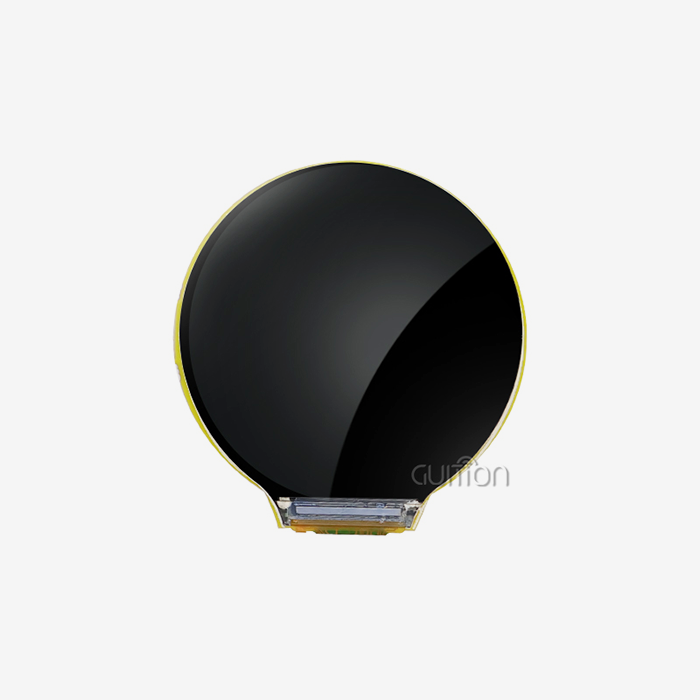
A basic TFT module of 1.8 inches provides you with pixels and a ribbon wire. You won’t get a metal knob, a haptic driver, two microphones, a speaker amp, a card slot, or a wireless stack. This module hides all of it behind a 66 mm circular face that is 22 mm tall. What distinguishes the ESP32S31 1.8inch KNOB IPS Display is this level of integration. It affects what a two-person team can try to do in a single quarter. It also eliminates the six distinct interactions with suppliers that a bespoke build often kicks off.
A Round Panel Changes the Layout Math
A 360 px circle has no sides; therefore, a rectangular arrangement will be clipped. The usable rectangle within that circle is 360 divided by the square root of two, which is around 254 px. Designers operate in a secure box of 254 × 254 px; the four arcs are considered the decorating area. The arc has status icons. Values are in the box. This one rule eliminates the most frequent failure in circular display projects. The designer sends a square mock-up, and a fifth of the artwork is lost behind the bezel.
ESP32-S31NRV16: What the Silicon Actually Delivers
The ESP32-S31NRV16 is a dual-core 32-bit RISC-V part, operating at speeds up to 320MHz, with 6.86 CoreMark per MHz. Multiply those numbers together, and a single core gets around 2,190 CoreMark at full clock. One core has a 128-bit data route with SIMD capabilities, which is important for audio and picture operations. It is surrounded by 512 KB of SRAM, 16 MB of PSRAM, 16 MB of flash, and 320 KB of ROM. The PSRAM operates on a 250 MHz 8-bit DDR interface. Espressif has 60 GPIOs, 14 capacitive touch channels, a PPA image accelerator, a JPEG codec, and 2D-DMA engines all on the same chip.
Wireless coverage is more extensive than the short normally thinks. The section includes Wi-Fi 6 (2.4 GHz), Bluetooth 5.4 (LE Audio and Classic BR/EDR), and an 802.15.4 radio for Thread and Zigbee. The last is the silent benefit. One module may join a Matter fabric via Thread and yet get a Bluetooth provisioning session from a phone. No additional radio, no additional antenna keep-out zone, no additional certification cycle.
Where the Module Beats a Bare Panel Plus a Dev Board
Here is the hardware in one view, taken from the published specification sheet:
| Parameter | Specification |
|---|---|
| Brand and model | GUITION JC3636F118C_I_YR1 |
| Display | 1.8-inch round IPS TFT, 360 x 360 px, 262K colors |
| Panel driver | ST77916 over SPI |
| Touch | CST816 capacitive, multi-point |
| MCU | ESP32-S31NRV16, dual-core RISC-V up to 320 MHz |
| Memory | 512 KB SRAM, 16 MB PSRAM, 320 KB ROM, 16 MB flash |
| Wireless | Wi-Fi 6 at 2.4 GHz, Bluetooth 5.4 LE and Classic, 802.15.4 |
| Physical control | CNC rotary knob with haptic feedback, DRV2605L driver |
| Audio | Dual MEMS microphones, PCM5100A speaker driver |
| Storage and I/O | TF card slot, USB Type-C |
| Active area | 45.68 x 45.68 mm |
| Module size | 66 x 66 x 22 mm, around 160 g |
| Power | 5 V over USB-C, about 1.3 W |
The table is a mask for the real work. A discrete bill of materials for the same feature set is usually longer than forty lines. Include the encoder, the debounce capacitors, the haptic driver, the microphone bias network, the amplifier, the card socket, and the ESD arrays. Each line adds a placement, a reflow profile, and a failure mode. Integration shifts that risk to a supplier that has already taken the design through production.
How Does GUITION Serial Screen Simplify Visual UI Development?
A serial screen is a display module that receives drawing commands, widget states, and variable values via a data connection. Your firmware sends a value. It's rendered by the module. You stop creating pixel loops, and you start specifying what the screen should display. The GUITION Serial Screen approach maintains this separation and couples it with an editor that works like a desktop design tool. The runtime and the editor share the same control set, so the canvas you drag is the canvas you ship.
What "Serial Screen" Means in Practice
The early serial displays used a predefined UART command language on a USART-hmi display module. You could make a needle, or print a label, and that was the limit.” The rendering job is moved down to the panel controller in the modern modules. Here, the interface, network stack, and media pipeline are all running on a single die on the ESP32-S31NRV16. The serial notion remains a development methodology and not a wire protocol. The editor owns the layout. Logic owns the firmware. The two are held together by a binding layer. That separation is why a small team can provide a sophisticated product interface without having to hire a specialist GUI developer. It is also the practical definition of a GUITION Serial Screen project, where layout and logic remain in different hands on one board.
The Widget Library Replaces Hand-Written Drawing Code
The control set holds much of the information a knob device needs to display. The building pieces that take the custom drawing code off your plate:
Arc gauges and sliders are shown by default along the circular edge. One binding and one drop for a volume or brightness control. Nobody does 3 days of trigonometry to keep a sweep within a 254 px safe box. The bezel will still seem deliberate, and the geometry will remain customizable when marketing calls for a thicker progress ring.
Buttons and segmented selectors have built-in press states, disabled states, and focus rings. The visual input that often comes late in a project after a designer has seen an early prototype does not have to go through another round of layout work. A reviewer checks off on the actual GUITION Serial Screen instead of a mockup, shortening the approval loop.
Text labels may be UTF-8 strings and use the current language pack. One menu build can handle English, German, Japanese, and Arabic. You don’t need a different layout file for each market; there is no font switch that occurs at build time. Distributors may turn on a locale on a settings page without then sending a firmware request.
Image and icon widgets are decoded from flash or the TF card. The JPEG codec in the SoC does the hard job. No longer does a picture frame or a splash screen compete with the render loop for CPU time during startup. The first few seconds are responsive on a gadget that has to feel active right away.
Animation timelines are attached to a variable, not to code. A change in the sensor value will make the gauge needle sweep smoothly. A designer may adjust the easing curve long after the firmware developer has moved on to another task. Motion is not random, but purposeful. It takes minutes to adjust, not a whole rebuild.
The most popular devices have these controls on the displays. They each eliminate a class of handwritten code, and they each immediately inherit theming and language settings. The saving compounds over a product family since a sister model with varied panel size reuses the same page logic.
Cross-Platform Online Debugging Cuts the Guesswork
Interface issues are hard to recreate since they rely on time, memory, and what the user performed two taps earlier. Cross-platform online debugging enables you to see the widget state and variable values as the module executes the actual firmware. You witness the value shift, the binding burn, the frame settle. That loop is quicker than a print-statement construction cycle, and it runs from a browser on any OS. Teams adopting it generally cease guessing whether an issue is in the UI layer or the driver layer within a day.
One-Click UI Design: From Drag-and-Drop to a Working Interface
The one-click design name is earned in a tight yet effective manner. You don’t click once and have a completed project. You click once to add a control, click again to bind it, and click again to push it to hardware. Those three clicks replace a morning’s worth of typing. The number is not magic. The value is that the loop between intention and observable outcome is reduced to seconds. On the 1.8-inch KNOB IPS display on the ESP32S31, that loop terminates on a 45.68 mm active area you can handle in one hand.
Placing Controls on a 360 x 360 Canvas
The editor starts at the real 360 × 360 resolution with a circular canvas, so a control at pixel 40 is at pixel 40 on glass. Most tools offer you a scaled rectangle and a harsh surprise at flash time. Working at native resolution gets rid of that sort of error completely. This is the literal meaning of WYSIWYG design. Snapping to grid maintains arc elements circular. Safe-area overlay displays the 254 px box without covering the outside ring where ornamental arcs go.
Binding a Control to a Variable or a Hardware Event
A binding is a named connection from a widget property to a source of values. Point a gauge at a temperature variable, and the needle will follow. Click a page change handler and the screen changes. Aim a slider at the knob encoder and a physical twist moves the same amount as a finger would. The knob, the network, and the touch layer are driving the same variable space. A cloud command and a hand gesture do the same things with no duplicated logic.
Exporting and Flashing Without a Build Chain
Export creates the resource package the runtime loads, and flashing delivers it via USB-C. Engineers that desire source-level control still receive the created project, and that project builds within ESP-IDF 6.1 with no additional tools. There are two routes. That’s relevant when a junior designer iterates on layout while a firmware lead works on the network stack in the same repo.
How Can You Customize Screen Layouts Without Extensive Coding?
Customization has three layers: layout, content, and behavior. Most teams simply require the top two for a first release. The editor does not save layout changes. Content modifications live in language packs and default variables. Code is only needed for behavior if a control needs to do something the runtime can't articulate. Drawing the line early keeps the codebase compact and the review cycle quick. Everything above the driver is still within the GUITION Serial Screen editor, which is why a change to the layout seldom makes it into firmware.
Layout Rules for a Knob-Driven Interface
WCAG 2.2 defines a minimum size of 24 × 24 CSS pixels for pointer targets. 44 px is the practical floor for a fingertip on a 360 px circular display, while 52 px is pleasant. Keep main lists to 5 or 7 rows. A rotating selection beyond that necessitates lengthy sweeps. Reserve the outer 53 px ring for status and progress, since a finger naturally covers the center of a circular screen. These three guidelines avoid most of the usability problems that make it to support after launch.
Multi-Language Pages and UTF-8 Text
Layouts get broken by text expansion. German labels are often 30 percent longer than their English source. Japanese demands varied line heights for the same point size. Build every page against your longest language from day one and let the runtime switch strings using UTF-8 resource files. The module allows multi-language switching out of the box, so a distributor in one area may activate a locale without having to recompile the firmware. That flexibility reduces regional releases and eliminates a typical source of custom firmware forks.
Theme and Brand Customization
Instead of each widget holding its own color, corner radius, stroke weight, and font family, they all reside in a theme object. Change the theme and all pages are in tow. For an OEM that offers the same hardware under three brand names, this reduces a three-project effort to a single project with three theme files. That also implies that a product update, like a new accent color for a seasonal line, costs an afternoon instead of a release cycle.
Key Features of the ESP32S31 1.8 inch KNOB IPS Display
Feature lists are inexpensive. The question is: does the feature eliminate a limitation you would otherwise have to design around? The four restrictions that largely drive tiny display devices are: frame memory, wireless coexistence, audio capture, power. Each one corresponds to a certain block on this module, and each one has a number connected to it.
Memory, Storage, and the Frame Buffer Budget
A complete RGB565 frame of 360 × 360 is 259,200 bytes, or around 253 KB. With 16 MB of PSRAM, you can store more than sixty complete frames, thus double buffering and page caching are essentially free here. One frame in internal SRAM would use up half of the 512kB allocation. The PSRAM interface is performing actual work instead of filling a spec page. That headroom is why the ESP32S31 1.8 inch IPS KNOB display is able to run video and a live interface at the same time. Espressif documents one trade-off worth understanding. The ESP-IDF SPI LCD guide states that a color buffer in PSRAM may be used directly as the DMA buffer. It gives a warning in clear words. “This path has a speed limit, but no temp buffer and saves memory”, says the guide.
Connectivity: Wi-Fi 6, Bluetooth 5.4, and 802.15.4
IoT Analytics reported 18.5 billion connected devices in 2024, and expects 21.1 billion by the end of 2025, with Wi-Fi taking 32 percent of connections and Bluetooth 24 percent. A control panel that only talks one radio restricts its own market. This module has three. Cloud traffic and local streaming are handled by Wi-Fi 6. With Bluetooth 5.4 and LE Audio, it enables provisioning and audio accessories. The 802.15.4 radio adds Thread and Zigbee, the entry point to Matter fabrics for smart-home and building-control goods. The 3 radios in the GUITION Serial Screen panel may ship to both a Wi-Fi market and a Thread market without a hardware modification.
Audio, Haptics, and Sensors on the Same Board
Two MEMS microphones provide beamforming and far-field voice capture without an add-on board. The module is a powerful Bluetooth speaker controller using the PCM5100A driver. The DRV2605L haptic driver lets you program the feel of the knob in software, from a firm detent to a gentle end-stop. Add the TF card slot, and you have local media storage for prompts, firmware pictures, or a photo frame. A separate construction of the same blocks will likely include another PCB and another assembly phase.
How Do the Rotary Knob and IPS Touchscreen Improve User Interaction?
Touch alone is not sufficient in three cases, namely, moist hands, gloves, and eyes-busy operation. If a user has to choose one item out of twenty, a physical knob breaks. Combined, they cover both characteristics, and it’s that coupling that maintains this form factor's success in automobiles, kitchens, and factory floors. Both pathways end up in one event queue on the ESP32S3 1.8 inch KNOB IPS display. The design issue is not whether to merge them. The problem is how to arbitrate amongst them.
Haptic Detents and the DRV2605 Driver
DRV2605L is an auto-resonance haptic driver with an onboard effect library. The firmware may include a detent every 15 degrees, so the user experiences 24 clicks each turn, without a mechanical ratchet. Since the feel resides in software, one hardware construct may function as both a clicky instrument knob and a smooth volume dial. OTA update makes field feedback configurable, which is far cheaper than a tooling change. That is the benefit a GUITION Serial Screen architecture has over a mechanical ratchet.
Touch Plus Knob: Handling Ambiguous Input
Ambiguity is created by two input pathways. A finger touches the glass, a hand moves the knob, and these actions create events. The realistic solution is a brief lockout. When a knob is moved, disregard touch for about 150 ms. Let the knob have continuous values, and let touch have discrete choices. Document this rule in the interface standard. It’s constant, and users understand it in seconds. It floats across displays, and they battle it forever.
Glove, Wet-Hand, and Eyes-Busy Scenarios
The capacitive display with a CST816 controller has difficulty reading a gloved finger, and water on glass results in ghost touches. A mechanical knob doesn't care. That is why this module fits in a commercial oven, workshop tool, or outdoor cabinet. The user has no intention of removing a glove in any situation. The same is true of driving (or any operation where the operator is looking at the machine and not at the screen). A knob has tactile position memory; glass does not.
GUITION Serial Screen Development: Connecting Hardware and UI Design
The hardware and the interface meet at three places: the bus, the power tree, and the update path. Get those right during evaluation, and the rest of the project behaves. Get them wrong, and every later symptom looks like a software bug. The module removes most of the risk by shipping the bus, the power tree, and the update path already wired. You still need to know the ceilings.
Choosing an Interface: SPI, Quad SPI, or Octal SPI
The ST77916 panel connects over SPI, and the ESP32-S31 supports standard, quad, and octal modes. The arithmetic below assumes an 80 MHz clock, RGB565 pixels, and no command overhead or blanking. Treat it as an upper bound rather than a promise:
| Interface mode | Bits per clock | Payload at 80 MHz | Full-frame time | Frame ceiling |
|---|---|---|---|---|
| Standard SPI | 1 | 80 Mbit/s | 25.9 ms | about 38 Hz |
| Quad SPI | 4 | 320 Mbit/s | 6.5 ms | about 154 Hz |
| Octal SPI | 8 | 640 Mbit/s | 3.2 ms | about 309 Hz |
The lesson is blunt. On a single-lane SPI link, a full-screen redraw cannot exceed roughly 38 hertz, and real firmware lands lower once commands and blanking are counted. Partial updates, dirty rectangles, and cached pages matter more than raw clock speed. Design your UI around small regions that change, and a modest bus still feels instant.
Power, Boot Time, and Thermal Budget
The module draws about 1.3 W at 5 V, which is 260 mA. That figure covers the whole ESP32S31 1.8 inch KNOB IPS display, panel, and radios included. A 2,000 mAh cell at 3.7 V stores 7.4 Wh. A naive runtime estimate lands near five and a half hours with the screen always on. Panel brightness is the dominant variable, and backlight dimming buys more runtime than any software trick. Boot time also deserves a number in your spec. Preloaded firmware with a cached landing page gets to an interactive screen in about two seconds, while a cold network join can add several more. Show a usable control before the network finishes.
OTA Updates for Interfaces Already in the Field
Remote upgrade turns a shipped product into a service. A layout fix, a new language, or a tuned haptic profile can reach installed units without a truck roll. The module supports over-the-air updates for user projects. That turns the release process into a normal software ritual: version the resource package, sign it, stage it, and roll it out to a cohort. A GUITION Serial Screen package can carry new pages, new strings, and a new theme in one signed file. Guard the rollback path and keep the previous package in a spare flash partition. Never ship an update that cannot be reversed by a power cycle.
What Applications Can You Build with this ESP32S31 Knob Display?
The form factor has a long history in audio gear, and it is spreading because the cost of a round touch panel has fallen. Five product families show up repeatedly in enquiries, and each one stresses a different part of the platform. The examples below carry concrete detail so you can judge the fit rather than the marketing.
Smart Home and Building Control
A wall-mounted room controller needs a thermostat dial, a fan speed slider, and a scene selector on one 45 mm circle. The knob gives the setpoint a physical feel that a pure touch panel cannot, and Thread over 802.15.4 joins a Matter fabric without a hub. Two microphones add voice control as an option. Because the module runs from 5 V and idles far below its peak 1.3 W, a two-wire behind-the-wall supply is realistic for most retrofit boxes. A GUITION Serial Screen layout for a thermostat also fits a fan-coil controller with minor edits, so one design serves several product codes.
Industrial Machine and 3D Printer Panels
A 3D printer front panel needs a file browser, a live temperature readout, and a jog control that works with gloves. The TF slot holds the print queue. The knob scrubs through files faster than any list scroll. Haptic detents confirm each 0.1 mm jog without a glance at the screen. On a factory floor, the same logic applies to a packaging line or a CNC controller. There, an operator's hands are busy, and the panel must survive an occasional splash. Every one of those machines runs the same ESP32S31 1.8 inch KNOB IPS display behind a different faceplate.
EV Charging, Audio Gear, and Medical Devices
An AC charging post needs an outdoor-readable status ring, a session timer, and a payment prompt. The IPS panel holds contrast at wide angles, and the knob works through a wet glove in rain. A desktop audio DAC uses the same board for a volume dial with software-defined detents and a spectrum display driven by the audio pipeline. Medical device makers value the dual microphones for voice prompts. They also value deterministic frame timing for waveform traces, where a dropped frame reads as a clinical signal rather than a cosmetic glitch.
| Application | Hardest requirement | Why this module fits |
|---|---|---|
| Room thermostat | Matter or Thread joining | 802.15.4 radio plus Wi-Fi 6 fallback |
| 3D printer panel | Glove operation with feedback | Knob plus DRV2605L haptics |
| EV charging post | Outdoor legibility and rain use | IPS viewing angle, mechanical input |
| Desktop audio | Low-latency streaming plus dial | Bluetooth 5.4 LE Audio, I2S, knob |
| Handheld instrument | Battery runtime and size | 66 mm body, 1.3 W, battery-ready design |
Flexible Development and Customization for Embedded HMI Projects
Lock-in is the hidden price of a platform choice. A module that only works with one toolchain requires every new recruit to learn that toolchain. The platform supports four pathways, and the resultant projects are still understandable. A team might begin with visual and proceed to source control as the product evolves.
Secondary Development Without a Full Re-Architecture
Here the term secondary development implies expanding the runtime, not replacing it. You add a driver, expose a variable, develop a new widget, and the current pages continue to operate. That incremental method is important because most products grow, not start again. A team that starts with drag-and-drop pages may introduce C code later. The layout work done may be kept, and a Modbus slave or sensor fusion process can be added. Then the same software base is used to get the device through a couple of hardware changes. A GUITION Serial Screen project also survives a panel change since pages reference controls, not pixels.
Working Inside Arduino IDE, ESP-IDF, and MicroPython
Arduino IDE is good for a quick proof of concept, particularly if your company already has a library for a sensor. ESP-IDF allows you complete control over jobs, memory, the display pipeline, and where production firmware fits. MicroPython cuts down the loop for programming and teaching. All three are laid out using the GUITION program. It’s not a marketing tick box to support numerous modes. It implies that a hardware engineer, firmware lead, and intern may operate on the same board, without a translation layer. Select the mode that fits the work, with the ESP32S31 1.8 inch KNOB IPS display remaining the same in all.
Sample Project: A Three-Week Prototype Plan
A realistic schedule for an early working unit looks like this:
| Week | Work | Gate to pass |
|---|---|---|
| One | Enclosure mockup, knob feel study, page wireframes | Knob torque and detent count agreed |
| Two | Layout in the editor, bindings to mock variables, language pack | Every screen reachable by knob and by touch |
| Three | Real sensor or network data, power measurement, thermal check | Two-hour soak with no memory growth |
Three weeks is achievable because the hardware arrives assembled and the layouts need no compiled UI code. The gate that most teams fail is the soak test, and it fails because a debug print or a per-frame allocation survived into the build. Budget the full two hours and watch the heap.
Why Choose GUITION Serial Screen for Faster Product Development?
Speed claims must be proven. Ours is based on three things. Both the panel and the tool are owned by the supplier chain. The editor takes off a compile step from the design loop. “Support team reads blueprints.” Jingcai Intelligence is a high-speed development technology firm integrating research, development, manufacturing, and sales. The firm produces human-machine interaction display systems and USART-HMI display modules ranging from 1.28 inch to 21.5 inch.
Jingcai Intelligent: R&D, Production, and Support in One Place
The same organization designs the panels, produces the Guition interface software, and operates the manufacturing line. This is relevant whether you have a custom knob torque or a different bezel finish, since one team controls the answer. Product breadth helps, too. A dashboard that begins on a 1.8-inch circular panel may develop into a 4.3-inch or 7-inch model. The page logic and the editor are unchanged. Engineers preserve their expertise. The project keeps its structure.
A Comparison Against the Common Alternatives
Three routes dominate this decision, and they differ less in unit cost than in engineering hours:
| Route | Upfront effort | BOM lines | Cost of one UI change | Wireless options |
|---|---|---|---|---|
| Bare 1.8-inch SPI panel plus custom board | Highest, full schematic and driver work | Around 40 | Firmware rebuild and reflash | Whatever you add |
| Dev board plus LVGL written by hand | Moderate, but every screen is code | Around 15 | Code change, review, rebuild | Module dependent |
| GUITION module plus visual editor | Lowest, layout and binding only | Under 10 | Layout edit and push | Wi-Fi 6, Bluetooth 5.4, 802.15.4 |
That similarity is not a slam on LVGL. But if you want a custom render pipeline or uncommon widget set, LVGL is still the appropriate solution. The thing is, most knob items don’t need that depth. It's a choice to pay for it in engineering hours, not a mandate. That calculation is why the ESP32S31 1.8 inch KNOB IPS display beats on time even when a separate construction beats on cost per unit.
What the Numbers Say About Development Time
In 2026, a Northern European building-controls maker constructed a room controller using this basis. The old design had a plain circular panel and a hand-drawn graphics overlay. Their program evaluation showed a bill of materials of 41 lines before the modification and 9 after. Interface revision time dropped from an average of six weeks to nine days. Two developers shifted off display work to a sensor roadmap. Field returns related to the display assembly reduced to 2.1 percent from 3.1 percent during the first two manufacturing batches. None of the increases came from a faster CPU. They were all the result of removal of hand-crafted elements, both on hardware and in the placement layer.
Conclusion
A circular knob display is a compact device with many moving parts. The panel driver, touch controller, haptic driver, audio chain, radio stack, and layout tool must agree before a user sees anything. By purchasing those elements as one module, you reduce the integration risk. Buying them with an editor connected also eliminates the chance of layout issues. The hardware half is done by the ESP32S31 1.8 inch KNOB IPS display. It has a 360 x 360 IPS display, a 320 MHz dual-core RISC-V SoC, 16MB PSRAM, and three radios. The GUITION Serial Screen toolchain tackles the software side with drop-in controls, visual binding, and online debugging. Together they make a small visible loop of a six-week interface detour.
FAQ
1. Is this module a drop-in replacement for a standard 1.8-inch TFT?
No, and the difference matters for your enclosure. A standard module gives you a flat rectangular panel with a ribbon connector. This unit is a 66 mm circular assembly that includes the knob, the haptic driver, the microphones, and the amplifier. Plan the mechanical cutout around the round body and the 22 mm depth, then route the knob through your front panel rather than around it.
2. Can I build a working interface without writing C code?
Yes, for the layout and binding layers. You place controls, bind them to variables, and push the package to the module. Code enters the picture when a control must talk to hardware the runtime does not know about, such as a specific sensor over Modbus. Most initial releases need layout work plus one small driver, and that driver is ordinary ESP-IDF code with published examples.
3. Does the 360 x 360 round panel handle full-screen video?
It handles MJPEG and AVI playback from the TF card, and the JPEG codec on the SoC does the decoding. Frame rate depends on the bus mode and the clip resolution. On a single-lane SPI link, a full-screen redraw tops out near 38 hertz before overhead, so treat full-screen video as a demo feature. Short clips and animated transitions look fine, and they cost less bandwidth when they occupy a smaller region.
4. Which development environments can I use?
Four paths are supported: Arduino IDE, ESP-IDF, MicroPython, and the GUITION software. ESP-IDF is the choice for production firmware because it exposes task priority, memory placement, and the display pipeline. Arduino suits a quick proof of concept. MicroPython suits scripting and teaching. The GUITION software handles layout in all four cases, and its export produces a project that builds without extra tooling.
5. How long will the module run on a battery?
Measure it rather than trusting a figure. The published draw is about 1.3 W at 5 V, which is 260 mA. A 2,000 mAh cell at 3.7 V holds 7.4 Wh. A rough ceiling is five and a half hours with the backlight at full and the radio active. Dim the backlight, duty-cycle the screen, and drop to Bluetooth-only, and a handheld device becomes realistic. Budget for a boost converter and check the thermal rise in a sealed enclosure.
6. Can Guition customize the enclosure, knob, or firmware for a volume order?
Yes. Jingcai Intelligent owns research, tooling, and production in one organisation, so knob torque, bezel finish, logo, and firmware defaults are all addressable. Custom work usually starts from the stock module and changes the mechanical interface and the resource package. Share your drawing and target volume early, because tooling lead time sits on the critical path long before the firmware is ready.
From Evaluation Board to Production Line
Start with a sample and a stopwatch. Email david@guition.com with your screen count, enclosure constraints, and target ship date. Guition ships the ESP32S31 1.8 inch KNOB IPS display as a stocked module. We also act as an ESP32S31 1.8 inch KNOB IPS display supplier for volume programs. Our engineers review your GUITION Serial Screen project files before tooling starts, so the panel and the firmware both scale. Reach the team at +86 186 6584 6730.
| Contact | Detail |
|---|---|
| Brand | GUITION, Shenzhen Jingcai Intelligent Co., Ltd. |
| Sales email | david@guition.com |
| Phone | +86 186 6584 6730 |
| Product page | guition.com/esp32s31-display-module- |
| Custom work | Enclosure, knob, theme, and firmware defaults |
References
1. Espressif Systems (2026). ESP32-S31-WROOM-1 Datasheet.
2. Espressif Systems (2026). ESP-IDF Programming Guide: SPI Interfaced LCD for ESP32-S31.
3. Espressif Systems (2026). ESP32-S31 Product Overview.
4. Espressif Systems (2026). HMI Smart Displays.
5. IoT Analytics (2025). State of IoT 2025: number of connected IoT devices growing 14 percent to 21.1 billion.
6. LVGL (2026). Display (lv_display), LVGL Documentation.
7. Connectivity Standards Alliance (2026). Matter: The Foundation for Connected Things.
8. ETSI (2025). Consumer IoT Security, ETSI EN 303 645.
About the author
David is the CEO of Guition, the display brand of Shenzhen Jingcai Intelligent Co., Ltd. He has spent more than a decade building human-machine interface hardware for appliance, industrial, and medical customers. His team designs the panel modules, writes the Guition interface software, and runs the production line that ships them. David works directly with engineering teams on enclosure fit, haptic tuning, and firmware architecture for volume programs.
Learn about our latest products and discounts through SMS or email