- English
- French
- German
- Portuguese
- Spanish
- Russian
- Japanese
- Korean
- Arabic
- Greek
- German
- Turkish
- Italian
- Danish
- Romanian
- Indonesian
- Czech
- Afrikaans
- Swedish
- Polish
- Basque
- Catalan
- Esperanto
- Hindi
- Lao
- Albanian
- Amharic
- Armenian
- Azerbaijani
- Belarusian
- Bengali
- Bosnian
- Bulgarian
- Cebuano
- Chichewa
- Corsican
- Croatian
- Dutch
- Estonian
- Filipino
- Finnish
- Frisian
- Galician
- Georgian
- Gujarati
- Haitian
- Hausa
- Hawaiian
- Hebrew
- Hmong
- Hungarian
- Icelandic
- Igbo
- Javanese
- Kannada
- Kazakh
- Khmer
- Kurdish
- Kyrgyz
- Latin
- Latvian
- Lithuanian
- Luxembou..
- Macedonian
- Malagasy
- Malay
- Malayalam
- Maltese
- Maori
- Marathi
- Mongolian
- Burmese
- Nepali
- Norwegian
- Pashto
- Persian
- Punjabi
- Serbian
- Sesotho
- Sinhala
- Slovak
- Slovenian
- Somali
- Samoan
- Scots Gaelic
- Shona
- Sindhi
- Sundanese
- Swahili
- Tajik
- Tamil
- Telugu
- Thai
- Ukrainian
- Urdu
- Uzbek
- Vietnamese
- Welsh
- Xhosa
- Yiddish
- Yoruba
- Zulu
CYD Display Module with Touchscreen: Complete Setup Tips
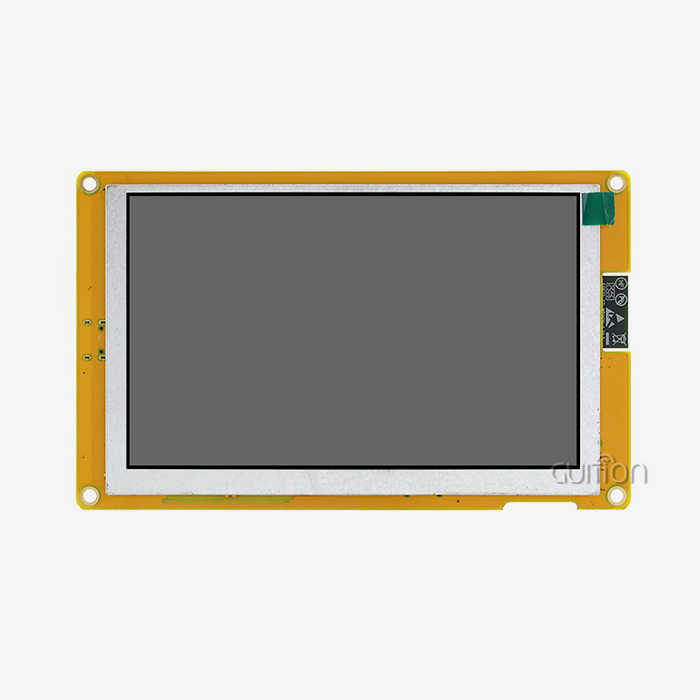
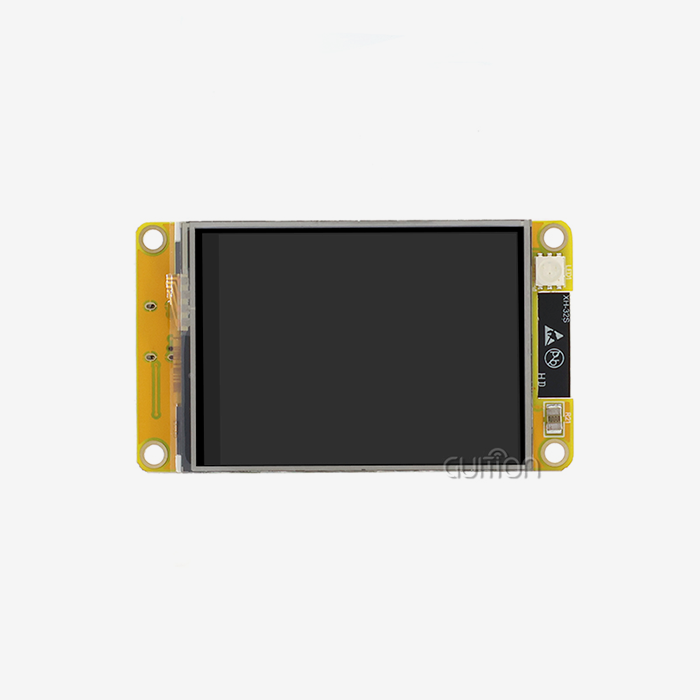
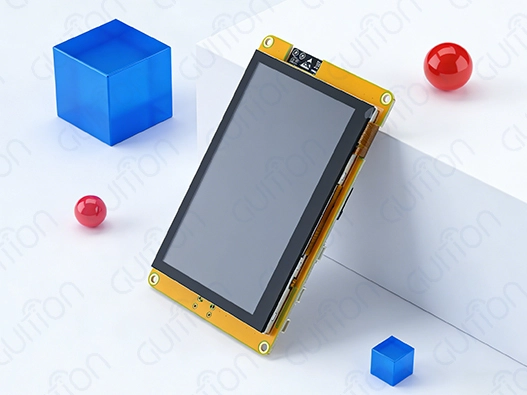
Setting up a CYD display module that can work with touchscreens opens up a world of industrial and business possibilities. The GUITION ESP32-8048S043C_I is a big step forward in human-machine interface technology. It has a beautiful 4.3-inch sensitive touchscreen and a powerful ESP32-S3R8 dual-core processor. This detailed setup guide shows you every step you need to take to get the most out of this high-tech display option. Understanding the right way to configure things is important whether you're making industrial control panels, smart home devices, or IoT apps. This will help you get the best speed and stability. The 800x480 resolution, built-in WiFi and Bluetooth, and support for various development environments make the module a great choice for engineers looking for efficient HMI options.
Understanding CYD Display Modules with Touchscreen
Human-machine interfaces that are both clear to see and quick to touch are needed in many modern industrial uses. The CYD display module architecture meets these needs with integrated design principles that get rid of common connection problems that come up with separate component sets.
Technical Specifications and Core Components
The GUITION ESP32-8048S043C_I has a strong ESP32-S3R8 dual-core microprocessor unit that can work at up to 240MHz. This much working power lets complicated graphical user interfaces run smoothly while still detecting touches. The memory setup has 512KB SRAM, 384KB ROM, 8MB PSRAM, and 16MB Flash storage, which is more than enough for demanding programs.
The 800x480 quality of the 4.3-inch LCD screen makes the images clear, and the 16-bit RGB decoding supports 65K colors. Capacitive touch technology makes sure that gestures are correctly recognized and that multiple points of contact are found, which are important for professional use. The built-in lighting control circuit lets you change the brightness on the fly, and the touch screen control circuit handles precise point mapping.
Connectivity and Expansion Features
Built-in Bluetooth v4.2 + BLE and WiFi 802.11 b/g/n make it easy to connect to a network without adding any extra gear. The reserved TF card interface lets you add more storage space for fonts, images, and program data. The module can be used in a variety of industrial situations because it has multiple IO port connections that allow sensors to be added and peripherals to be controlled.
Development Environment Compatibility
The module works with many coding tools, such as the Arduino IDE, ESP-IDF, MicroPython, and Mixly. This adaptability works for a range of computing styles and project needs. Pre-programmed test code cuts down on the time needed to set up an application, so developers can focus on making the application work instead of doing basic setup tasks.
Comparing CYD Display Modules with Other Display Technologies
Engineers can make smart choices about which display technologies to use for their projects when they know what other companies are out there. Each technology has its own benefits that depend on the needs of the application and the limitations of the operation.
Performance Analysis Against Alternative Technologies
When it comes to static material, OLED screens have great contrast ratios and use very little power. However, they have problems with burn-in and last less long in industrial settings. The CYD display module is more durable and works the same way at different temperatures, which makes it better for situations where it needs to be used all the time.
LCD technology can show colors and brightness levels very well, but most standard setups need separate touch controls and complicated wire harnesses. The CYD modules' combined design gets rid of these problems while keeping the same level of visual clarity.
E-Ink screens don't use much power and are easy to read in bright light, but they don't have the refresh rates needed for dynamic interactions. The CYD display module allows both static information display and interactive control elements, balancing power consumption with update speed.
Cost-Effectiveness and Total Ownership Analysis
When procurement experts look at display options, they need to think about more than just the original hardware costs. They also need to think about the development time, the difficulty of integration, and the long-term upkeep needs. The unified design of CYD display module systems makes the bill of materials less complicated and gets rid of the weak spots that can happen with setups with multiple parts.
When you order more than the usual MOQ, you can get better prices by buying in bulk. The modular design makes it easier to keep track of supplies and lessens the need for specialized technology help during the rollout stages.
Environmental Durability Considerations
Electronic parts in factories are exposed to high and low temperatures, vibrations, dampness, and electromagnetic pollution. CYD units are put through a lot of tests to make sure they work reliably in these tough circumstances. The sturdy PCB design and choice of military-grade parts give users peace of mind for long-term use in tough situations.
Step-by-Step Setup Guide for CYD Display Module with Touchscreen
Following the right steps for installation and setup will ensure the best performance and stop common problems that can cause project delays. This detailed guide talks about both setting up hardware and setting up software.
Pre-Installation Requirements and Tool Preparation
Before you start the setup process, make sure that the software versions in your working environment are compatible. The appropriate ESP32 board support packages are included with Arduino IDE versions 1.8.19 and up. You can get access to advanced functions and bug fixes if you have ESP-IDF version 4.4 or later.
A stable USB cord for making links, the right mounting hardware for your enclosure, and anti-static handling equipment to keep sensitive parts safe are all tools that you will need. Setting up the work area should include making sure there is enough lighting and that cables are organized so that damage doesn't happen by mistake during assembly.
Physical Installation and Connection Procedures
Securely mount the module inside the case of your choice, making sure there is enough room for accessing connectors and managing heat. When it's working, the CYD display module doesn't make a lot of heat, but it needs to be placed somewhere with good air flow.
To start talking to your work environment, connect the USB programming cord. Before installing software, use the device manager tools to make sure that the device is properly recognized. The power source must have a stable 5V input and enough current capacity to handle the highest operating loads.
Software Configuration and Calibration
For the programming setup you've chosen, install the right board definitions and library packages for the CYD display module. The Guition software suite has many tools for designing interfaces and making systems run better. Touch calibration steps make sure that the point mapping is correct across the whole screen.
Set up the WiFi and Bluetooth settings so that they meet your network's protection needs. Before adding your own application logic, use the example code that was given to test the basic functions. Systematic testing stops setup problems and makes sure that the system works reliably.
Troubleshooting Common Setup Issues
Connection problems are often caused by bad cables or by incorrectly installing the drivers. To fix connection problems, make sure the USB cord is working properly and update the system drivers. If your touch doesn't respond properly, it could mean that the setting is off or that close electronics are interfering.
Display flaws or color differences could mean that the power source isn't stable or that there is electromagnetic interference. Implement proper grounding techniques and verify the power source control. Most software compilation mistakes are caused by library versions that aren't right or dependencies that aren't present.
Procurement Considerations and Supplier Insights
Cost optimization, quality assurance, and long-term support needs must all be balanced in good buying strategies. Knowing what suppliers can do and how the market works helps you make smart buying decisions that support the success of your project.
Supplier Evaluation and Partnership Criteria
Reliable CYD display module providers show consistent quality by using well-known ways to make the modules and thorough testing procedures. Check out possible partners to see how good their technical help is, how well they explain things, and how quickly they answer customer questions.
OEM partnership deals give you access to services that let you customize your products and faster support routes. It's helpful to have these connections when projects need specific changes or faster release times. Check the supplier's financial health and market position to make sure they will be available in the future and help with continuation.
Pricing Models and Procurement Strategies
Volume price structures use tiered discount systems to reward customers who buy more. Standard MOQ requirements are usually between 100 and 1000 units, but this can change based on how complicated the customization is and the supplier's rules. By combining orders and making long-term buying commitments, you can get better rates.
Managing lead times becomes very important when demand is high or when there are problems in the supply chain. Make shipping plans clear and keep extra stock on hand for important uses. Think about other ways to get your supplies to lower your supply risk and keep your price competitive.
Quality Assurance and Warranty Coverage
Incoming inspection methods, functional testing protocols, and reliability proof are all parts of complete quality assurance programs, especially when evaluating the CYD display module. Include these clear requirements in buy deals to make sure that the quality of the products shipped is the same each time.
Hardware problems and efficiency loss over certain working periods should both be covered by the warranty. Learn how to get permission to return items and how to get expert help escalated so that problems with the project don't cause too many problems.
Applications and Future Trends of CYD Display Modules
Because CYD display module technology is so flexible, it can be used in a wide range of industries, each with its own specific needs and performance standards. Knowing about these applications can help you find ways to improve them and decide where to go with future development.
Industrial Automation and Control Systems
Manufacturing environments leverage CYD modules for operator interfaces, process monitoring displays, and equipment status indicators. The strong design can handle rough working conditions and gives clear visual feedback and easy-to-use touch controls. Integration with current SCADA systems enables centralized monitoring and control capabilities.
Quality control applications benefit from the high-resolution display capabilities and precise touch detection. Inspection interfaces guide operators through standardized procedures while recording results for compliance documentation. Real-time data visualization helps identify process variations and optimization opportunities.
Medical Device Integration
Healthcare apps need to be very reliable and let users connect with them precisely. Implementing CYD display modules in patient tracking systems provides clear vital sign displays and alarm management interfaces. The capacitive touch technology supports medical-grade cleaning methods essential for sterile environments.
Diagnostic equipment interfaces benefit from the modular design approach, enabling rapid prototyping and iterative improvement cycles. Regulatory compliance requirements are simplified through comprehensive documentation and established quality management systems.
Smart Building and Energy Management
Commercial building automation systems utilize CYD modules for environmental control interfaces, security system displays, and energy monitoring dashboards. The integrated wireless capabilities enable distributed sensor networks and centralized management platforms.
Energy management applications leverage the low power consumption characteristics and remote connectivity features to implement comprehensive monitoring and control systems. Real-time usage visualization helps building operators optimize energy consumption and reduce operational costs.
Emerging Technology Integration
Future developments in CYD technology focus on enhanced processing capabilities, improved power efficiency, and expanded connectivity options. Machine learning integration enables predictive maintenance applications and intelligent user interface adaptation.
Edge computing capabilities transform traditional display modules into distributed processing nodes capable of local data analysis and decision-making. These advancements reduce network bandwidth requirements and improve system responsiveness in time-critical applications.
Conclusion
The CYD display module is a big step forward in human-machine interface technology. It gives engineers and system designers a complete solution that combines processing power, clear images, and touch functionality in one box. With its powerful ESP32-S3R8 processor, high-resolution display, and many connectivity choices, the GUITION ESP32-8048S043C_I model is a great example of these skills. Proper setup processes, well-thought-out purchasing strategies, and knowledge of the unique needs of each application are what make implementation work in a wide range of workplace settings. As technology keeps getting smarter and more integrated, CYD modules are the building blocks for new ideas that make the user experience better while still meeting industrial-grade performance and reliability standards.
FAQ
Q: What is the expected lifespan of a CYD display module in industrial applications?
A: CYD display modules typically operate reliably for 50,000+ hours under normal industrial conditions. The solid-state design eliminates mechanical wear points, while the military-grade components ensure consistent performance across temperature variations and environmental stresses.
Q: Can CYD modules be customized for specific industrial requirements?
A: Yes, the modular architecture supports extensive customization, including screen size modifications, connector configurations, and software adaptations. Guition provides comprehensive customization services through its engineering team, accommodating unique application requirements while maintaining quality standards.
Q: What development support is available for new users?
A: Guition offers complete documentation packages, example code libraries, and technical support through multiple channels. The intuitive development environment reduces learning curves, while community forums provide peer support and application examples for various industries.
Q: How do I request samples or bulk quotations efficiently?
A: Contact the Guition sales team directly through david@guition.com with your specific requirements. Include application details, quantity requirements, and timeline expectations to receive accurate quotations and sample arrangements.
Partner with Guition for Advanced Display Solutions
Guition stands as a leading CYD display module manufacturer, delivering cutting-edge HMI solutions that transform industrial applications worldwide. Our ESP32-8048S043C_I model combines exceptional performance with unmatched reliability, supported by comprehensive development tools and expert technical assistance. The Guition software suite streamlines interface development while our global support network ensures project success from concept to deployment. Experience the difference that professional-grade display technology makes in your next project. Contact our technical team at david@guition.com to discuss your specific requirements and discover how our advanced display solutions can accelerate your development timeline while enhancing end-user experience.
References
1. Industrial Human-Machine Interface Design Guidelines and Best Practices for Systems That Can Be Touched, published by the IEEE Standards Association in 2023.
2. Comparative Study of Different Display Technologies for Use in Industrial Automation, Journal of Manufacturing Systems Integration, Vol. 45, 2024.
3. Technical Reference Manual for the ESP32 Microcontroller Architecture and Development Ecosystem, published by Espressif Systems in 2023.
4. The 2024 International Conference on Industrial Electronics will talk about how to use capacitive touch technology in industrial control systems.
5. The ISO/IEC Quality Management Guidelines for 2023 list quality assurance standards for human-machine interface parts used in manufacturing settings.
6. The Global Electronics Manufacturing Report for 2024 looks at the market for industrial display technology solutions and predicts how they will change in the future.
Learn about our latest products and discounts through SMS or email