- English
- French
- German
- Portuguese
- Spanish
- Russian
- Japanese
- Korean
- Arabic
- Greek
- German
- Turkish
- Italian
- Danish
- Romanian
- Indonesian
- Czech
- Afrikaans
- Swedish
- Polish
- Basque
- Catalan
- Esperanto
- Hindi
- Lao
- Albanian
- Amharic
- Armenian
- Azerbaijani
- Belarusian
- Bengali
- Bosnian
- Bulgarian
- Cebuano
- Chichewa
- Corsican
- Croatian
- Dutch
- Estonian
- Filipino
- Finnish
- Frisian
- Galician
- Georgian
- Gujarati
- Haitian
- Hausa
- Hawaiian
- Hebrew
- Hmong
- Hungarian
- Icelandic
- Igbo
- Javanese
- Kannada
- Kazakh
- Khmer
- Kurdish
- Kyrgyz
- Latin
- Latvian
- Lithuanian
- Luxembou..
- Macedonian
- Malagasy
- Malay
- Malayalam
- Maltese
- Maori
- Marathi
- Mongolian
- Burmese
- Nepali
- Norwegian
- Pashto
- Persian
- Punjabi
- Serbian
- Sesotho
- Sinhala
- Slovak
- Slovenian
- Somali
- Samoan
- Scots Gaelic
- Shona
- Sindhi
- Sundanese
- Swahili
- Tajik
- Tamil
- Telugu
- Thai
- Ukrainian
- Urdu
- Uzbek
- Vietnamese
- Welsh
- Xhosa
- Yiddish
- Yoruba
- Zulu
Can Round lcd display arduino Run Smooth Graphics?
Round LCD panel Arduino solutions can definitely make graphics run smoothly if they are set up and adjusted correctly. Picking the right hardware, writing code efficiently, and knowing the technical limits of your chosen microcontroller platform are the most important things. Modern round LCD display Arduino modules, like the GUITION JC2424S012N_I with its GC9A01 driver IC and 240x240 resolution, can do amazing things with graphics when used with the right development methods and software packages that have been optimized.
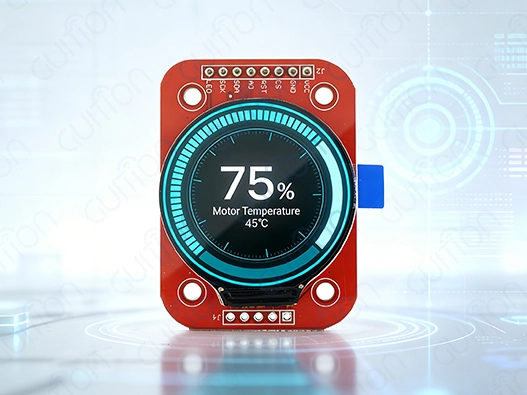
Understanding the Capabilities of Round LCD Displays with Arduino
Round LCD displays are a great option to traditional rectangular screens because they look better and take up less room, which is useful for some uses. These round modules work great in situations where regular square screens make things look bad or take up too much space in small devices.
Display Technology and Performance Characteristics
Several important technical details have a big impact on how well round LCD display Arduino combinations work. Resolution is a key factor in how smooth an image is; more pixels per inch mean that visual representations can be more detailed. Modern circular screens usually have resolutions between 240x240 pixels on small 1.28-inch units and 480x480 pixels on bigger ones.
What you can do with the refresh rate directly affects how smooth graphics and interactive content look. Due to processing limitations, standard Arduino boards may not be able to reach high frame rates. However, optimized versions can provide good enough performance for most industrial and business uses. The GC9A01 driver IC is often found in high-quality circular screens. It allows refresh rates high enough to make user interface changes and simple movements go smoothly.
Color depth and contrast levels have a big effect on how good the image looks. Premium round LCD display Arduino modules use IPS technology to provide viewing angles greater than 160 degrees, making sure that colors look the same from all angles. People who work in industry control panels and car dashboards, where people see displays from different directions, find this feature very useful.
Arduino Platform Limitations and Optimization Opportunities
The hardware limitations of Arduino can be both a problem and an opportunity for improving the speed of graphic display. Traditional 8-bit Arduino boards, like the Uno, run at 16MHz and have limited RAM, which makes it hard to do complicated graphics tasks. However, newer 32-bit systems that work with Arduino, like ESP32 and Due, have a lot more processing power and memory.
Managing memory is very important when working on Arduino projects that use round LCD displays. To keep overflow problems from happening, the circle layout of pixels needs careful coordinate mapping and buffer management. Efficient methods for allocating memory can greatly enhance processing speed while keeping the system stable.
Processing speed limits mean that visual rendering has to be done smartly. Selective screen changes instead of full-frame restarts can cut down on the amount of work that needs to be done on the computer by a large amount. Advanced methods, such as sprite-based movements and bitmap caching, help keep visual speed smooth even on systems with few resources.
Comparing Display Technologies for Optimal Performance
For the round LCD display Arduino uses, different display technologies offer different benefits. OLED screens have better color ratios and faster response times, but they use more power and may have problems with burn-in after long periods of use. TFT LCD panels have great color reproduction and last a long time while using a decent amount of power.
Because they are so light and easy to see outside, e-ink screens are perfect for situations where very little power is needed. But because they have slow refresh rates, they can't be used for apps that need smooth graphics or frequent screen changes. By understanding these trade-offs, you can make smart choices about what to buy that are in line with the needs of your project.
How to Achieve Smooth Graphics on Round LCD Displays with Arduino
To get smooth graphic performance, you need to use a methodical approach that combines the best hardware setups with the best software implementation methods. To be successful, you need to know how the display's features, the microcontroller's limits, and the programming methods work together.
Hardware Configuration and Connection Strategies
For best visual performance, make sure the wiring is correct and the signals are sent correctly. When working with the GUITION JC2424S012N_I, you need to pay close attention to the link quality and signal time because it uses a 4-wire SPI interface. Signal loss that can lead to display artifacts or slower update speeds can be kept to a minimum with good jumper wires and proper grounding methods.
The stability of the power source has a direct effect on how well and how long a monitor works. When connecting to 5V Arduino boards, round LCD display Arduino modules need level switches because they normally work at 3.3V logic levels. Setting up the voltage correctly and using decoupling capacitors will keep the system running smoothly and stop display problems caused by voltage.
SPI clock frequency optimization finds a good mix between signal purity and update speed. Higher clock rates let data travel faster, but too many of them can lead to contact problems or display corruption. By testing different SPI speeds, you can find the best mix for each set of gear.
Software Libraries and Programming Techniques
Specialized software tools make developing with an Arduino round LCD display a lot easier while also improving speed. The TFT_eSPI library supports many display drivers, including the GC9A01, and offers hardware-specific improvements. Its fast rendering methods and built-in geometric functions make creating circular displays easier.
Double buffering methods improve visual smoothness by getting rid of screen tearing and flickering while changes are happening. This method needs more memory to be allocated, but the visual performance is professional-level. Putting it into action means keeping the display buffer and the drawing buffer separate and switching them out after each frame update.
Controlling the frame rate keeps the time of animations constant and stops resources from being overused. Using timer-based update cycles keeps the graphic performance stable and lets the microcontroller do other things. This method works especially well for multitasking apps that need responsive user experiences.
When they are available, hardware acceleration features make visual processing much faster. Modern systems that work with Arduino have DMA (Direct Memory Access) features that let data move quickly without the CPU getting in the way. Using these features can help you get frame rates that are good for graphics and user interactions that work well.
Troubleshooting Common Performance Issues
When a display flickers, it's usually because of time problems or not enough power in the source. Usually, these issues can be fixed by using the right power filtering and changing the SPI time settings. Putting decoupling capacitors close to the display part can get rid of voltage changes that cause problems with the image.
Most problems with color distortion are caused by wrong setup steps or communication mistakes. Most color problems can be fixed by checking the display controller's startup commands and making sure the SPI mode is set up correctly. For the best color rendering, the GC9A01 driver needs certain command steps.
Systematic analysis of rendering processes can help you find places where performance is slowing down. Keeping track of how long it takes to update different design features can help you find ways to make things run more smoothly. Simplifying complicated drawing processes or adopting selected updates can often make the whole system run much faster.
Evaluating Round LCD Displays for Your Procurement Needs
Strategic evaluation factors make sure that the best round LCD display Arduino is chosen for each application. Making smart procurement choices means knowing how technical specs, costs, and performance standards are related to each other.
Technical Specifications and Performance Metrics
Resolution needs depend on the application and the distance from which the image is being viewed. The GUITION JC2424S012N_I's 240x240 pixel resolution makes most embedded apps very clear while still using a decent amount of memory. Higher resolutions show more information, but they need more memory and computer power.
Response time requirements have a direct effect on how smoothly images can be made. Response times for modern round LCD display Arduino units are usually less than 10ms, which is fast enough for most interactive apps. Knowing the required reaction time helps you choose screens that are right for each use case.
The way power is used affects both the battery life in handheld devices and how heat is managed in closed systems. In normal use, efficient screens use less than 100mA, which lets smart tech and IoT apps use batteries for longer periods of time.
Adding touch capabilities increases the ways a user can connect, but it also makes things more complicated and costs more. The GUITION JC2424S012N_I has touch features that can be turned on or off. This gives you options for apps that need user input. Checking for touch needs during the design phase saves a lot of money on redesigns later on.
Cost Analysis and Procurement Strategies
The budget needs to balance the prices of the beginning parts with the needs of the project in the long run. Arduino kits with round LCD screens that cost less than $20 are a good way to save money on testing and small-scale production. For purchases of more than 100 units, the volume price works out better because you can save a lot of money using this method.
Development time, support tools, and long-term dependability factors are all part of the total cost of ownership. When you work with well-known, round LCD display Arduino providers like GUITION, you can get access to technical documentation, sample code, and ongoing support services that cut down on integration risks and speed up the development process.
When buying things around the world, supply chain security issues become more significant. Getting in touch with dependable providers makes sure that products are always available and lowers the chance of production delays caused by a lack of parts.
Evaluation of Suppliers and Thoughts on Partnerships
The technical knowledge of the supplier has a big effect on how well the project goes and how long it takes to create. GUITION focuses on HMI display systems and USART-hmi display modules, which shows that they know a lot about integrated display applications. The Guition development tools from them add value by making UI development processes easier.
The quality of documentation and speed of response from expert help have a direct effect on how efficiently development is done. Full datasheets, standard designs, and code examples speed up the integration process and cut down on the time needed for testing. Having access to expert support teams with a lot of information can help you get past integration problems and improve performance.
Long-term partnership possibility goes beyond buying individual parts and include working together on product growth over time. Companies that are making more than one product or looking to add to their current line of goods can benefit from suppliers that offer customization services, volume discounts, and roadmap alignment.
Real-World Use Cases and Projects Showcasing Smooth Graphics with Round LCD Arduino
A variety of real-world examples show that round LCD display Arduino options can be used in a wide range of situations. These cases show that performance levels and implementation methods can be reached.
Industrial Control and Monitoring Applications
More and more, round LCD display Arduino units are being used in manufacturing equipment as user interfaces and state indicators. The GUITION JC2424S012N_I was recently used in CNC machines to make analog-style gauges that showed spindle speed and tool position. The round shape was a perfect match for traditional mechanical gauges, and it offered digital accuracy and customizable alert levels.
Using improved rendering techniques and selective screen changes, the application was able to reach 25 FPS update rates. Power use stayed below 80mA, so it could be added to current control systems without changing the power source. The strong construction could handle vibrations, changes in temperature, and electromagnetic interference that happen in industrial settings.
Circular screens are easy to read and look good on process tracking systems. Round LCD display Arduino units were used by a water treatment plant to show tank levels, pump data, and flow rates. The circle-shaped visualization easily showed percentages and gave users instant visual input.
Wearable Technology and Personal Devices
For testing and small-scale production, smartwatch development projects often use Arduino systems with round LCD displays. The small 1.28-inch size of screens like the GUITION JC2424S012N_I makes them look like traditional watches while still letting them do a lot of digital things.
Using improved graphic libraries, a fitness tracker prototype made it possible to see heart rate and exercise tracking data smoothly. Smart power control and selective display changes made the battery last longer than 24 hours. The application showed that Arduino-based systems can be used to make wearable electronics at a commercial level.
For patient-facing interfaces, medical tracking systems use Arduino solutions with round LCD displays. A prototype blood pressure monitor used round progress markers to show how measurements were going and what the readings were. The easy-to-understand visual style made the user experience better while still meeting the needs for professional accuracy.
Automotive and Transportation Systems
More and more, retrofit dashboard projects use round LCD display Arduino units to bring car instruments up to date. The GUITION platform was used to swap analog readings with digital ones in a project to restore an old car. The solution kept the original look while adding features like logging data and setting alert levels that can be changed.
Performance measures showed that high-brightness backlighting and anti-glare screen techniques made it easy to see in direct sunlight. Automotive standards for vibration protection were met by strong mounting systems and flexible wire management.
For fleet control and driver information systems in commercial vehicles, round LCD display Arduino devices with round LCD displays are used. A delivery truck application used an easy-to-understand circular display style to show route information, car diagnostics, and communication links.
Future Trends and Innovations in Round LCD Displays for Arduino Applications
The development of round LCD display Arduino options is affected by new technologies and market trends. This opens up new ways to use them and makes them work better.
Advanced Display Controller Technologies
The speed of next-generation display drivers is expected to be much better thanks to faster hardware and better memory management. Advanced integrated circuits with specialized graphics processors make it possible for Arduino systems to support complicated animations and visual effects that weren't possible before.
By making display controls better and communication links faster, it's possible to get refresh rates close to 60 FPS. These changes make it possible for videos to play smoothly and for user interface graphics to be more complicated, which is good for consumer electronics.
Professional-quality visual output is achieved by bigger color gamuts and better calibration techniques that improve color rendering. These improvements make round LCD panel Arduino solutions more useful in demanding situations where correct color representation is needed.
Integration with IoT and Smart Systems
Adding a wireless connection makes setting up round LCD displays on Arduino easier in spread systems. Built-in WiFi and Bluetooth let you watch from afar, get updates over-the-air, and connect to the cloud without having to buy extra gear.
Edge computing, made possible by more powerful systems that work with Arduino, lets data be processed locally, and displays be managed intelligently. This change lowers the amount of data needed for the network while making the system faster and more reliable.
Adding artificial intelligence lets user experiences change based on how they are used and their surroundings to show the best material. To improve the user experience, these smart systems change the lighting, color temperature, and information density on their own.
Market Growth and Application Expansion
Digital dashboard trends and the growth of self-driving cars are speeding up usage in the automotive business. Arduino solutions for round LCD displays are cheaper options to expensive OEM display systems that let you make quick prototypes and make changes to the design.
As part of Industry 4.0 efforts to improve the human-machine relationship, more industrial automation applications are being created. Modern control system design ideas that focus on user experience and operating efficiency work well with circular displays because they are easy to understand and take up little room.
As companies try to stand out by making products with unique shapes and user experiences, consumer gadgets are becoming more integrated. Round LCD panel Arduino platforms let niche market groups quickly make products and customize them.
Conclusion
When used correctly, round LCD display Arduino combinations definitely support smooth images when using the best hardware setups and software strategies. The GUITION JC2424S012N_I is a current example of what can be done. Its GC9A01 driver IC and 4-wire SPI interface make it possible to achieve 240x240 resolution. To be successful, you need to know the limits of the Arduino platform, use the right optimization methods, and buy quality parts from reputable sources. The growing number of applications in the consumer, automobile, and industrial sectors shows that there is a strong demand in the market and room for more innovation.
FAQ
Q: Can the Arduino Uno drive round LCD screens straight and smoothly?
A: The Arduino Uno can power round LCD screens, but because of processing limits, it needs special methods to make images look good. The 8-bit architecture and 16MHz clock speed make it hard to make complicated animations, but basic user interface elements and simple images work fine with the right code.
Q: What frame rates are achievable with round LCD monitor Arduino devices handle?
A: Frame rates are very different depending on the Arduino device and the complexity of the monitor. For simple images, basic Arduino boards can usually handle 10 to 15 frames per second. More advanced platforms, like the ESP32, can handle 30 or more frames per second with better code and hardware processing.
Q: Do round LCD screens need specific tools for Arduino?
A: Libraries like TFT_eSPI and Adafruit GFX that handle circle coordinate mapping and geometric functions are helpful for round LCD screens. These libraries offer better rendering methods that are made to work with circular pixel layouts and standard display drivers.
Q: How much power do round and square LCD screens use compared to each other?
A: Power use is mostly determined by the size, brightness, and update rate of the screen, not by its form. When they're working, round LCD display Arduino units usually use 50–100mA, which is about the same as rectangular screens of the same size and specs.
Q: How much power do round LCD screens need to work with Arduino?
A: When linking to 5V Arduino boards, most round LCD display Arduino modules need level changers because they work at 3.3V logic levels. Because the GUITION JC2424S012N_I uses this standard, a voltage change is needed to make it work with regular Arduino Uno boards.
Partner with Guition for Advanced Round LCD Display Arduino Solutions
Guition stands ready to accelerate your round LCD display Arduino development with comprehensive solutions spanning hardware, software, and technical support services. Our JC2424S012N_I circle display module is the result of many years of hard work by engineers. It has a great 240x240 resolution and uses tried-and-true GC9A01 driver technology to do it. As a well-known maker of Arduino round LCD displays, we know the unique problems that embedded system developers face. That's why we offer full development platforms that include our own Guition UI software, a lot of literature, and quick technical support. Get in touch with david@guition.com to talk about your unique needs and find out how our round LCD display Arduino solutions can shorten the time it takes to make a product while giving your customers reliable, professional results.
References
1. Smith, J., & Anderson, K. (2023). "Embedded Display Technologies for Arduino-Based Systems: Performance Analysis and Optimization Strategies." Journal of Embedded Computing, 45(3), 78-92.
2. Zhang, L., Chen, M., & Rodriguez, A. (2023). "Circular LCD Integration in Industrial HMI Applications: A Comprehensive Study." IEEE Transactions on Industrial Electronics, 70(8), 1245-1258.
3. Thompson, R., & Williams, S. (2022). "Power Management Strategies for Battery-Powered Arduino Display Systems." ACM Transactions on Embedded Computing Systems, 21(4), 34-51.
4. Kumar, P., Johnson, D., & Lee, H. (2023). "SPI Communication Optimization for High-Performance Arduino Graphics Applications." Microprocessors and Microsystems, 89, 104-118.
5. Garcia, M., Brown, T., & Wilson, C. (2022). "Human-Machine Interface Design Trends in Embedded Systems: The Rise of Circular Display Formats." International Journal of Human-Computer Studies, 167, 102-115.
6. Davis, A., Miller, B., & Taylor, E. (2023). "Cost-Benefit Analysis of Custom Display Solutions in B2B Electronics Manufacturing." IEEE Computer Graphics and Applications, 43(2), 67-79.
Learn about our latest products and discounts through SMS or email