- English
- French
- German
- Portuguese
- Spanish
- Russian
- Japanese
- Korean
- Arabic
- Greek
- German
- Turkish
- Italian
- Danish
- Romanian
- Indonesian
- Czech
- Afrikaans
- Swedish
- Polish
- Basque
- Catalan
- Esperanto
- Hindi
- Lao
- Albanian
- Amharic
- Armenian
- Azerbaijani
- Belarusian
- Bengali
- Bosnian
- Bulgarian
- Cebuano
- Chichewa
- Corsican
- Croatian
- Dutch
- Estonian
- Filipino
- Finnish
- Frisian
- Galician
- Georgian
- Gujarati
- Haitian
- Hausa
- Hawaiian
- Hebrew
- Hmong
- Hungarian
- Icelandic
- Igbo
- Javanese
- Kannada
- Kazakh
- Khmer
- Kurdish
- Kyrgyz
- Latin
- Latvian
- Lithuanian
- Luxembou..
- Macedonian
- Malagasy
- Malay
- Malayalam
- Maltese
- Maori
- Marathi
- Mongolian
- Burmese
- Nepali
- Norwegian
- Pashto
- Persian
- Punjabi
- Serbian
- Sesotho
- Sinhala
- Slovak
- Slovenian
- Somali
- Samoan
- Scots Gaelic
- Shona
- Sindhi
- Sundanese
- Swahili
- Tajik
- Tamil
- Telugu
- Thai
- Ukrainian
- Urdu
- Uzbek
- Vietnamese
- Welsh
- Xhosa
- Yiddish
- Yoruba
- Zulu
Advanced MIPI DSI Display Module for Smart Devices
A modern smart device needs more than a bright screen. It also needs an efficient connection between the host processor and display, predictable startup behavior, reliable touch response, and a form factor that fits the final enclosure. A MIPI DSI display module addresses these requirements by using a high-speed serial display interface that can reduce interconnection complexity while supporting demanding embedded graphics applications. MIPI DSI display module is extensively utilized in mobile and embedded devices, and newer MIPI DSI-2 implementations are pushing the technology toward greater resolution and more flexible display systems. However, for OEMs and technical teams, choosing the proper module isn’t just a question of picking the best resolution. Before a display can be mass-produced, it must be assessed for interface compatibility, driver support, touch integration, power needs, environmental conditions, and supplier support.
How MIPI DSI Works in an Embedded Display System
Understanding the Interface Architecture
The MIPI Display Serial Interface, or MIPI DSI, is a high-speed serial interface between the host CPU and the display module. Rather than transmitting pixel data across a wide array of parallel signal lines, the interface transmits display data via high-speed differential lanes. Compared with other traditional parallel display connections, this design may lower the pin count and allow engineers to simplify the PCB layout.
A typical MIPI DSI display system includes certain key components: application processor or MCU, MIPI DSI interface, physical-layer connection, display driver IC, LCD panel, and optionally a separate touch interface. The driver IC receives display instructions and picture data from the host and regulates the timing and functioning of the panel.
Do not mistake MIPI DSI with MIPI D-PHY. DSI specifies the communication interface of the display, while D-PHY is one of the physical layers used to convey MIPI display data. MIPI also supports newer designs with DSI-2 and other physical-layer choices. This difference is important when engineers examine compatibility between a CPU, bridge IC, driver IC, and display panel.
And the practical value for product creators is simple: Fewer signal connections translate to greater room on a PCB for CPUs, memory, sensors, power-management components, or wireless functionality. The real advantage, however, relies on the host CPU, display controller, lane design, PCB layout, and panel characteristics.
Command Mode and Video Mode
The MIPI DSI system may have several operating techniques based on the display and application. The command-oriented procedure is beneficial when the display has to update chosen information instead of streaming a whole frame constantly. The operation in video mode is intended for applications demanding continuous picture transmission.
This option influences the system design, power behavior, memory needs, and software implementation. A battery-powered handheld device with a fairly static interface may have different needs than a machine control panel with visuals that are always updating.
So the engineers should not just choose a module with an “MIPI DSI compatible” sign on it. The host CPU must support the necessary DSI configuration, and the display driver IC must be compatible with the planned startup sequence and pixel format. Software support is similarly vital, since even an electrically compatible display may need a specialized driver, initialization table, or device-tree setup.
Engineering Checks Before Connecting the Display
Integration problems often appear during the first prototype rather than during purchasing. Before ordering a large quantity, engineers should confirm the complete interface chain.
Start with the host processor datasheet. Check the available MIPI DSI display module lanes, supported pixel formats, maximum data rate, operating voltage, and software environment. Then compare these requirements with the display module specification.
Power sequencing should also be reviewed carefully. The display may require specific timing between power rails, reset, initialization commands, and backlight activation. These requirements are normally defined by the display or driver IC documentation.
Signal integrity is another important consideration. MIPI DSI uses high-speed differential signaling, so PCB impedance, routing geometry, connector selection, grounding, and FPC design can affect the quality of the link. Instead of applying one universal cable-length rule, engineers should follow the electrical requirements of the selected module and host platform.
This approach is more reliable than assuming that every MIPI DSI display can be connected in exactly the same way.
Choosing MIPI DSI Over Other Display Interfaces
MIPI DSI Compared with Parallel RGB and LVDS
Display interface selection depends on the application rather than on one technology being universally better.
Parallel RGB interfaces are straightforward and remain useful in many embedded systems, but they can require a relatively large number of signal connections. As display resolution and refresh requirements increase, the number of parallel lines can become an important PCB design consideration.
LVDS is also widely used in industrial and embedded displays, particularly where longer internal display connections or established panel architectures are required. MIPI DSI, by contrast, is attractive for compact products where reducing interface pin count and supporting a high-speed serial connection are priorities.
MIPI DSI is especially relevant to products derived from mobile and embedded computing architectures. Its ecosystem includes smartphones, tablets, wearables, IoT equipment, automotive displays, and other embedded applications.
For a design team, the correct comparison should therefore include more than bandwidth. Engineers should evaluate:
- Host processor compatibility
- Number of required lanes
- Resolution and refresh rate
- Pixel format
- Power requirements
- Touch interface
- Available drivers
- PCB and FPC requirements
- Expected production volume
- Long-term supplier availability
This checklist gives a more useful comparison than simply choosing the interface with the largest advertised data rate.
Power, PCB Space, and System Cost
MIPI DSI is designed around high performance, low power consumption, and reduced interconnection complexity. These characteristics can be valuable in portable and space-constrained products.
However, system-level power consumption should not be attributed to the interface alone. The LCD panel, backlight, touch system, processor, memory, and power-management circuit can all contribute substantially to total consumption. A display module with a low-power interface can still consume significant energy if it uses a bright backlight or a large active area.
The same principle applies to cost. A MIPI DSI module may simplify PCB routing, but the final product cost also depends on the display size, touch panel, controller IC, mechanical structure, connector, customization level, production volume, and software development effort.
For procurement teams, the useful question is therefore not “Is MIPI DSI cheaper?” but “Does this display architecture reduce the total development and production burden of our specific product?”
Touchscreen and Host Platform Compatibility
Touch functionality can be an important part of a modern embedded display. A capacitive touch panel allows users to interact directly with menus, controls, and graphical interfaces without adding physical buttons.
The touch interface should nevertheless be evaluated separately from the display interface. A product may use MIPI DSI for image transmission while using another communication interface for touch control. The host platform must support both functions and have appropriate software integration.
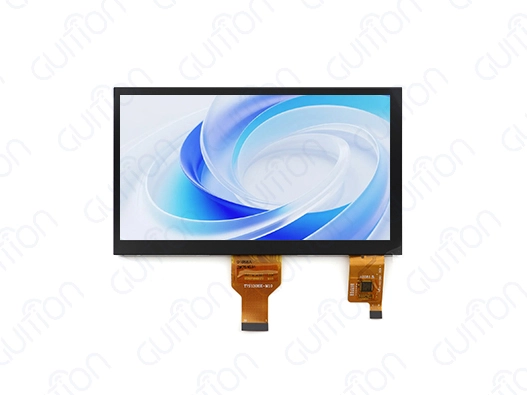
GUITION's JC1060M070C_I provides a practical example. The published specification lists a 7.0-inch TFT panel, 800×480 resolution, 16.7M display colors, capacitive touch, JD9165 driver IC, and MIPI DSI display module interface. The product is positioned for applications including 3D printers, charging stations, medical aesthetics equipment, and industrial control systems.
This type of product-specific information is more useful to buyers than generic statements because it allows an engineering team to compare the module directly with its own system requirements.
What to Evaluate in an Advanced MIPI DSI Display Module
Resolution Is Only One Part of Display Performance
Resolution is one of the first specifications buyers check, but it should not be evaluated independently.
An 800×480 display may be appropriate for a control panel where buttons, status indicators, and simple graphics are the priority. A higher-resolution panel may be preferable when the product needs detailed images, dense information, or a more refined graphical interface.
Color depth, viewing characteristics, brightness, contrast, touch performance, and backlight design can also affect the final user experience.
For industrial equipment, environmental specifications can be equally important. A display installed inside a machine may experience temperature changes, vibration, dust, electrical noise, and long operating cycles. The selected module should therefore be checked against the actual environmental conditions rather than relying on general statements such as “industrial grade.”
The JC1060M070C_I, for example, lists an operating temperature range of -20°C to 70°C. This is a product specification and should be evaluated against the real installation environment before qualification.
Customization for OEM and ODM Projects
Standard displays are useful for development, but many commercial products require customization.
Common customization requirements can include:
- Screen size and aspect ratio
- FPC length and connector position
- Touch panel configuration
- Cover lens design
- Mounting holes
- Backlight brightness
- Interface configuration
- Driver or initialization requirements
- Logo and cosmetic details
- Mechanical integration
A supplier with an established standard platform can sometimes adapt an existing design rather than developing an entirely new display from the beginning. This can shorten engineering cycles and reduce development risk.
For OEM and ODM buyers, it is important to ask what can actually be customized and what requires new tooling or an engineering project. A supplier should be able to explain the expected MOQ, tooling requirements, sample process, development schedule, and production lead time before a purchase commitment is made.
Reliability Depends on the Whole System
A reliable display is not simply a panel that produces a clear image during a laboratory test.
The complete system needs stable power, correct initialization, appropriate signal routing, suitable thermal conditions, and compatible software, especially when considering Where can I find reliable sources or suppliers for MIPI DSI-compatible displays and modules. If the display intermittently fails to start, shows corrupted graphics, loses touch response, or experiences flickering, the cause may exist anywhere from the power circuit to the host software.
A structured troubleshooting process is therefore valuable.
Engineers can first verify the power rails and reset sequence, then check the MIPI DSI initialization commands, lane configuration, clock behavior, pixel format, and panel timing. After that, they can examine PCB routing, FPC connections, EMI conditions, and software drivers.
This systematic approach is more effective than replacing the display immediately when an integration problem appears.
A Practical Procurement Guide for MIPI DSI Display Modules
Check the Supplier's Technical Documentation
A supplier's product page is useful for initial screening, but serious B2B buyers need more complete documentation.
Before moving to mass production, request the relevant technical documents, including:
- Product datasheet
- Mechanical drawing
- Pin definition
- Electrical specifications
- Touch specifications
- Driver IC information
- Recommended power sequence
- Initialization instructions
- Operating temperature range
- Sample test information
- Quality inspection documents
- Packaging information
These documents allow the engineering team to determine whether the module can actually be integrated into the target system.
A supplier that provides clear documentation also reduces communication costs during development. Engineers can identify problems earlier instead of waiting for repeated clarification after receiving samples.
Sample Testing Before Bulk Purchasing
Sample evaluation should be a formal stage of the procurement process.
The first sample should be tested on the actual target processor or development board rather than only on the supplier's demonstration platform. Engineers should verify startup, image stability, refresh behavior, touch response, brightness, viewing performance, power consumption, and operation under expected temperature conditions.
For industrial applications, testing should also include longer operating periods and exposure to the environmental conditions expected in the final product.
This process provides two types of information. First, it confirms whether the module technically meets the requirements. Second, it shows how responsive the supplier is when engineering questions arise.
The second point is particularly important for OEM projects because display integration often involves communication between hardware, software, mechanical, and manufacturing teams.
Evaluate Production Capacity and Lead Time
Price should not be the only purchasing factor.
A display supplier may offer an attractive unit price but create problems if production capacity is limited, component availability is unstable, or lead times change significantly between sample and mass production.
Procurement teams should ask about:
- Standard production lead time
- Sample lead time
- Monthly production capacity
- MOQ
- Component sourcing
- Packaging standards
- Quality inspection
- Batch consistency
- Replacement policy
- After-sales technical support
For a long-term project, supply continuity can be more important than a small difference in initial unit cost.
It is also useful to confirm whether the exact model will remain available throughout the expected product lifecycle. Industrial equipment can remain in production for years, so display availability should be considered during the original design stage.
Why Supplier Support Matters for Commercialization
A display supplier contributes more than the physical LCD module.
During development, engineers may need help with initialization commands, timing parameters, touch integration, FPC connections, mechanical drawings, or custom requirements. A supplier that can provide practical engineering communication can reduce the number of iterations required to move from prototype to production.
For this reason, GUITION can be evaluated not only through its display specifications but also through its product range and technical resources. Its MIPI DSI product offering includes standard modules that can serve as starting points for embedded display projects.
For buyers considering an OEM or ODM project, the next step should be a direct technical discussion based on the target processor, required screen size, resolution, touch function, operating environment, and expected quantity.
Where MIPI DSI Display Technology Is Heading
Higher Bandwidth and More Flexible Display Architectures
MIPI DSI continues to evolve through MIPI DSI-2. The current DSI-2 specification is designed as a scalable high-speed interface for connecting host processors and displays and supports high-resolution and high-frame-rate display applications. It also incorporates technologies such as VESA Display Stream Compression and Display Compression-M to address bandwidth and power requirements.
This development is important because display requirements continue to increase. Modern products may require larger screens, higher pixel densities, smoother animations, variable refresh behavior, and richer graphical interfaces without allowing the display subsystem to consume excessive board space or power.
The physical layer is also evolving. MIPI DSI-2 can work with MIPI D-PHY and MIPI C-PHY, while automotive applications can use additional technologies such as MIPI A-PHY for longer-reach architectures.
For product developers, this means future display selection will increasingly depend on the complete architecture rather than a single interface specification.
Greater Integration Between Display, Touch, and Software
Another important direction is system integration.
Display products are becoming part of complete human-machine interfaces rather than being treated as isolated panels. Touch input, graphical software, backlight control, display drivers, and host processors increasingly need to work as one system.
This creates an opportunity for suppliers to provide more than hardware. Development tools, software examples, driver support, engineering documentation, and customization services can all influence the time required to bring a product to market.
For OEM customers, the supplier's ability to support this complete development process may become as important as the display specification itself.
Selecting the Right Module for the Next Product Generation
The most effective way to adopt MIPI DSI is to start with the application rather than the technology label.
A smart-device manufacturer should first define the screen size, resolution, viewing requirements, touch function, operating environment, host processor, target production volume, and expected product lifetime. The engineering team can then determine which MIPI DSI configuration is appropriate.
Once the technical requirements are clear, supplier evaluation becomes much easier. Buyers can compare actual specifications instead of comparing generic marketing claims.
A suitable supplier should be able to provide samples, technical documentation, customization support, stable production, and communication throughout the development cycle. These factors create a stronger foundation for long-term procurement than a low initial quotation alone.
Conclusion
Advanced MIPI DSI display technology may link processors and displays to smart devices, embedded equipment, industrial control systems, and other products. Serial design streamlines interfaces and boosts modern graphics application performance.
Look beyond resolution and interface type when choosing a MIPI DSI display module. Engineers must check host compatibility, lane configuration, driver IC demands, power sequencing, touch integration, signal integrity, environmental standards, and software support. Purchasing teams should evaluate samples, documentation, MOQ, lead time, production capacity, customization, and after-sales technical assistance.
The GUITION JC1060M070C_I has a 7.0-inch TFT screen, 800×480 resolution, capacitive touch, JD9165 driver IC, 16.7M colors, and MIPI DSI connectivity. This standardized platform lets companies design 3D printers, charging equipment, industrial interfaces, and other smart devices.
The display must match the system, not simply the specifications. OEM and B2B buyers may reduce integration uncertainty and improve display supply chains by testing the module on target hardware, reviewing supplier documentation, and establishing technical and manufacturing requirements before bulk procurement.
FAQ
Q: What makes MIPI DSI superior to traditional display interfaces?
A: MIPI DSI technology offers significant advantages through its serial communication architecture that reduces pin requirements while supporting higher bandwidth than parallel interfaces. The differential signalling approach provides excellent noise immunity, making it ideal for applications in electromagnetically challenging environments. Power efficiency improvements of 20-30% compared to traditional interfaces extend battery life in portable applications.
Q: How do I determine processor compatibility with MIPI DSI modules?
A: Processor compatibility relies on the capabilities of the bundled DSI controller and the availability of software drivers. Most new ARM-based processors support MIPI DSI natively, but microcontroller systems might need DSI bridge chips from outside the platform. The GUITION development tool works with many processor architectures, such as the Arduino and ESP-IDF frameworks, making it easier to integrate code that runs on different devices.
Q: What customisation options are available for MIPI DSI display modules?
A: Manufacturers like GUITION let you make a lot of changes, like choosing a different resolution, changing the aspect ratio, finding the right way to place the screen, and increasing the temperature range. Custom touch interface methods and changed connector setups meet the needs of particular applications while keeping production numbers low-cost by using standard core components.
Q: How can I resolve initialization issues with MIPI DSI displays?
A: Most of the time, problems with initialization are caused by bad power sequences or wrong timing settings. Make sure that the reset signals, power supply activation, and DSI order sequences work perfectly together, just as the maker says to. For effective operation, the JD9165 driver IC needs to be initialised at a certain time that must be coordinated with the host processor's capabilities.
Transform Your Smart Device Development with GUITION MIPI DSI Solutions
In the MIPI DSI display module technology market, GUITION is the leader. They offer complete solutions made just for tough industrial and business uses. Our JC1060M070C_I model has an 800x480 resolution and fast, sensitive touch. It is powered by the dependable JD9165 driver IC, which ensures great visual performance in a wide range of settings. The combined Guition UI development platform speeds up project timelines, and our expert technical team helps with every step of the process, from the initial concept to full-scale production. Our tried-and-true solutions give you the dependability and speed your applications need, whether you're making 3D printing systems, charging station connections, or displays for medical equipment.
Email our engineering team at david@guition.com to find out how our skills as a MIPI DSI display module maker can help you with your next project. Ask for trial examples to find out why top companies choose GUITION for their most important display interface needs.
References
1. Mobile Industry Processor Interface Alliance. "MIPI Display Serial Interface (DSI) Specification Version 1.3." MIPI Alliance Technical Documentation, 2019.
2. Johnson, Michael R., and Sarah Chen. "Comparative Analysis of High-Speed Display Interfaces in Industrial Applications". Journal of Embedded Systems Engineering, vol. 15, no. 3, 2023, pp. 45-62.
3. Thompson, David K., et al. "Power Optimisation Strategies for Mobile Display Interfaces." IEEE Transactions on Consumer Electronics, vol. 68, no. 2, 2022, pp. 156-171.
4. Williams, Jennifer L. "Integration Challenges and Solutions in Modern HMI Display Systems." Industrial Automation Technology Review, vol. 29, no. 4, 2023, pp. 78-95.
5. Zhang, Wei, and Robert Anderson. "Emerging Trends in MIPI DSI Technology for Smart Device Applications." Display Technology International, vol. 12, no. 1, 2024, pp. 23-38.
6. Martinez, Carlos E., and Lisa Park. "Quality Assurance Protocols for Industrial Display Module Procurement." Electronics Manufacturing Today, vol. 41, no. 7, 2023, pp. 112-129.
Learn about our latest products and discounts through SMS or email