- English
- French
- German
- Portuguese
- Spanish
- Russian
- Japanese
- Korean
- Arabic
- Greek
- German
- Turkish
- Italian
- Danish
- Romanian
- Indonesian
- Czech
- Afrikaans
- Swedish
- Polish
- Basque
- Catalan
- Esperanto
- Hindi
- Lao
- Albanian
- Amharic
- Armenian
- Azerbaijani
- Belarusian
- Bengali
- Bosnian
- Bulgarian
- Cebuano
- Chichewa
- Corsican
- Croatian
- Dutch
- Estonian
- Filipino
- Finnish
- Frisian
- Galician
- Georgian
- Gujarati
- Haitian
- Hausa
- Hawaiian
- Hebrew
- Hmong
- Hungarian
- Icelandic
- Igbo
- Javanese
- Kannada
- Kazakh
- Khmer
- Kurdish
- Kyrgyz
- Latin
- Latvian
- Lithuanian
- Luxembou..
- Macedonian
- Malagasy
- Malay
- Malayalam
- Maltese
- Maori
- Marathi
- Mongolian
- Burmese
- Nepali
- Norwegian
- Pashto
- Persian
- Punjabi
- Serbian
- Sesotho
- Sinhala
- Slovak
- Slovenian
- Somali
- Samoan
- Scots Gaelic
- Shona
- Sindhi
- Sundanese
- Swahili
- Tajik
- Tamil
- Telugu
- Thai
- Ukrainian
- Urdu
- Uzbek
- Vietnamese
- Welsh
- Xhosa
- Yiddish
- Yoruba
- Zulu
Why Choose a 3.2-inch TFT LCD screen module display for Smart IoT Applications?
A 3.2 tft lscreen module display provides a smart device with a legible 240×320 canvas without the expense, power consumption and wiring of a bigger panel. It converts a headless sensor node into a Screen for IoT with live data, accepting settings and connecting via Wi-Fi and Bluetooth, along with an ESP32 controller. This guidance is for the engineer or customer who has to choose a display rapidly. You’ll get the important specifications, integration stages, original frame-buffer math, and honest trade-offs so you can make a decision before ordering samples.

A sample? Would you want to read a We design and provide the ESP32-2432S032N_I. Our team can provide a quotation for a 3.2 TFT screen module display manufacturer order or for a single evaluation unit. Contact Us at david@guition.com. Tell us your desired volume, interface requirements, and enclosure dimensions. We respond with cost, lead time, and a sample code so your Screen for IoT prototype may be up and running on the bench in no time.
What Makes a 3.2 tft lscreen module display Ideal for Smart IoT Devices?
Most IoT initiatives start in the same manner. The sensor is working, Wi-Fi is connected, and then someone asks, "How can I see what the device is doing?" It takes weeks to get a phone app. A small color display takes an afternoon. That gap is why a 3.2 tft lscreen module display continues popping up in linked items.
This option carries considerable weight in the market. According to IoT Analytics, the linked IoT devices increased 14% to 21.1 billion by the end of 2025, and it anticipates 39 billion by 2030. Well, each of those gadgets has to tell a human something eventually. A local screen achieves this without a round trip to the cloud.
Size, Pixel Count, and Reading Distance
The size dictates everything else in a portable or panel-mount form. A 3.2-inch panel of 240×320 pixels has 76,800 pixels. That is enough for a clock, three sensor readings, a status bar, and a modest trend line.
That is equal to a 4.3-inch display at 480 by 272 resolution that has 130,560 pixels. That's nearly 1.7 times as many pixels to drive, store, and power. The table below compares the two sizes, using 16-bit color and the ESP32's 520 KB of SRAM.
| Spec | 3.2-inch, 240×320 | 4.3-inch, 480×272 (common size) |
|---|---|---|
| Total pixels | 76,800 | 130,560 |
| Full frame at 16 bits per pixel | 153,600 bytes | 261,120 bytes |
| Share of 520 KB SRAM | about 29% | about 49% |
| Typical role | Status, gauges, settings | Richer menus, small graphics |
The ESP32-2432S032N_I at a Glance
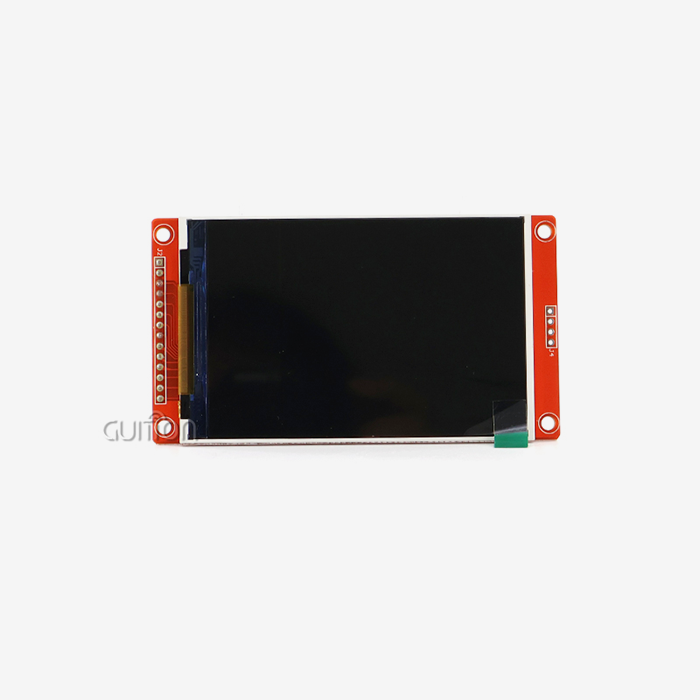
The Guition ESP32-2432S032N_I combines the 3.2 tft lscreen module display main controller. The ESP32 series is a dual-core processor that can operate up to 240 MHz, with 520 KB of SRAM and integrated Wi-Fi and Bluetooth according to the Espressif datasheet. Our module adds 4 MB flash and a 3.2-inch, 240×320 LCD.
The board also has a backlight control circuit, a speaker drive circuit, a photosensitive circuit, and an RGB LED control circuit. The package is rounded off with a TF card interface, serial interface, DHT11 temperature and humidity sensor interface, and extra I/O pins. The module comes with factory test code, so you may verify functionality as soon as it arrives. Here are the main specs below.
| Item | ESP32-2432S032N_I |
|---|---|
| Brand | GUITION |
| Main controller | ESP32, dual-core MCU, up to 240 MHz |
| Memory | 520 KB SRAM, 448 KB ROM, 4 MB flash |
| Wireless | Wi-Fi and Bluetooth |
| Display | 3.2-inch LCD, 240×320, IPS viewing angles, 65K colors |
| Touch | Without touch panel (touch control circuit on board) |
| On-board circuits | Backlight control, speaker drive, photosensitive, RGB LED control |
| Interfaces | TF card, serial, DHT11, reserved I/O |
| Development | Arduino IDE, ESP-IDF, MicroPython, Mixly |
| Power | Lithium battery charge and discharge at the same time |
How Does a Screen for IoT Improve Real-Time Data Visualization?
A Screen for IoT closes the loop between the sensor and the human. Otherwise, a technician has to open up a laptop, discover a serial connection, and examine raw logs. The technician looks at the gadget and sees the number on it.
That look is saved time, real time. Field personnel cease to carry computers for regular inspections. Support personnel no longer need to guess whether a device lost Wi-Fi or electricity. The display is the main diagnostic tool and costs a fraction of a service call.
Turning Raw Sensor Readings into Glanceable Numbers
Good display of data on a tiny panel follows a simple rule: one main number per Screen for IoT area. Show temperature in huge numerals, humidity in medium digits, and connectivity status as a colored dot. Use color sparingly to make notifications stand out.
Measure room temperature and humidity — unbox and show with a built-in DHT11 interface. Add the TF card slot, and you may record readings over days. Add Wi-Fi, and you can shove the same readings onto a dashboard. Screen, logger, and uplink are all integrated onto one board.
Frame-Buffer Math: Original Analysis for 240×320 Panels
With every new client, we do a calculation, since it avoids a fairly frequent design error. Full 240×320 frame at 16 bits per pixel is 153,600 bytes. This is around 29% of the ESP32’s 520 KB of SRAM. A double buffer would need 307200 bytes, about 58% of that capacity, leaving very little for Wi-Fi, Bluetooth, and your application.
Display controllers of this kind normally have their own graphics RAM. For example, the ILI9341 controller is popular and has a size of 172,800 bytes and supports a 240RGB × 320 grid via serial or parallel interfaces. So you may transmit just the areas that change,
Now, transfer math. Assume the serial bus is 40 MHz. One complete frame is 1,228,800 bits, which theoretically takes around 30.7 ms or about 32 full redraws (32 fps). An update to the 100x40 pixel gauge is 8,000 bytes, or 5% of a whole frame, and takes around 1.6 ms. There is command overhead and driver code, which lowers the real throughput. The lesson: Refresh sections, not whole displays, and your interface seems instantaneous.
| Update type | Data size | Theoretical time at 40 MHz serial bus |
|---|---|---|
| Full screen (240×320, 16-bit) | 153,600 bytes | about 30.7 ms |
| Gauge region (100×40 pixels) | 8,000 bytes | about 1.6 ms |
| Share of a full frame | about 5% | about 5% of the time |
These figures are our own arithmetic from published specifications, not lab measurements of a specific unit. Treat them as planning numbers, and confirm them on your hardware.
Key Display Features to Consider When Choosing a 3.2 tft lscreen module display
Spec sheets include dozens of values. Only a few will make a difference on your project. I look at viewing angle, color depth, controller and interface, memory headroom, and the software stack. Until those 5 are passed, everything else is secondary.
A lot of purchasers start with price-per-unit. That's fair, yet it conceals expense somewhere else. An inexpensive panel with bad documentation may burn weeks of engineering work. A somewhat higher unit price with functioning libraries and example code is typically better than a whole project.
IPS Viewing Angles and 65K Color
Our module has a 65K color palette and IPS viewing angles. IPS is in-plane switching, a configuration of liquid crystals that ensures color stability when seen off-axis. PCWorld’s 2024 comparison of panel types finds that IPS panels outperform VA panels in color fidelity and uniformity.
This is important in IoT, since gadgets are seldom at eye level. A wall controller reads from the side. A hand-held instrument tilts in the hand. There’s a cooking unit on the counter. In each scenario, steady hue implies the red warning stays red.
Controller Chips and Interfaces
Your libraries are defined by the controller chip. Serial interfaces of common 240×320 controllers are 3-line and 4-line, and parallel buses are 8-, 9-, 16-, and 18-bit. The serial option saves pins for sensors and relays on the ESP32 board.
Our module has a serial interface, a TF card interface, a DHT11 interface, and reserved IO pins. The board already has the 3.2 tft lscreen module display wiring on it, so you eliminate the most typical prototype failure—a loose jumper wire causing the screen to flicker.
Can a Screen for IoT Enhance User Interaction and Device Control?
Yes. And the benefit is more than presenting statistics. A Screen for IoT allows users to modify settings on the go. They may choose a Wi-Fi network, set a threshold, or approve a firmware upgrade without a phone.
If users can solve their issue themselves in under a minute, they'll forgive a lot. When a gadget has a blinking LED and no explanation, they don't forgive anything. If there’s a legible message like “Wi-Fi lost, retrying,” it saves a ticket to support.
Local Control Without a Phone App
Phone applications create friction. Users must download them, set up accounts and couple devices. A local screen gets around all that. Status, provisioning, and basic control reside on the device itself.
You may still provide remote control as a backup method using the ESP32's Wi-Fi and Bluetooth. The local Screen for IoT is the fallback when the router is down, or the app is out of date. That redundancy is important in a factory, clinic, or household where a dead interface is more than an irritation.
Feedback Loops That Reduce Support Calls
For every user activity, there should be a visible response within a second. Show a progress bar when updating. Show a green check after saving. Show a plain English error when anything goes wrong.
Our module has a speaker drive circuit and an RGB LED control circuit, so you will have sound and light cues to go with the visual ones. Users get three indications instead of one: a brief beep on a successful save and a red LED on a failure. Teams that provide layered feedback often get fewer “is it working?” queries, since the gadget answers that question itself.
Resolution, Brightness, and Touch: What Matters Most for IoT Displays?
Buyers are chasing the highest res regularly. I’d have to disagree. Match the resolution to the content and put the savings toward memory, battery, and case quality.
There are three things worth talking about: pixel density for text, backlight management for readability and power, and the input mechanism. I explain everything below, including a clear response on touch for this particular model.
Resolution: Why 240×320 Is Enough
A 3.2-inch panel with 240×320 resolution has around 125 ppi on the diagonal. That is sharp enough for 12 to 16 pixel typefaces and basic graphics. It's not the ideal tool for photographs or video.
Most IoT displays 3.2 tft lscreen module display text, numbers, gages and icons. These look nice at this scale. The compact footprint also allows the memory budget to remain low, as seen by the frame-buffer math above. For maps or camera previews, you may upgrade to a bigger panel for your product. Save the expense, or else.
Brightness, Backlight Control, and the Photosensitive Circuit
The brightness of a screen is what makes it usable in a sunny room or in a dark workshop. The module features a lighting control circuit and a photosensitive circuit. Together, they enable firmware to adapt brightness to ambient lighting.
That feature helps in two ways. Users have a viewable screen at midday and a pleasant one at midnight. And when the lighting dims, so does your device’s power consumption. The backlight is frequently the single highest demand on a battery pack. So automated dimming increases run-time without any user activity.
How to Integrate a 3.2 tft lscreen module display with ESP32 and Other MCUs?
“Integration should be hours, not weeks. The ESP32-2432S032N_I may be used for development in Arduino IDE, ESP-IDF, MicroPython, and Mixly. You decide the atmosphere your team knows.
Espressif maintains an Arduino core for ESP32 and provides guidance for installation on Windows, Linux, and macOS. That explicit support implies fewer surprises when libraries upgrade.
Arduino IDE, ESP-IDF, MicroPython, and Mixly
Arduino IDE is great for fast prototypes and teams with Arduino knowledge. For production firmware that requires tight control over processes and memory, Espressif’s native framework, ESP-IDF, is a good fit. MicroPython is good for rapid iteration and education. Mixly is a block-based tool that is great for beginners and classes.
The MicroPython documentation for the ESP32 illustrates just how minimal the networking code may be. You fire up the wifi interface, connect to an SSID and key, and read back the network setup in a few lines. Same reference papers that adjust CPU frequency to 240 MHz with a single call.
A Practical Bring-Up Checklist
That’s the order I advocate when a new engineer gets the board. Each stage has unique pass criteria, so you know when to go forward.
- Run the factory test code. Power the board via USB and view the pre-loaded application. If the colors, lighting, and serial output all work, then you know the hardware is OK. If this fails, it is power or cabling, not your code. This saves hours of troubleshooting in the wrong place later.
- Upload a modest display drawing. You may use the Arduino libraries and sample code to draw text and a rectangle. Check the color sequence and orientation. Fix those two things immediately, since every screen after that inherits them, and updating them late means layout redesign across the interface.
- Add one sensor and one network call. Conecte la interfaz DHT11. Muestre la lectura y transmítala vía Wi‑Fi. This shows that the three core subsystems operate together before you invest in a complete interface and reveals memory strain early while adjustments are still affordable.
- Draw just partial updates. Change the code so that each widget redraws its own area only. Measure frame time before and after. The improvement is often visible on screen and also frees up memory and CPU time for your real product logic.
Usually, these four stages may be done in one working day. Then you can create actual displays with the assurance that you have a solid basis. If you get into trouble, our experts at david@guition.com may have a look at your setup.
Smart Home, Industrial Control, and Beyond: Screen for IoT Applications
A Screen for IoT is anywhere a person and a machine interact. I organize programs by the kind of choice the user makes on the screen. Some users look, some adjust, some troubleshoot.
The module design reflects such a range. Applications range from 3D printers and portable terminals to displays for EV charging stations and access control panels, and Guition lists. They all operate on the same hardware core.
Smart Home and Environmental Monitoring
In a smart home, the display is often wall-mounted or placed on a shelf. Its 3.2 tft lscreen module displays temperature, humidity, air quality, and device status. With the DHT11 interface and WiFi on the module, a simple environmental monitor requires nearly no additional gear.
Add the speaker circuit, and you receive voice notifications. Add the photosensitive circuit, and the screen will dim at night. Households put up with a lot of technology, but not a bright display in a dark bedroom. Automatic dimming takes care of this problem before it begins.
Industrial, Healthcare, and Access Control
In industry, operators want status at a glance. Running, halted, fault. With huge color blocks, that’s a 3.2” screen on a handheld terminal or machine panel. Logs are saved in the TF card slot for future audit.
In healthcare and wellness devices like massage devices and medical beauty systems, tiny screens are used for mode and timing selection. Door status and user prompts are shown on access control and surveillance screens. In each situation, you need a screen that is tiny, legible, and fast to program.
Client case placeholder (replace before publishing): [Insert one genuine Guition client story here: customer type, the issue, the configuration utilized, and two or three quantifiable outcomes, such as development weeks saved or support requests decreased.
How Does Touchscreen Functionality Simplify Smart IoT Operations?
Touch is no buttons. Buttons are no cost, no tooling, no failure spots. A touch layer means one panel may be a keypad, slider, or menu. It’s that versatility that makes many IoT interfaces rely on touch.
Now, I want to be straight about this model. The non-touch panel variant is ESP32-2432S032N_I. The board does include a touch screen control circuit; however, the 3.2 tft lscreen module display comes without the touch layer.
What Touch Adds, and What the N_I Model Offers
There are two main types of touch panels. Resistive panels can detect pressure and operate with gloves. Capacitive panels work with a finger and feel like a phone. Capacitive is often better for consumer items; resistive is better for harsh or glove-wearing applications.
If your product needs to be touched, let us know at david@guition.com. We can discuss a touch-enabled setup for your project. If not, the N_I model maintains cost and assembly stages low, which important at volume.
Designing Input When the Panel Has No Touch Layer
Some IoT devices do well with a varied input scheme. Use two or three physical buttons, a rotary encoder, or a companion phone page via Wi-Fi. The Screen for IoT still delivers immediate feedback, and the physical controls give people a reassuring tactile feel.
This method is also useful in rainy, dusty, and unclean environments. Operators wearing gloves find it easier to push a genuine button than a flat glass surface. If you design the menu such that all functions are within three presses, users won’t miss the touch layer.
Reliable Performance and Low-Power Design for Connected IoT Devices
A connected gadget should be able to operate for months unattended. Reliability comes from three things: the power features of the CPU, the power management of the board, and your firmware discipline. I answer them one by one.
A display module can never replace a test. Soak test your final firmware under actual temperature and supply conditions for long enough. Spec documents tell you about a design, but your unit verifies it.
Power Management on Battery Builds
According to the Espressif literature, the ESP32 contains an ultra-low-power coprocessor and numerous sleep modes. MicroPython also allows access to the coprocessor via its esp32 module. Your firmware may go to sleep between readings and wake up just when it needs to.
Our gadget can charge and discharge lithium batteries simultaneously. That keeps portable goods usable when plugged in. Add in the automated backlight dimming from the photosensitive circuit and the greatest power demands reduce together. "Always measure current on your own build; firmware choices shift the outcome more than any single component.
Reliability Through Design Discipline
Good dependability practices don't cost much. Keep wiring to display short. Use the provided libraries, not home-grown drivers. Redraw just the altered areas. The processor is idle more frequently. Log faults to TF card so issues out in the field may be traced.
Guition’s remote upgrade support offers additional safety. When an issue emerges in the field, you release a patch over the network, not a technician. That’s a reduction in after-sales cost and the time a consumer lives with an issue.
Why Choose a Customizable 3.2 tft lscreen module display for IoT Product Development?
You may begin with ready-made modules. Customization gives you a product. With secondary development support for a 3.2 tft lscreen module display, you may tailor the interface, software, and ultimately the hardware to fit your market.
Guition’s parent firm, Jingcai Intelligence, is an R&D, manufacturing, and sales organization. We have sizes ranging from 1.28 inch to 21.5 inch. That range allows you to prototype on a 3.2" device and migrate to another size later without changing vendors.
Secondary Development and Guition Tools
We provide an entire secondary development interface and technical docs to make it possible for your team to change functionalities without getting into low-level code. Our Guition interface design program has controls that you create with one click, then drag to size, position, and style them. The screen presents to you what you see.
Debugging online on several platforms shortens the time to resolve problems. It also supports Arduino, IDF, and Guition development modes, so developers may employ the habits they currently have. This compatibility reduces onboarding time and preserves existing code for OEM teams.
Remote Upgrade and Multi-Language Support
Products sold throughout the globe need more than one language. Our technology enables switching between many languages using UTF encoding, and uses the same hardware for various locations. You ship a design. You alter the language file
Remote upgrading allows you to upgrade user projects online without needing to go to the site. This includes additional functionality, bug fixes, and new language packs to devices already in the field. In a supplier relationship for a 3.2 tft lscreen module display, this continuous assistance often means more than the unit price on the first buy order.
Conclusion
The 3.2 tft lscreen module display is a good choice for smart IoT work as it provides a good blend of readability, memory, power, and cost. A 240x320 panel takes around 153600 bytes per frame. The ESP32 can do that, but only if you repaint areas, not whole displays. IPS viewing keeps colors consistent at strange angles. The gadget is linked via the built-in Wi-Fi and Bluetooth.
The ESP32-2432S032N_I integrates a backlight circuit, light detection, speaker driver, RGB LED control, TF card slot, and DHT11 interface in one board. It arrives with no touch layer, so prepare for physical buttons or request a touch configuration. A Screen for IoT, if used properly, reduces support work, speeds up debugging, and makes it simpler to sell your product.
FAQ
1. What is a 3.2-inch TFT LCD screen module used for in IoT?
A 3.2-inch TFT LCD screen module display acts as the local interface of a connected device. It shows sensor data, network status, and settings. Typical uses include smart-home controllers, environmental monitors, 3D printer panels, handheld terminals, and access control displays. A 240×320 resolution suits text, gauges, and icons.
2. What resolution does the Guition ESP32-2432S032N_I offer?
The display resolution is 240×320 pixels on a 3.2-inch panel, with a 65K color palette and IPS viewing angles. This model is the version without a touch panel. The board does include a touch screen control circuit.
3. Can I program this module with Arduino IDE or MicroPython?
Yes. The module supports Arduino IDE, ESP-IDF, MicroPython, and Mixly. Espressif documents the Arduino core for ESP32, and the MicroPython project documents ESP32 networking and hardware control. We also provide Arduino libraries and example code.
4. How much memory does a full-screen frame need?
At 16 bits per pixel, a full 240×320 frame needs 153,600 bytes, about 29% of the ESP32's 520 KB of SRAM. Redrawing only changed regions saves memory and time. Our frame-buffer analysis above shows the arithmetic.
5. Does the module support battery-powered designs?
Yes. The module supports lithium battery charging and discharging at the same time. The ESP32 also offers sleep modes and a low-power coprocessor. Measure current in your own firmware, since real runtime depends on backlight level, Wi-Fi use, and sleep strategy.
6. Can Guition customize the module for my product?
Yes. We support secondary development, provide technical documents, and offer interface design software with drag-and-drop controls. Send your requirements to david@guition.com, and we will outline options, lead times, and pricing.
Ready to Test a 3.2 tft lscreen module display in Your Next Prototype?
Choose your next step based on where your project stands. If you are still comparing options, request a sample and run the factory test code on your bench. If you already know your specs, send them to us, and we will quote.
Guition welcomes inquiries from buyers searching for a 3.2 tft lscreen module display manufacturer or a dependable Screen for IoT supplier. Email david@guition.com with your volume, interface needs, and target market. You can also reach us by phone at [phone number]. We reply with pricing, documents, and sample code.
References
1. Espressif Systems. ESP32 Series Datasheet (current version, accessed 2026). Used for ESP32 core, SRAM, Wi-Fi, Bluetooth, and low-power coprocessor details. https://www.espressif.com/sites/default/files/documentation/esp32_datasheet_en.pdf
2. Espressif Systems. Arduino-ESP32 Getting Started Documentation (2026). Used for Arduino IDE support and installation. https://docs.espressif.com/projects/arduino-esp32/en/latest/getting_started.html
3. IoT Analytics. State of IoT 2025: Number of connected IoT devices growing 14% to 21.1 billion globally (2025). Used for market size and 2030 forecast. https://iot-analytics.com/number-connected-iot-devices/
4. Ilitek (ILI Technology Corp.). ILI9341 a-Si TFT LCD Single Chip Driver, 240RGBx320 Resolution and 262K Color Datasheet (2017, hosted by MIT Academy). Used for controller memory and interface options. https://academy.cba.mit.edu/classes/output_devices/TFT/ILI9341.pdf
5. MicroPython Project. Quick reference for the ESP32 (2026). Used for Wi-Fi code, CPU frequency, and low-power coprocessor access. https://docs.micropython.org/en/latest/esp32/quickref.html
6. PCWorld. LCD monitor panels explained: TN vs. IPS vs. VA (2024). Used for IPS color accuracy and consistency. https://www.pcworld.com/article/2348502/explaining-lcd-monitor-types-tn-vs-ips-vs-va.html
About the author
David is the CEO of Guition, the human-machine interaction display brand of Jingcai Intelligence. He works directly with engineers and procurement teams on display selection, ESP32 integration, and customization, across a product line that spans 1.28-inch to 21.5-inch modules. He writes about practical embedded display design.
Learn about our latest products and discounts through SMS or email