- English
- French
- German
- Portuguese
- Spanish
- Russian
- Japanese
- Korean
- Arabic
- Greek
- German
- Turkish
- Italian
- Danish
- Romanian
- Indonesian
- Czech
- Afrikaans
- Swedish
- Polish
- Basque
- Catalan
- Esperanto
- Hindi
- Lao
- Albanian
- Amharic
- Armenian
- Azerbaijani
- Belarusian
- Bengali
- Bosnian
- Bulgarian
- Cebuano
- Chichewa
- Corsican
- Croatian
- Dutch
- Estonian
- Filipino
- Finnish
- Frisian
- Galician
- Georgian
- Gujarati
- Haitian
- Hausa
- Hawaiian
- Hebrew
- Hmong
- Hungarian
- Icelandic
- Igbo
- Javanese
- Kannada
- Kazakh
- Khmer
- Kurdish
- Kyrgyz
- Latin
- Latvian
- Lithuanian
- Luxembou..
- Macedonian
- Malagasy
- Malay
- Malayalam
- Maltese
- Maori
- Marathi
- Mongolian
- Burmese
- Nepali
- Norwegian
- Pashto
- Persian
- Punjabi
- Serbian
- Sesotho
- Sinhala
- Slovak
- Slovenian
- Somali
- Samoan
- Scots Gaelic
- Shona
- Sindhi
- Sundanese
- Swahili
- Tajik
- Tamil
- Telugu
- Thai
- Ukrainian
- Urdu
- Uzbek
- Vietnamese
- Welsh
- Xhosa
- Yiddish
- Yoruba
- Zulu
Knob Display Module Integration Guide for Smart Devices
Adding a Knob display module to your smart device project changes how users interact with it by mixing clear visible feedback with tactile rotary control. Embedded engineers and product managers face important design problems every day, like how to make controls easy to use while cutting down on development time and system complexity. These modules solve those problems. This complete guide explains how to choose the right products, how to integrate them technically, and how to buy them. It is meant for companies that make industrial tools, offer Internet of Things (IoT) solutions, or build automation systems in North American markets. Your development team will be able to speed up time-to-market and make reliable, future-proof human-machine connections if they understand how these display solutions are built and how they work.


Understanding Knob Display Modules for Smart Device Integration
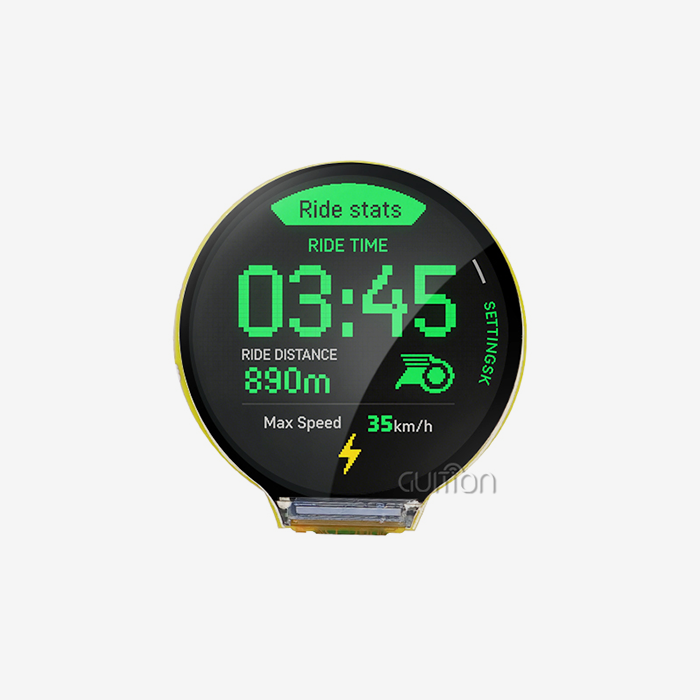
Knob display modules are advanced human-machine interface (HMI) parts that combine rotary inputs with built-in circular screens, which usually use IPS LCD or OLED technology. Unlike regular potentiometers or touchscreens that stand alone, these combined modules allow communication to go both ways. Users see right away that their changes have been saved, and they can still feel the satisfaction of physically rotating the device. This way of thinking about design fixes a major problem with current touch-only interfaces: they don't have physical feedback that lets you use them without looking at them.
Usually, these sections' design is made up of three important subsystems that work together. The rotary encoder can record changes in angular position using either mechanical contacts with stop devices or magnetic Hall-effect sensors that don't need to be touched. The display subsystem shows real-time data on a round screen with a size of 240x240 to 480x480 pixels that is placed in the middle of the spinning bezel. The transmission interface, which is usually UART, SPI, or I²C, connects the module to your main controller and sends and receives encoder data and display orders.
Core Components and Operating Principles
Both how your integration works and how reliable it is are determined by the encoder system. Mechanical encoders make clear clicks that users associate with fine adjustments, but because they are contact-based, they can only work for about 30,000 to 50,000 spin cycles before they stop working. Magnetic encoders use Hall sensors to find changes in position in a rotating magnetic field, so there is no direct touch at all. This contactless method increases the lifetime to more than a million cycles and allows software-programmable haptic feedback—the code alone can be used to change the step frequency and detent strength.
The choice of display technology affects readability, power use, and fit for the surroundings. When there is a lot of light around, IPS LCD screens work great because they can produce 350 to 800 nits of brightness while using less power than self-emissive technologies. OLED alternatives have better contrast ratios and deeper blacks, which makes them especially useful for low-light settings like car displays or home thermostats where vision at night is important. The sensitive touch layer that is often built into high-end modules adds press-to-select functionality to the knob, turning it into a multi-modal input device.
Application Scenarios Across Industries
Smart home gadget makers use these units to combine several buttons and LED lights into a single, sealed contact point. Think about a current coffee machine. The user can turn it to choose the amount of the brew, and the screen shows the extraction time and temperature. The whole thing is protected by a waterproof case that meets IP65 standards. When used in a humid kitchen, capacitive touchscreens often give off fake triggers, but the actual turn doesn't.
These units make it possible to use industrial control panels without having to look at them. An HVAC worker can change setpoints while keeping an eye on other pressure gauges. They can count steps without seeing them by feeling the detents. Medical device designers like how resistant it is to contamination—a sealed knob only needs to be cleaned on the surface, while membrane keypads with gaps that trap fluids are more difficult to clean. Automotive apps take advantage of the safety benefit: drivers can change the volume or climate settings by muscle memory, so they can keep their eyes on the road instead of trying to find touch targets on shiny screens.
Technical Specifications and Integration Essentials
Matching the electrical properties to your system design is the first step to successful integration. Most units work with 3.3V to 5V DC and need 50mA to 150mA of power during active display changes, based on the screen technology and brightness level. The processor is built directly into ESP32-S3-based modules like those in Guition's product line. This cuts down on the number of external parts and makes power planning easier. This 240MHz dual-core MCU design can handle showing on the screen, processing touches, and decoding encoders all at the same time without putting too much stress on your main application processor.
Communication Protocols and Data Exchange
The UART serial interface is still the most common way for Knob display modules to talk to each other because it is easy to set up in a variety of development settings. A simple frame structure is what most data packets have: header bytes, command number, parameter content, and checksum. To ask for a display update, you might send a message like 0xAA 0x70 0x00 0x05 0xCC 0x33 0xC3 0x3C, where the bytes represent the target picture ID or text string. This high-level protocol hides changes at the pixel level so you can focus on the logic of your program instead of the basics of images.
When sending video or quick animation routines to the screen, SPI versions are necessary because they provide faster throughput. The four-wire interface (MOSI, MISO, SCK, and CS) lets modules with clock speeds up to 80MHz play videos at 30 frames per second at a resolution of 360x360. I²C is used in low-bandwidth situations where fewer wire links are more important than speed. However, you should make sure that the module's I²C address doesn't clash with those of other modules on the same bus.
Physical Integration and Mounting Considerations
The Guition JC3636W518C_I_Y needs a 58mm diameter mounting hole with a 0.2mm adjustment to make sure the bezel fits properly. The panel cutout specs are very precise. The module usually comes with a threaded bushing and locknut for fixing on the back panel. This makes a strong mechanical link and keeps the front face protected with IP54. Designers should keep at least 3 mm of edge space between nearby components to keep stress from building up on the PCB while the knob is being used.
For small structures, FPC (Flexible Printed Circuit) wires are used for electrical connections. For breadboard testing, standard pin headers are used. We suggest strain relief for wires that are likely to be shaken, like those used in cars or heavy machinery. Advanced modules like the JC3636W518C_I_Y have a reserved TF card interface that lets you store high-resolution graphics files locally. This makes the flash memory on your main device less busy. This helps add multilingual interfaces or holiday UI styles without having to recompile the firmware.
Comparing Knob Display Modules – Choosing the Best Fit for Your Smart Device
In order to choose the best Knob display module, performance requirements must be balanced against project limits, such as budgets, development timelines, and the working environment. On the market, you can find a wide range of choices, from simple segment-display buttons that can be used to prototype appliances to high-tech smart modules that have built-in WiFi and over-the-air (OTA) update capabilities.
Encoder Technology Trade-offs
Mechanical encoders work well for consumer goods that need to save money, since their 30,000-cycle lifespan is about the same as the average time between appliance replacements. Their unique tactile input doesn't need power, which makes them a good choice for gadgets that run on batteries. However, the wear on the contacts causes location drift over time, which might need software debouncing methods and regular calibration. Manufacturers who want to sell to high-end customers or use their products for a long time should choose magnetic encoders, even though they cost 30 to 50 percent more. Because the encoder has an endless mechanical lifespan, there are no warranty worries about it breaking, and the fact that it operates quietly makes the product seem better.
Display Technology Assessment
IPS LCD panels are most common in workplace and outdoor settings where readability in direct sunlight is important. Under 100,000 lux of light, the lighting can still be seen, but 120–150mA of power is used at full brightness. Over 85% of the time, the colors are accurate across the whole viewing angle, so they can be read no matter where the operator is standing. This is very important for shared-use equipment like business cooking timers or gym equipment displays.
OLED options are great for consumer goods where looks are a big part of the choice to buy. With contrast ratios higher than 100,000:1, the real black pixels make UI elements look like they move above the bezel. Power use changes a lot depending on what is being shown. An interface that is mostly black uses less than 30mA of power, while screens that are all white use 180mA. By using dark UI styles, this feature lets smart power-saving techniques work on devices that run on batteries.
Integrated Controller Benefits
Modules with ESP32-S3 processors, like Guition's JC3636W518C_I_Y, speed up development in a revolutionary way. With 512KB SRAM and 16MB flash, you don't need any extra memory chips. Also, the built-in WiFi and Bluetooth make it possible to connect to the cloud without any extra radio modules. When compared to separate component parts, this integration cuts BOM costs by about 40%. One processor is used for creating the display, and the other handles the code of your application. This keeps the user interface from lagging while computations are being done.
During the testing phase, development freedom is very important. Modules that work with the Arduino IDE are appealing to makers and fast prototyping teams that already know how to use the framework. Professional embedded engineers who need direct hardware access and real-time operating system functions like those that ESP-IDF provides are compatible. Support for MicroPython makes it easier for teams that are switching from desktop development to web development by letting them use Python-based UI coding without needing C build toolchains.
Procurement and Supply Chain Insights
To buy Knob display modules efficiently, you need to know how the whole supply chain works. For example, wait times, minimum order quantities (MOQs), and quality assurance processes all have an effect on project budgets and plans. Standard SKUs are usually kept in stock by established sellers, and orders of less than 500 pieces can be delivered in two to four weeks. As production moves from stock assembly to build-to-order production, wait times rise to 6 to 8 weeks for custom setups that need specific firmware versions or changed bezels.
Strategic Sourcing Approaches
For buyers who buy more than 1,000 units a year, direct producer ties offer the most value. Guition and other similar companies have tiered prices, which means that unit costs go down by 15–25% at 500, 1,000, and 5,000 pieces. When you commit to a certain volume, you get extra benefits like specialized technical support resources, priority placement during shortages of parts, and the chance to work together on the product plan. Product managers should talk to suppliers about yearly blanket purchase orders with quarterly releases, weighing the costs of keeping goods against the benefits of lower prices.
Small to medium-sized businesses can get good service from authorized wholesalers, who offer break-bulk services that get rid of MOQ hurdles. When compared to buying directly, distributors charge 10–20% more per unit, but they can ship stocked items the same day and make the return process easier. During the prototype phase, when design changes could make bought goods useless, this route works best. We suggest checking directly with manufacturers to make sure that the distributor's permission status is correct, since fake modules that haven't been properly screened for quality sometimes get into gray-market channels.
Quality Validation and Compliance
Before units are put together in production, critical parameters should be checked by incoming quality control methods. To make sure an encoder is reliable, it is put through 1,000 spins while the signal integrity is checked. Modules that pass the test keep the quadrature output clean and free of false pulses. When judging the quality of a display, dead pixels (zero tolerance in industrial grades), backlight consistency (less than 15% luminance change), and color accuracy (Delta E < 3 for professional apps) are all looked at.
For North American countries, environmental safety paperwork is now a must. Modules must have RoHS (Restriction of Hazardous Substances) approval that says they were made without lead. FCC Part 15 Class B approval makes sure that electromagnetic emissions stay below levels that could damage electrical equipment nearby. Even though CE marking comes from Europe, it shows that a product meets safety standards that many industry users in the U.S. look for in suppliers.
Best Practices for Optimizing Knob Display Module Performance
For esp32 display module Knob display modules to work at their best, you need to pay attention to both the details of how the hardware is integrated and the methods for optimizing the software. Problems with signal integrity happen when the encoder wire goes beyond 150 mm without proper shielding. This is because electromagnetic interference causes jittery rotation counts or false position changes. These artifacts are removed by twisted-pair wiring with 100% foil insulation, which keeps the quadrature signals clean even in noisy industrial settings next to motor drives and switching power sources.
Firmware Optimization Techniques
The number of display updates has a direct effect on how fast something seems. People can tell when something is slow when the latency is more than 100ms, so your communication protocol needs to put the encoder answer ahead of background jobs. By setting up a special method to handle interrupts when the encoder state changes, user input is captured right away, and updates to the display are put on hold until the next refresh cycle. This design keeps interactions smooth even when your main loop runs methods that require a lot of computing power.
The drag-and-drop interface maker in the Guition development environment makes it easier to make UIs by getting rid of the need to manually calculate coordinates for control placement. There are progress bars, analog gauges, and animated icons in pre-built widget packages that work well with the graphics processor in the module. The WYSIWYG design sample cuts down on iteration time because what you arrange in the development tool looks the same on the real screen, so you don't have to keep moving things around until you get it right. With UTF-8 encoding support, you can easily install multiple languages, which is important for goods that are sold all over the world because the firmware doesn't have to be recompiled for each regional version.
Remote Maintenance Capabilities
Over-the-air (OTA) updates change upkeep after release by getting rid of the need for technicians to visit sites to apply firmware patches or make UI changes. The modules that are connected to WiFi can receive encrypted software packages from cloud services and check the digital signatures of the packages before installing them. This function is very helpful for fixing bugs found in the field or introducing new features to all loaded devices at once. Medical device makers really like this feature because it helps them stay in line with regulations by keeping track of different versions of software.
Diagnostic data collection improves reliability engineering by showing patterns of use that can't be seen during lab tests. Tracking the number of encoder rotations, button presses, and display lighting choices helps designers make better products in the future. By collecting this information from all of your devices, you can find possible warranty problems before they get worse. For example, a quick rise in encoder error rates could mean that there are contamination problems in a manufacturing batch, which would lead to proactive replacement campaigns instead of reactive warranty claims.
Conclusion
When Knob display modules are built into smart devices, they improve the quality of the user experience, the speed of development, and the devices' long-term dependability. When you combine tactile control with instant visual input, you get simple interfaces that users learn on their own, which cuts down on the need for training and support costs. Technical leaders feel more confident when they know about encoder technologies, display features, and processes for integrating them in a way that keeps project risks to a minimum. Strategies for buying things that focus on quality control and building relationships with suppliers make sure that the supply of parts matches up with production plans. As IoT communication becomes more common, modules with built-in wireless and over-the-air (OTA) support make designs more flexible to meet changing market needs while also making maintenance easier.
FAQ
What development platforms work with modern knob display modules?
Modern modules allow a number of different working environments so that engineers can choose the ones that work best for them. The Arduino IDE is the easiest way to start because it has a lot of community tools and simple example code. Professional teams often pick ESP-IDF because it allows direct hardware access and FreeRTOS interaction, which ensures real-time performance. The Guition platform combines these methods by offering visual user interface (UI) development tools that make code that works well with both frameworks. Support for MicroPython lets teams with scripting language skills work on embedded projects. However, apps that need to run quickly may need natively compiled code.
How do I ensure IP-rated sealing with panel-mounted modules?
To get IP65 or better protection, you need to choose the right gasket and limit the fitting torque. A silicone or EPDM gasket should be pressed against the panel surface by the module bezel. This will make a continuous seal around the cutout's edges. Put threadlocker on the mounting bushing and tighten the back locknut to the manufacturer's specs. For normal modules, this is usually between 0.8 and 1.2 Nm. When you tighten too much, the display base could crack, but when you don't tighten enough, vibrations can cause it to come free. Before finishing container designs, we suggest that they be tested for IP with a pressurized water spray at the given rating angle.
Can I customize the UI for my specific application?
Yes, the Guition creation software lets you change the whole user interface (UI) without having to do any low-level graphics code. Through an easy-to-use interface, you can add your own picture assets, set up touch-sensitive areas, and program responsive behaviors. The module has onboard flash memory that saves your compiled UI. It can update displays with simple serial messages sent from your main device. This design splits presentation logic from application logic, which lets industrial designers improve the way things look without changing the software code that's built in. Support for multiple projects lets you keep different UI styles for different versions of a product that use the same hardware.
Partner with a Trusted Knob Display Module Supplier
Your smart device projects need speed, flexibility, and help, and Guition gives it to you. When you put our JC3636W518C_I_Y module together with the powerful ESP32-S3 processor and the beautiful 360×360 IPS display, you can connect to WiFi and Bluetooth right away. The ability to work with multiple platforms is appreciated by development teams. Whether they prefer Arduino, ESP-IDF, or our own Guition software, they can find the tools they need to speed up their time-to-market. We know how hard it is for embedded engineers and product managers; that's why we offer detailed technical paperwork, quick engineering support, and flexible order sizes that can be changed as your production ramps up. You can talk about your unique integration needs with David at david@guition.com and find out why top industrial equipment manufacturers choose Guition as their preferred Knob display module manufacturer. Let's work together to make your HMI idea come true.
References
1. Anderson, M. & Chen, L. (2022). Human-Machine Interface Design for Industrial IoT Applications. Technical Press International.
2. Bergstrom, K. (2021). "Rotary Encoder Technologies: Mechanical vs Magnetic Implementation Strategies," Journal of Embedded Systems Engineering, 18(4), 234-251.
3. Davidson, R. (2023). Smart Display Integration for Consumer Electronics. Manufacturing Insights Publishing.
4. Hoffmann, S. & Patel, A. (2022). "UART Communication Protocols in Modern HMI Modules," IEEE Transactions on Industrial Electronics, 69(7), 1823-1835.
5. Liu, Y. (2023). Supply Chain Management for Electronic Components: B2B Procurement Strategies. Global Manufacturing Review Press.
6. Williams, T. & Rodriguez, M. (2021). "Environmental Testing Standards for Panel-Mounted Display Modules," International Journal of Quality Engineering, 35(2), 112-129.
Learn about our latest products and discounts through SMS or email