- English
- French
- German
- Portuguese
- Spanish
- Russian
- Japanese
- Korean
- Arabic
- Greek
- German
- Turkish
- Italian
- Danish
- Romanian
- Indonesian
- Czech
- Afrikaans
- Swedish
- Polish
- Basque
- Catalan
- Esperanto
- Hindi
- Lao
- Albanian
- Amharic
- Armenian
- Azerbaijani
- Belarusian
- Bengali
- Bosnian
- Bulgarian
- Cebuano
- Chichewa
- Corsican
- Croatian
- Dutch
- Estonian
- Filipino
- Finnish
- Frisian
- Galician
- Georgian
- Gujarati
- Haitian
- Hausa
- Hawaiian
- Hebrew
- Hmong
- Hungarian
- Icelandic
- Igbo
- Javanese
- Kannada
- Kazakh
- Khmer
- Kurdish
- Kyrgyz
- Latin
- Latvian
- Lithuanian
- Luxembou..
- Macedonian
- Malagasy
- Malay
- Malayalam
- Maltese
- Maori
- Marathi
- Mongolian
- Burmese
- Nepali
- Norwegian
- Pashto
- Persian
- Punjabi
- Serbian
- Sesotho
- Sinhala
- Slovak
- Slovenian
- Somali
- Samoan
- Scots Gaelic
- Shona
- Sindhi
- Sundanese
- Swahili
- Tajik
- Tamil
- Telugu
- Thai
- Ukrainian
- Urdu
- Uzbek
- Vietnamese
- Welsh
- Xhosa
- Yiddish
- Yoruba
- Zulu
Is a 2.4 inch ESP32 display module the Right Choice for Compact HMI Display Projects?
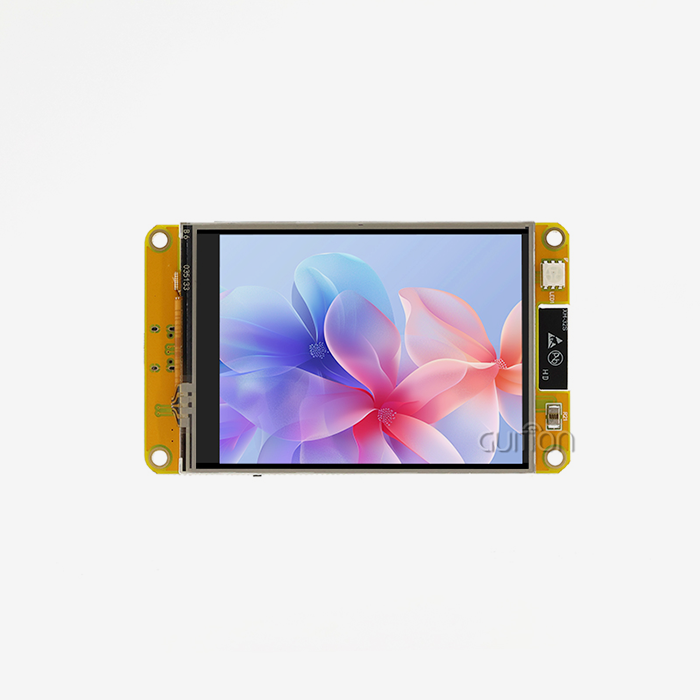
A 2.4-inch esp32 display module is just the thing when your product requires a tiny screen, built-in Wi-Fi and Bluetooth, and a quick development cycle. It combines a 240×320 display, a dual-core controller, and a pre-made board in one box. This is not the appropriate option for photographs, video, or thick menus. This tutorial shows where a tiny HMI (human-machine interface, the screen humans use to read and operate a device) fits, where it fails, and how to assess one before you purchase.

Need to test hardware? Guition manufactures the ESP32-2432S024N, and our staff at david@guition.com can price a 2.4-inch ESP32 display module factory order or a single evaluation device. Tell us your volume, your interface demands, and your enclosure dimensions. We respond with cost, lead time, and sample code, so your HMI display prototype can be up and running on the bench fast.
What Key Specifications Should You Check in a 2.4-inch ESP32 display module?
There are dozens of values listed on spec sheets. A few determine the fate of your endeavor. I examine the controller, RAM, panel, interfaces, and software support in sequence. A gap in any one may set a launch back weeks.
The Guition ESP32-2432S024N has an ESP32 primary controller. The ESP32 is a dual-core processor that runs up to 240 MHz, with 520 KB of SRAM, 448 KB of ROM, Wi-Fi 802.11b/g/n, and Bluetooth 4.2 + Bluetooth LE, as per Espressif’s datasheet. The module adds a 240x320 display and 4 MB of flash.
The ESP32-2432S024N at a Glance
The board has several circuits that engineers generally add by hand. It incorporates a backlight control circuit, a touch screen control circuit, a speaker drive circuit, a photosensitive circuit, and an RGB LED control circuit. It also has a TF card interface, a serial interface, a DHT11 temperature and humidity sensor interface, and dedicated I/O pins.
The module comes with factory test code, so you can verify functionality the instant it arrives. The specs are summarized in the table below.
| Item | ESP32-2432S024N |
|---|---|
| Brand | GUITION |
| Main controller | ESP32 dual-core MCU, up to 240 MHz |
| Memory | 520 KB SRAM, 448 KB ROM, 4 MB flash |
| Wireless | Wi-Fi and Bluetooth |
| Display | 2.4-inch TFT, 240×320 pixels, 65K colors |
| Display driver | ILI9341 |
| Touch | Without touch panel (touch control circuit on board) |
| On-board circuits | Backlight, speaker driver, photosensitive, RGB LED |
| Interfaces | TF card, serial, DHT11, reserved I/O |
| Development | Arduino IDE, ESP-IDF, MicroPython, Mixly, Guition software |
| Power | USB or lithium battery, with charging protection |
Why Memory Specs Deserve More Attention Than Clock Speed
Clock speed — buyers adore it. I turn to memory instead. The 2.4 inch ESP32 display module has just 520 KB of SRAM to contain your program data, Wi-Fi stack, Bluetooth stack, and graphics buffers together. Run out, and the gadget will crash.
A complete 240×320 frame at 16 bits per pixel requires 153,600 bytes. That’s almost 29% of the SRAM. Plan buffers early, and you prevent the most frequent late-stage failure. This is shown in the RAM budget chart later in this book.
How Does Display Resolution Affect HMI Display Performance?
Resolution dictates how much information you can display, and how much memory and bandwidth the display will take. More looks better on a spec sheet. It also costs more power, memory, and time in a small product.
The controller of our panel is ILI9341, which provides 240RGB×320 resolution and 262K colors, and the 65K color modes are supported. Our module utilizes a 65K palette, which keeps each pixel to 16 bits.
Pixel Density on a 2.4 Inch Panel
A 240×320 panel has 76800 pixels. The diagonal is 400 pixels, since the square root of 240² + 320² is 400. It is spread across 2.4 inches; thus, that is around 167 pixels per inch.
A 3.2-inch screen with the same resolution would be roughly 125 pixels per inch. The 2.4-inch size appears crisper, so the little characters are still readable. The active area of a typical 2.4-inch module is around 37.7 × 49.0 mm with a pixel pitch of 0.153 mm.
| Size | Resolution | Pixels | Approx. pixel density |
|---|---|---|---|
| 2.4 inch | 240×320 | 76,800 | about 167 ppi |
| 3.2 inch | 240×320 | 76,800 | about 125 ppi |
Resolution, Memory, and Transfer Time: Original Analysis
I do this calculation with every new client. So say the serial bus to the panel is 40 MHz. A whole frame is 153,600 bytes ( 1,228,800 bits), hence a full refresh would theoretically be roughly 30.7 ms. That's 32 complete redraws ( 32 fps) before overhead.
Now let’s compare a little gauge update of 100 by 40 pixels. It transfers 8000 bytes and takes 1.6ms. The ILI9341 has its own graphical memory of 172800 bytes, so you only have to provide the updated areas. Redraw areas, not screens, and your HMI display seems instantaneous.
| Update type | Data size | Theoretical time at 40 MHz |
|---|---|---|
| Full screen, 16-bit | 153,600 bytes | about 30.7 ms |
| Gauge region, 100×40 px | 8,000 bytes | about 1.6 ms |
These values are not lab measurements, but are our own calculations from the stated specs. The actual throughput is reduced by the command overhead. Please confirm timing on your HW.
Resistive vs. Capacitive Touch: Which Is Better for Compact HMI Projects?
Touch choice affects cost, feel, and durability. I want to be upfront about this module. The ESP32-2432S024N does not have a touch panel; however, the board has a touch screen control circuit. If your product requires touch, let us know, and we may negotiate a setup.
It is dependent on who is touching the screen and where, whether it is resistive or capacitive. Often it is gloves, dampness, and finances that determine.
How the Two Technologies Differ
It is a resistive screen, and hence it responds to pressure and so works with gloves and styluses. Capacitive panels generally need bare skin or a conductive stylus. Capacitive screens offer multi-point touch gestures, whereas resistive panels only detect a single point.
Riverdi’s comparison provides further points. Due to the additional layers, resistive panels have less optical clarity. Capacitive displays are brighter, sharper, scratch-resistant, and need less care. Resistive panels are better for dust and moisture, but capacitive panels may need additional protection in severe environments.
| Factor | Resistive | Capacitive |
|---|---|---|
| Activation | Pressure; gloves and stylus work | Bare finger or conductive stylus |
| Multi-touch | Single point | Multi-touch gestures |
| Image clarity | Lower | Higher |
| Durability | Moderate | High |
| Moisture and dust | Reliable | May need added protection |
| Maintenance | Occasional recalibration | Minimal |
What Touch Adds to Bill of Materials Cost
Cost is key for small products. One public offering for a 2.4-inch ILI9341 module lists a resistive panel with controller for US$1.17 and a capacitive panel with controller at US$4.43. That is a difference of US$3.26, or about 3.8 times the resistive add-on.
The deficit is around US$32,600 at 10,000 units. Prices may vary, and this listing is from a different source, so consider it an example for planning. Resistive is a winner on both cost and functionality if your users wear gloves. Capacitive is money well spent if you want that phone-like sensation.
How Do ESP32 Processing Power and Wireless Connectivity Improve HMI Functionality?
A screen by itself merely shows. A screen, a CPU, and a radio are a linked controller. That distinction is what makes 2.4 inch ESP32 display module rule compact HMI operation.
The dual-core architecture is helpful in practice. One core can operate the interface, and the other can run Wi-Fi or sensors or logic. The touch response remains smooth when the device is uploading data.
Wi-Fi and Bluetooth Without Extra Modules
Espressif offers Wi-Fi speeds up to 150Mbps in 802.11n mode and compatibility with Bluetooth 4.2 and Bluetooth LE. Our module combines both of them. You avoid the additional radio board, the extra antenna, and the extra certification work.
Connectivity enables helpful features. Send readings to the dashboard. Take orders from a distance. Pair with a phone to set up. Firmware update over the air. Remote upgrade support reduces after-sales costs, meaning that you may keep items online without having to visit the site.
Power Modes for Battery Products
The ESP32 datasheet covers 5 power modes. Modem-sleep is between 20 and 68 mA. Light-sleep is roughly 0.8 mA. Deep-sleep consumes roughly 10 μ A, and hibernation consumes about 5 μ A.
Our module may be powered by USB or lithium battery and has protection against charging. Coupled with the automated lighting dimming from the photosensitive circuit, runtime increases dramatically. And of course, always measure current on your own build. Firmware decisions have more effect on the outcome than any one component.
Which Communication Interfaces Support Easy HMI Display Integration?
Interfaces determine the speed at which you can prototype a 2.4 inch ESP32 display module and the number of pins left for your own sensors. A small board must supply adequate connections without expanding in size.
The ILI9341 panel driver supports 3-line and 4-line serial interfaces, 8-, 9-, 16-, and 18-bit parallel buses, and RGB modes. On our board, the display wiring is done for you, which eliminates a typical cause of flicker and loose-wire failures.
Built-In Interfaces on the Board
It has a TF card interface, serial interface, DHT11 interface, and several reserved I/O pins. The TF card slot contains logs, pictures, or configuration files. The serial interface facilitates troubleshooting and communication with other devices.
DHT11 interface: A temperature and humidity sensor is connected directly. Within minutes after unpacking, you may show room conditions on screen. Reserved I/O pins allow you to add buttons, relays, or other sensors later.
| Interface | Typical use on this module |
|---|---|
| Serial | Debugging, device-to-device communication |
| TF card | Data logging, images, configuration storage |
| DHT11 | Temperature and humidity sensing |
| Reserved I/O | Buttons, relays, extra sensors |
| Wi-Fi / Bluetooth | Cloud links, phone pairing, remote upgrade |
Choosing Pins Before You Finalize the Design
List all the peripherals needed for your product. Count the pins. See what’s left after the display and the TF card have had theirs. This five-minute workout does not need a re-spin.
Ask us in advance for the pin map. Our experts at david@guition.com can check which pins are designated for your sensors and which pins are used for other tasks on the board.
Can LVGL and Arduino Simplify Touchscreen HMI Development?
Yes. Software features often save more time than hardware. LVGL is an open-source integrated graphics library with ready-made widgets such as buttons, sliders, charts, and lists. Arduino gives you a familiar environment and a massive library ecosystem.
Espressif offers an Arduino core for the 2.4 inch ESP32 display module that works on Windows, Linux, and macOS. The module also supports ESP-IDF, MicroPython, Mixly, and Guition’s own development mode.
What LVGL Needs on an ESP32
LVGL documentation says it has low requirements. It requires more than 64 kB of flash for core parts and recommends more than 180 kB. It requires around 2 kB of static RAM, 2 kB+ of stack (8 kB suggested), and 2 kB+ of heap (48 kB recommended) for multiple widgets.
The display buffer should be bigger than one horizontal line of pixels; 10 lines are suggested. Ten lines on a 240-pixel-wide screen equals 2400 pixels or 4800 bytes at 16 bits. Simple to install.
Guition Software: Click, Drag, See
Our professional interface software, Guition, allows you to add a control with a click. Then you drag it into position and resize and customize it. The editor works on a what-you-see-is-what-you-get basis.
Cross-platform online debugging for faster bug-finding. Your team may create additional functionality without having to touch the low-level code thanks to complete secondary development interfaces and technical manuals. Designers may modify layouts and developers may still work on the logic.
| Tool | Best for | Trade-off |
|---|---|---|
| Arduino IDE | Fast prototypes, familiar libraries | Less control of advanced features |
| ESP-IDF | Production firmware, full control | Steeper learning curve |
| MicroPython / MicroPython | Quick tests, teaching | Slower than compiled code |
| LVGL | Rich widgets and animation | Needs memory planning |
| Guition software | Visual UI design, short cycles | Follows the Guition workflow |
Compact HMI Display Applications in Smart Home and Industrial Equipment
A tiny HMI display that deserves its place whenever a person and a machine interact in a limited area. I sort programs by user task. Some look at it, some repair it, some debug it.
Guition mentions uses ranging from 3D printers and portable devices to EV charging stations and security panels. They all have the same hardware core, which makes development costs inexpensive.
Where the Module Fits Best
Here are the instances in which clients question us most often:
- Air quality monitoring, smart home controllers. These items display temperature, humidity, air quality, and device status. The built-in DHT11 interface and Wi-Fi mean a simple monitor requires no additional gear. A photosensitive circuit dims the screen at night so a bedroom device won’t glare. Being able to flip between many languages allows a single design to be used throughout various locations.
- Industrial equipment & 3D printing. Operators want status at a glance: running, halted, fault. A 2.4-inch screen displays huge color blocks and certain essential digits. The TF card keeps records for subsequent inspection. Remote upgrading allows you to patch software on equipment already placed on a manufacturing floor without sending a specialist.
- Medical, financial and security devices. Patient monitoring controls, transaction displays, keypads and access control panels require clear, fast screens. Suitable for portable and wall-mounted systems. The speaker drive circuit has an audio alarm, and the RGB LED control circuit has a visual cue.
Automotive, EV charging, and hand-held gadgets. Compact, legible screens are required for vehicle information displays, charging station interfaces, and portable instrumentation. Support for lithium batteries in portable equipment. People are busy. People are distracted. A concise and well-designed menu encourages them to respond swiftly.
They all have one pattern in common. The hardware is the same. The interface differs. As your product family increases, that trend keeps costs low.
Client case placeholder (replace before publishing): [Insert one genuine Guition client story here: customer type, the issue, the configuration utilized, and two or three quantifiable outcomes, e.g. development weeks saved, support tickets decreased. Get written authorization from the consumer before you publish.
Matching Module Features to Product Needs
Relate features to the work of the user. A glance product must be readable and low power. Touch or buttons are needed to alter a product. A troubleshooting product needs logs and clear messaging.
TF card for logs, Serial port for service tools, Wi-Fi for remote diagnostics. That combination means your screen is both a user interface and a tool for service.
How Much Memory and Processing Power Does Your HMI Display Need?
On a 2.4 inch ESP32 display module project, teams commonly overbuy or underbuy. Overbuying is wasted money. Underbuying costs months. A basic budget will answer the question.
The table below combines ESP32’s 520 KB SRAM with LVGL’s suggested minimums. It uses the figures as planning values, not guarantees.
A Practical Memory Budget
| Item | Planning value | Share of 520 KB SRAM |
|---|---|---|
| LVGL heap (recommended for many widgets) | 48 KB | about 9% |
| LVGL stack (recommended) | 8 KB | about 2% |
| LVGL static RAM | about 2 KB | under 1% |
| Partial display buffer (10 lines, 16-bit) | 4.8 KB | about 1% |
| Subtotal for LVGL and buffer | about 63 KB | about 12% |
| Full-frame buffer option (240×320, 16-bit) | 150 KB | about 29% |
The suggested flash of LVGL, 180 kB, is around 4% of the module’s 4 MB flash. Most of the RAM is left for Wi-Fi, Bluetooth, and your own logic. That is why a 2.4-inch screen is so well suited to 2.4 inch ESP32 display module technology.
When You Need More Than This Module
Some items outgrow the ESP32. Camera previews, video, massive animated displays, and high-definition panels demand extra memory and bandwidth. The 65K-color, 240 x 320 display is likewise taxed by photo-heavy interfaces.
If you intend to have such functions, get a bigger display and a beefier controller. If not, save the expense. With a range from 1.28 inches to 21.5 inches, Guition allows you to develop without changing vendors.
What Design Limitations Should You Consider Before Choosing a 2.4-Inch Screen?
I owe you honest trade-offs on every small HMI display. A little screen makes you choose. Get to know them early and avoid redesigns later.
What matters most are three limits: screen area, touch target size, and viewing circumstances. Each has a realistic solution.
Screen Area and Content Density
The active surface of a common module is just around 37.7 × 49.0 mm. That fits a title, 3 or 4 values, and a status bar. It won’t work for tables, large lists, or paragraphs.
Create one task per screen. The primary reading should be huge digits. “There are icons instead of words where possible Keep menus to three levels deep. Any function should be accessible in three button pushes.
Touch Targets, Brightness, and Viewing Angles
So at 240 pixels over 37.7 mm you get around 6.4 pixels per millimeter. As a matter of thumb, we want to have a touch target of at least 7 mm or roughly 45 pixels. Smaller buttons cause consumers frustration.
The average 2.4-inch module has a brightness of 300 cd/m², a contrast ratio of 500:1, and viewing angles of 60 to 70 degrees. That’s good for indoor use. Test your specific device in direct sun. Our backlight control and photosensitive circuitry enable you to adapt to the ambient light.
| Limitation | Practical fix |
|---|---|
| Small active area | One task per screen; large digits; icons |
| Small touch targets | 45-pixel (about 7 mm) buttons; physical buttons as backup |
| Limited brightness and angle | Test in real lighting; use auto-dimming and angled mounting |
| No photo or video capability | Choose a larger panel for media-heavy products |
| Frame-buffer memory | Use partial redraws and a ten-line buffer |
How to Evaluate a 2.4-inch ESP32 display module for Long-Term HMI Product Deployment?
A prototype validates a concept, but a deployed HMI display has to live for years. A product has to last for years. Evaluation should be more than a bench demo.
I’d propose testing in four areas: environment, firmware upgrades, supply, and support. A failure in any one hurts after launch, when corrections are most expensive.
A Practical Evaluation Checklist
For each module you examine, follow these procedures. Each has clear passing criteria.
- Run the factory test code and your sample. Plug in power to the board via USB and view the pre-loaded program. Then upload a basic display sketch using the included Arduino library. If you get colors, lighting, and serial output, your hardware is healthy. Any problem is power or cabling, not your code.
- Test the temperature and illumination you’re expecting. The 2.4 inch ESP32 display module chip itself has a specified working range of -40°C to 125°C for chips without in-package flash. But the whole assembly, including the screen, will have its own constraints. A common 2.4-inch module offers -20 °C to 70 °C. Test the finished item under actual soaking circumstances.
- Show the update route. Push a firmware update over Wi-Fi and verify that the device reboots successfully. Remote upgrade support allows you to keep items up and running without visiting the site. Test a failed update too, so you know the device recovers.
- Check the supply and support. Inquire about lead time, minimum order, paperwork, and engineering assistance. Guition has R&D, manufacturing, and sales, so we control the supply chain from design to delivery. Good assistance shortens bring-up and keeps your timetable safe.
These four tests capture most deployment errors before they reach the consumer. If you want a second opinion on your proposal, send your needs to david@guition.com, and our engineers will have a look.
Building Credibility Before You Commit
If you want more information, ask the provider for references, test data, and a sample. Check out assertions; don’t just believe them. Every figure in this tutorial is either from a referenced source or from arithmetic presented in the text, so that every figure can be checked by you.
Guition is a technological firm that merges R&D, manufacturing, and sales, and is operated by Jingcai Intelligence. Our guiding principle is “technology-driven, customer-centric”. From 1.28-inch to 21.5-inch HMI display solutions, our portfolio has you covered as your next product expands.
Conclusion
A 2.4 inch ESP32 display module fits smaller HMI applications that need a crisp little screen, built-in Wi-Fi, and rapid development. The panel is 240x320 and delivers around 167 pixels per inch. The ESP32 consists of a dual-core CPU, 520 KB SRAM, Wi-Fi, and Bluetooth. An LVGL-based interface fits in around 12% of that RAM.
It doesn’t work well for media-heavy items or thick menus. Touch early in the plan: The ESP32-2432S024N is supplied without a touch panel. Test under actual settings, verify your update route, and budget memory. Do that, and your HMI display project remains on course.
FAQ
1. What is a 2.4 inch ESP32 display module?
A 2.4-inch ESP32 display module is a board that combines an ESP32 controller with a 2.4-inch color screen. It adds Wi-Fi, Bluetooth, and supporting circuits. Guition's ESP32-2432S024N uses a 240×320 display driven by the ILI9341 chip and supports Arduino IDE, ESP-IDF, MicroPython, and Mixly.
2. Does the ESP32-2432S024N have a touchscreen?
No. This model ships without a touch panel. The board does include a touchscreen control circuit. If your product needs touch, contact david@guition.com to discuss options. Resistive panels work with gloves, while capacitive panels offer multi-touch and a sharper image.
3. How much memory does an LVGL interface need?
LVGL recommends more than 180 kB of flash and about 48 kB of heap for many widgets, plus 8 kB of stack. With a ten-line display buffer, the total comes to about 63 KB of RAM, roughly 12% of the ESP32's 520 KB of SRAM.
4. Can I program the module with Arduino?
Yes. Espressif maintains the Arduino core for ESP32 and supports Windows, Linux, and macOS. We also provide an Arduino library and test programs. The module supports ESP-IDF, MicroPython, Mixly, and Guition software as well.
5. Is a 2.4-inch screen big enough for an HMI display?
It works well for status screens, simple controls, and sensor dashboards. The 240×320 panel gives about 167 pixels per inch, so text stays sharp. It does not suit dense tables, video, or photo-heavy interfaces. Design one task per screen.
6. Can Guition customize the module for my product?
Yes. We provide complete secondary development interfaces and technical documents, interface design software, remote upgrade support, and multi-language switching. Send your requirements to david@guition.com, and we will outline options, lead times, and pricing.
Ready to Test a 2.4-inch ESP32 display module in Your Next HMI Project?
Pick your next step based on where your project stands. If you are comparing options, request a sample and run the factory test code on your bench. If your specs are set, send them to us, and we will quote.
Guition welcomes inquiries from buyers searching for a 2.4 inch ESP32 display module supplier or a dependable HMI display manufacturer. Email david@guition.com with your volume, interface needs, and target market. We reply with pricing, documents, and sample code.
References
1. Espressif Systems. ESP32 Series Datasheet (accessed 2026). Used for CPU, memory, wireless, power modes, and temperature range. https://documentation.espressif.com/esp32_datasheet_en.pdf
2. Ilitek (ILI Technology Corp.). ILI9341 a-Si TFT LCD Single Chip Driver, 240RGBx320 Resolution and 262K Color Datasheet (2017, hosted by MIT Academy). Used for resolution, color modes, graphics memory, and interfaces. https://academy.cba.mit.edu/classes/output_devices/TFT/ILI9341.pdf
3. BuyDisplay (East Rising). 2.4 inch 240x320 TFT LCD Module with ILI9341, ER-TFTM024-3 (accessed 2026). Used as a typical 2.4-inch module for active area, brightness, viewing angle, temperature range, and touch option prices. https://www.buydisplay.com/qvga-2-4-inch-tft-lcd-touch-shield-320x240-serial-module-display-ili9341
4. Riverdi. Resistive or Capacitive: What Is the Right Touch Panel? (accessed 2026). Used for touch technology comparison. https://riverdi.com/blog/resistive-or-capacitive-what-is-the-right-touch-panel
5. LVGL. Requirements, LVGL 9.5 Documentation (2026). Used for flash, RAM, and display buffer requirements. https://lvgl.io/docs/open/9.5/introduction/requirements
6. Espressif Systems. Arduino-ESP32 Getting Started Documentation (2026). Used for Arduino IDE support and operating systems. https://docs.espressif.com/projects/arduino-esp32/en/latest/getting_started.html
About the author
David is the CEO of Guition, the human-machine interaction display brand of Jingcai Intelligence. He works directly with engineers and procurement teams on display selection, ESP32 integration, and UI tooling, across a product line that spans 1.28-inch to 21.5-inch modules. He writes about practical embedded display design.
Learn about our latest products and discounts through SMS or email