- English
- French
- German
- Portuguese
- Spanish
- Russian
- Japanese
- Korean
- Arabic
- Greek
- German
- Turkish
- Italian
- Danish
- Romanian
- Indonesian
- Czech
- Afrikaans
- Swedish
- Polish
- Basque
- Catalan
- Esperanto
- Hindi
- Lao
- Albanian
- Amharic
- Armenian
- Azerbaijani
- Belarusian
- Bengali
- Bosnian
- Bulgarian
- Cebuano
- Chichewa
- Corsican
- Croatian
- Dutch
- Estonian
- Filipino
- Finnish
- Frisian
- Galician
- Georgian
- Gujarati
- Haitian
- Hausa
- Hawaiian
- Hebrew
- Hmong
- Hungarian
- Icelandic
- Igbo
- Javanese
- Kannada
- Kazakh
- Khmer
- Kurdish
- Kyrgyz
- Latin
- Latvian
- Lithuanian
- Luxembou..
- Macedonian
- Malagasy
- Malay
- Malayalam
- Maltese
- Maori
- Marathi
- Mongolian
- Burmese
- Nepali
- Norwegian
- Pashto
- Persian
- Punjabi
- Serbian
- Sesotho
- Sinhala
- Slovak
- Slovenian
- Somali
- Samoan
- Scots Gaelic
- Shona
- Sindhi
- Sundanese
- Swahili
- Tajik
- Tamil
- Telugu
- Thai
- Ukrainian
- Urdu
- Uzbek
- Vietnamese
- Welsh
- Xhosa
- Yiddish
- Yoruba
- Zulu
Can a Secondary development display Cut Development Costs?
Yes, a secondary development display can cut development costs when a project needs a custom interface and the engineering team has limited time or display expertise. The unit price may be higher than a bare panel. The module already includes drivers, touch control, and development tools, so engineers write less low-level code, build fewer prototype revisions, and reach testing sooner. I base this answer on total project cost, not purchase price alone. Below, I explain what the technology is, where the savings appear, how to calculate them, and which limits to check before you place an order.

What Is a Secondary Development Display?
A Programmable Display Built for Customisation
A secondary development display is a display module that engineers can program, modify and integrate into a larger product. Usually you get access to it via an SDK, source code, graphical design tool, firmware utilities or written down communication protocols. A regular display only shows what the host controller sends it, so the customer has to write the driver, the touch routine and the code for the interface from scratch. A programmable module takes a lot of that work off the board that displays things. The host driver, software layer, touch interface, and the end OEM product all work together as one chain. This is in the middle, and it controls the touch and screen. That separation accelerates integration for embedded engineers and HMI designers.
Serial, Embedded TFT, and Linux or Android Options
The secondary development display is a collection of architectures. Smart serial screens can receive UART instructions, so a full interface can be run from even a small microcontroller. When TFT modules are embedded, developers have more control over graphics, storage and how the system works because they have their own processor. Linux and Android are good for projects that require an operating system, video or a lot of animation. They want you to learn more about the software and to validate it for longer. Custom LCD solutions can support screens in different shapes and sizes. I think the design should be adapted to the programme. It’s not often you need Android on a simple control panel, but a booth with lots of media might need more than a serial display. The proper choice maintains the work that went into hardware and software in line with the results.
The Guition JC2432W328N as a Working Example
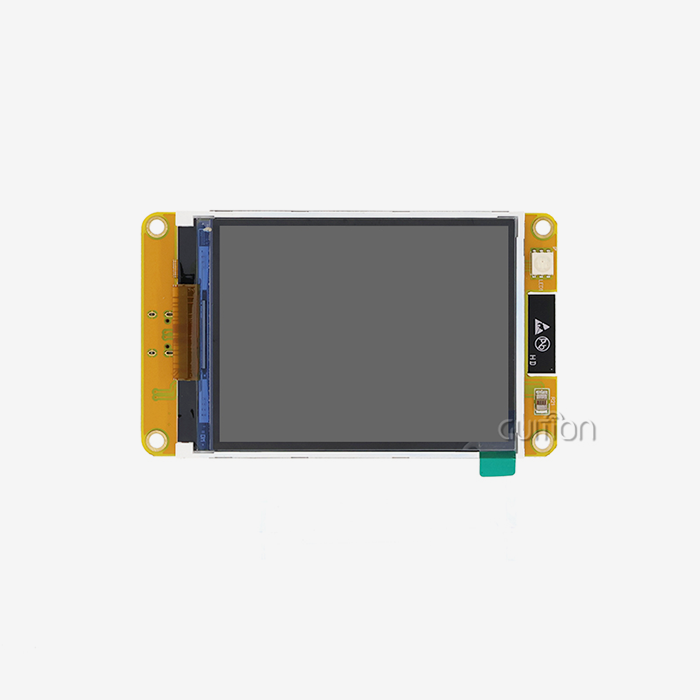
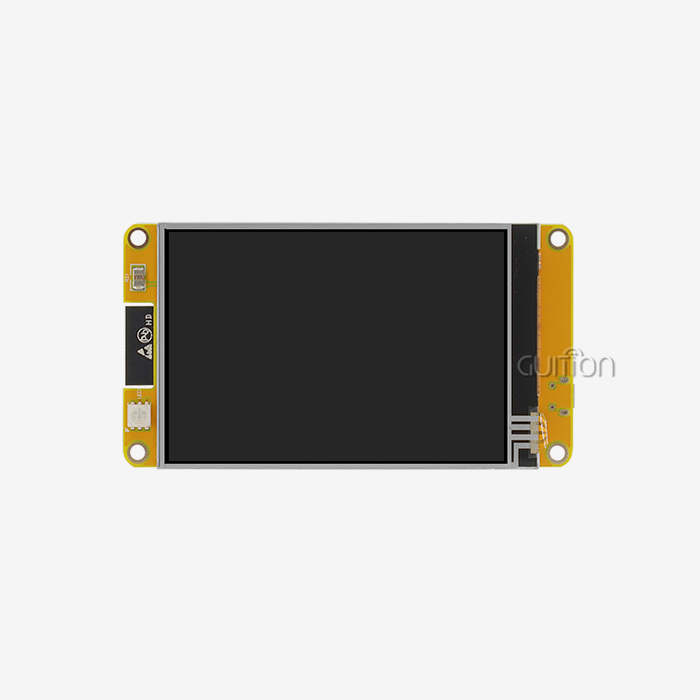
The Guition JC2432W328N is an example of a secondary development display in a real module. Has a main frequency up to 240 MHz, 520 KB SRAM, 448 KB ROM and 4 MB flash. The main controller is ESP32; the MCU has two cores and built-in Wi-Fi and Bluetooth. The screen is 2.8 inches with a 240x320 resolution and resistive touch. The board is supplemented by a touch control circuit, a speaker drive circuit, a sensor circuit and RGB-LED control. It also has a TF card interface, serial interface, DHT11 temperature and humidity sensor interface and IO ports reserved for specific purposes. Guition tool, Arduino IDE, ESP-IDF or MicroPython can be used by developers. Planned uses include industrial automation, 3D printing, medical devices, smart home panels, charging station interfaces and environmental monitoring.
Can a Secondary Development Display Reduce Development Costs?
Unit Price Versus Total Project Cost
A buy order shows only one line of the budget. This also includes the time spent engineering, integrating, testing, making and maintaining the product. The total project cost is also included. To me, total cost is just the sum of the hardware cost, the engineering cost, the integration cost, the testing cost, and the maintenance cost. A price tag might suggest a bare screen is cheaper, but the team could spend weeks working on drivers, touch calibration and interface code. If a secondary development display cuts down even a little on that work, the additional cost per unit may not be worth it. Volume matters because engineering costs are spread over all units shipped.
Where the Engineering Savings Come From
Savings are realised as work that the team does not have to re-do. Most of the low-level programming is already done by prebuilt drivers and touch handling. The drag-and-drop tool allows a creator to create screens without writing layout code. Instead, they can just point and click on it. Factory installed test apps will immediately show whether the screen, touch and Wi-Fi features work. Libraries and example programs for Arduino to cut down on prototype loops. Being able to update remotely also cuts down on after-sales costs, as it means not having to send a worker out to fix the firmware. In a 2002 report on software testing infrastructure, NIST estimated that software bugs cost the US economy some $59.5 billion per year. That means fewer bugs late in the game really cost money.
When It May Not Be the Cheapest Choice
I am not saying that this is useful for all projects. Very high volume products may be able to afford a fully custom display since the cost of engineering is spread over millions of units. A full platform control might be needed for projects that require a custom OS, or a graphics architecture used only by that project, or a strict safety and cybersecurity certification. And engineers waste hours studying behaviour that is not recorded, wasting time and money. Bad sample code on a secondary development display can cost more than a blank screen. I suggest buyers try the SDK, read the docs and run a sample on the target hardware before they decide.
Secondary Development Display vs. Standard Display Module
Price and Prototype Speed
A standard display module typically costs less initially. A secondary development display is more per unit but comes with a working controller, touch support, and a path for future development. The change is obvious at the prototype stage. A typical module might take weeks of driver and interface work to get the first screen going. The team can load a test program, check that the hardware works, and start making screens right away in a customisable section. Making samples faster is safer too. Barry Boehm showed in his book “Software Engineering Economics” in 1981 that the cost to fix a bug increases the later it is found in a project.
Software Integration and UI Flexibility
When you buy a standard module, you do not get the full software stack. Serial displays are good for simple control interfaces, like a menu with a temperature readout and button presses. Developers have more control over graphics, storage, and system behaviour using embedded displays like the ESP32-based JC2432W328N. They also work with the Guition tool, Arduino IDE, ESP-IDF and MicroPython so that each engineer can work in a setting they are comfortable with. At the high end are integrated HMI displays that have more of the interface logic built into them. They typically allow you less freedom to alter low level behaviour.
Support and Product Line Growth
Technical support should be part of the comparison. A datasheet is usually the only thing that comes with a standard module. A customisable module should come with example programmes, library papers, and an easy way to make the module better. One more thing I check is if the seller has different sizes. Often, a product line needs more than one screen. Gutition sizes go from 1.28 inches to 21.5 inches, so a team can get a bigger or smaller screen from the same source. The best fit is determined by the complexity of the application, the skills of the in-house software team, how much is being made, and when the product is to be released.
How the Display Secondary Development Process Works
Start with Requirements.
Every project begins with a list of tasks to be done. I need to define the screen size, resolution, touch type, brightness, working environment, communication interface, processor needs, projected volume, etc. before I select a secondary development display. A 240x320 resistive screen works well in a small panel where people might wear gloves or press with a stylus. In contrast, a different module is needed for a project that needs multi-touch. Then there is interface compatibility. The host should have the same UART links, Wi-Fi, Bluetooth and sensor ports. Putting these things in writing first helps you avoid wasting money on things like buying a module only to find that it doesn’t have a port you need.
Prototype, Test, and Validate
Once the needs are defined, the team will choose a design and evaluate the SDK. Then a prototype is built, and the hardware and software are tested together. I look at the boot time, the power used, the accuracy of the touch, the emc performance and how well the hardware fits in the case. The JC2432W328N comes with test programs pre-loaded to help you quickly check the display, touch and sensor interfaces. One-click programming also speeds up the software load. Cross-platform online testing helps speed up finding bugs. This can reduce uncertainty for an international buyer before placing a large order by using a staged checklist of requirements, SDK review, prototype, validation and pilot run.
Calculating the Real Cost Savings
I looked at how much money was saved by comparing the engineering hours spent on driver development, UI design, touch support, communication debugging and software maintenance. And then I put in changes to the prototype, testing cycles, launch date, and support long term. This is a sample with fake numbers and not based on real project data. The difference is 250 hours. The programmable module is 150 hours vs 400 hours for a custom software route. Then multiply that number by your loaded hourly rate and compare that to the cost of the extra module for the expected amount. The programmable module wins if it saves you work. If you have lots of it, the cost per unit may be higher than the time it saves.
How to Choose the Best Secondary Development Display
Hardware and Software Criteria
First, the hardware. What kind of display, how many pixels, how bright, what interfaces, what kind of processor and its resources, operating temperature, power requirements and how will it be mounted. Then, consider the quality of the software’s SDK, the availability of source code, documentation, UI tools, support for multiple languages, firmware updates, and compatibility with your IDE. Guition allows you to swap languages, handy for teams shipping to more than one area. Relate each item to the product requirements and not the title of the data sheet. A module with a fast processor but bad instructions might cost more than a simple module with clear instructions. Your choice. Same for every secondary development display.
Supplier Support and Documentation
The provider is only as good as the module. I ask for experience with OEM and ODM, sample availability, lead time, quality systems, life cycle policy and ability to make changes. Good providers will answer technical questions promptly and in writing, give clear specs, and provide easy-to-understand quotes. Guition calls itself a technology company that integrates research and development, production and sales. It also develops its own interface software. This means the same source maintains both the module and the tool. Technical support is useful because it reduces the time to fix problems, avoids redesigning things, and shortens the time needed to make things.
Common Risks That Raise Costs
Savings can be wiped out by hidden risks. Schedules slip due to lack of information, lack of sample code, unclear firmware structure, and slow technical responses. When the hardware and software don’t match up, problems can arise with the operating system, processor resources, touch drivers, power supplies, or the integrity of signals. When buyers only look at the unit price, they often miss these problems. I check the availability of parts, how to change firmware, replacement models, the policy for giving notice of a product change, and the last-time-buy terms before starting a long-term programme. Those checks take a few days and cover a line of goods that could be sold for years.
Conclusion
When the total cost of the project, not the price per unit, is what drives the choice, a secondary development display can lower development costs. You can save money by using pre-built drivers, graphical design tools, sample code, test programs that are already loaded, and remote upgrades. These cut down on engineering hours, changes to prototypes, and visits after the sale. Standard modules cost less to buy, but they make the buyer do more program work. It is best for the process if early checks are made on requirements, SDK quality, testing, and supplier support. The benefit can be lost if there are very high volumes, complex operating systems, strict certification requirements, or bad documentation. This method is shown by the JC2432W328N, which has an ESP32 controller, a 2.8-inch resistive touch screen, and helps with Arduino IDE, ESP-IDF, MicroPython, and the Guition tool.
FAQ
Q: What is a secondary development display?
A: Engineers can change it using an SDK, development tools, or written protocols. This means that the host controller doesn't have to handle all screen tasks.
Q: Does a higher unit price mean a higher project cost?
A: Not all the time. When turnover is low or medium, engineering hours, testing, and upkeep costs often make up for the difference in price.
Q: Which tools does the JC2432W328N support?
A: The Arduino IDE, ESP-IDF, MicroPython, and the Guition tool can all be used with it.
Q: What should I request with a sample?
A: Ask for the datasheet, library documents, sample programs, information about the interface, and steps on how to upgrade the firmware.
Q: Can I update deployed devices?
A: Yes. The module lets teams update projects without having to physically access the system.
Request a Secondary Development Display Evaluation from Guition.
Send a quotation to an email at david@guition.com with your screen size, resolution, touch, interface, and volume needs, and our team will help you find a good secondary development display by sending you samples or technical advice. We assist you in testing early and reducing risk as a secondary development display supplier with sizes ranging from 1.28 inches to 21.5 inches, our own interface software, and remote upgrade support. For more information, go to https://jingcaizhineng.aixdb.cn/.
References
1. Espressif Systems, ESP32 Series Datasheet, 2023
2. Espressif Systems, ESP-IDF Programming Guide, 2024
3. National Institute of Standards and Technology, The Economic Impacts of Inadequate Infrastructure for Software Testing, 2002
4. Barry W. Boehm, Software Engineering Economics, 1981
5. LVGL, LVGL Documentation, 2024
6. Arduino, Arduino IDE 2 Documentation, 2024
Learn about our latest products and discounts through SMS or email