- English
- French
- German
- Portuguese
- Spanish
- Russian
- Japanese
- Korean
- Arabic
- Greek
- German
- Turkish
- Italian
- Danish
- Romanian
- Indonesian
- Czech
- Afrikaans
- Swedish
- Polish
- Basque
- Catalan
- Esperanto
- Hindi
- Lao
- Albanian
- Amharic
- Armenian
- Azerbaijani
- Belarusian
- Bengali
- Bosnian
- Bulgarian
- Cebuano
- Chichewa
- Corsican
- Croatian
- Dutch
- Estonian
- Filipino
- Finnish
- Frisian
- Galician
- Georgian
- Gujarati
- Haitian
- Hausa
- Hawaiian
- Hebrew
- Hmong
- Hungarian
- Icelandic
- Igbo
- Javanese
- Kannada
- Kazakh
- Khmer
- Kurdish
- Kyrgyz
- Latin
- Latvian
- Lithuanian
- Luxembou..
- Macedonian
- Malagasy
- Malay
- Malayalam
- Maltese
- Maori
- Marathi
- Mongolian
- Burmese
- Nepali
- Norwegian
- Pashto
- Persian
- Punjabi
- Serbian
- Sesotho
- Sinhala
- Slovak
- Slovenian
- Somali
- Samoan
- Scots Gaelic
- Shona
- Sindhi
- Sundanese
- Swahili
- Tajik
- Tamil
- Telugu
- Thai
- Ukrainian
- Urdu
- Uzbek
- Vietnamese
- Welsh
- Xhosa
- Yiddish
- Yoruba
- Zulu
Can a 1.28 Inch ESP32C3 Display Module Improve UX?
With its combination of responsive capacitive touch, bright IPS visuals, and wireless connection, the 1.28 inch ESP32C3 display module greatly improves the user experience. This addition gets rid of interface lag, clears up the screen, and makes it easier to use by combining processing power and display into a small package. Modern users expect industrial control panels, smart home devices, and medical tracking equipment to respond smoothly and professionally. Small ESP32-based displays can do this when paired with effective development tools and software that has been optimized.
Understanding the 1.28 Inch ESP32C3 Display Module and Its Impact on UX
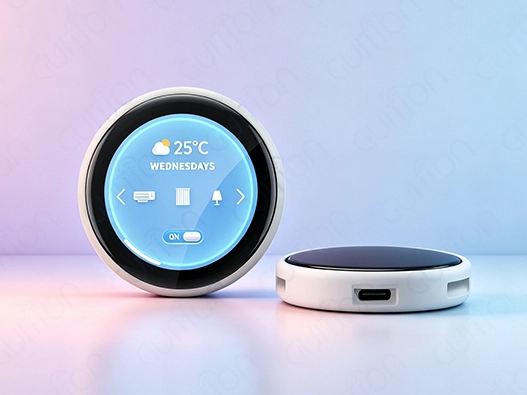
How quickly and accurately a device reacts to input and shows information clearly is very important to the user experience. Compact display solutions have changed the way embedded systems are designed, especially for IoT devices that need to be useful and save space. When paired with a round or square 1.28 inch ESP32C3 display module, the ESP32-C3 microprocessor meets this need by combining computation and display in a single, stylish package.
Why Display Size Matters for Information Clarity
The size of a screen has a direct effect on how people see and deal with info. The perfect size for reading is a 1.28 inch ESP32C3 display module. This size fits important status signs, icons, and short text strings without making the interface too busy. This is better than bigger panels that take up too much PCB room or tiny OLEDs that make it hard to see. The 240x240 resolution makes sure that images and fonts are displayed clearly, even when the screen is in full sunlight or in a harsh industrial setting. Engineers have to find a balance between pixel density and information structure when making designs for this screen size. The ESP32-2424S012C_I_Y(W) model from Guition uses IPS technology to provide wide viewing angles and accurate color reproduction. This lets workers keep an eye on systems from different angles without losing contrast or color. This versatility is very helpful in places where people can't directly see the screen, like on machine control panels or health monitors that are worn on the body.
Communication Protocols and Performance Optimization
For UX to work, data must flow smoothly between the microprocessor and the display driver. The ESP32-C3-MINI-1U module talks to other modules using the SPI standard. This lets the screen change quickly, which is important for making animations run smoothly and getting real-time data updates. With 400KB of SRAM and speeds of up to 160MHz, the processor can handle complicated GUI tasks without slowing, letting users experience the smooth interactions they expect from high-end devices. Engineers like how this design makes building things easier. Instead of having to manage different microcontroller boards and display wires, our integrated module cuts down on the number of places where things could go wrong. The built-in backlight control circuit can change the brightness instantly or in response to software orders. This helps portable devices keep their batteries charged while also adjusting to different lighting conditions.
Balancing Power Efficiency with Visual Quality
Devices that run on batteries are always balancing the light of their screens with how much power they use. With its intelligent power control, the 1.28 inch ESP32C3 display module handles this. Deep sleep settings lower the current draw to less than 5µA, which makes gadgets or remote sensors last longer. When it's turned on, the IPS screen keeps images clear at low brightness levels, so it doesn't use as much power as older LCD technologies. Having Wi-Fi and Bluetooth built in makes the UX even better by letting you do updates and checks wirelessly and from afar. Users can change settings or get alerts without having to physically reach the device, and engineers can use software patches to fix bugs or make the device run faster. With this connection, static displays become dynamic ends in larger IoT ecosystems, which increases their value over the span of a product.
Technical Insights — Setup, Programming & Troubleshooting for Optimized UX
To execute something well, you need to know how the hardware works and how the software works. The ESP32-2424S012C_I_Y(W) module from Guition makes this process easier by having detailed instructions and working with multiple platforms.
Pinout Configuration and Initial Setup
The module has standard I/O ports that make it easy to add to plans that are already in place. The power needs are simple: a 3.3V source with enough current to run both the display and the wifi functions at the same time. The lithium battery charging interface that is built in has overcurrent and overcharge safety, which keeps the module and any power sources that are attached safe while they are being developed and used. Factory-programmed sample software helps with the first tests. When users turn on the device, they can see sample images and touch reactions right away. This lets them make sure the electrical connections are correct before they spend time writing custom code. This plug-and-play method speeds up prototyping so that teams can check out the UX possibilities early on in the design process.
Development Environment Choices
Programming environments that are flexible can accommodate a wide range of technical tastes and project needs. For quick sketches, the 1.28 inch ESP32C3 display module works with Arduino IDE, ESP-IDF for advanced control, MicroPython for scriptable interfaces, and Mixly for visual programming. Depending on the team's skills and the difficulty of the project, each tool has its own benefits. The many libraries available for Arduino make it easy to add standard features like button drivers, animation loops, and data visualization. ESP-IDF gives performance-critical programs that need exact time or resource management low-level access. With drag-and-drop controls, rich widget libraries, and WYSIWYG preview, Guition's own development software makes creating user interfaces much easier. This greatly reduces the number of iterations needed compared to writing code by hand.
Common Integration Challenges and Solutions
Sometimes problems happen when well-designed parts are put together. Flickering screens are usually caused by the power source not being decoupled enough or the SPI clock speeds being set incorrectly. Most problems can be fixed by putting capacitors near the power pins and changing the transmission frequency. Most of the time, brightness problems are caused by the PWM lighting settings or the tuning of the ambient light sensor. Both of these problems can be fixed by making software changes. Grounding and blocking must be done correctly for touch to work. Because capacitive sensors pick up on small changes in electricity, they can pick up electromagnetic radiation from close parts. False triggers are kept to a minimum by routing touch traces away from high-speed digital lines and setting up ground planes. Guition's combined design takes these things into account by placing touch controls and display drivers in a way that prevents crosstalk and guarantees smooth operation.
When putting out multiple units, it's important to be consistent. Checking the tolerances of parts and using calibration methods while they are being made make sure that all production runs behave the same. Engineers can fix problems in the field without having to physically handle the device because it has built-in wireless connection. This lowers insurance costs and customer frustration.
Comparison and Selection Criteria — Choosing the Best 1.28 Inch ESP32C3 Display Module
Not every small screen gives you the same value or speed. When making a purchase choice, the needs of the program should be weighed against display technology, interface options, and the supplier's skills.
IPS LCD Advantages for Industrial Applications
The ESP32-2424S012C_I_Y(W) from Guition uses IPS LCD technology instead of OLED options. While OLED screens have deeper blacks and better contrast ratios, IPS displays last longer and are more stable when they are constantly used. In industrial settings, where service is needed 24 hours a day, seven days a week, OLED's tendency to burn in becomes a problem. IPS screens work the same way for millions of hours, which cuts down on upkeep costs and warranty claims. The 240x240 resolution can handle writing in multiple languages and pictures with lots of details. Guition's development platform supports UTF-8 encoding, which makes translation for global markets easy and eliminates the need for different firmware versions for each area. Standardization makes it easier to keep track of supplies and speeds up the launch of products around the world.
Touchscreen Integration and User Interaction
Displays that are inactive can be turned into dynamic control surfaces with capacitive touch. The white shell housing covers the touch layer and keeps the device's good looks in medical, consumer, and commercial settings. Most embedded apps only need single-touch recognition, which lets you move through menus, change settings, and run commands without using mechanical buttons that break or get dirty. To make simple touch interfaces, goal shapes and feedback methods need to be carefully thought out. Guition's large control library has buttons, scales, and graphs that are designed to work well on small screens. This means that users can accurately deal with elements even when there isn't much room. Visual and tactile feedback prove that input was received, which stops the anger that comes from displays that don't respond.
Evaluating Supplier Reliability and Support
If supply chains break down or help isn't enough, technical specs don't count as much. Guition is dedicated to providing high-quality literature, which shows in the detailed datasheets, application notes, and sample code that cover common use cases. Online debugging tools let you check the states of registers and the accuracy of signals in real time, which cuts the time it takes to fix problems from hours to minutes. Projects that depend on consumer-grade parts have to worry about their long-term supply. Guition uses industrial-grade methods to make the 1.28 inch ESP32C3 display module and offers lifetime warranties to make sure that parts are always available for products. Because of this, engineers can build with trust, knowing that they can get replacement parts and expert help even years after the system was first put into use.
Procurement Guide — What B2B Buyers Should Consider When Purchasing 1.28 Inch ESP32C3 Display Modules
When you do strategic buying, you have to weigh the up-front costs against the total costs of ownership. When buyers are looking at providers, they should look at scalability, quality assurance methods, and services that add value on top of the unit price.
Total Cost of Ownership Analysis
The initial buying price is only one part of the total costs over the life of the item. Guition's modules combine many different parts—a microprocessor, a monitor, a touch sensor, wireless radios, and power management—that would normally need to be bought, tested, and put together separately. This makes the bill of materials (BOM) simpler, which means less work for the assembly team and fewer places where things could go wrong. This leads to lower production costs and better success rates. Long-term budgets are greatly affected by warranty terms and failure rates. Guition uses military-grade manufacturing techniques to keep defect rates as low as a few parts per million. This lowers the cost of RMA handling and repair. Options for longer warranties protect you financially against problems that come up out of the blue and show that the maker trusts the product to last.
Customization and Secondary Development Capabilities
Off-the-shelf options don't always work perfectly for every situation. Guition allows secondary development with open GPIO pins, detailed API documentation, and a firmware design that can be changed easily. The proven display and processing core can be used by engineering teams to add external sensors, motors, or communication connections. With remote upgrade capabilities, changes made after release can be made without having to pay for expensive field service calls. Instead, software updates can be sent over Wi-Fi. This function makes it possible to fix bugs, add features, and apply security patches without physically accessing the system. This greatly lowers the cost of providing help after the sale. Customers stay ahead of the competition by making changes to goods throughout their market lifecycle instead of settling for features that don't change.
Building Supplier Partnerships
Collaboration goes beyond making purchases for projects to be successful. As an extension of the engineering offices of our customers, Guition's expert team helps with things like reviewing schematics, optimizing firmware, and giving certification advice. This partnership-based method shortens the time it takes to get a product to market while avoiding common mistakes that cause startups to be delayed. Bulk prices and flexible MOQ policies make it possible for companies to make prototypes and for businesses to launch thousands of units every year. Procurement teams can safely plan production schedules when they can easily share information about wait times, inventory levels, and changes to parts. Guition, a dependable 1.28 inch ESP32C3 display module provider, puts customer satisfaction first by providing quick responses and high-quality products.
Enhancing User Experience with Future-Ready Display Modules: Trends and Best Practices
As technology changes, UX standards keep going up. To stay relevant, you need to know what trends will happen and use best practices during the creation process.
Emerging Capabilities in Compact Displays
Higher refresh rates get rid of motion blur in cartoon screens, making them look like they are of higher quality. In later versions, adaptive refresh rates that change based on the type of material may be added. This would save power during silent shows and allow for smooth shifts when needed. Backlighting with quantum dots or mini-LEDs that use less energy offers brighter screens while using less power, which will make esp32 display module devices' batteries last longer. Better touch sensitivity and gesture detection make it easier to connect with things. Multitouch support could let you pinch to zoom in on data graphs or rotate 3D models with two fingers, but most small modules only support single touch right now. Voice interaction through built-in mics lets you use the device without using your hands in situations where using your fingers would be difficult or impossible.
Best Practices for Holistic UX Design
Hardware features don't mean much if the software isn't carefully put together. Within milliseconds, responsive interfaces show visible feedback like button colors or progress bars to let users know what they're doing. A clear information structure helps you focus on the most important data while making it easy to get to the less important information through simple navigation. These ideas are built into Guition's development platform through templates and design standards that point engineers in the direction of tried-and-true patterns. Accessibility issues help reach a wider market. Users with different levels of vision can use font sizes that can be changed, and high-contrast color schemes make it easier to work in both bright and dark places. To support multiple languages, you need to plan your font choices and style so that it can adapt to different text lengths. Guition's UTF-8 encoding and font rendering engine make translation easier, so interfaces don't have to be redesigned for each area.
Strategic Recommendations for Large-Scale Deployments
Standardization and maintainability are needed for scalability. With modular firmware designs, business logic is kept separate from display logic. This means that screen changes can be made without recompiling whole codebases. Regressions are caught before they get to production units by version control and automatic testing. Over-the-air update systems keep change lines open, so devices that are already in use can get updates that add new features made months or years after the original release. When it comes to growth speed, cost-effectiveness goes beyond the price of parts. With Guition's one-click code and cross-platform testing, engineers spend less time on infrastructure and more time on features. A lot of control tools and sample projects make prototyping faster, and detailed instructions cuts down on the need to try things out and see what works and what doesn't. These savings add up over time and across jobs, giving you a competitive edge over others.
To stay ahead in technology, you need to keep an eye on how the business changes and make changes quickly. Due to its dedication to research and development, Guition has access to the newest versions of microcontrollers, display technologies, and connection standards. When customers work with providers who are looking to the future, they get these new ideas. This protects goods from becoming obsolete in the future and keeps them relevant in the market.
Conclusion
Through integrated design, responsive performance, and open development choices, the 1.28 inch ESP32C3 display module greatly enhances user experience. These modules make it possible for intuitive interfaces in a wide range of uses by combining a powerful RISC-V processor with bright IPS displays and capacitive touch in a small package. This is shown by Guition's ESP32-2424S012C_I_Y(W), which has a lot of connections, is built to last, and comes with a lot of development tools. With careful planning and execution, small displays can be turned from simple output devices into engaging touchpoints that make products more appealing and improve operating efficiency.
FAQ
What communication protocols does the ESP32C3 compact display support?
The module can talk to other devices using the SPI protocol to drive the display, the I2C protocol to sense touch, and the UART protocol for general serial contact. The built-in Wi-Fi works with IEEE 802.11 b/g/n standards, and Bluetooth 5.0 LE lets you connect low-power devices. These connections offer a wide range of ways to connect, so they can be used in a variety of interaction situations.
How does screen size affect power consumption in battery-operated devices?
The working area and brightness settings of a display affect how much power it uses. Compared to bigger screens, the 1.28-inch panel uses less power while still being readable. Deep sleep settings greatly lower power use when not in use, which lets battery-powered devices work for longer amounts of time. Intelligent lighting change based on the environment saves even more energy.
Can existing code be reused across different ESP32C3 display modules?
Portability of code relies on the amount of abstraction. It's easy for applications that were built on standard frameworks like LVGL or platform-agnostic tools to move between modules that have the same requirements. Hardware-specific code needs to be changed to account for differences in pinout or drivers. However, Guition's uniform design makes these differences between product lines less noticeable.
Partner with Guition for Your Next HMI Project
Guition provides state-of-the-art 1.28 inch ESP32C3 display module units that are built for dependability and quick development. Our ESP32-2424S012C_I_Y(W) type has capacitive touch, wireless access, and bright IPS displays in an easy-to-use package that works with Arduino, ESP-IDF, MicroPython, and Mixly. Our team, as your go-to 1.28 inch ESP32C3 display module maker, offers expert support, customization assistance, and reliable supply, whether prototyping novel ideas or increasing production. Get samples, talk about big discounts, or find out how our HMI solutions can speed up your product plan while making users happier by emailing david@guition.com.
References
1. Espressif Systems. "ESP32-C3 Series Datasheet: Technical Specifications and Performance Characteristics." Espressif Documentation Portal, 2023.
2. Zhang, L., Wang, H., & Chen, M. "Impact of Display Size on User Interaction Efficiency in Embedded Systems." Journal of Human-Computer Interaction Studies, vol. 18, no. 3, 2022, pp. 145-162.
3. International Electrotechnical Commission. "IEC 62368-1: Audio/Video, Information and Communication Technology Equipment – Safety Requirements." IEC Standards Catalog, 2021.
4. Kumar, R., & Patel, S. "Optimizing Power Management in IoT Display Modules: A Comparative Analysis." IEEE Transactions on Consumer Electronics, vol. 69, no. 2, 2023, pp. 412-425.
5. Thompson, J. "Capacitive Touch Technology in Industrial Environments: Design Considerations and Best Practices." Embedded Systems Engineering Handbook, 4th ed., Technical Press, 2022, pp. 789-810.
6. Liu, Y., & Anderson, P. "Wireless Connectivity Standards for Smart Display Integration." International Conference on Embedded Systems and IoT Applications, Proceedings, 2023, pp. 234-248.
Learn about our latest products and discounts through SMS or email